
1. Introduction
Thank you for choosing the SHOOT Replacement Battery Kit with Dual Fast Charger for your Insta360 X4 camera. This kit provides a reliable and convenient power solution, ensuring you can capture extended footage without interruption. This manual will guide you through the proper use and care of your new battery kit.
The kit includes two high-capacity 2500mAh Li-ion batteries and a dual charger, designed for seamless compatibility and efficient charging.
2. Product Overview
The SHOOT Replacement Battery Kit is specifically designed for the Insta360 X4 camera, offering extended shooting times and convenient charging. Below are the components included in your kit:
- 2 x Rechargeable Li-ion Batteries (Model: JH-X4, 2500mAh, 3.85V)
- 1 x Dual Battery Charger
- 1 x Type-C Charging Cable

Image: The complete SHOOT battery kit, showing two batteries and the dual charger.
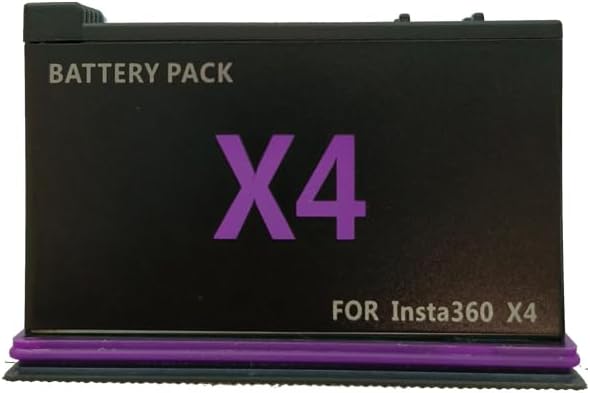
Image: A single SHOOT rechargeable Li-ion battery for Insta360 X4.

Image: Close-up of the battery label, detailing model, capacity, voltage, and safety warnings.
3. Setup
Follow these steps to set up your SHOOT Dual Fast Charger and batteries:
- Connect the Charger: Use the provided Type-C charging cable to connect the dual charger to a USB power source (e.g., wall adapter, power bank, computer USB port).
- Insert Batteries: Carefully insert one or two SHOOT batteries into the charging slots of the dual charger. Ensure the battery contacts align correctly with the charger's pins.

Image: A battery correctly inserted into one slot of the dual charger, showing the charging indicator light.
4. Operating Instructions
The dual charger is designed for simple and efficient operation:
- Charging Indicator: Each charging slot has an LED indicator light.
- When a battery is charging, the corresponding light will be RED.
- When the battery is fully charged, the corresponding light will turn GREEN.
- The charger can charge one or two batteries simultaneously.
Once fully charged, remove the batteries from the charger and store them properly until needed. Insert the charged battery into your Insta360 X4 camera to power it.
5. Maintenance and Care
Proper maintenance ensures the longevity and safe operation of your batteries and charger:
- Charge Only with Specified Charger: Always use the provided SHOOT dual charger or a compatible charger specified for these batteries.
- Avoid Extreme Temperatures: Do not store batteries at temperatures over 60°C (140°F). Avoid direct sunlight or extremely cold environments.
- Proper Disposal: Do not dispose of batteries in fire. Follow local regulations for proper disposal of Li-ion batteries.
- Do Not Disassemble: Do not attempt to disassemble the batteries or the charger. This can cause damage and void any warranty.
- Keep Dry: Keep the charger and batteries away from water and moisture.
- Clean Contacts: Periodically clean the battery contacts and charger pins with a dry, soft cloth to ensure good connection.
6. Troubleshooting
If you encounter any issues, refer to the table below for common problems and solutions:
| Problem | Possible Cause | Solution |
|---|---|---|
| Battery not charging (no LED light) | Loose cable connection, faulty power source, incorrect battery insertion. | Check Type-C cable connection. Try a different USB power source. Re-insert battery, ensuring proper alignment. |
| Charging light remains RED after extended time | Battery not fully charged, battery issue. | Allow more time for charging. If issue persists, try charging a different battery to isolate the problem. |
| Battery drains quickly in camera | Battery not fully charged, battery degradation, high power consumption by camera. | Ensure battery is fully charged (green LED). If battery is old, it may need replacement. Check camera settings for power-saving options. |
| Charger feels warm during charging | Normal operation. | A slight warmth is normal during charging. If it becomes excessively hot, disconnect immediately and contact support. |
7. Specifications
Detailed technical specifications for the SHOOT Replacement Battery Kit:
| Feature | Description |
|---|---|
| Brand | SHOOT |
| Model Number | XT-592 |
| Battery Type | Lithium-ion |
| Battery Model | JH-X4 |
| Rated Capacity | 2500 mAh (9.63 Wh) |
| Rated Voltage | 3.85 V |
| Limited Charge Voltage | 4.40 V |
| Charger Input | Type-C USB |
| Compatibility | Insta360 X4 Camera |
| Number of Batteries | 2 (included) |
| Item Weight | 284 Grams (total package) |
| Battery Weight | 72 Grams (per battery) |
8. Warranty and Support
SHOOT products are manufactured to high-quality standards. For any questions, technical assistance, or warranty claims, please contact the seller or manufacturer directly through the platform where you purchased the product. Please retain your proof of purchase for warranty purposes.
For more information, you may visit the official SHOOT brand store on Amazon: SHOOT Brand Store