
1. Introduction
This manual provides essential information for the safe and effective use, installation, and maintenance of the yancinne M7084 Electric Wheelchair Motor Controller, specifically the Down Control Box variant. This component is crucial for managing the power and movement of an electric wheelchair, working in conjunction with a user interface (such as a joystick controller) to translate user commands into motor actions. Please read this manual thoroughly before installation or operation.
2. Safety Information
Adherence to safety guidelines is paramount to prevent injury or damage to the equipment. Always observe the following precautions:
- Professional Installation: Installation and replacement of the control box should only be performed by qualified technicians.
- Power Disconnection: Always disconnect the wheelchair's power source before performing any installation, maintenance, or inspection.
- Water and Moisture: Keep the control box dry. Exposure to water or excessive moisture can cause electrical shorts and damage.
- Temperature: Avoid exposing the control box to extreme temperatures.
- Authorized Parts: Use only original or manufacturer-approved replacement parts.
- Regular Inspection: Periodically inspect all wiring and connections for signs of wear or damage.
3. Product Overview
The yancinne M7084 Down Control Box is the central processing unit for your electric wheelchair's propulsion system. It receives input from the user interface (e.g., joystick) and converts it into precise commands for the wheelchair motors, enabling movement and speed control. The image below illustrates a typical user interface (joystick controller) that connects to the Down Control Box.
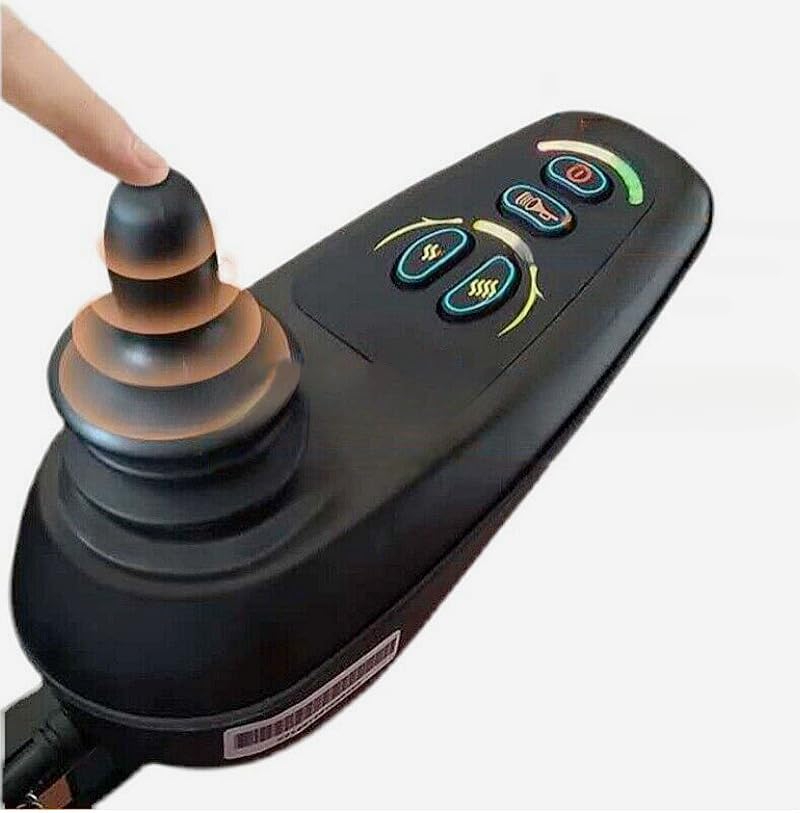
Image Description: A black electric wheelchair joystick controller is shown. A finger is positioned on the joystick, indicating user interaction. The controller features several illuminated buttons: a power button, a horn button, and two buttons for speed adjustment (indicated by 'SS' and 'SSSS'). A curved LED indicator light is visible, likely displaying battery status or speed level. This joystick unit serves as the primary input device for the M7084 Down Control Box.
4. Setup and Installation
The M7084 Down Control Box is designed for integration into an electric wheelchair system. Due to the complexity and safety implications, installation should be performed by a certified technician.
4.1. Pre-Installation Checks
- Ensure the wheelchair's power is completely off and the battery is disconnected.
- Verify that the M7084 Down Control Box is the correct model for your wheelchair.
- Inspect the control box for any visible damage.
4.2. Installation Steps (Technician Recommended)
- Mount the Down Control Box securely in its designated location on the wheelchair chassis, ensuring it is protected from physical impact and moisture.
- Connect the motor cables to the corresponding ports on the control box. Ensure correct polarity and secure connections.
- Connect the battery cables to the control box, observing correct polarity.
- Connect the user interface (joystick controller) cable to the designated port on the control box.
- Connect any auxiliary components (e.g., lights, horn) if applicable.
- Once all connections are secure, reconnect the wheelchair battery.
- Perform initial power-on and functional tests in a safe, open area.
5. Operating Instructions
The M7084 Down Control Box operates in conjunction with the user interface (joystick controller). The following instructions describe general operation principles.
5.1. Power On/Off
- To power on the wheelchair, press the power button on the joystick controller. The battery indicator lights should illuminate.
- To power off, press and hold the power button until the system shuts down.
5.2. Driving
- Forward/Backward: Gently push the joystick forward to move forward, and pull it backward to move backward. The speed will increase with the degree of joystick displacement.
- Turning: Push the joystick left to turn left, and right to turn right.
- Stopping: Release the joystick to its neutral position. The wheelchair will automatically brake.
5.3. Speed Adjustment
Use the speed adjustment buttons on the joystick controller (often labeled with 'SS' for slower and 'SSSS' for faster, or similar icons) to select your desired speed setting. The current speed level may be indicated by LEDs on the joystick.
5.4. Battery Indicator
Monitor the battery indicator lights on the joystick controller. When the battery level is low, recharge the wheelchair battery promptly to avoid unexpected power loss.
6. Maintenance
Proper maintenance ensures the longevity and reliable operation of your M7084 Down Control Box.
- Cleaning: Wipe the exterior of the control box with a dry, soft cloth. Do not use abrasive cleaners or allow liquids to enter the unit.
- Connection Checks: Periodically check all electrical connections to the control box for tightness and corrosion. Ensure no wires are frayed or damaged.
- Environmental Protection: Ensure the control box remains protected from direct sunlight, rain, and extreme dust.
- Professional Inspection: It is recommended to have the control box and entire wheelchair system inspected by a qualified technician annually.
7. Troubleshooting
If you encounter issues with your M7084 Down Control Box, refer to the following basic troubleshooting steps. For complex problems, contact a qualified technician.
- No Power:
- Check if the wheelchair battery is charged and properly connected.
- Ensure the power button on the joystick is pressed.
- Inspect all power cables for damage or loose connections.
- Erratic Movement:
- Ensure the joystick is functioning correctly and returning to neutral.
- Check for any obstructions around the wheelchair wheels or motors.
- Verify all motor connections to the control box are secure.
- Wheelchair Not Responding:
- Confirm the wheelchair is powered on.
- Check the connection between the joystick controller and the Down Control Box.
- Listen for any error beeps or observe error codes on the joystick display (if applicable). Consult your wheelchair's specific manual for error code interpretation.
8. Specifications
| Manufacturer | yancinne |
| Part Number | M7084 |
| Style | Down control box |
| ASIN | B0DD3HHVM3 |
| Date First Available | August 14, 2024 |
9. Warranty and Support
The yancinne M7084 Electric Wheelchair Motor Controller (Down Control Box) comes with a 120-day warranty from the date of purchase. This warranty covers manufacturing defects under normal use.
For technical support, warranty claims, or further assistance, please contact your retailer or the manufacturer directly. Ensure you have your purchase details and the product's model number (M7084) available when contacting support.