
LG WT8400CB
LG WT8400CB 5.5 Cu. Ft. Mega Capacity Top Load Washer User Manual
Model: WT8400CB
Introduction
This user manual provides essential information for the safe and efficient operation, maintenance, and troubleshooting of your LG WT8400CB 5.5 Cu. Ft. Mega Capacity Top Load Washer. Please read this manual thoroughly before using the appliance and retain it for future reference.
Safety Information
Always follow basic safety precautions to reduce the risk of fire, electric shock, or injury to persons when using this appliance.
- Do not install or store the washer where it will be exposed to the weather or to freezing temperatures.
- Do not wash articles that have been previously cleaned in, washed in, soaked in, or spotted with gasoline, dry-cleaning solvents, or other flammable or explosive substances.
- Do not allow children to play on or in the appliance. Close supervision of children is necessary when the appliance is used near children.
- Always disconnect the appliance from the power supply before attempting any service.
Setup and Installation
Proper installation is crucial for the optimal performance and longevity of your washer.
Unpacking
Carefully remove all packaging materials, including the base packaging and any shipping bolts or restraints. Inspect the washer for any damage incurred during shipping.
Location Requirements
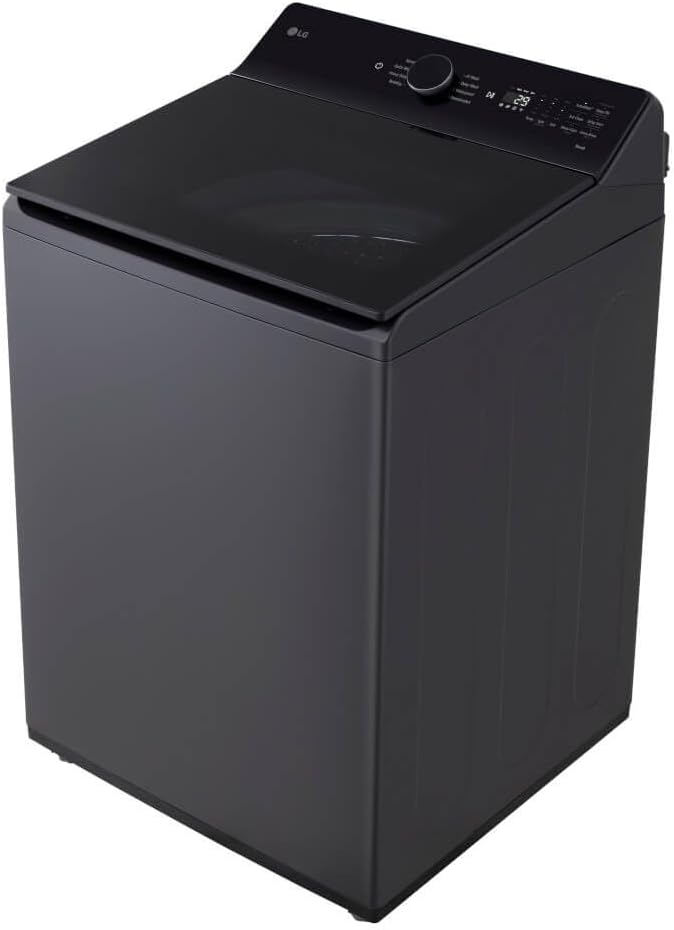
Place the washer on a firm, level floor. Ensure there is adequate space for water inlet hoses, drain hose, and power cord. The product dimensions are approximately 29.5 x 43.5 x 31.5 inches (Width x Height x Depth).
Connecting Water and Drain Hoses
Connect the hot and cold water inlet hoses to the corresponding valves and to the washer. Ensure connections are tight to prevent leaks. Securely attach the drain hose to a standpipe or laundry tub, ensuring it is properly vented to prevent siphoning.
Electrical Connection
Plug the washer into a grounded 120V, 60Hz, 15 Amp circuit. Do not use an extension cord.
Leveling the Washer
Use a level to ensure the washer is perfectly level. Adjust the leveling feet at the bottom of the washer as needed to eliminate any wobbling.

Operating Instructions
Familiarize yourself with the control panel and washing cycles for optimal laundry care.
Control Panel Overview
The electronic controls with LED display allow for easy selection of wash cycles and options. The central knob is used to select the desired wash program, while touch buttons activate additional features.

Loading Laundry
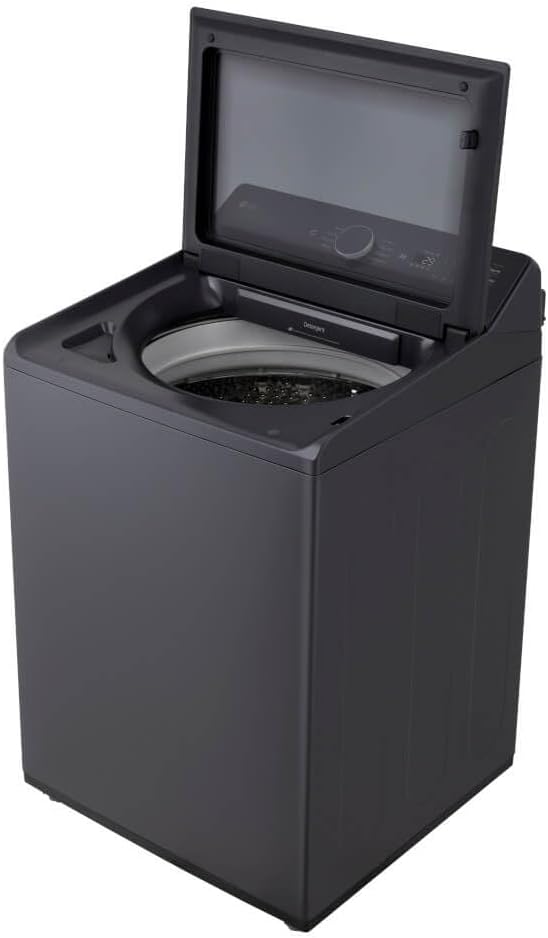
Open the SlamProof Glass Lid. Distribute laundry evenly around the wash plate. Do not overload the washer; the 5.5 cu. ft. Mega Capacity allows for large loads, but proper space is needed for effective washing.
Adding Detergent and Fabric Softener
Locate the detergent dispenser drawer, typically found under the lid. Add liquid or powder detergent to the main wash compartment. If using fabric softener, add it to the designated compartment. Do not overfill.
Selecting a Wash Cycle
Turn the cycle selector knob to choose from the 8 standard cycles. The built-in AI technology can detect fabric type and load size to select optimal wash settings for enhanced cleaning and fabric care. Additional options like temperature, spin speed, and soil level can be adjusted using the touch controls.
Starting a Wash
Press the Start/Pause button to begin the selected wash cycle. The LED display will show the remaining time.
EasyUnload Feature
The EasyUnload design provides comfortable, ergonomic reach into the drum, making it easier to retrieve items after the wash cycle is complete.
Maintenance
Regular maintenance helps ensure your washer operates efficiently and extends its lifespan.
Cleaning the Washer Tub
Periodically run a 'Tub Clean' cycle (if available) or a hot wash cycle with a washing machine cleaner to prevent odor and residue buildup.
Cleaning the Dispenser Drawers
Remove and clean the detergent and fabric softener dispenser drawers regularly to prevent clogs and residue buildup.
Cleaning the Exterior
Wipe the exterior surfaces with a soft, damp cloth. Avoid abrasive cleaners that could damage the finish.
Troubleshooting
Before calling for service, refer to the following common issues and their solutions.
| Problem | Possible Cause | Solution |
|---|---|---|
| Washer does not start | Power cord unplugged; Lid not closed properly; Circuit breaker tripped. | Ensure power cord is securely plugged in; Close lid completely; Reset circuit breaker. |
| Poor wash results | Overloading; Incorrect detergent amount; Improper cycle selection. | Reduce load size; Use recommended detergent amount; Select appropriate cycle for fabric type and soil level. |
| Excessive vibration/noise | Washer not level; Shipping bolts not removed; Uneven load. | Level the washer using adjustable feet; Ensure all shipping bolts are removed; Redistribute laundry evenly. |
| Water leaks | Loose hose connections; Clogged drain hose. | Tighten all water inlet and drain hose connections; Clear any obstructions from the drain hose. |
For error codes displayed on the LED screen, consult the full LG service manual or contact customer support.
Specifications
Key technical specifications for the LG WT8400CB washer.
| Feature | Specification |
|---|---|
| Brand | LG |
| Model Name | WT8400CB |
| Capacity | 5.5 Cubic Feet |
| Access Location | Top Load |
| Item Weight | 143.3 Pounds |
| Product Dimensions (W x H x D) | 29.5 x 43.5 x 31.5 inches |
| Controls Type | Touch |
| Standard Cycles | 8 |
| Voltage | 120 Volts |
| Installation Type | Freestanding |
Warranty Information
LG provides a limited warranty for this product. Specific warranty terms, conditions, and duration may vary by region and product component. Please refer to the warranty card included with your appliance or visit the official LG website for detailed warranty information and registration.
Retain your proof of purchase for warranty service.
Customer Support
For technical assistance, service requests, or general inquiries about your LG WT8400CB washer, please contact LG Customer Service.
- Online Support: Visit the official LG website for FAQs, troubleshooting guides, and product registration.
- Telephone Support: Refer to your product documentation or the LG website for the appropriate customer service phone number in your region.
- LG Store: For more information about LG products, visit the LG Store on Amazon.