
UBPet C10
UBPet C10 Self-Cleaning Cat Litter Box Instruction Manual
Model: C10
1. Introduction
Thank you for choosing the UBPet C10 Self-Cleaning Cat Litter Box. This manual provides essential information for the safe and efficient operation, setup, maintenance, and troubleshooting of your device. Please read this manual thoroughly before use and retain it for future reference.

The UBPet C10 Self-Cleaning Cat Litter Box, shown with a cat comfortably using it, alongside the mobile application interface for remote control and monitoring.
2. Product Features
- Low Entry, Large Space: Designed with a low entry point (14.7 cm) and a spacious interior (57.6 L, 37.8 x 34.8 x 50 cm mobile space) to accommodate cats weighing between 1.5 kg and 8 kg, including older cats, short-legged cats, and those with reduced mobility.
- Anti-Pinch Design: Equipped with 10 high-precision sensors that immediately stop operation if a cat approaches. The integrated drum and waste bin rotate together during cleaning, eliminating pinch points.
- Double Odor Control: Features a sealed waste container to prevent odors from escaping and an odor eliminator that breaks down ammonia to neutralize unpleasant smells. Three odor eliminators are included.
- App Control & Health Monitoring: Connects to 2.4 GHz Wi-Fi, allowing remote control and monitoring via a mobile application. Track your cat's weight and activity in real-time. Supports up to 6 cats, though similar weights may affect individual identification.
- Automatic Cleaning: Automatically cleans the litter box after your cat exits, separating waste into the bin. Compatible with various clumping litters, including plant-based and tofu litter. For optimal performance, use litter particles less than 1 cm.
- Easy Installation & Cleaning: Tool-free assembly and disassembly. Features a one-click empty function for convenient litter replacement and drum cleaning. The entire body is washable, except for the electronic base unit.
3. Setup Instructions
- Unpacking: Carefully remove all components from the packaging.
- Assembly: The UBPet C10 is designed for tool-free assembly. Follow the visual guides to connect the drum to the base unit.
- Placement: Place the litter box on a flat, stable surface. Ensure no mats or rugs are placed directly underneath the unit, as this can interfere with the weight sensors and cause inaccurate readings.
- Power Connection: Connect the power adapter to the unit and plug it into a suitable electrical outlet.
- Initial Self-Inspection: After powering on, allow the litter box to complete its automatic self-inspection cycle.
- Add Litter: Once the self-inspection is complete, pour clumping cat litter into the drum. Do not fill beyond the indicated warning line to prevent excess litter from being cleaned out. For best results, use litter with particles less than 1 cm.
- App Connection: Download the UBPet mobile application. Follow the in-app instructions to connect your device to a 2.4 GHz Wi-Fi network.
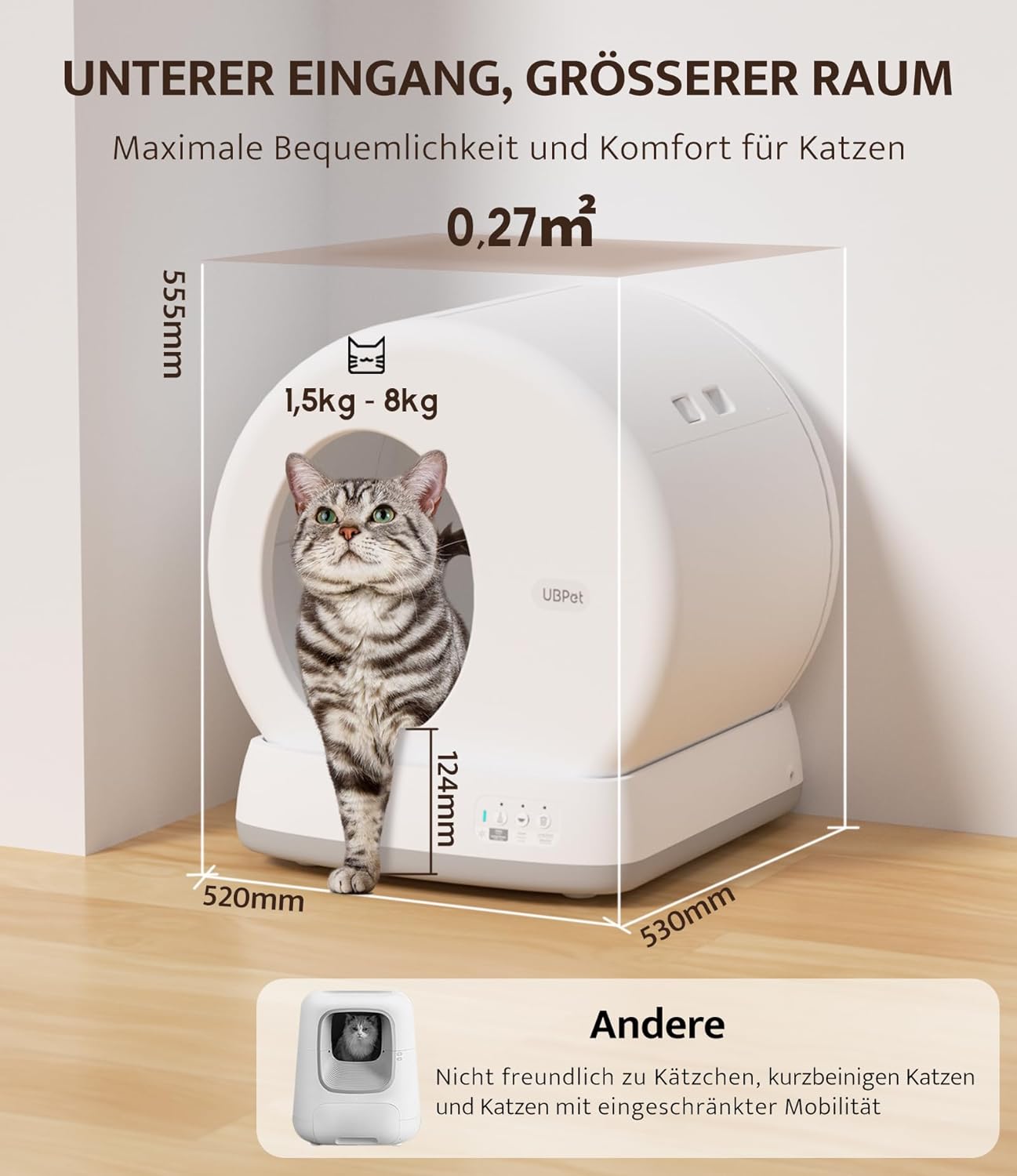
This image illustrates the low entry design (124mm) and spacious interior of the UBPet C10, suitable for cats weighing between 1.5 kg and 8 kg. Overall dimensions are 520mm width, 530mm depth, and 555mm height.
4. Operating Instructions
4.1 Automatic Cleaning
The UBPet C10 automatically detects when your cat has left the litter box and initiates a cleaning cycle after a set delay. The drum rotates to sift clean litter from waste, depositing the waste into the sealed bin below.
4.2 Mobile Application Control
The UBPet app provides comprehensive control and monitoring features:
- Remote Cleaning: Initiate a cleaning cycle manually from anywhere.
- Scheduled Cleaning: Set specific times for cleaning cycles.
- Health Monitoring: View real-time data on your cat's weight, frequency of use, and duration of visits. This data can help identify potential health changes.
- Multi-Cat Management: Track data for up to 6 individual cats.
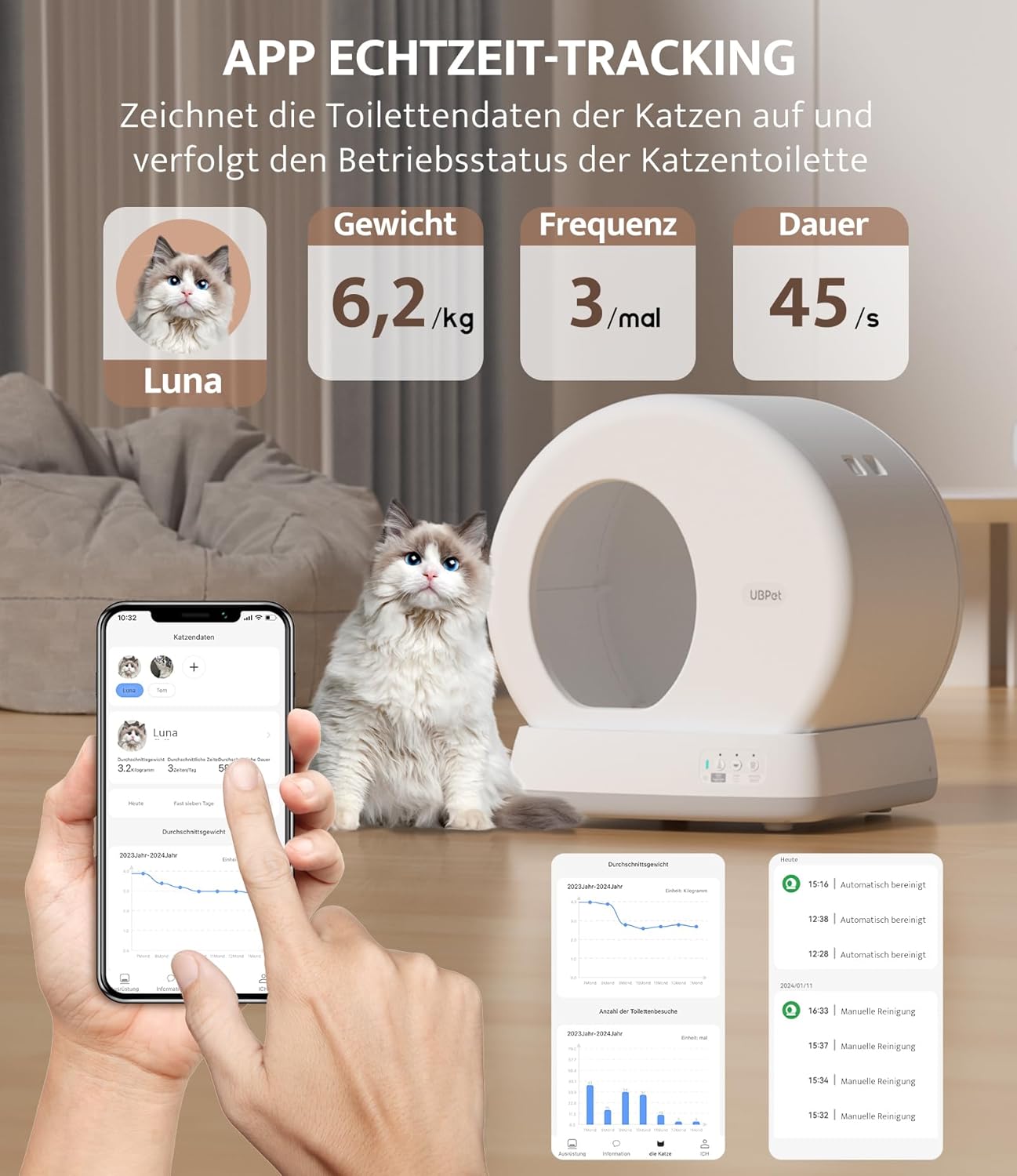
The mobile application for the UBPet C10 allows real-time tracking of your cat's health data, including weight, frequency of use, and duration of visits. This feature helps monitor up to 6 cats.

This image demonstrates the automatic cleaning cycle of the UBPet C10, which separates waste into a bin. The mobile app provides options for automatic cleaning, scheduled cleaning, and one-click manual cleaning functions.
4.3 Safety Features
The UBPet C10 incorporates multiple safety sensors to protect your cat:
- Grid Sensor: Detects obstructions within the drum and stops operation immediately.
- Radar Sensors: Detects a cat approaching the unit and halts any ongoing cleaning cycle.
- Weight Sensors: Detects the presence of a cat inside the litter box, preventing cleaning cycles while occupied.
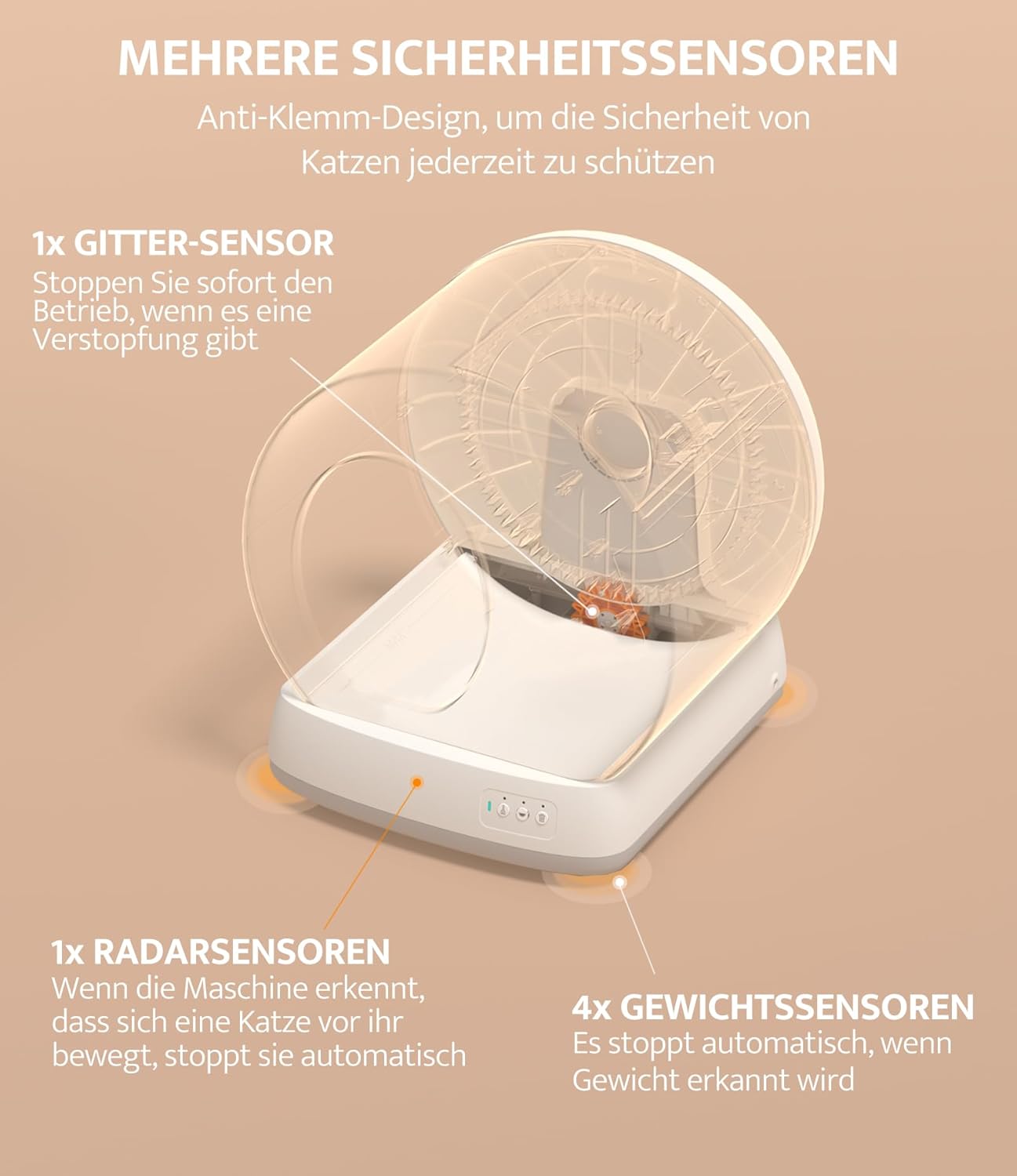
The UBPet C10 is equipped with multiple safety sensors: a grid sensor to detect obstructions, radar sensors to stop operation when a cat approaches, and weight sensors to detect a cat's presence, ensuring safety during operation.

The UBPet C10 incorporates anti-pinch protection, utilizing gravity and radar sensors to detect a cat's presence within an 80cm, 120-degree range, automatically stopping operation to ensure safety.
5. Maintenance and Cleaning
5.1 Waste Bin Emptying
The waste bin should be emptied regularly. The frequency depends on the number of cats and their usage. Use the one-click empty function for convenient waste disposal.
5.2 Litter Replacement
Replace the litter box liner every 3 to 5 days to maintain hygiene and prevent bacterial growth. Ensure the litter level does not exceed the warning line.
5.3 Deep Cleaning
For thorough cleaning, the drum and waste bin components can be easily disassembled without tools. The entire body of the litter box, excluding the electronic base unit, is washable. It is recommended to clean the interior every one to three months.
Important: Do not submerge the base unit, which contains electronic components, in water. Clean it with a damp cloth only.
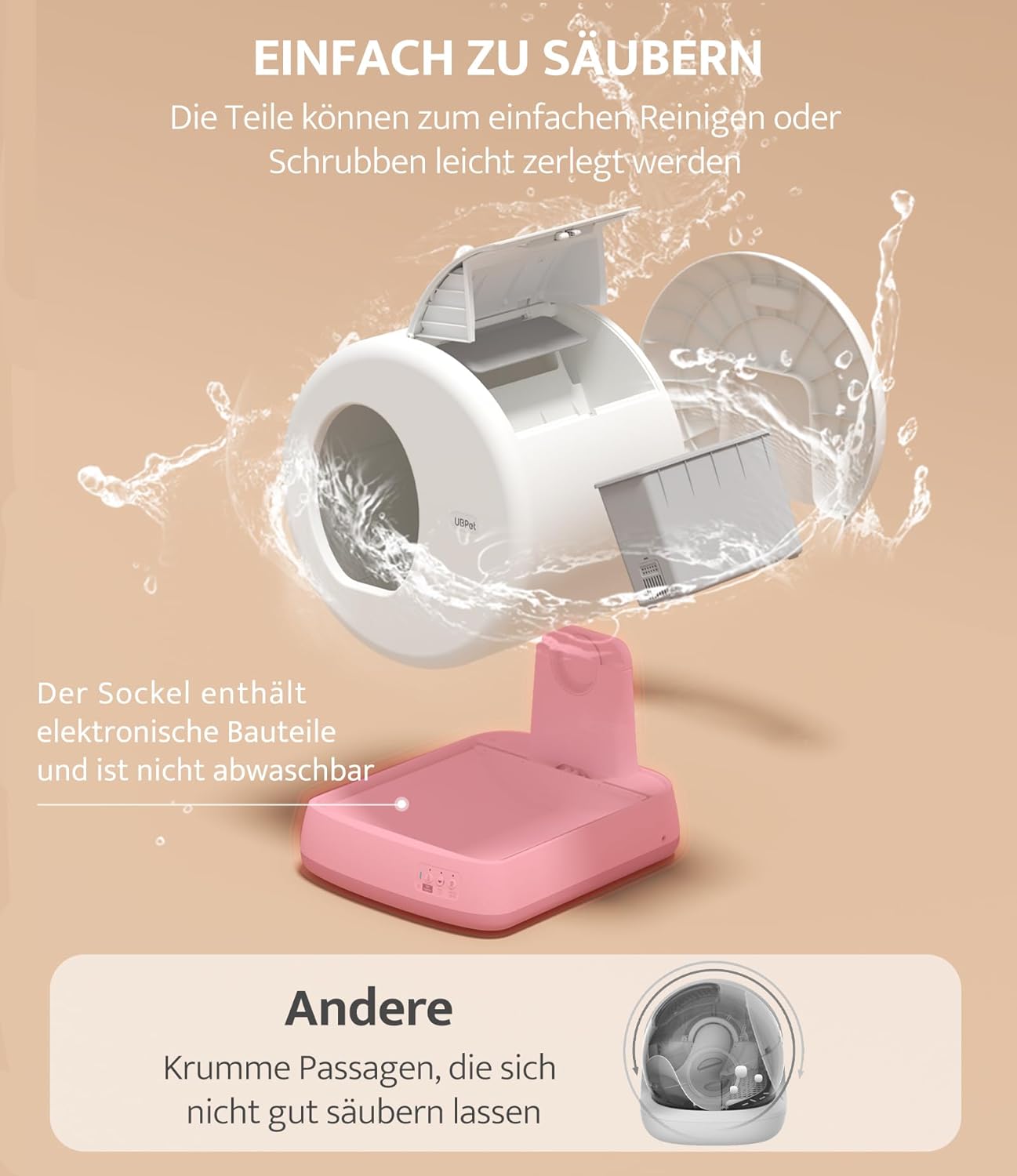
The UBPet C10 is designed for easy cleaning. The main drum and waste bin components can be disassembled for thorough washing. The base unit, containing electronic components, should not be submerged in water.
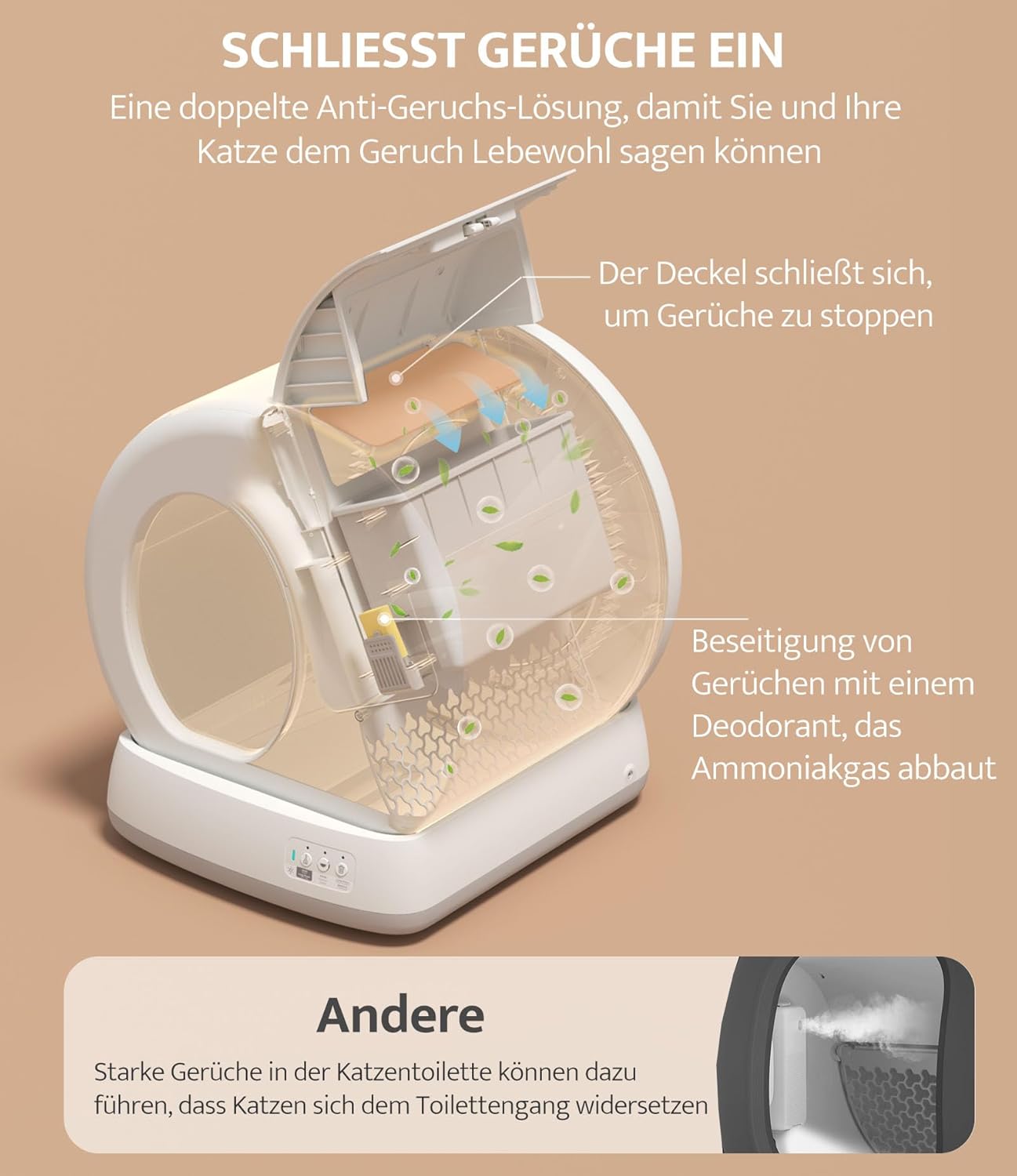
The UBPet C10 features a dual odor control system. Waste is deposited into a sealed container to prevent odors from escaping, and an integrated odor eliminator breaks down ammonia to neutralize remaining smells.
6. Troubleshooting
- Inaccurate Weight Readings: Ensure no mats or rugs are placed under the litter box. The unit must be on a flat, hard surface for accurate weight detection.
- Cleaning Cycle Not Initiating: Check if a cat is still inside or too close to the unit. The safety sensors will prevent operation. Ensure the power is connected and the unit has completed its self-inspection.
- Odor Issues: Verify that the waste bin is properly sealed and that the odor eliminator is active and not expired. Ensure regular emptying of the waste bin.
- App Connectivity Problems: Confirm your Wi-Fi network is 2.4 GHz. Ensure the litter box is within range of your Wi-Fi router. Restart both the litter box and your mobile device, then attempt to reconnect via the app.
- Excess Litter Being Cleaned: Ensure the litter level does not exceed the warning line inside the drum. Using litter with particles larger than 1 cm may also lead to inefficient sifting.
7. Specifications
| Feature | Specification |
|---|---|
| Model Number | C10 |
| Brand | SAROSORA (UBPet) |
| Manufacturer | UBTECH |
| Dimensions (L x W x H) | 49 x 49 x 49 cm |
| Weight | 12.94 kg |
| Color | White |
| Material | Polypropylene (PP) |
| Cat Weight Range | 1.5 kg - 8 kg |
| Entry Height | 14.7 cm |
| Connectivity | Wi-Fi 2.4 GHz |
| Special Features | Self-cleaning, App control, Odor elimination, Multiple safety sensors |

The UBPet C10 operates quietly, with noise levels below 38dB during cleaning, ensuring minimal disturbance in your home environment.
8. Warranty and Support
Specific warranty information and customer support details are not provided in this manual. Please refer to the product packaging or the manufacturer's official website for warranty terms and contact information for technical support.
Related documentsC10


Ask a question about this manual
Ask about setup, troubleshooting, compatibility, parts, safety, or missing instructions. Manuals+ will review the question and use this page’s manual context to help answer it.