
Introduction
This manual provides comprehensive instructions for the setup, operation, maintenance, and troubleshooting of your Dear Household Smart Digital Body Weight Scale. This advanced scale is designed to help you monitor over 25 essential health metrics, including body weight, BMI, muscle mass, and more, providing valuable insights for your wellness journey.

The Dear Household Smart Digital Body Weight Scale, featuring a sleek black design and a digital display, shown alongside a smartphone displaying its companion app and a smartwatch.
Setup
1. What's in the Box
Upon unboxing, ensure all components are present:
- Dear Household Smart Digital Body Weight Scale
- User Manual (this document)
- Charging Cable (if applicable, for rechargeable models)
2. Charging the Scale
Your scale is equipped with a powerful 800mAh Li-ion rechargeable battery. Before first use, or if the battery is low, connect the scale to a power source using the provided charging cable. A full charge can last up to 120 days.

A woman plugging in the Dear Household Smart Digital Body Weight Scale for charging in a bathroom setting. The image highlights the scale's rechargeable battery feature.
3. App Installation and Initial Registration
To utilize the full features of your smart scale, download the "Dear Household Health" app from your device's app market (iOS App Store or Google Play Store). Follow the on-screen prompts to register your primary account and connect the scale.
This video demonstrates the process for first-time users to install the Dear Household Health app, register an account, and connect the smart scale for initial setup.
4. Connecting the Scale (Wi-Fi & Bluetooth)
The scale supports both Wi-Fi and Bluetooth connectivity for seamless data synchronization with your smartphone. Ensure your phone's Bluetooth is enabled and follow the app's instructions to pair your device. For Wi-Fi connectivity, the app will guide you through connecting the scale to your home network.

An image illustrating the easy Wi-Fi and Bluetooth connection of the smart scale, showing compatibility with Apple Health, Google Health, Fitbit, and Samsung Health apps.

This graphic emphasizes the scale's ability to connect with smartphones via Bluetooth or Wi-Fi, allowing users to sync and monitor their health metrics directly through the app.
5. Adding Multiple Users
The Dear Household Smart Digital Body Weight Scale supports up to 200 users, making it ideal for families or group settings. The primary user can add additional users through the app's Device Management section.
This video provides a step-by-step guide on how to add additional users to your Dear Household Smart Digital Body Weight Scale through the companion app.
Operation
1. Taking Measurements
To take a measurement, simply step onto the scale with bare feet. The scale will automatically detect your presence and begin measuring. Ensure your feet are positioned correctly on the four electrodes for accurate body composition analysis. The results will be displayed on the scale and synced to your app.
This video demonstrates how to step onto the scale to obtain all 25 health metrics quickly, showcasing the app interface displaying the results.
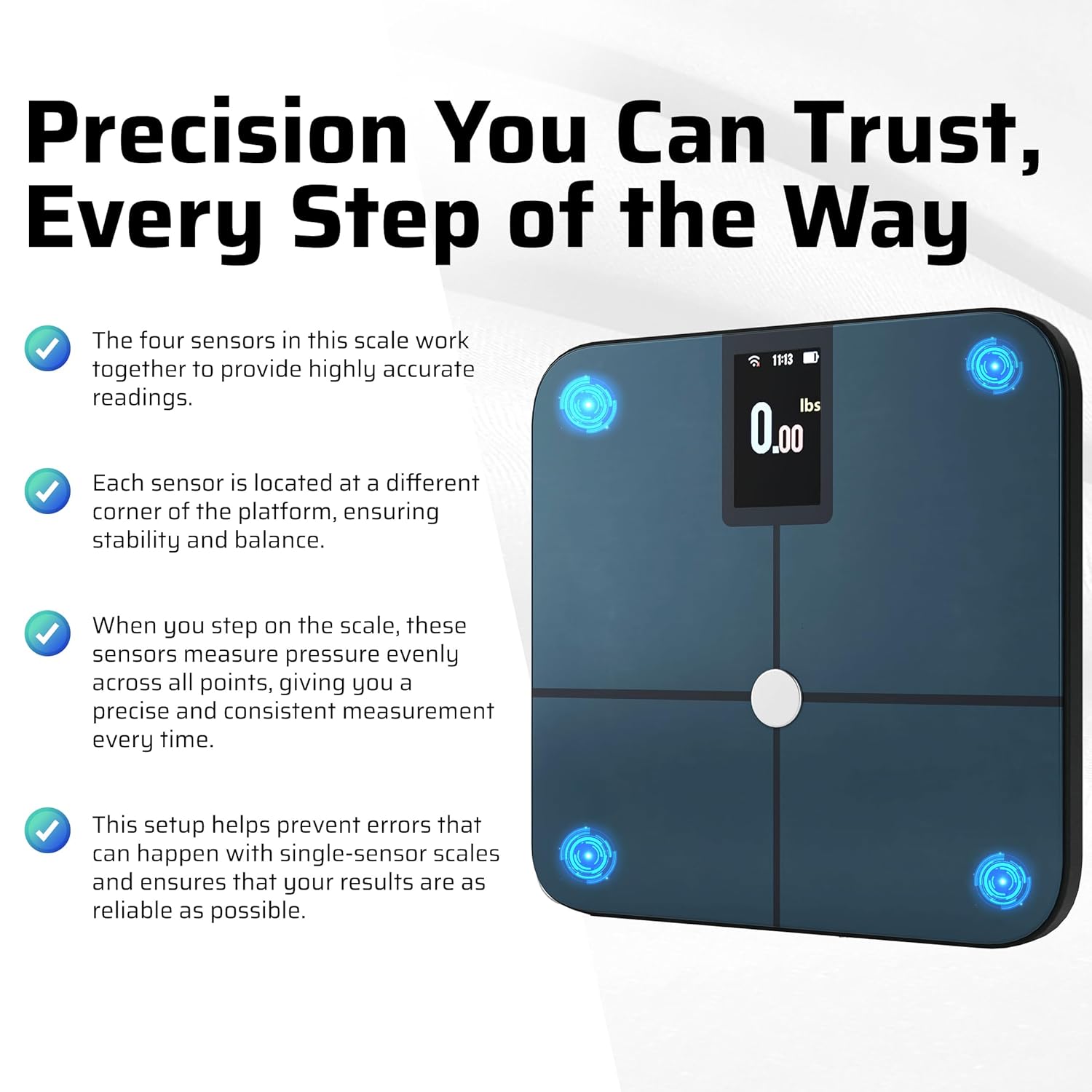
A close-up of the smart scale highlighting its four sensors, strategically placed at each corner of the platform to ensure precise and consistent measurements.
2. Understanding Your Metrics
The scale tracks over 25 health metrics, providing a comprehensive overview of your body composition. These metrics are categorized for easy understanding within the app.
- Top 5 Essential Metrics: Body Weight, Body Fat Percentage, Muscle Mass, Water Percentage, BMI.
- Additional Key Metrics: BMR (Basal Metabolic Rate), Bone Mass, Skeletal Muscle, Metabolic Age, Visceral Fat.
- Extended Health Insights: Fat-Free Body Weight, Subcutaneous Fat, Protein Levels, Body Age, Weight Management Support.

An infographic visually representing the 25+ health metrics tracked by the Dear Household Smart Digital Body Weight Scale, including Weight, Fat Ratio, Fat Mass, Water Ratio, BMR, Body Type, Protein Ratio, Skeletal Muscle Mass, Bone Mass, BMI, Visceral Fat, Body Age, Weight Control, Fat Control, Subcutaneous Fat Ratio, Obesity Level, Muscle Control, Heart Rate, Muscle Rate, Muscle Mass, Skeletal Muscle Rate, Standard Weight, Fat Free Mass, Health Evaluation, and Health Score.

A graphic categorizing the health metrics into "Top 5 Essential Metrics," "Additional Key Metrics," and "Extended Health Insights" as displayed within the companion app.
3. App Features and Syncing
The Dear Household Health app allows you to track, view, and monitor your metrics over time. It also supports syncing with popular wellness apps like Apple Health, Google Health, Fitbit, and Samsung Health for a unified health overview.

The Dear Household app interface showing steps to download and authorize third-party services for tracking wellness metrics.
Maintenance
1. Cleaning Your Scale
To clean the scale, wipe the surface with a soft, damp cloth. Do not use abrasive cleaners or immerse the scale in water. Ensure the scale is dry before storage or next use.
2. Battery Care
The integrated 800mAh Li-ion battery is designed for long-lasting performance. Recharge the scale when the battery indicator in the app or on the scale's display shows low power. Avoid prolonged exposure to extreme temperatures.

A graphic highlighting the scale's sleek, space-saving design, high capacity (up to 400 lbs), durable construction, and long-lasting rechargeable battery for continuous tracking.
Troubleshooting
1. Inaccurate Readings
- Ensure the scale is placed on a hard, flat surface. Soft surfaces like carpets can affect accuracy.
- Step onto the scale with bare, dry feet, ensuring contact with all four electrodes.
- Calibrate the scale by stepping on it briefly, stepping off, and then stepping back on for a measurement.
- Check battery level; low battery can impact performance.
2. App Connectivity Issues
- Ensure Bluetooth is enabled on your smartphone and the scale is within range.
- Verify your Wi-Fi connection is stable if using Wi-Fi sync.
- Restart the app and/or your smartphone.
- If issues persist, try re-pairing the scale with the app.
3. Deleting Incorrect Entries
If an incorrect measurement is recorded, you can delete it from the app to maintain accurate tracking.
This video demonstrates the steps to delete an incorrect measurement entry from the Dear Household Health app.
Specifications
| Feature | Detail |
|---|---|
| Model | B0DCZZLK4N |
| Dimensions | 11.81 x 11.81 x 1.02 inches |
| Weight Capacity | Up to 400 lbs (180 kg) |
| Battery | 800mAh Li-ion (Rechargeable) |
| Connectivity | Wi-Fi & Bluetooth |
| Metrics Tracked | 25+ Body Composition Metrics |
| Sensors | 4 High-Precision Sensors |
| Display Type | LCD |
Warranty and Support
For warranty information and customer support, please refer to the product packaging or contact Dear Household customer service directly. Details can often be found on the official Dear Household website or through the contact information provided in the app.