
Introduction
Thank you for choosing the Harpaq 47 Inch Black Dresser with LED Lights & Hanging Rack. This versatile furniture piece is designed to maximize your storage space with its 5 fabric drawers, integrated hanging rack, and bottom shelves. It also features a convenient built-in charging station and adjustable LED lighting to enhance your living space. This manual provides detailed instructions for assembly, operation, maintenance, and troubleshooting to ensure you get the most out of your new dresser.
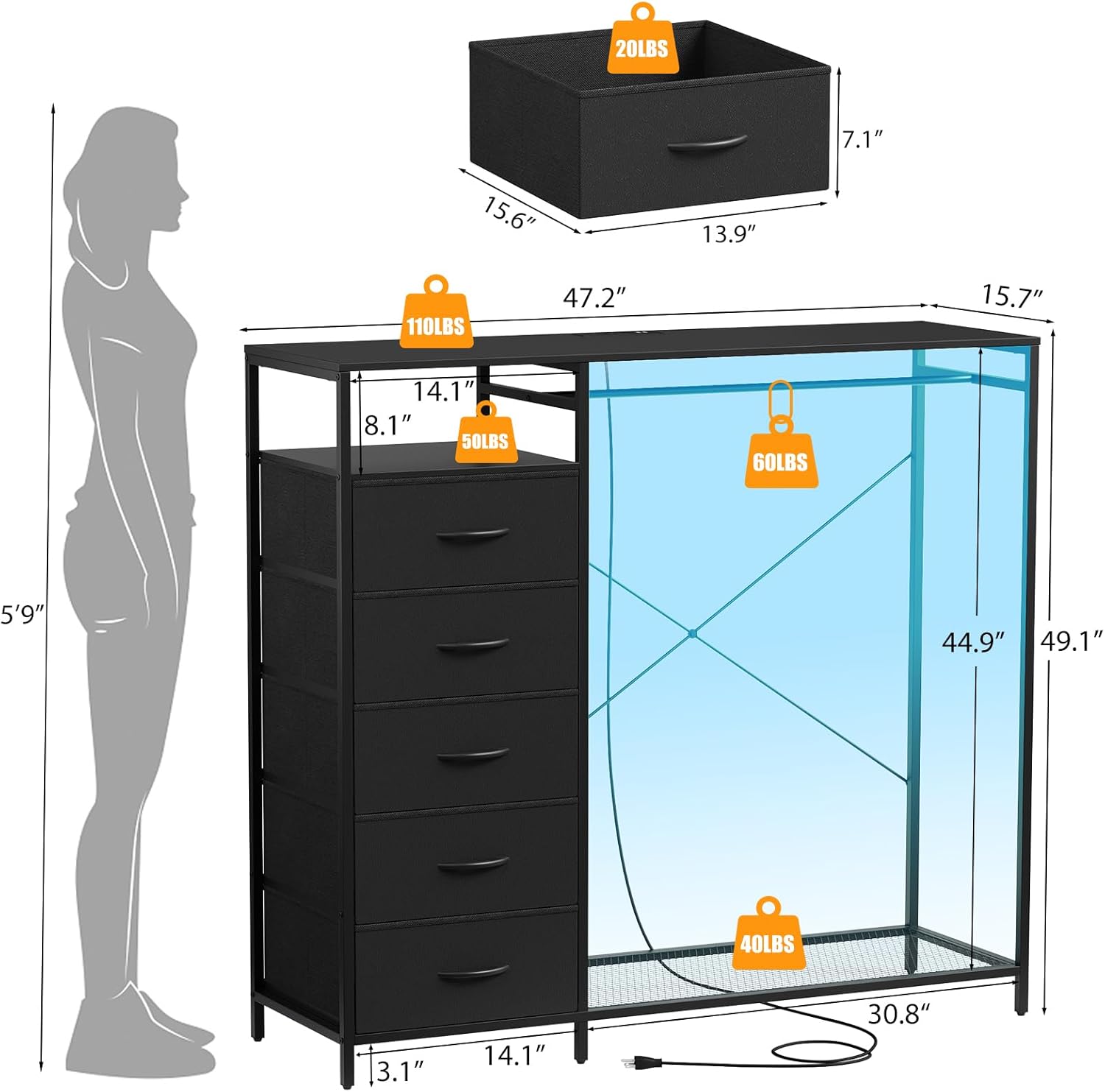
Image: The Harpaq 47 Inch Black Dresser, fully assembled and organized with clothes, shoes, and decorative items.
Safety Information
Important Safety Instructions
- Always follow the assembly instructions carefully to ensure proper and stable construction.
- Utilize the provided anti-tipping strap to secure the dresser to a wall. This is crucial to prevent accidental tipping, especially in households with children or pets.
- Do not overload drawers or the hanging rack beyond their specified weight capacities. Refer to the specifications section for details.
- Ensure all electrical connections for the charging station and LED lights are secure and properly plugged into a suitable power outlet. Do not use if the power cord is damaged.
- Keep liquids away from the charging station to prevent electrical hazards.
- Periodically check all screws and connections to ensure they remain tight and secure.

Image: Detail showing the anti-tipping strap installation and the robust steel frame construction.
Package Contents
What's Included
Before beginning assembly, please verify that all components listed below are present and undamaged. If any parts are missing or damaged, please contact customer support.
- Metal Frame Components (Labeled A, B, C, etc.)
- Fabric Drawers (5 units)
- Wooden Top Panel
- Hanging Rod
- Bottom Mesh Shelf
- LED Light Strip
- Power Adapter with Charging Station (2 AC outlets, 2 USB ports)
- Remote Control for LED Lights
- Adjustable Feet (Pre-attached or separate)
- Hardware Kit (Screws, Allen wrench, Anti-tipping strap, etc.)
- Instruction Manual
Assembly Instructions
Step-by-Step Assembly Guide
Assembly is designed to be straightforward. Please follow these steps carefully. It is recommended to have a clear, flat workspace and, if possible, a second person to assist.
- Unpack and Identify Parts: Lay out all components and hardware. Match them with the parts list and diagrams in the included instruction manual. Each part is typically marked with a number or letter.
- Assemble the Base Frame: Connect the bottom metal frame pieces using the provided screws. Ensure all connections are snug but do not overtighten initially.
- Attach Vertical Supports: Secure the vertical metal supports to the base frame. Pay attention to the orientation of the supports for the drawer side and the hanging rack side.
- Install the Top Frame: Attach the top metal frame pieces to the vertical supports.
- Insert the Wooden Top: Place the wooden top panel onto the assembled metal frame. Secure it with the designated screws.
- Install the Hanging Rod: Secure the hanging rod between the designated vertical supports on the open side of the dresser.
- Place the Bottom Mesh Shelf: Position the mesh shelf on the lower part of the hanging rack side.
- Assemble and Insert Drawers: Unfold each fabric drawer and insert the bottom panel. Place the assembled drawers into their respective slots on the drawer side of the dresser.
- Install LED Lights and Charging Station: Adhere the LED light strip to the underside of the top panel on the hanging rack side. Install the charging station into its designated slot on the top panel. Connect the LED light strip to the charging station's power output.
- Secure Anti-Tipping Strap: Attach the anti-tipping strap to the back of the dresser and secure it to a wall stud using appropriate hardware. This step is critical for safety.
- Final Tightening: Once fully assembled, go back and gently tighten all screws to ensure stability. Do not overtighten.

Image: Detailed diagram illustrating the overall dimensions and individual weight capacities for the drawers, top surface, and hanging rack.
Operating Instructions
Using Your Dresser
LED Lights Operation
The integrated LED lights offer customizable ambiance for your space. Use the provided remote control to adjust settings:
- Power On/Off: Press the power button on the remote to turn the lights on or off.
- Color Selection: Choose from over 60,000 colors using the color wheel or preset color buttons on the remote.
- Brightness Adjustment: Use the brightness up/down buttons to increase or decrease the light intensity.
- Mode Selection: Cycle through various dynamic modes such as strobe, fade, jump, or music sync mode (if applicable).
- Timing Function: Set a timer for the lights to automatically turn off.

Image: The dresser illuminated by LED lights in different colors, alongside the remote control and icons representing its features.
Charging Station Usage
The built-in charging station provides convenient power access for your electronic devices.
- Power Connection: Plug the dresser's main power cord into a standard wall outlet.
- AC Outlets: Use the two standard AC outlets (25V/12A) to power small appliances or chargers.
- USB Ports: Use the two USB ports (5V/A2) to charge mobile phones, tablets, and other USB-powered devices.
- The 6.5-foot power cord allows for flexible placement of the dresser.

Image: A detailed view of the integrated power strip with AC outlets and USB ports, demonstrating its use for charging electronic devices.
Storage and Organization
This dresser offers multiple storage solutions:
- Fabric Drawers: The five wide and deep fabric drawers are ideal for storing folded clothes, accessories, linens, or toys.
- Hanging Rack: Use the integrated hanging rack for daily outfits, coats, or garments that need to be hung.
- Bottom Shelves: The bottom shelf is perfect for shoes, storage boxes, or other items, keeping them off the floor and easily accessible.
- Top Surface: The sturdy wooden top provides additional space for decorative items, books, or frequently used personal belongings.
Maintenance
Care and Cleaning
- Wooden Top: Wipe the wooden top surface with a soft, damp cloth. Avoid harsh chemicals or abrasive cleaners.
- Metal Frame: Clean the metal frame with a soft cloth and mild detergent if necessary. Dry thoroughly to prevent rust.
- Fabric Drawers: The fabric drawers are made of abrasion-resistant material. For minor spills, spot clean with a damp cloth and mild soap. Allow to air dry completely. Do not machine wash.
- Dusting: Regularly dust all surfaces with a dry, soft cloth to prevent buildup.
- Inspection: Periodically inspect all hardware and connections to ensure they are tight. Retighten if necessary.
Troubleshooting
Common Issues and Solutions
| Problem | Possible Cause | Solution |
|---|---|---|
| Dresser feels wobbly or unstable. | Screws are loose; uneven floor; anti-tipping strap not installed. | Tighten all assembly screws. Adjust the adjustable feet to level the dresser. Ensure the anti-tipping strap is securely anchored to the wall. |
| Drawers do not slide smoothly or are difficult to open/close. | Drawer is overloaded; fabric is creased; drawer not inserted correctly. | Reduce the weight in the drawer. Reshape the fabric drawer if creased. Ensure the drawer is fully and correctly seated in its slot. |
| LED lights are not working. | Power cord unplugged; LED strip disconnected; remote control battery dead. | Check if the dresser's power cord is securely plugged into a wall outlet. Ensure the LED strip is properly connected to the charging station. Replace the remote control battery. |
| Charging station is not providing power. | Dresser not plugged in; power surge; device not compatible. | Verify the dresser is plugged into a live outlet. Check if the outlet itself is working. Try a different device to confirm compatibility. |
Specifications
Product Specifications
| Feature | Detail |
|---|---|
| Brand | Harpaq |
| Model Name | YSW01-05B |
| Product Dimensions | 11.8"D x 39.4"W x 31.5"H |
| Color | Black |
| Mounting Type | Floor Mount |
| Room Type | Laundry Room, Dressing Room, Bedroom, Guest Room, Living Room |
| Special Feature | Portable, Adjustable Feet, LED Lights, Charging Station, Hanging Rack |
| Assembly Required | Yes |
| Item Weight | 39.3 pounds |
| Country of Origin | China |
| Charging Station | 2 AC Outlets (25V/12A), 2 USB Ports (5V/A2), 6.5ft Power Cord |
Warranty and Support
Warranty Information
Harpaq products are manufactured with quality and durability in mind. For specific warranty details regarding your 47 Inch Black Dresser, please refer to the warranty card included in your package or visit the official Harpaq website. The warranty typically covers manufacturing defects under normal use.
Customer Support
Should you encounter any issues, have questions about assembly, or require replacement parts, please do not hesitate to contact Harpaq customer support. Our team is dedicated to providing assistance and ensuring your satisfaction.
Please have your model number (YSW01-05B) and purchase date ready when contacting support for faster service.