
Introduction
This manual provides detailed instructions for the safe and effective use of your Laviniar Automatic Electric Nail Clipper, Model CH-707. This device is designed for effortless nail trimming and polishing, featuring a built-in light, three-speed settings, and convenient nail clip storage. It is suitable for adults, seniors, and children.
Package Contents
Please check the package for the following items:
- 1 x Electric Nail Clipper
- 1 x Cleaning Brush
- 1 x Type-C Cable
- 1 x User Manual
Product Overview
The Laviniar Automatic Electric Nail Clipper is a versatile device designed for efficient and safe nail care. It combines trimming and polishing functions in one compact unit.
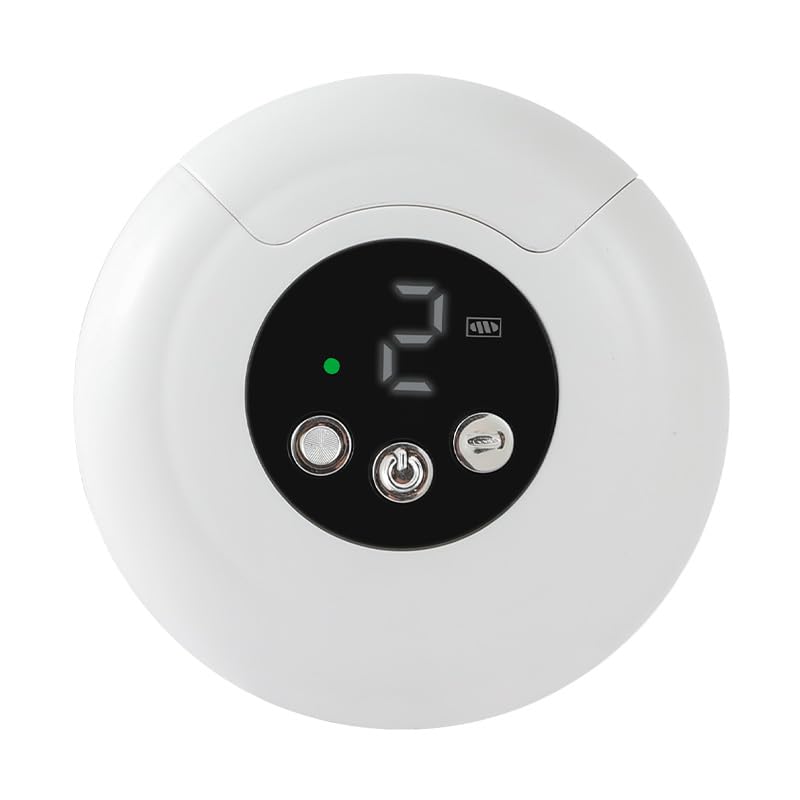
Image: The Laviniar Automatic Electric Nail Clipper in white, showcasing its compact design.

Image: Illustration of the two-in-one functionality, showing how the clipper trims and polishes nails for a smooth, glossy finish.

Image: The device displaying its LCD screen, indicating speed settings and battery status.

Image: A close-up view of the internal grinding mechanism, designed for smooth and safe nail shaping.

Image: The integrated LED light illuminating the nail area during use, enhancing visibility for precise trimming.

Image: Various USB charging methods for the device, highlighting its long battery life of up to 90 days on a full charge.

Image: The integrated storage bin for nail clippings, preventing mess and simplifying cleanup.
Product Videos
Video: An overview demonstrating the automatic electric nail clipper's features, including its LED light, nail filing capabilities, speed settings, and nail chip storage. This video provides a comprehensive look at the product in action.
Video: This video showcases the unboxing experience and highlights the control buttons for the electric nail clipper, providing a clear guide on how to get started with the device.
Setup
- Unpack: Carefully remove all items from the packaging. Verify that all package contents listed above are present.
- Initial Charge: Before first use, fully charge the device using the provided Type-C cable. Connect the cable to the charging port on the device and a suitable USB power source (e.g., power bank, laptop, wall adapter). The LCD display will indicate charging status.
- Familiarize with Controls:
- The device features two main buttons. One controls the nail trimming function, and the other controls the nail polishing function.
- Long press a button to turn on the respective function.
- Click the button repeatedly to cycle through the three-speed levels (Low, Medium, High).
- Long press again to turn off the function.
- Remove Protective Cover: Gently remove the transparent protective cover from the trimming/polishing head before use.
Operating Instructions
1. Nail Trimming
- Power On: Long press the nail trimmer switch (usually the left button) to turn on the trimming function. The LED light will activate, and the speed display will show the current setting.
- Adjust Speed: Press the nail trimmer switch again to cycle through the three-speed levels (Low, Medium, High) to suit your preference and nail thickness.
- Position Nail: Gently place your fingernail or toenail into the trimming slot. The recessed cutters are designed for safety, preventing direct contact with skin.
- Trim: Allow the device to automatically trim your nail. Move your finger slightly to ensure an even trim. The built-in LED light provides clear visibility.
- Power Off: Long press the nail trimmer switch to turn off the trimming function when finished.
2. Nail Polishing (if applicable)
- Power On: Long press the nail polisher switch (usually the right button) to activate the polishing function.
- Adjust Speed: Press the nail polisher switch again to cycle through the three-speed levels for desired polishing intensity.
- Polish Nail: Gently touch the polishing head to the surface of your trimmed nail. Move the device smoothly over the nail to achieve a desired shine.
- Power Off: Long press the nail polisher switch to turn off the polishing function.
3. LED Light
The integrated LED light automatically turns on when the trimming or polishing function is activated, providing enhanced visibility for precise nail care, especially in low-light conditions.
Maintenance
- Empty Nail Clip Storage: The device features a built-in storage box for nail clippings. After use, rotate the button on the back of the device to open the storage compartment and easily dump the collected nail clippings.
- Clean Trimming Head: Use the provided cleaning brush to remove any remaining nail dust or debris from the trimming and polishing heads. Ensure the device is turned off before cleaning.
- Wipe Exterior: Wipe the exterior of the device with a soft, dry cloth. Do not use harsh chemicals or abrasive cleaners.
- Storage: Store the device in a cool, dry place away from direct sunlight and moisture.
Troubleshooting
- Device does not turn on:
- Ensure the device is fully charged. Connect it to the Type-C cable and a power source.
- Verify that you are long-pressing the power button for a few seconds to activate the device.
- Nails are not trimming effectively:
- Check the speed setting and increase it if necessary.
- Ensure the trimming head is clean and free of debris. Use the cleaning brush.
- Make sure your nail is properly positioned in the trimming slot.
- Nail clippings are not collecting:
- Ensure the nail clip storage compartment is properly closed before use.
- Empty the storage compartment regularly to prevent overflow.
If you encounter any issues not covered here, please refer to the Warranty and Support section for assistance.
Specifications
| Product Name | Electric Nail Clipper |
| Model | CH-707 |
| Brand | Laviniar |
| Material | Acrylonitrile Butadiene Styrene (ABS) |
| Size | 85x85x37mm |
| Weight | 135g |
| Charging Port | Type-C |
| Power Source | Battery Powered |
Warranty and Support
Laviniar is committed to providing high-quality products and excellent customer service. While specific warranty details are not provided in this manual, we offer 24-hour uninterrupted service for our customers from the date of purchase of your automatic electric nail clipper.
For any questions, concerns, or support needs, please contact our customer service team through the platform where you purchased the product. Your satisfaction is our priority.