1. Introduction
The HSFTOOLS P2W is an advanced thermal imaging camera designed for precise and efficient inspections. It features a 256x192 IR detector resolution enhanced to 640x480 with Super Resolution technology, a 3.5-inch touchscreen, and an 8MP visible camera. This manual provides detailed instructions for the safe and effective use of your P2W thermal camera.
2. What's in the Box
Carefully unpack your HSFTOOLS P2W thermal camera and verify that all items are present:
- P2W Thermal Camera
- Protective Storage Case
- 2-in-1 USB-C to USB-A/C Cable (for Charging and Data Transfer)
- Anti-drop Wrist Strap for Imager
- User Manual
- Calibration Card
- After-sales Card

Image: The P2W Thermal Camera, protective case, USB-C cable, wrist strap, and documentation included in the package.
3. Setup
3.1 Charging the Device
Before first use, fully charge the P2W thermal camera using the provided 2-in-1 USB-C cable and a compatible power adapter. The charging indicator will show the charging status.
3.2 Powering On/Off
To power on the device, press and hold the power button until the screen illuminates. To power off, press and hold the power button again and follow the on-screen prompts.
3.3 App Installation
For enhanced functionality, download the HSFTOOLS app on your smartphone or tablet. The app is available on Google Play for Android devices and the Apple App Store for iOS devices. Search for "HSFTOOLS".

Image: The HSFTOOLS thermal camera wirelessly connected to a smartphone running the HSFTOOLS app for image transfer and reporting.
4. Operating Instructions
4.1 Display and Navigation
The P2W features an ultra-large 3.5-inch 640x480 HD touchscreen for intuitive control and crisp thermal imaging. Navigate through menus and settings by tapping and swiping on the screen.

Image: A finger interacting with the 3.5-inch HD touchscreen of the HSFTOOLS P2W thermal camera.
4.2 Imaging Modes and Color Palettes
The device offers 5 image modes and 8 color palettes to suit various inspection needs. Switch between modes such as Visual, Thermal, Fusion, Picture-in-Picture (PIP), and Blending using the on-screen interface. The 8MP visible camera enhances image details in fusion modes.

Image: A comparison of various imaging modes including Visual, Thermal, Fusion, PIP, and Blending, demonstrating the camera's flexibility.
4.3 Super Resolution
The HSFTOOLS Live Super Resolution algorithm enhances the native 256x192 detector resolution to an impressive 640x480 imaging resolution in real-time, providing smooth and vivid thermal views at a 25 Hz frame rate.

Image: A thermal image showing the enhanced 640x480 resolution achieved through Live Super Resolution, with a smaller inset showing the original 256x192 resolution.
4.4 Intelligent Scene Detection (IntellFault)
The P2W incorporates HSFTOOLS' unique IntellFault technology and Pro Scene Color Alarm. This system uses advanced deep learning to quickly detect potential water leaks and insulation voids. The Pro Scene automatically analyzes environmental data to detect and alert users to abnormal moisture or insulation issues.

Image: Examples of suspected water leaks and insulation voids highlighted by the IntellFault intelligent technology.
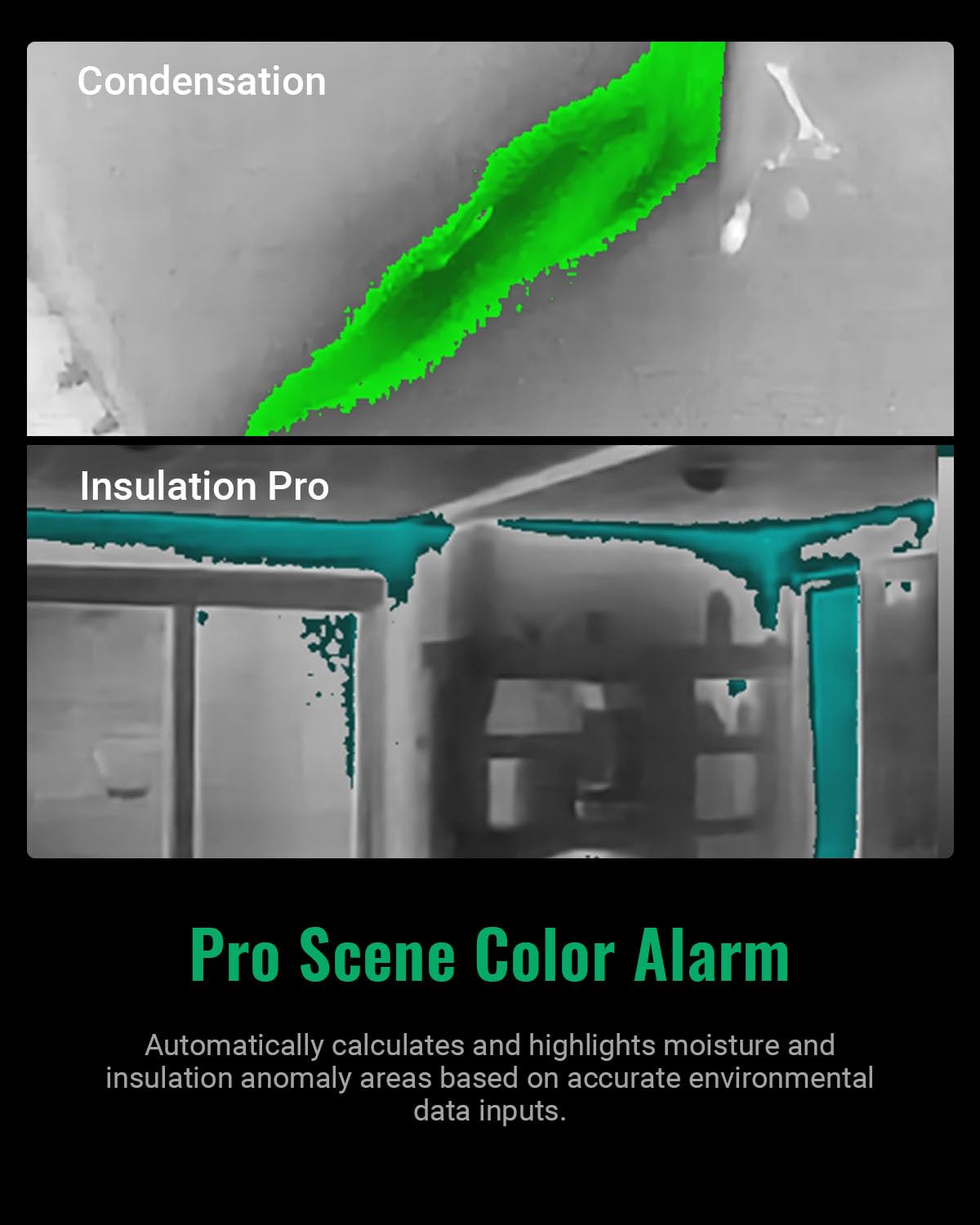
Image: Thermal images illustrating condensation and insulation issues detected and highlighted by the Pro Scene Color Alarm feature.
4.5 Temperature Measurement
The P2W offers a wide temperature range of -4°F to 752°F (-20°C to 400°C) with a thermal sensitivity of <40mK and accuracy of max(±3.6°F, ±2%). It automatically tracks the hottest, coldest, and center temperature spots. Users can set High/Low temperature exceedance alerts, displayed via OSD text, LED flashlight, or audio buzzer.

Image: A thermal image showing instant temperature readings for the center, hot, and cold spots within the frame.
4.6 Adjustable Measurement Settings
To ensure accurate temperature measurements, the P2W allows users to adjust emissivity settings based on specific materials (e.g., wood, bricks) and set the distance to objects. This customization helps in obtaining precise readings across various substances.

Image: A table illustrating recommended emissivity values for common materials and various distance settings to optimize temperature measurement accuracy.
4.7 Image and Video Recording
The P2W has a built-in 16GB eMMC storage, capable of storing up to 60,000 radiometric thermal images and 54 hours of recorded MP4 videos. It supports live video and audio recording.

Image: The thermal camera display showing a video recording in progress and a gallery of captured images, highlighting its extensive storage capabilities.
4.8 Connectivity and Software
The camera offers Wi-Fi connectivity for seamless pairing with the HSFTOOLS app, allowing easy access, sharing, analysis, and reporting on your smartphone or tablet. For advanced image analysis, screen projection, real-time monitoring, and 3D plotting, use the HSF Studio Windows PC software, available for download from the official HSFTOOLS website.

Image: A laptop displaying the HSF Studio Windows PC software, demonstrating its capabilities for professional image analysis and data visualization.
4.9 Additional Features
- Built-in LED Flashlight: Ensures safe operation in dimly lit areas.
- ¼"-2 Tripod Hole: Enables easy installation on a tripod for stable inspection work.

Image: A technician using the thermal camera in a dark area, with the built-in LED light illuminating the inspection target.
5. Maintenance
5.1 Battery Care
The P2W is equipped with a rechargeable lithium-ion battery providing up to 4 hours of continuous operation. To prolong battery life, utilize power-saving functions such as auto power off, sleep mode, and adjustable screen brightness. Avoid extreme temperatures during charging and storage.
5.2 Cleaning
Clean the camera body with a soft, damp cloth. Do not use abrasive cleaners or solvents. For the lens, use a specialized lens cleaning cloth and solution to avoid scratching. Ensure the device is powered off before cleaning.
5.3 Storage
Store the camera in its protective storage case in a cool, dry place when not in use. Avoid prolonged exposure to direct sunlight or high humidity.
6. Troubleshooting
This section addresses common issues you might encounter with your P2W thermal camera. If you experience problems not listed here, please contact HSFTOOLS customer support.
- Device not powering on: Ensure the battery is charged. Connect the camera to a power source using the USB-C cable.
- Image appears blurry or unclear: Check if the lens is clean. Adjust focus if applicable (P2W has fixed focus, but ensure no obstructions).
- Wi-Fi connection issues: Ensure the camera's Wi-Fi is enabled and within range of your smartphone/tablet. Restart both devices if necessary.
- Inaccurate temperature readings: Verify that emissivity settings are correctly adjusted for the material being inspected and that the distance to the object is accurately set.
- Short battery life: Adjust screen brightness, enable auto power-off and sleep functions to conserve power.
7. Specifications
| Feature | Specification |
|---|---|
| IR Detector Resolution | 256x192 |
| Imaging Resolution (Super Resolution) | 640x480 |
| Thermal Sensitivity | <40mK |
| Temperature Range | -4°F to 752°F (-20°C to 400°C) |
| Temperature Accuracy | max(±3.6°F, ±2%) |
| Visible Camera | 8MP |
| Display | 3.5" 640x480 HD Touchscreen |
| Refresh Rate | 25 Hz |
| Storage | 16GB eMMC (approx. 60,000 images / 54 hours video) |
| Battery Life | Up to 4 hours continuous operation |
| Drop Test Rating | 6.6 ft (2 meters) |
| IP Rating | IP54 |
| Connectivity | Wi-Fi |
| Dimensions | 6.97 x 4.8 x 2.72 inches |
| Weight | 1.37 Pounds |

Image: An overview of the P2W's durable features, including its IP54 rating, 6.6 ft drop test capability, standard tripod hole, adjustable brightness, and 4-hour battery life.
8. Warranty and Support
8.1 Warranty Information
The HSFTOOLS P2W thermal camera typically comes with a 1-year limited warranty. Please refer to the included warranty card or the official HSFTOOLS website for specific terms and conditions.
8.2 Customer Support
For technical assistance, product inquiries, or warranty claims, please visit the official HSFTOOLS website or contact their customer support team. Lifetime firmware updates and technical support are provided.


