
1. Introduction
The Xoopon AK16 Smart Air Quality Monitor is a comprehensive device designed to provide real-time data on various indoor air quality parameters. This 16-in-1 monitor helps you understand the air you breathe by detecting PM2.5, PM10, CO2, TVOC, HCHO, PM1, AQI, temperature, and humidity. Equipped with a high-definition color screen and a built-in rechargeable battery, it is suitable for use in homes, offices, schools, and other indoor environments.

Image 1.1: The Xoopon AK16 Smart Air Quality Monitor showing its main display with readings for PM2.5, PM1.0, PM10, TVOC, HCHO, Temperature, Humidity, CO2, and AQI.
2. Package Contents
Please check the package contents carefully upon unboxing to ensure all items are present and undamaged.
- 1x Xoopon AK16 Air Quality Monitor
- 1x USB Type-C Charging Cable
- 1x User Manual
3. Product Features
The Xoopon AK16 Air Quality Monitor offers a range of features designed for accurate and convenient air quality assessment:
- High Accuracy & Fast Refresh Data: Utilizes smart sensors and a double ventilation structure for precise and rapidly updated air quality data, ensuring over 99.9% high precision AQI.
- 16-IN-1 Indoor Air Test Kits: Monitors PM2.5, PM10, CO2, HCHO, TVOC, time, temperature, and humidity, all displayed on an ultra-high definition color screen.
- Versatile & Stylish Design: Features a hanging hole for wall mounting and is suitable for various environments including grow rooms, offices, kitchens, schools, cellars, and cars.
- Hassle-Free Rechargeability: Equipped with a built-in 2000mAh battery, providing approximately 7 hours of continuous use. It automatically enters energy-saving mode after 30 minutes of operation. Charges via USB Type-C cable.
- AQI with Buzzer Alerts: Provides Air Quality Index (AQI) readings with customizable buzzer alerts to notify users of significant changes in air quality.

Image 3.1: The Xoopon AK16 monitor in a home setting, highlighting its comprehensive detection capabilities for various air pollutants and environmental factors.
4. Setup
Follow these steps for initial setup of your Xoopon AK16 Air Quality Monitor:
- Unpack the Device: Carefully remove the monitor and all accessories from the packaging.
- Initial Charge: Before first use, connect the monitor to a power source using the provided USB Type-C cable and a compatible USB power adapter (not included). Allow the device to charge fully. The battery icon on the display will indicate charging status.
- Power On: Press and hold the power button (location typically on the side or back) for a few seconds until the display illuminates.
- Placement: Place the monitor in the desired indoor location. For accurate readings, avoid placing it near direct airflow from vents, windows, or heat sources. Ensure the ventilation openings are not obstructed.
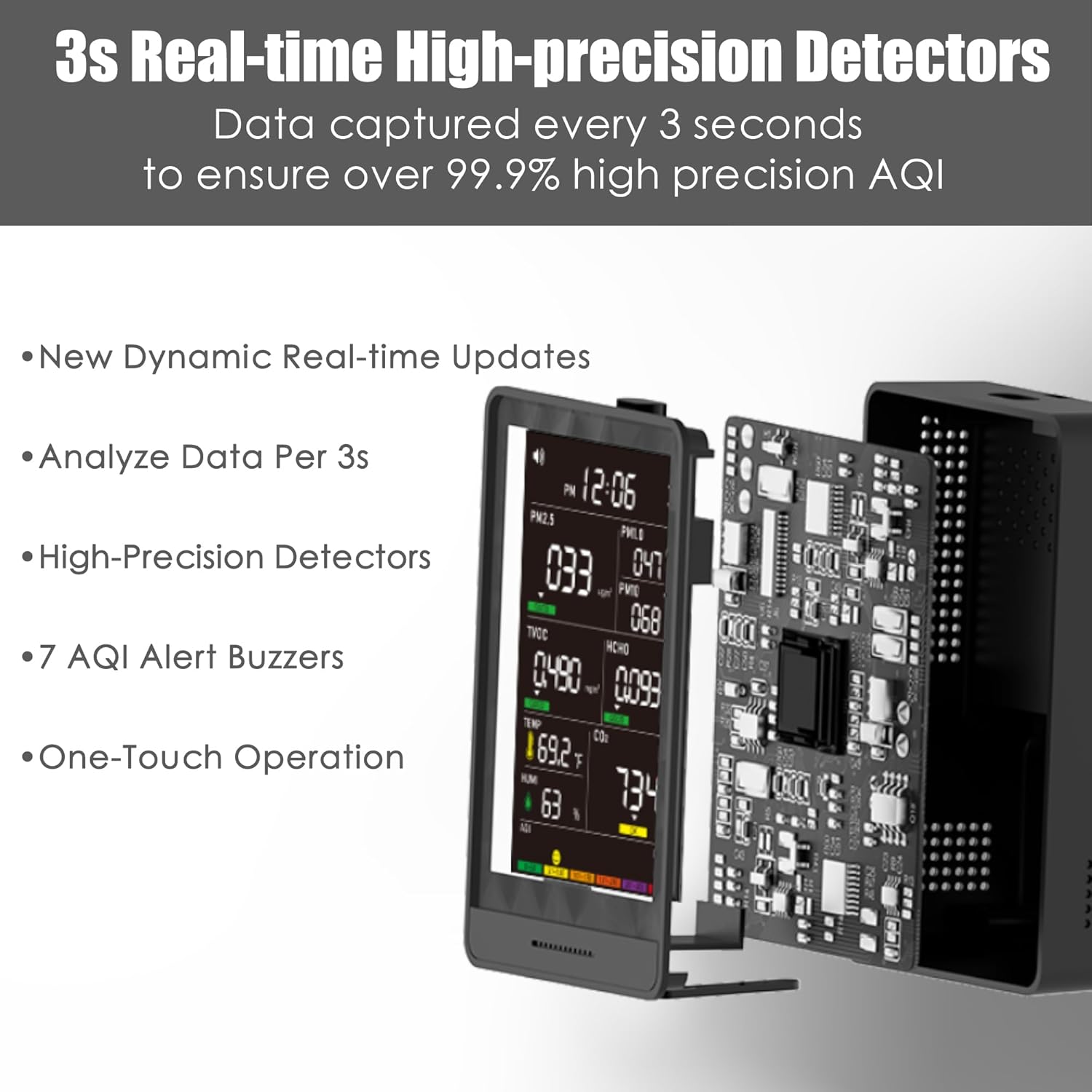
Image 4.1: An exploded view of the Xoopon AK16 monitor, illustrating its internal high-precision sensors and components responsible for real-time data analysis.
5. Operating Instructions
The Xoopon AK16 monitor provides real-time data on its high-definition color screen. Here's how to operate and interpret its readings:
5.1 Display Overview
The screen displays multiple parameters simultaneously. Each reading is typically accompanied by its unit and a color-coded indicator (Good, OK, Poor) based on predefined thresholds.
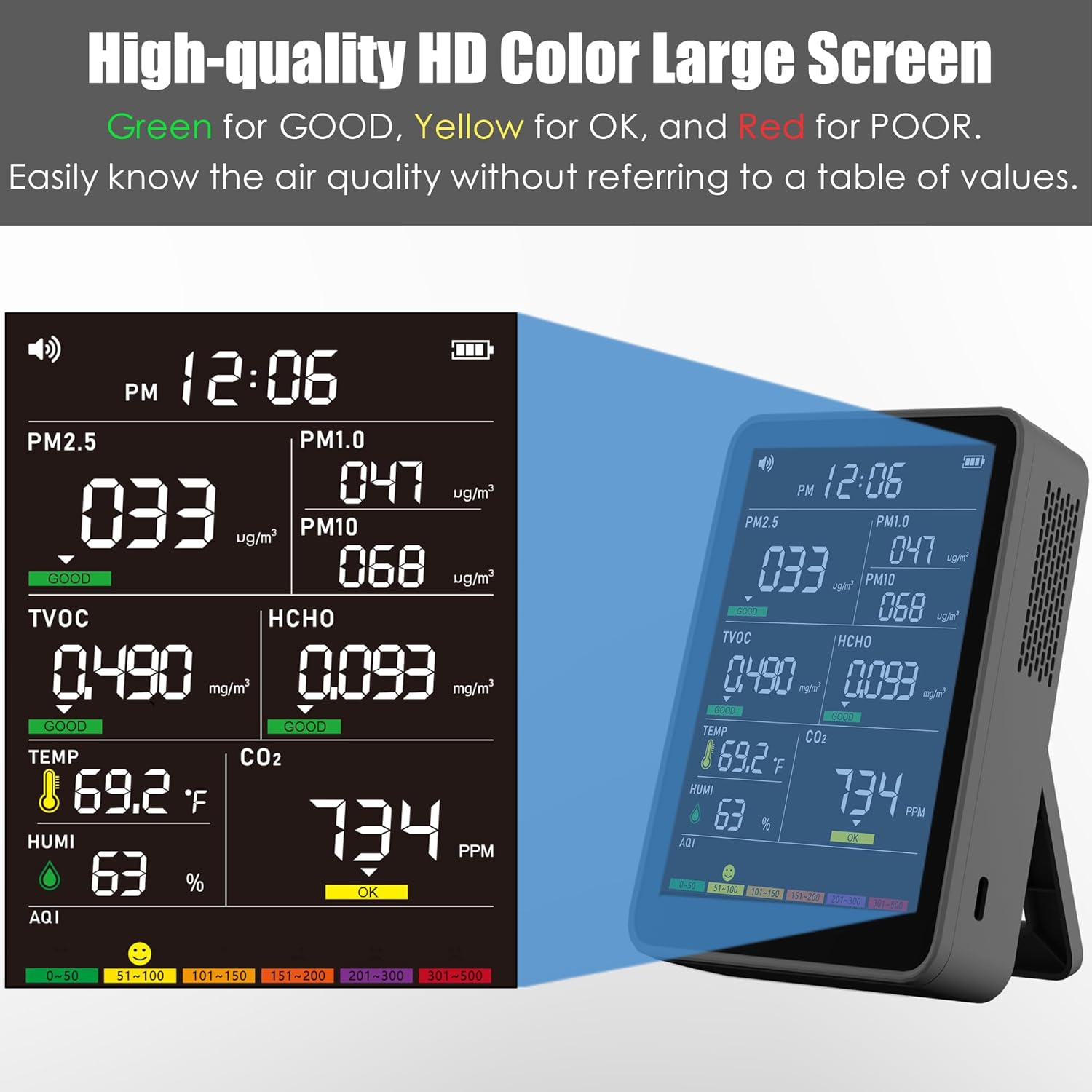
Image 5.1: A detailed view of the Xoopon AK16 monitor's high-quality HD color screen, showing various air quality parameters and their corresponding color-coded status indicators (Green for GOOD, Yellow for OK, Red for POOR).
5.2 Understanding Readings
- PM2.5, PM1.0, PM10: Particulate matter readings in micrograms per cubic meter (ug/m³). These indicate the concentration of fine airborne particles.
- CO2: Carbon Dioxide levels in parts per million (ppm). High CO2 can indicate poor ventilation.
- TVOC: Total Volatile Organic Compounds in milligrams per cubic meter (mg/m³). These are chemicals that can be emitted from various products and materials.
- HCHO: Formaldehyde levels in milligrams per cubic meter (mg/m³). A common indoor air pollutant.
- TEMP: Temperature in degrees Celsius (°C) or Fahrenheit (°F).
- HUMI: Humidity in percentage (%).
- AQI: Air Quality Index, a single number that indicates the overall air quality based on the measured pollutants.
5.3 Alarm Functions
The monitor features buzzer alerts for CO2, TVOC, HCHO, and PM2.5. These alarms activate when pollutant levels exceed predefined thresholds, indicating potentially unhealthy air conditions.
- Activating/Deactivating Alarms: Double-click the designated button (refer to device specific buttons, usually a power or mode button) to toggle the buzzer alarm on or off.
- Alarm Thresholds: The device uses a color-coded system (Green, Yellow, Red) and specific thresholds for each pollutant to indicate air quality levels. Refer to the table below for details.

Image 5.2: A table detailing the air quality alert thresholds for PM1.0, PM2.5, PM10, CO2, TVOC, HCHO, and AQI, with corresponding color indicators (GOOD, OK, POOR) and buzzer alert conditions.
5.4 Energy Saving Mode
To conserve battery, the monitor automatically enters an energy-saving mode after 30 minutes of operation. It continues to monitor air quality without sacrificing alertness.
6. Maintenance
Proper maintenance ensures the longevity and accuracy of your air quality monitor.
- Cleaning: Gently wipe the device with a soft, dry cloth. Do not use abrasive cleaners, solvents, or immerse the device in water.
- Ventilation Openings: Ensure the ventilation openings on the device are kept clear of dust and debris to allow for proper air circulation to the sensors.
- Storage: When not in use for extended periods, store the monitor in a cool, dry place away from direct sunlight and extreme temperatures.
- Battery Care: Recharge the battery regularly, even if the device is not in constant use, to maintain battery health. Avoid fully discharging the battery frequently.
7. Troubleshooting
If you encounter issues with your Xoopon AK16 Air Quality Monitor, refer to the following common problems and solutions:
- Device does not power on:
- Ensure the battery is charged. Connect the device to a power source using the USB Type-C cable and allow it to charge for at least 30 minutes before attempting to power on again.
- Verify the power button is pressed and held for the required duration.
- Inaccurate or inconsistent readings:
- Ensure the device is placed in an area with good air circulation and not near direct sources of pollutants (e.g., cooking fumes, open windows, air vents).
- Check that the ventilation openings are not blocked by dust or other obstructions.
- Allow the device to stabilize for at least 5-10 minutes after powering on or moving to a new location.
- If CO2 readings seem consistently low (e.g., around 400-420 ppm) even in occupied spaces, this might indicate a sensor issue. Contact customer support.
- Short battery life:
- Ensure the device is fully charged before use.
- The stated continuous usage time is approximately 7 hours. If battery life is significantly shorter, the battery may be degrading.
- Frequent use of the buzzer alarm or high screen brightness can consume more power.
- Buzzer alarm not working:
- Double-check that the buzzer alarm is enabled (refer to section 5.3).
- Ensure the pollutant levels have exceeded the set thresholds for the alarm to trigger.
If these steps do not resolve the issue, please contact Xoopon customer support for further assistance.
8. Specifications
Detailed technical specifications for the Xoopon AK16 Air Quality Monitor:
| Feature | Detail |
|---|---|
| Brand | Xoopon |
| Model Number | AK16 |
| Detection Items | PM2.5, PM1, PM10, CO2, TVOC, HCHO, Temperature, Humidity, Time Display, AQI |
| Sensor Type | Electrochemical, Semiconductor Temperature/Humidity |
| Alarm Mode | CO2 /TVOC/HCHO/PM2.5 Buzzer Alarm (7 AQI Beep Alarm) |
| Power Source | Battery Powered |
| Battery Type | 1 Lithium Ion battery (included) |
| Battery Capacity | 2000mAh |
| Charging Port | USB Type-C |
| Product Dimensions | 5"D x 2"W x 4"H (approx. 4.7" x 3.6" x 0.94" as per image) |
| Item Weight | 0.59 Pounds (approx. 9.4 ounces) |
| Material | Plastic, Metal |
| Operating Humidity | 1% ~ 99% |
| Upper Temperature Rating | 60 Degrees Celsius (140°F) |
| PM 2.5 Measure Range | 0~999ug/m3 |
| PM 2.5 Accuracy | 0~100ug/m3 ±10ug/m3; 100~500ug/m3 ±10% |
| PM 2.5 Resolution | 1ug/m3 |

Image 8.1: A visual representation of the Xoopon AK16 Air Quality Monitor's key specifications and included accessories.
9. Warranty and Support
Xoopon products are designed for reliability and performance. For specific warranty information, please refer to the warranty card included with your product or visit the official Xoopon website. If you have any questions, require technical assistance, or need to report an issue, please contact Xoopon customer support. Contact details can typically be found on the product packaging or the brand's official website.
10. Safety Information
Please read and follow these safety guidelines to ensure safe operation and prevent damage to the device:
- Do not disassemble, repair, or modify the device yourself. This may cause damage, electric shock, or fire.
- Keep the device away from water, moisture, and high humidity environments.
- Avoid exposing the device to direct sunlight, extreme temperatures, or open flames.
- Use only the provided USB Type-C cable for charging.
- Keep out of reach of children.
- Do not block the air inlet/outlet ports, as this can affect measurement accuracy.
- Dispose of the device and its battery according to local regulations. Do not dispose of in household waste.