1. Introduction
This manual provides essential information for the proper use and care of your Envibe Protective Tablet Case, designed exclusively for the UMIDIGI G7 Tab Pro 11 inch tablet. This premium cover is crafted to offer comprehensive protection while enhancing the functionality and elegance of your device.
To ensure a perfect fit and optimal performance, please confirm your tablet's model number is UMIDIGI G7 Tab Pro 11 inch before installation.
2. Key Features
- Comprehensive Protection: Specifically designed to safeguard your UMIDIGI G7 Tab Pro from daily bumps, scratches, and accidental drops.
- Ergonomic Angle Design: Features an adjustable folding stand to provide optimal viewing or typing angles for work or entertainment.
- Soft Touch Material: Made from high-quality PU leather, offering a soft, supple touch and adding a sophisticated aesthetic to your device.
- Precise Openings: Precision-cut to ensure easy and unobstructed access to all ports, buttons, and features, allowing charging and headphone use without removing the case.
- Fashionable and Simple Design: Boasts a modern and minimalist aesthetic, combining elegance with simplicity.
- Integrated Pencil Holder: A convenient slot for securely storing your stylus or pencil.
- Wrist Strap: Provides a secure and comfortable grip for one-handed use.
3. Setup and Installation
Follow these steps to properly install your UMIDIGI G7 Tab Pro tablet into the Envibe protective case:
- Ensure your UMIDIGI G7 Tab Pro tablet is clean and free of dust or debris.
- Carefully align the tablet with the case, starting with one of the longer sides.
- Gently press the tablet into the case, working your way around the edges until all corners are securely fitted.
- Verify that all ports (charging, headphone), buttons (power, volume), and the camera cutout are perfectly aligned with the case's openings and remain easily accessible.
- Once installed, the case should provide a snug and secure fit.
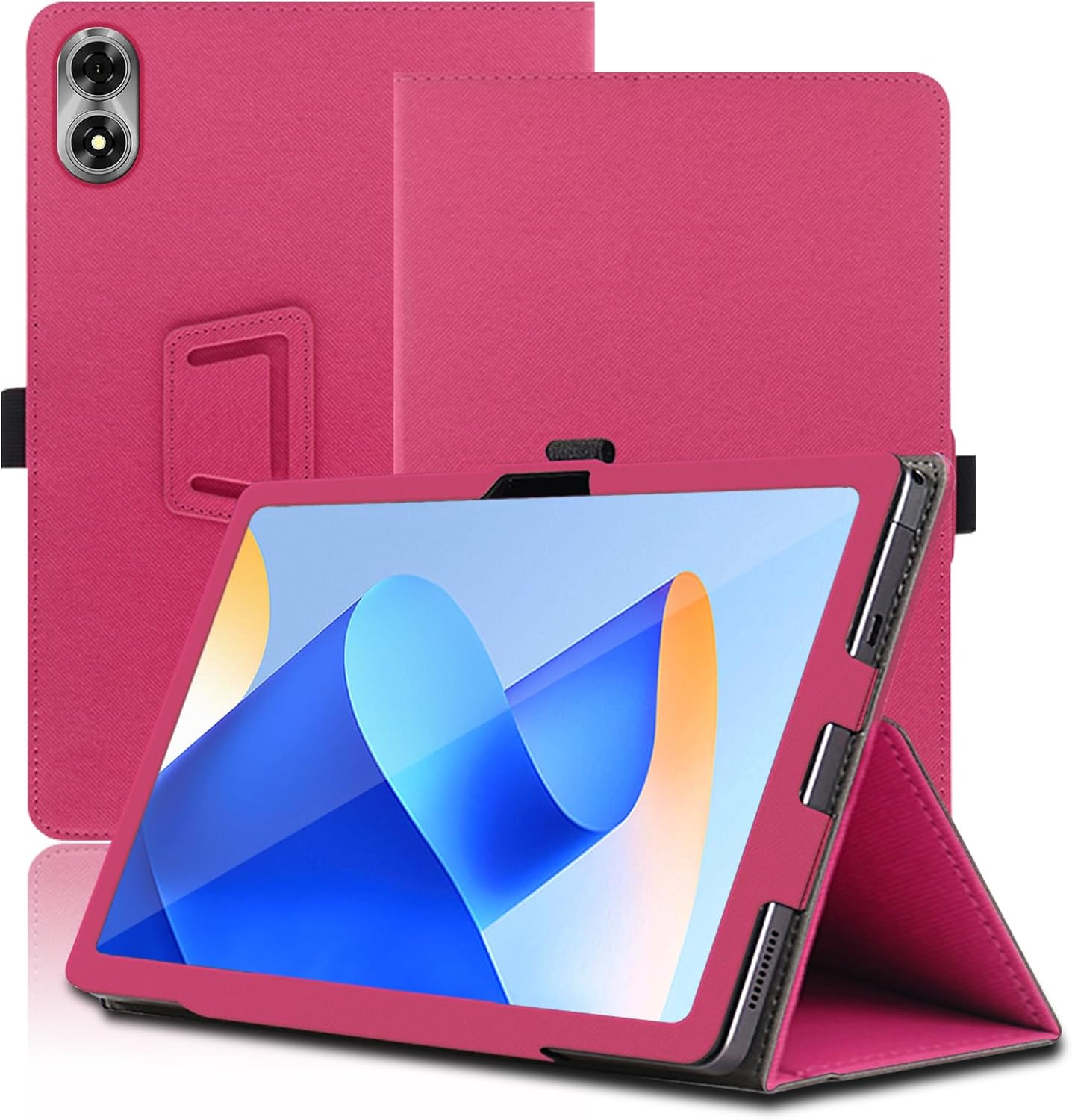
Figure 3.1: Tablet securely fitted within the Envibe case, demonstrating the protective design.
4. Operating Instructions
4.1. Using the Folding Stand
The case is designed with an ergonomic folding stand feature, allowing for multiple viewing angles:
- To activate the stand, fold the front cover backward and tuck it into the designated slot or groove on the back of the case.
- Adjust the angle by positioning the tablet in one of the available grooves for either a comfortable viewing angle (e.g., for watching videos) or a suitable typing angle.
- Ensure the stand is stable on a flat surface before use.

Figure 4.1: Demonstrating the two available viewing angles provided by the folding stand.
4.2. Utilizing the Pencil Holder
A dedicated pen sleeve is integrated into the case for convenient storage of your stylus or digital pen.
- Simply slide your pencil into the elastic loop or designated slot on the side or interior of the case to keep it secure and easily accessible.

Figure 4.2: Detail of the integrated pen sleeve design.
4.3. Using the Wrist Strap
For enhanced security and comfort during one-handed use, the case includes a wrist strap.
- Slide your hand through the elastic strap located on the back of the case to achieve a firm and comfortable grip, reducing the risk of accidental drops.

Figure 4.3: Illustration of the wrist strap design for secure handling.
5. Maintenance and Care
Proper care will extend the life and maintain the appearance of your Envibe tablet case:
- Cleaning: To clean the exterior of the case, gently wipe it with a soft, slightly damp cloth. For stubborn marks, a mild soap solution can be used, but ensure to wipe off any residue immediately.
- Avoid Chemicals: Do not use harsh chemicals, abrasive cleaners, or solvents, as these can damage the material and finish of the case.
- Drying: Allow the case to air dry completely before re-inserting your tablet. Do not expose it to direct sunlight or high heat sources.
- Storage: When not in use, store the case in a cool, dry place away from direct sunlight.

Figure 5.1: Illustrating the high-quality materials and protective features of the case.
6. Troubleshooting
If you encounter any issues with your Envibe tablet case, please refer to the following common solutions:
- Issue: Tablet does not fit securely or ports are misaligned.
Solution: First, confirm that your tablet is indeed the UMIDIGI G7 Tab Pro 11 inch model. If it is, remove the tablet from the case and carefully re-align it, ensuring all corners and edges snap into place. Check that all cutouts for ports and buttons are perfectly aligned.
- Issue: The folding stand is unstable.
Solution: Ensure the stand is fully engaged by tucking the cover securely into the designated groove. Place the tablet on a flat, stable surface. If the issue persists, check for any foreign objects obstructing the fold mechanism.
- Issue: Case appears dirty or stained.
Solution: Refer to the "Maintenance and Care" section (Section 5) for proper cleaning instructions. Avoid using harsh chemicals.
7. Product Specifications
| Brand | Envibe |
| Compatible Devices | UMIDIGI G7 Tab Pro |
| Form Factor | Cover |
| Shell Type | Hybrid |
| Colour | Red (Other colors available: Black, Brown, Light Blue, Blue) |
| Special Features | Adjustable Stand, Pencil Holder, Wrist Strap, High Bezel for Camera Protection |
| Material | High-quality PU Leather |
| Item Weight | 200 g |
| Parcel Dimensions | 31.8 x 19.5 x 2 cm |
| Manufacturer | CaKoo |
| ASIN | B0DCY5D348 |

Figure 7.1: Available color options for the Envibe tablet case.
8. Warranty and Support
Envibe is committed to providing high-quality products. For specific warranty details, return policies, or technical support regarding your tablet case, please refer to the documentation included with your purchase or contact the seller directly through the platform where the product was acquired.
For general inquiries or assistance, you may also visit the Envibe brand page on Amazon or contact Amazon customer service for support related to your order.