
Barphygo PYS-PEG-E01000
Barphygo 1000W Portable Power Station with Solar Panel User Manual
Model: PYS-PEG-E01000
1. Product Overview
The Barphygo 1000W Portable Power Station is a versatile energy solution designed for various applications, including outdoor activities, emergency backup, and home use. It features a 1024Wh LiFePO4 (LFP) battery and can deliver up to 1000W of AC power. This package includes a 200W foldable solar panel for convenient recharging.

Image: The Barphygo 1000W Portable Power Station, a black and yellow unit with multiple outlets and a digital display, shown alongside its accompanying black foldable solar panel.

Image: The Barphygo 1000W Portable Power Station and its solar panel set up on a wooden table in a camping environment, with people relaxing in the background.
Key Features:
- 1024Wh LiFePO4 Battery: High-efficiency and safe lithium-ion battery.
- 1000W AC Output: Capable of powering various appliances.
- Multiple Output Ports: Includes AC, USB-C (PD 100W), USB-A (QC 18W, 5V/2.4A), DC, and car ports.
- Integrated LED Lighting: Features flashlight, strobe, and SOS modes for emergencies.
- Multiple Charging Methods: Supports AC wall charging, car charging, and solar panel charging.
- Battery Management System (BMS): Ensures safety with protections against overcharge, over-discharge, over-current, and short-circuit.
2. Safety Information
Read all safety instructions before operating the power station. Failure to follow these instructions may result in electric shock, fire, or serious injury.
General Safety Guidelines:
- Do not disassemble, repair, or modify the unit.
- Avoid exposure to rain or moisture.
- Keep away from heat sources, open flames, and flammable materials.
- Do not use or store in direct sunlight or high temperatures.
- Ensure proper ventilation during use and charging.
- Keep out of reach of children and pets.
- Use only approved accessories and charging cables.
- If the unit emits smoke, odor, or unusual noise, discontinue use immediately and contact support.
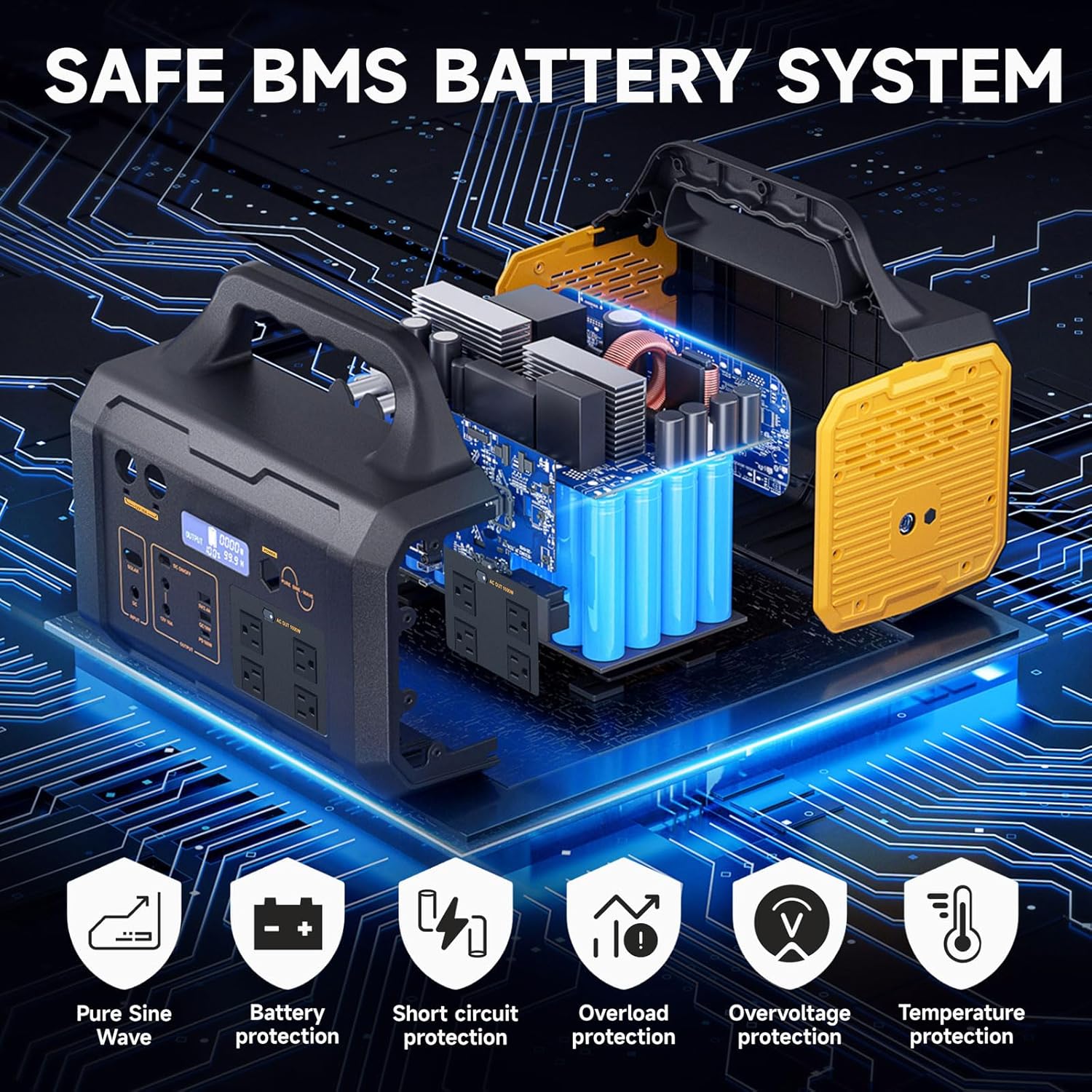
Image: An internal diagram of the power station illustrating the Battery Management System (BMS) and its protective features, including pure sine wave output, battery protection, short circuit protection, overload protection, overvoltage protection, and temperature protection.
3. Setup and Initial Charging
Package Contents:
Verify that all items are present in your package:
- 1x Barphygo 1000W Portable Power Station
- 1x 200W Foldable Solar Panel
- 1x AC Adapter & Cable
- 1x Car Charger Cable
- 1x Instruction Manual

Image: A visual representation of the package contents, including the user manual, AC adapter, car charger cable, 200W foldable solar panel, and the 1000W power station.
Charging Methods:
The power station can be recharged using three methods:
- AC Wall Charging: Connect the AC adapter to the power station's input port and then to a standard wall outlet. Full charge typically takes 6-8 hours.
- Car Charging: Use the provided car charger cable to connect the power station to your vehicle's 12V car port. Full charge typically takes 5-6 hours.
- Solar Panel Charging: Connect the 200W foldable solar panel to the power station's solar input port. In full sunlight, charging typically takes 5-7 hours.

Image: A collage showing the three charging methods: solar panel charging (5-7 hours), AC wall charging (3-4 hours recommended DC input), and car charging (8-10 hours).

Image: A visual guide to fast and dual charging, depicting the power station being charged by a 100W solar panel, a DC input from a wall charger, and a car charger.
4. Operating Instructions
Powering On/Off:
Press and hold the main power button to turn the unit on or off. The LCD display will illuminate, showing battery level and output status.
Using Output Ports:
The power station is equipped with various output ports to power up to 11 devices simultaneously:
- AC Outlets (4x 1000W): Press the AC button to activate. Connect devices requiring 120V AC power.
- USB-C Port (1x PD 100W): For fast charging compatible USB-C devices.
- USB-A Ports (1x QC 18W, 1x 5V/2.4A): For charging standard USB devices.
- DC Output (2x 12V/10A): For devices requiring 12V DC power.
- Car Ports (2x 12V/10A): For car appliances.
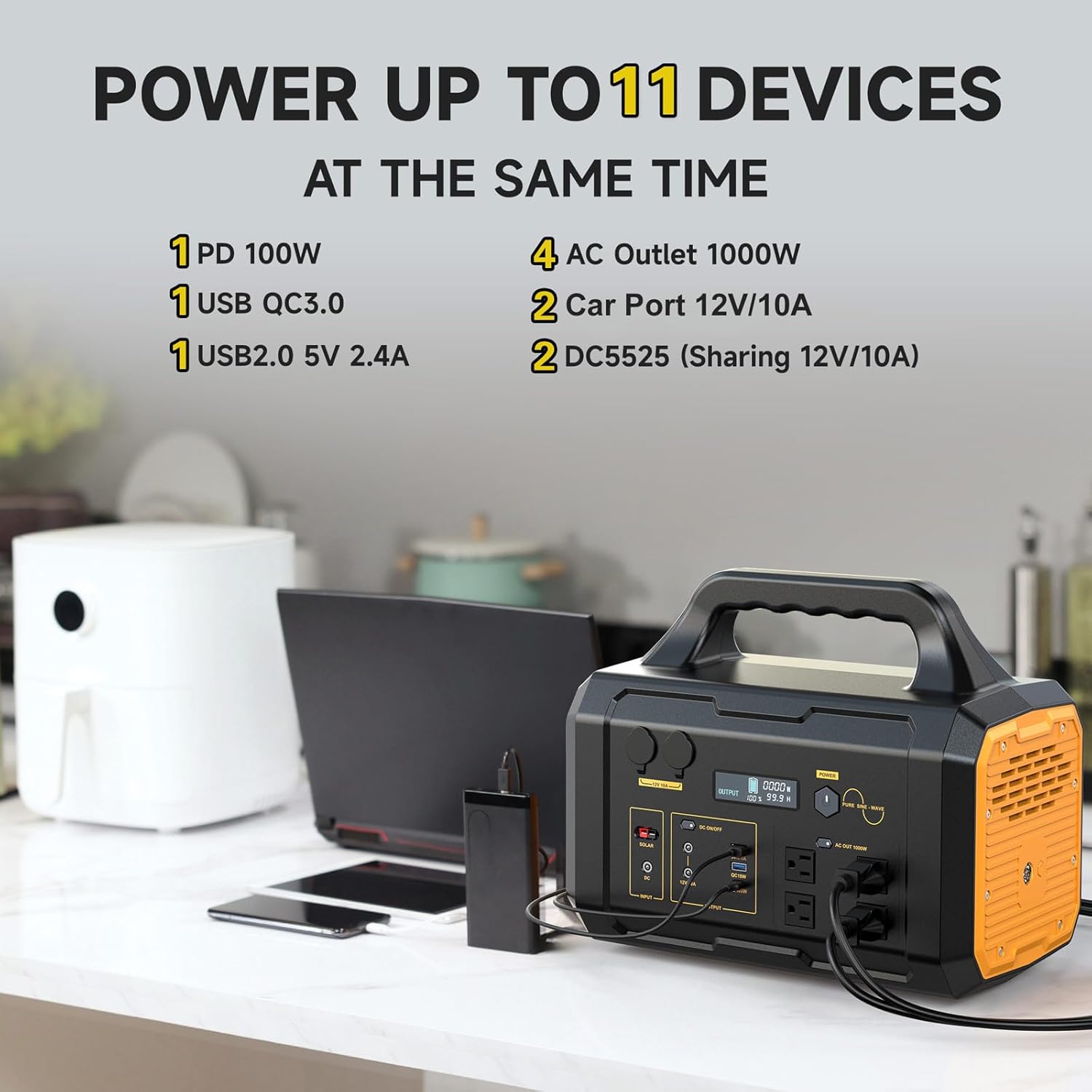
Image: The Barphygo power station connected to and charging multiple devices, including a laptop, smartphone, and an air fryer, demonstrating its capability to power up to 11 devices simultaneously.

Image: A detailed view of the power station's output panel, highlighting the four AC outlets, one PD USB-C port, one QC fast charge port, one USB-A port, two DC outputs, and two car ports.
LED Lighting Function:
The power station includes a dual LED flashlight with three modes:
- Lighting Mode: Standard illumination.
- Strobe Mode: Flashing light for signaling.
- SOS Mode: International distress signal.
Press the dedicated LED light button to cycle through the modes or turn the light on/off.

Image: A person operating the LED light on the power station, with illustrations showing the three modes: Lighting, SOS, and Strobe.

Image: A couple sitting by a campfire with the power station's LED light providing additional illumination, demonstrating its use in emergency or low-light situations.
5. Maintenance
Storage:
- Store the power station in a cool, dry place, away from direct sunlight and extreme temperatures.
- For long-term storage, charge the unit to approximately 50-80% every 3-6 months to preserve battery health.
Cleaning:
- Wipe the exterior with a soft, dry cloth.
- Do not use abrasive cleaners or solvents.
- Ensure all ports are free from dust and debris.
6. Troubleshooting
Unit Not Turning On:
- Ensure the battery is charged. Connect to a power source and attempt to charge.
- Press and hold the power button for a few seconds.
Devices Not Charging/Powering:
- Check if the specific output port (AC, USB, DC) is activated.
- Verify that the device's power consumption does not exceed the port's or the unit's maximum output (1000W).
- Ensure cables are securely connected.
Power Station Shuts Off Prematurely:
- This may indicate an overload or low battery. Reduce the load or recharge the unit.
- Hard Reset Procedure: If the unit consistently shuts off or does not discharge properly, perform a hard reset by completely draining the battery until the unit powers off, then fully recharge it using the AC adapter.
Solar Panel Not Charging:
- Ensure the solar panel is in direct sunlight and not obstructed.
- Check the connection between the solar panel and the power station.
- Verify the solar panel is clean and free of dirt or debris.
7. Specifications

Image: The power station demonstrating its 1024Wh capacity and 1000W output by listing estimated run times for various appliances like a mini fridge, laptop, coffee maker, hair dryer, electric frying pan, and electric kettle.
| Feature | Detail |
|---|---|
| Brand | Barphygo |
| Model Name | PYS-PEG-U01000 |
| Battery Type | LiFePO4 (Lithium Ion) |
| Battery Capacity | 1024Wh |
| AC Output | 1000W (Running), 1000W (Starting), 120V AC |
| USB-C Output | 1x PD 100W |
| USB-A Output | 1x QC 18W, 1x 5V/2.4A |
| DC Output | 2x 12V/10A |
| Car Port Output | 2x 12V/10A |
| Charging Input | AC Wall, Car Charger, Solar Panel |
| Solar Panel Included | 200W Foldable Solar Panel |
| Product Dimensions | 15.12"L x 9.13"W x 12.64"H |
| Item Weight | 28.8 Pounds |
| Special Features | Portable, LED Light (Flashlight, Strobe, SOS) |
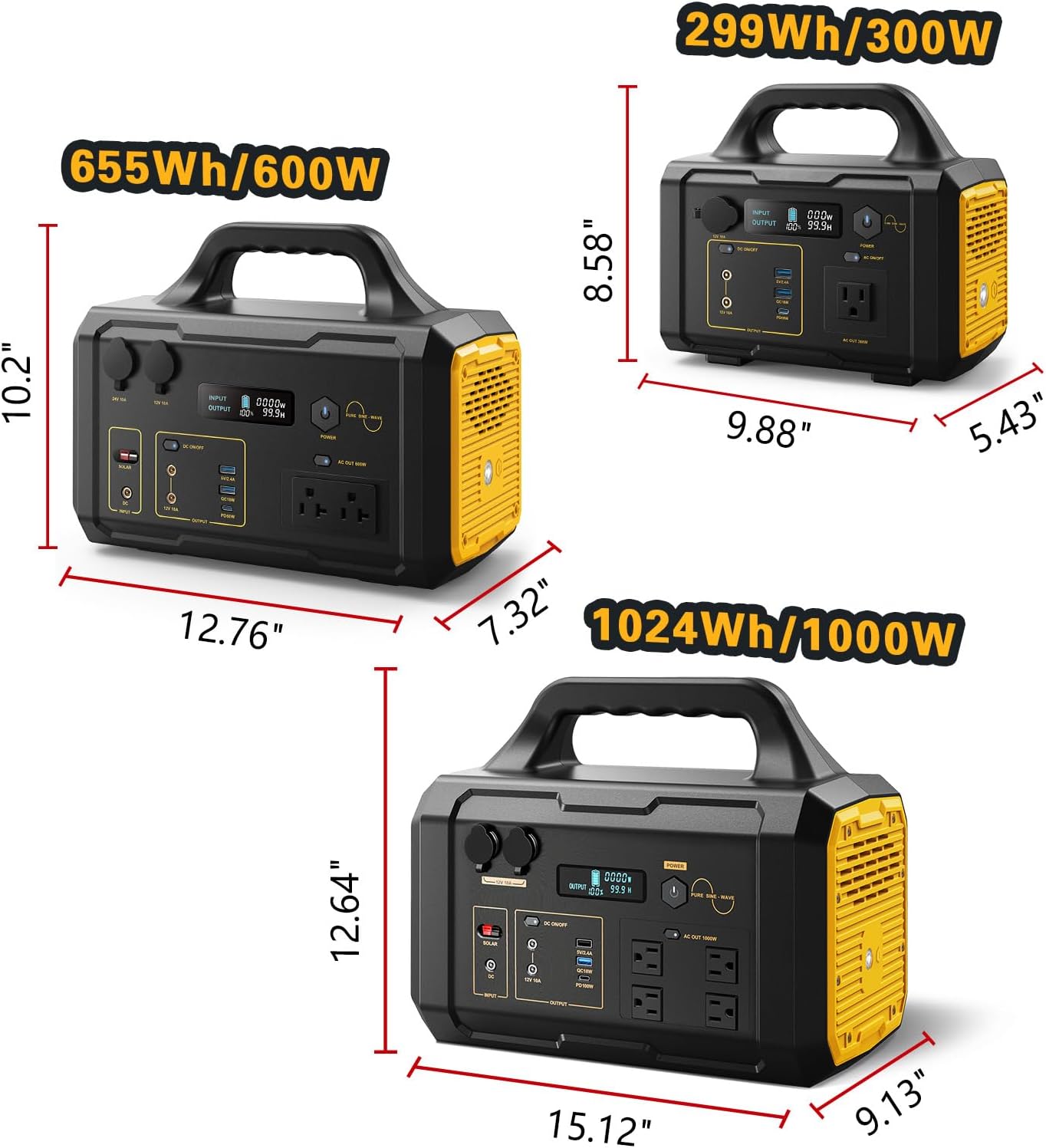
Image: A visual comparison of different Barphygo power station models, showing their respective capacities (299Wh/300W, 655Wh/600W, 1024Wh/1000W) and physical dimensions.

Image: The Barphygo power station on a wooden table outdoors, next to a coffee maker and a portable speaker, emphasizing its portable design and ease of use, with its net weight (28.79 lbs) and dimensions displayed.
8. Warranty and Support
For any questions regarding your Barphygo portable power station, please contact our customer support. We are committed to providing assistance and will respond to inquiries within 24 hours.
Please refer to your purchase documentation for specific warranty terms and conditions.
Ask a question about this manual
Ask about setup, troubleshooting, compatibility, parts, safety, or missing instructions. Manuals+ will review the question and use this page’s manual context to help answer it.