
Introduction
Thank you for choosing the YAMO YK10 Indoor Cycling Exercise Bike. This manual provides essential information for the safe assembly, operation, and maintenance of your new fitness equipment. Please read this manual thoroughly before initial use and retain it for future reference.

A full view of the YAMO YK10 Indoor Cycling Exercise Bike, showcasing its black frame with yellow accents, adjustable seat, handlebars, and LCD monitor.
Safety Information
- Consult a physician before starting any new exercise program.
- Ensure all bolts and nuts are securely tightened before each use.
- Keep children and pets away from the equipment during operation.
- Place the bike on a flat, stable surface. Use a mat to protect flooring.
- Wear appropriate athletic footwear and clothing.
- Do not exceed the maximum user weight capacity of 270 pounds (122 kg).
- Use the emergency brake function by pressing down on the resistance knob if you need to stop quickly.
Assembly and Setup
The YAMO YK10 exercise bike is designed for straightforward assembly. All necessary tools and a detailed instruction manual are included in the package. Assembly can typically be completed within 30 minutes.
- Unpack Components: Carefully remove all parts from the packaging and verify against the parts list in the included manual.
- Attach Stabilizers: Secure the front and rear stabilizer bars to the main frame using the provided bolts and washers.
- Install Pedals: Attach the left and right pedals to their respective crank arms. Note that the left pedal is reverse-threaded.
- Mount Seat Post and Seat: Insert the seat post into the frame and secure it. Attach the seat to the seat post.
- Mount Handlebar Post and Handlebars: Insert the handlebar post into the frame and secure it. Attach the handlebars to the post.
- Connect LCD Monitor: Connect the sensor wires and mount the LCD monitor onto the handlebar assembly.
- Final Checks: Ensure all connections are tight and the bike is stable before use.
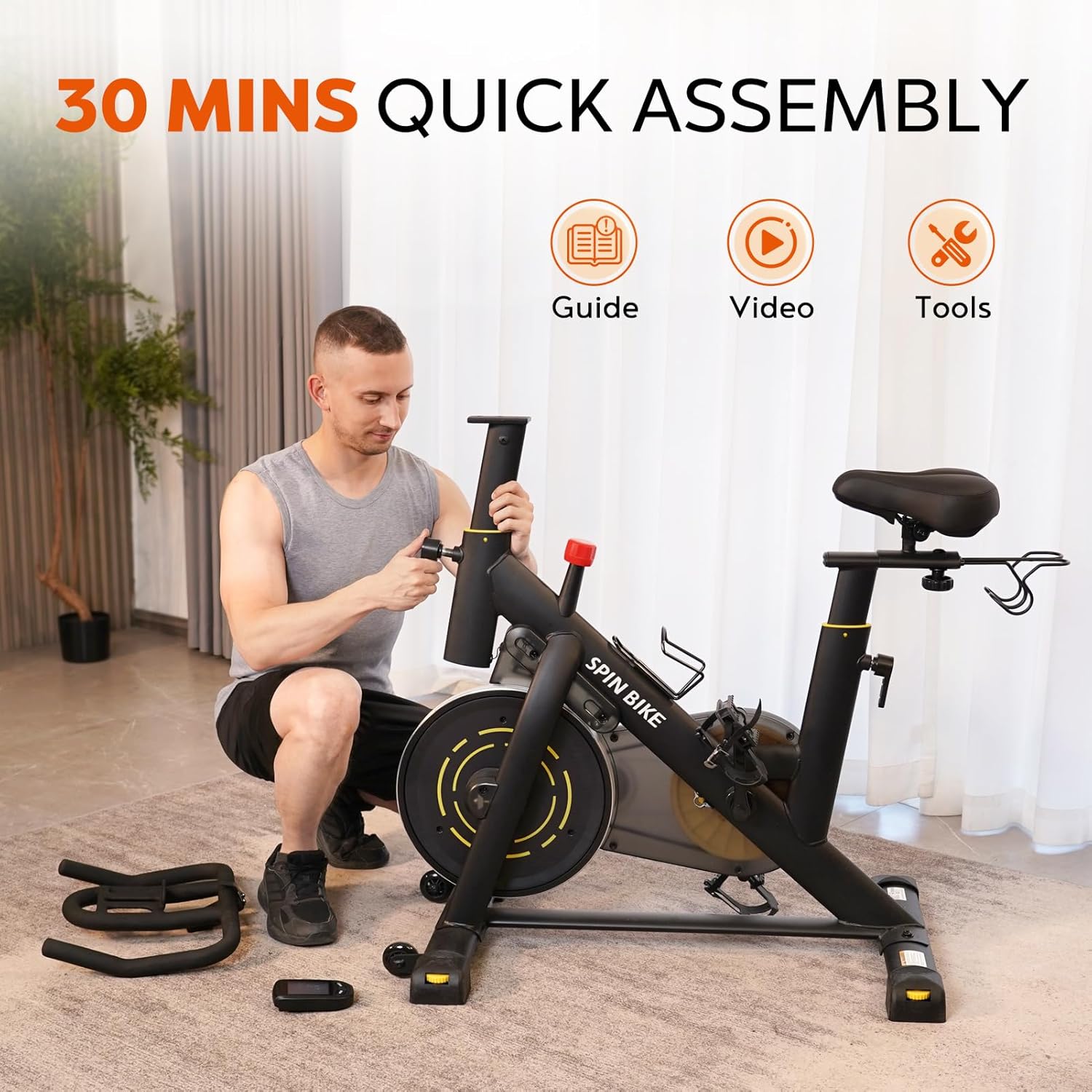
A man assembling the YAMO YK10 exercise bike, with icons indicating that a guide, video, and tools are included for quick assembly.

The YAMO YK10 exercise bike shown in a home environment, highlighting its compact dimensions (47" L x 21" W x 31"-46" H) and minimal footprint of 5.9 sq. ft.
Operating Instructions
Adjusting the Bike
The YAMO YK10 offers multiple adjustment points to ensure a comfortable and effective workout for various user heights (5 ft to 6.2 ft).
- Seat Adjustment: The seat can be adjusted in four directions (up, down, fore, and aft) using the spring pull pins. Loosen the pin, slide the seat to the desired position, and re-secure the pin.
- Handlebar Adjustment: The handlebars are adjustable in two directions (up and down). Loosen the spring pull pin, adjust to your preferred height, and re-secure.
- Resistance Adjustment: Turn the red resistance knob clockwise to increase resistance and counter-clockwise to decrease it. This allows for infinite resistance levels.
- Emergency Stop: Press down firmly on the red resistance knob to engage the emergency brake and stop the flywheel immediately.

An image illustrating the adjustable handlebar (5 height levels, 2-way) and seat (8 height levels, 4-way) of the YAMO YK10 bike, suitable for users 5' to 6'2" and supporting up to 330 lbs.

A detailed view of the red resistance knob on the YAMO YK10 exercise bike, indicating adjustable resistance levels from 0% to 100% and an emergency stop function.
Using the LCD Monitor
The upgraded LCD monitor tracks your workout data, helping you monitor progress and adjust your exercise plan.
- Functions: The monitor displays Speed, Distance, Calories, ODO (Odometer), and RPM (Revolutions Per Minute).
- Operation: Use the button on the monitor to cycle through different display modes or reset values. Refer to the specific monitor instructions in the included manual for detailed operation.
- Tablet Holder: The integrated tablet holder accommodates phones, iPads, or other devices, allowing for entertainment or guided workouts during your session.

The LCD monitor of the YAMO YK10 exercise bike displaying metrics like speed, time, ODO, calories, and RPM, with a tablet holder positioned above it.
Additional Features
- Water Bottle Holder: Stay hydrated during your workout with the conveniently located water bottle holder.
- Dumbbell Rack: Engage in diverse training with the integrated dumbbell rack.
- Transport Wheels: Easily move the bike by tilting it onto its front transport wheels.

A composite image detailing key features of the YAMO YK10 exercise bike: transport wheels for easy movement, adjustable pedals, solid foot pads for stability, and a comfortable seat.
Maintenance
Regular maintenance ensures the longevity and optimal performance of your YAMO YK10 exercise bike.
- Cleaning: Wipe down the bike with a damp cloth after each use to remove sweat and dust. Avoid abrasive cleaners.
- Inspection: Periodically check all bolts, nuts, and moving parts for tightness and wear. Tighten any loose fasteners.
- Lubrication: The belt drive system is designed to be low-maintenance and typically does not require lubrication. Refer to the detailed manual for any specific lubrication requirements.
- Storage: Store the bike in a dry, cool place away from direct sunlight and extreme temperatures.
Troubleshooting
Here are solutions to common issues you might encounter:
- Squeaking/Noise: Check all bolts and connections for tightness. Ensure the bike is on a level surface. If the noise persists, inspect the flywheel and belt for any obstructions or damage.
- LCD Monitor Not Working: Check if the batteries (2 AAA, not included) are correctly installed and have sufficient charge. Ensure all sensor wires are securely connected.
- Resistance Issues: If resistance is inconsistent or not changing, check the resistance knob mechanism for any obstructions or damage. Ensure the magnetic system is functioning correctly.
- Unstable Bike: Verify that the bike is placed on a flat surface. Adjust the leveling feet on the stabilizer bars to ensure all four points are in contact with the floor.
Specifications
| Feature | Specification |
|---|---|
| Model Number | YK10 |
| Product Dimensions | 122D x 53W x 114.5H Centimetres (48 x 20.9 x 45 inches) |
| Item Weight | 27 kg (59.5 lbs) |
| Maximum Weight Capacity | 270 Pounds (122 kg) |
| Material | Alloy Steel |
| Drive System | Belt Drive |
| Resistance Mechanism | Magnetic |
| Adjustable Features | Handlebar (2-way), Seat (4-way), Resistance (Infinite) |
| Recommended User Height | 5 ft to 6.2 ft |
| Power Source (Monitor) | Battery Powered (2 AAA batteries, not included) |
Warranty and Support
For information regarding warranty coverage or technical support, please refer to the warranty card included with your product or contact YAMO customer service directly. Contact details can typically be found on the product packaging or the official YAMO website.
