
1. Introduction
This manual provides detailed instructions for the installation, operation, and maintenance of your suptek PC Monitor Arm MD01A. Please read this manual thoroughly before installation and keep it for future reference. This gas spring display arm is designed to support a single LCD monitor, enhancing your workspace ergonomics and efficiency.

Figure 1: suptek PC Monitor Arm MD01A Overview with dimensions and specifications.
2. Product Features
- Compatible Monitors: This gas spring display arm supports a single LCD monitor. It has a load capacity of 2-9kg and is compatible with monitor sizes ranging from 13 to 32 inches.
- VESA Standards: Supports VESA mounting patterns of 75x75mm and 100x100mm.
- Multi-Angle Adjustment: The gas spring mechanism allows for smooth vertical and horizontal screen adjustments with minimal effort. The multi-axis design enables tilt up 90°, down 90°, swivel left/right 180°, and 360° rotation. This wide range of motion helps reduce eye strain and improve work efficiency.
- Space Saving: Replaces traditional monitor stands, freeing up significant desk space.
- Cable Management: Integrated cable clips help organize and protect cables, maintaining a tidy workspace.

Figure 2: Optimized workspace with the monitor arm.
3. Setup Instructions
3.1 Pre-Installation Check
Before proceeding with installation, ensure your desk and monitor meet the following requirements:
- Monitor Size: 13-32 inches
- Monitor Weight: 2-9 kg
- VESA Compatibility: 75x75mm or 100x100mm
- Desk Thickness (for Clamp Mount): 10-70mm
- Desk Hole Diameter (for Grommet Mount): Minimum 10mm

Figure 3: Pre-installation compatibility checks.
3.2 Choosing a Mounting Method
The monitor arm offers two installation methods:
- Desk Clamp: For desks with an edge, the robust C-clamp securely fastens the monitor, providing maximum stability. Suitable for desks 10-70mm thick.
- Grommet Mount: For desks with a pre-drilled hole, this method provides a flush and stable installation. Suitable for desks with a bolt-through hole (minimum hole diameter 10mm).
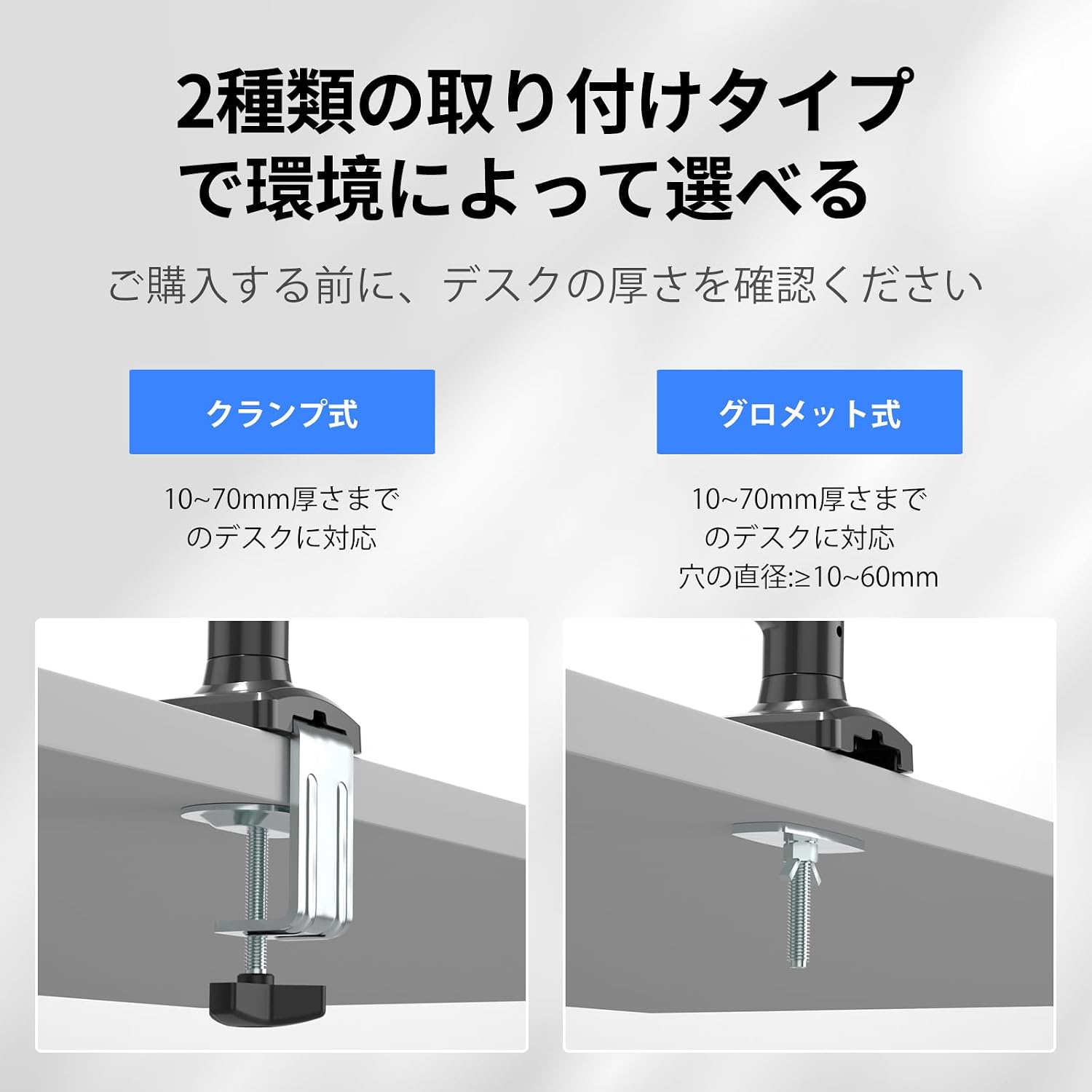
Figure 4: Clamp and Grommet mounting options.
3.3 Installation Steps
Follow these steps to install your monitor arm:
- Attach the Clamp/Grommet to the Desk: Securely fasten the chosen mounting base (C-clamp or grommet) to your desk according to the selected method. Ensure it is tightened firmly.
- Attach the Arm: Slide the monitor arm onto the pole of the mounting base.
- Attach the Monitor: Align your VESA-compatible monitor with the VESA plate on the arm. Secure the monitor using the provided screws.

Figure 5: Monitor arm installation steps.
4. Operating Instructions
4.1 Multi-Angle Adjustment
The monitor arm allows for flexible positioning to achieve optimal viewing angles:
- Tilt: Adjust the screen vertically up to 90° and down to 90°.
- Swivel: Rotate the screen horizontally left or right up to 180°.
- Rotation: Rotate the screen 360° for portrait or landscape orientation.

Figure 6: Multi-angle adjustment options.
4.2 Gas Spring Tension Adjustment
The gas spring tension must be adjusted to match your monitor's weight for smooth movement and stable positioning. Important: To prevent damage to the monitor or mount, always keep the arm in a horizontal position during adjustment. The gas pressure cannot be adjusted without a monitor attached.
- If the arm drops: Turn the internal bolt counter-clockwise (towards '+') to increase the gas spring tension until the arm stays in the desired position.
- If the arm rises or cannot be pushed down: Turn the internal bolt clockwise (towards '-') to decrease the gas spring tension until the arm stays in the desired position.

Figure 7: Gas spring tension adjustment.
4.3 Height and Length Adjustment
The arm allows for flexible height adjustment from 140mm to 450mm and a maximum extension length of 534mm to suit your ergonomic needs.

Figure 8: Adjusting arm height and length.
5. Maintenance
To ensure the longevity and proper functioning of your suptek PC Monitor Arm, follow these maintenance guidelines:
- Regular Cleaning: Wipe the arm and base with a soft, damp cloth to remove dust and dirt. Avoid abrasive cleaners or solvents that could damage the finish.
- Check Connections: Periodically check all screws and bolts to ensure they are tight. Re-tighten if necessary to maintain stability.
- Gas Spring Adjustment: If you change monitors or notice the arm is not holding its position correctly, re-adjust the gas spring tension as described in Section 4.2.
- Cable Management: Ensure cables are routed properly through the cable clips and are not pinched or under excessive tension.

Figure 9: Cable management routing.
6. Troubleshooting
| Problem | Possible Cause | Solution |
|---|---|---|
| Monitor arm drops or cannot hold position. | Gas spring tension is too low for the monitor's weight. | Increase gas spring tension by turning the internal bolt counter-clockwise (towards '+'). Refer to Section 4.2. |
| Monitor arm rises or cannot be pushed down. | Gas spring tension is too high for the monitor's weight. | Decrease gas spring tension by turning the internal bolt clockwise (towards '-'). Refer to Section 4.2. |
| Monitor is wobbly or unstable. | Mounting screws or clamp/grommet are not tight enough. | Check and tighten all mounting screws and the desk clamp/grommet. Ensure the monitor is securely attached to the VESA plate. |
| Limited range of motion. | Obstructions or incorrect assembly. | Ensure there are no physical obstructions. Review assembly steps in Section 3.3 to confirm correct installation. |
7. Specifications
- Model: MD01A
- Brand: suptek
- Mounting Type: Tabletop Mount (C-clamp or Grommet)
- Movement Type: Tilt, Swivel, Rotation, Height Adjustment
- Material: Alloy Steel
- Color: Black
- Compatible Monitor Size: 13-32 inches
- Load Capacity: 2-9 kg (4.4-19.8 lbs)
- VESA Compatibility: 75x75mm, 100x100mm
- Desk Thickness (Clamp): 10-70mm (0.39-2.76 inches)
- Desk Hole Diameter (Grommet): Minimum 10mm (0.39 inches)
- Tilt Range: +90° to -90°
- Swivel Range: ±180°
- Rotation: 360°
- Height Adjustment Range: 140-450mm (5.5-17.7 inches)
- Maximum Arm Extension: 534mm (21 inches)
8. Warranty and Support
suptek provides a one-year warranty from the date of purchase for this product. In case of any malfunction or defect, please contact us through your Amazon account. To expedite the support process, please include your order number when contacting us.
Contact Method:
- Log in to your Amazon account.
- Navigate to 'Account Service'.
- Go to 'Order History'.
- Find your order for the suptek PC Monitor Arm MD01A.
- Click on 'Seller' and then 'Ask a Question'.
We are committed to resolving your issues promptly and sincerely.