
1. Introduction
This manual provides detailed instructions for the installation, operation, and maintenance of the Kewig K7-C1U4 4.5 Inch Motorcycle Auxiliary LED Fog Light Kit. This product is designed to enhance visibility and safety for various vehicles, including motorcycles, Jeeps, cars, and trucks, through its powerful amber and white light modes and robust construction.
2. Safety Information
- Always disconnect the vehicle's battery before performing any electrical work to prevent electrical shock or damage.
- Ensure all wiring connections are secure and properly insulated to prevent short circuits.
- Mount the lights securely to avoid vibration and potential detachment during vehicle operation.
- Do not look directly into the LED lights when they are active, as this may cause eye strain or damage.
- Verify that the vehicle's electrical system can support the additional power draw of the lights (90W per light, up to 15 amps for both lights combined).
- Consult local regulations regarding auxiliary lighting installation and usage.
3. Package Contents
Verify that all components are present and undamaged before beginning installation.
- 2 x Kewig 4.5 Inch Auxiliary LED Fog Lights
- 2 x Mounting Brackets
- 1 x Wiring Harness with Fuse Box and Switch
- 3 sets of Handlebar Sleeves (22mm, 25.4mm, 28.6mm)
- Installation Hardware (screws, nuts, washers)

4. Specifications
| Feature | Specification |
|---|---|
| Brand | Kewig |
| Model Number | K7-C1U4 |
| Light Source Type | LED |
| Wattage | 90 Watts (per light) |
| Lumens | 9000 LM (per light) |
| Voltage | 12-15 Volts |
| Light Color | Amber/White (Switchable) |
| Color Temperature | 3000K/6000K |
| Waterproof Rating | IP68 |
| Housing Material | CNC Aluminum Alloy |
| Lens Material | High Borosilicate Optical Lenses |
| Dimensions (approx.) | 4.5 inch (112mm) diameter, 62mm depth |
| Lifespan | 50,000+ hours |


5. Setup and Installation
Follow these steps for proper installation of your Kewig K7-C1U4 auxiliary LED fog lights.
5.1 Mounting the Lights
- Select Mounting Location: Choose a suitable location on your vehicle (e.g., handlebars, crash bars, bumper) that provides clear light projection and does not obstruct other vehicle functions.
- Attach Brackets: Secure the mounting brackets to the chosen location. For handlebars, select the appropriate size sleeve (22mm, 25.4mm, or 28.6mm) to ensure a snug fit.
- Mount Lights: Attach the LED fog lights to the brackets using the provided hardware. Adjust the angle for optimal beam direction.


5.2 Wiring Connection
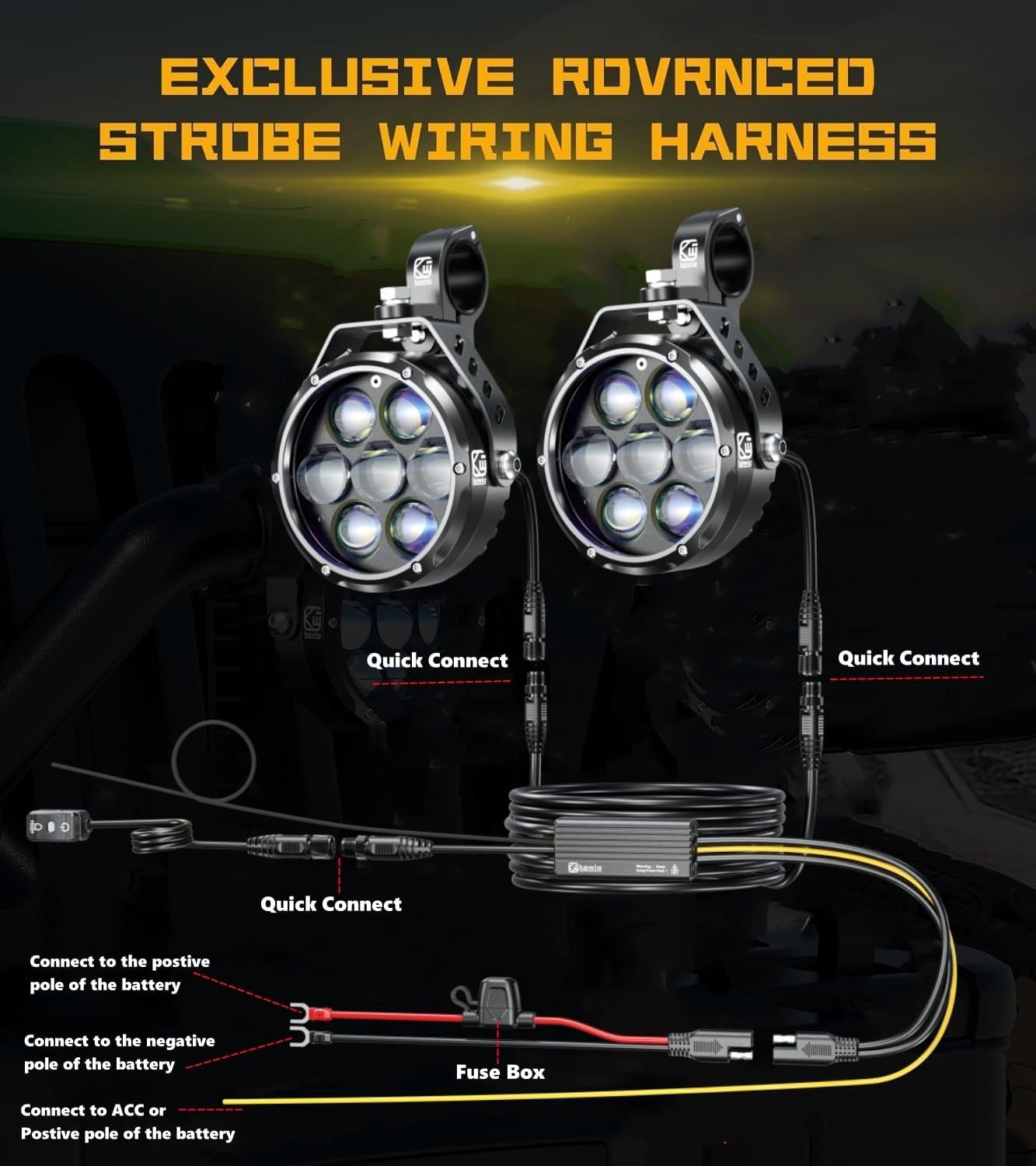
The auxiliary light kit includes a dedicated wiring harness for simplified installation.
- Disconnect Battery: Before starting, disconnect the negative terminal of your vehicle's battery.
- Connect to Battery: Connect the red wire from the wiring harness to the positive (+) terminal of the battery and the black wire to the negative (-) terminal. The harness includes a fuse box for protection.
- Connect to ACC (Accessory Power): Connect the yellow wire from the harness to an ACC (accessory) power source on your vehicle. This ensures the lights turn off with the ignition.
- Connect Lights to Harness: Use the quick-connect plugs to attach each LED fog light to the main wiring harness.
- Install Switch: Mount the control switch in an easily accessible location on your handlebars or dashboard.
- Reconnect Battery: Once all connections are secure, reconnect the negative terminal of the battery.

6. Operating Instructions
The Kewig K7-C1U4 features a multi-function switch to control five distinct lighting modes:

- Single Click:
- First click: Activates Low Beam (Amber or White, depending on previous setting).
- Second click: Switches to High Beam (Amber or White).
- Subsequent clicks: Cycles between Low Beam and High Beam.
- Double Click: Enters the burst warning light mode, cycling through different flashing patterns.
- Overtaking Light Switch: When connected to an ACC power source, this function allows for a momentary flash of the lights, typically used for signaling.
- Daytime Running Light Mode: Provides a constant, lower intensity light for improved daytime visibility.
- Breathing Light Mode: Creates a gradual transition from light to dark and back to bright, offering a unique visual effect.
7. Maintenance
Regular maintenance ensures optimal performance and longevity of your LED fog lights.
- Cleaning: Periodically clean the lenses with a soft cloth and mild soap solution to remove dirt and debris. Avoid abrasive cleaners that could scratch the lens.
- Connection Check: Annually inspect all wiring connections for corrosion or looseness. Ensure the quick-connect plugs are fully seated.
- Mounting Security: Verify that the lights and brackets remain securely fastened to the vehicle. Tighten any loose bolts or screws.
- Heat Dissipation: Ensure the heat sink fins on the back of the lights are free from obstruction to allow for proper cooling.
8. Troubleshooting
Refer to the following common issues and solutions:
| Problem | Possible Cause | Solution |
|---|---|---|
| Lights do not turn on | Loose wiring connection, blown fuse, insufficient power supply, faulty switch. | Check all wiring connections, inspect the fuse in the harness and replace if blown, ensure battery voltage is adequate, test the switch for functionality. |
| Lights flicker or dim | Loose connection, low battery voltage, excessive power draw on vehicle's electrical system. | Verify connections, check vehicle's charging system and battery health. Ensure the vehicle's electrical system can handle the 15 amp draw when both lights are on. |
| Lights overheat and turn off | Insufficient airflow to heat sinks, prolonged use in extreme temperatures, faulty unit. | Ensure heat sinks are clear of obstructions. If the issue persists, contact customer support for assistance. |
| Horn feature not working (if applicable) | Incorrect wiring to horn circuit. | Review wiring diagram and ensure the horn wire from the harness is connected to the correct horn signal wire on your vehicle. Some vehicles may require swapping to an alternative horn wire. |
9. Warranty and Support
Kewig products are manufactured to high-quality standards. For specific warranty details, please refer to the product packaging or contact Kewig customer support directly. If you encounter any issues not covered in this manual, or require further assistance, please visit the official Kewig store or contact their customer service department.
Kewig Official Store: Visit Kewig Store on Amazon