
NICGIGA 19 Port |16x PoE+ 250W+3x UPLink
NICGIGA 19-Port Unmanaged PoE+ Switch User Manual
Model: 19 Port |16x PoE+ 250W+3x UPLink
Product Overview
The NICGIGA 19-Port Unmanaged PoE+ Switch is designed to provide reliable and efficient network connectivity with Power over Ethernet capabilities. It features 16 PoE+ ports, 2 Gigabit uplink ports, and 1 SFP port, making it suitable for various network setups including IP cameras, IP phones, and wireless access points. This switch incorporates advanced features like AI Watchdog for automatic device recovery and One-Key VLAN for enhanced network security and performance.

Image: Front view of the NICGIGA 19-Port Unmanaged PoE+ Switch with its packaging, highlighting its PoE, High Power, Plug and Play, Long Distance, and RackMount features.
Key Features
- 16 Port PoE+ Capability: Provides a total maximum power budget of 250W, with up to 30W per PoE port, compliant with IEEE802.3af/at standards. Automatically detects and identifies Powered Devices (PDs).
- 2 Gigabit Uplink Ports & 1 SFP Port: Ensures high-speed data transfer to the core network.
- AI Watchdog Function: Automatically detects and recovers unresponsive or offline PoE devices, simplifying maintenance.
- One-Key VLAN Mode: Isolates ports 1-16 from each other while maintaining communication with uplink ports, enhancing network security and bandwidth utilization.
- 4KV Lightning Protection: Protects the switch and connected equipment from electrical surges, ensuring durability in various weather conditions.
- Durable Design: Features a sturdy metal housing for desktop or rack installation and excellent heat dissipation.
- Plug and Play: Requires no complex configuration, offering easy setup.

Image: Diagram illustrating the port layout of the NICGIGA 19-Port PoE Switch, showing 1-16 10/100Mbps PoE ports, 17-18 1000Mbps Uplink ports, and a 19th SFP port, along with power specifications (250W total, 30W per port).
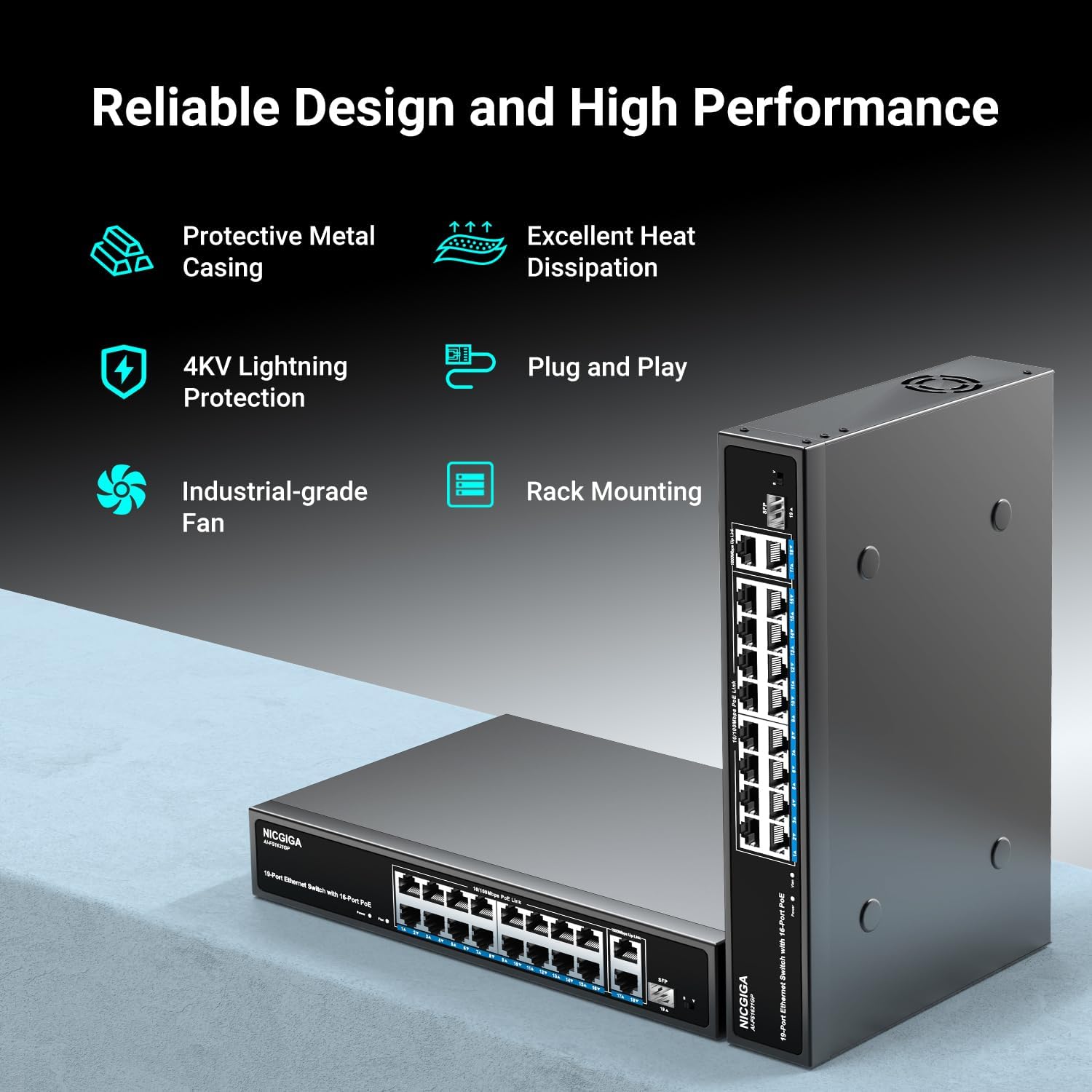
Image: Visual representation of the reliable design features of the switch, including protective metal casing, excellent heat dissipation, 4KV lightning protection, plug and play functionality, industrial-grade fan, and rack mounting capability.
Package Contents
Please verify that all items are present in the package:
- NIC-AI-FS1621GP (PoE Switch)
- Power Adapter
- Rack Mount Kit (2 pieces)
- Pack of Screws
- Quick Start Guide

Image: Illustration showing the contents of the product package, including the switch, power adapter, rack mount kit, screws, and quick start guide. It also depicts the switch mounted in a 19-inch rack, with dimensions.
Setup Instructions
The NICGIGA 19-Port PoE+ Switch is designed for simple plug-and-play operation. Follow these steps for initial setup:
- Connect to Power: Connect the provided power adapter to the switch's power input and then to a suitable power outlet.
- Connect Devices:
- For PoE-powered devices (e.g., IP cameras, IP phones, wireless APs), connect them to any of the 16 PoE+ ports (ports 1-16) using standard Ethernet cables. The switch will automatically detect and supply power.
- For non-PoE devices (e.g., routers, printers, NVRs), connect them to any available port.
- Connect your main network router or network backbone to one of the Gigabit uplink ports (ports 17 or 18) or the SFP port (port 19) for high-speed connectivity.
- Verify Connection: Check the LED indicators on the switch for active connections and PoE status.
The switch supports both desktop placement and 19-inch rack mounting using the included rack mount kit and screws.

Image: A three-step diagram illustrating the simple plug-and-play setup: 1. Connect to Power, 2. Connect the Devices, 3. Enjoy.

Image: Diagram showing the wide compatibility of the switch with both PoE devices (IP Phone, IP Camera, Wireless AP) and non-PoE devices (Router, Printer, NVR).
Operating Modes
The NICGIGA switch offers specific modes to optimize network performance and security:
VLAN Mode
The One-Key VLAN mode enhances network security by isolating the 16 PoE ports from each other. Devices connected to these ports cannot directly communicate with each other but can still communicate with the uplink ports (17-18) and thus with the broader network.
- To activate VLAN mode, locate the 'S/V' switch on the front panel and slide it to the 'V' position.
- To disable VLAN mode and allow all ports to communicate freely, slide the switch to the 'S' position (Standard mode).

Image: Diagram illustrating VLAN port isolation, showing that ports 1-16 are isolated from each other but can communicate with the uplink ports 17-18. The S/V switch for mode selection is also shown.
AI Watchdog
The AI Watchdog feature automatically monitors the status of connected PoE devices. If a PoE device becomes unresponsive or goes offline, the switch will automatically detect this and restart the power to that specific port, attempting to bring the device back online without manual intervention.
- This feature operates automatically in the background. No user configuration is required.
- It helps ensure continuous operation of PoE-powered devices like security cameras.
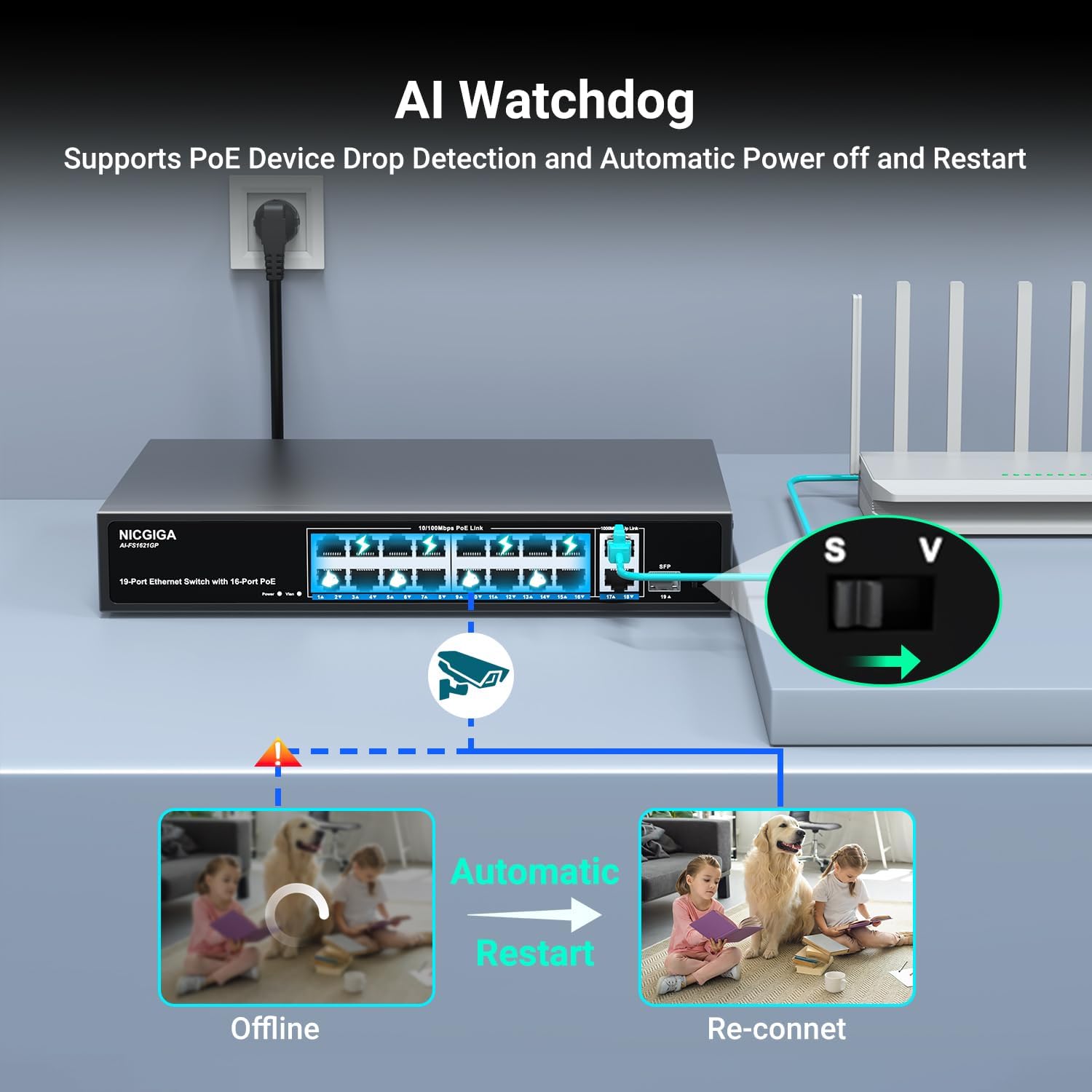
Image: Illustration of the AI Watchdog feature, showing how it detects an offline PoE device (camera) and automatically restarts its power to re-establish connection.
Maintenance
To ensure optimal performance and longevity of your NICGIGA PoE+ Switch, consider the following maintenance guidelines:
- Ventilation: Ensure the switch is placed in a well-ventilated area to allow for proper heat dissipation. Avoid blocking ventilation holes.
- Cleaning: Periodically clean the exterior of the switch with a soft, dry cloth. Do not use liquid or aerosol cleaners.
- Cable Management: Keep network cables organized and free from excessive bends or kinks to prevent signal degradation.
- Power Supply: Use only the power adapter provided with the switch.
- Environmental Conditions: Operate the switch within its specified temperature and humidity ranges. The 4KV Lightning Protection helps mitigate damage from electrical surges, but it is always advisable to use surge protectors in areas prone to lightning.
Troubleshooting
If you encounter issues with your NICGIGA PoE+ Switch, refer to the following common troubleshooting steps:
- No Power:
- Ensure the power adapter is securely connected to both the switch and a working power outlet.
- Check the power LED indicator on the switch.
- Device Not Connecting/No Data:
- Verify that the Ethernet cable is securely connected to both the switch port and the device.
- Check the link/activity LED for the specific port. If it's off, try a different cable or port.
- Ensure the connected device is functioning correctly.
- PoE Device Not Receiving Power:
- Confirm the device is a PoE-compatible Powered Device (PD) and meets IEEE802.3af/at standards.
- Check if the total power consumption of all connected PoE devices exceeds the switch's 250W power budget or 30W per-port limit.
- The AI Watchdog feature should automatically attempt to restart unresponsive PoE devices. If a device remains offline, try manually unplugging and re-plugging its Ethernet cable.
- Try connecting the PoE device to a different PoE port on the switch.
- Network Performance Issues (e.g., slow speed):
- Ensure you are using the Gigabit uplink ports (17-18) or SFP port (19) for high-bandwidth connections to your main network.
- If VLAN mode is enabled, ensure it is configured correctly for your network needs. Disabling VLAN mode (Standard mode) might resolve communication issues between local devices if unintended.
- Check for excessive network traffic or loops.
If the issue persists after following these steps, please contact NICGIGA customer support for further assistance.
Specifications
| Feature | Description |
|---|---|
| Model Number | 19 Port |16x PoE+ 250W+3x UPLink |
| Number of Ports | 19 (16 PoE+, 2 Gigabit Uplink, 1 SFP) |
| PoE Standard | IEEE 802.3af/at |
| Total PoE Power Budget | 250W Max |
| Max Power Per PoE Port | 30W |
| Data Transfer Rate | 10/100Mbps (PoE ports), 1000Mbps (Uplink ports) |
| Switch Type | Unmanaged |
| Interface Type | PoE, SFP |
| Case Material | Metal |
| Lightning Protection | 4KV |
| Item Weight | 4.49 pounds (approx. 2.04 kg) |
| Package Dimensions | 13.94 x 9.61 x 3.62 inches (approx. 35.4 x 24.4 x 9.2 cm) |
| Compatible Devices | Desktop, Router, Laptop, Camera |
| UPC | 790885826221 |
Warranty and Support
Each NICGIGA PoE switch undergoes rigorous testing for reliability, quality, and performance to ensure customer satisfaction.
For any questions, technical assistance, or support inquiries regarding your NICGIGA product, please contact our customer service team. Refer to the contact information provided in your Quick Start Guide or visit the official NICGIGA website for support details.
Related Documents - 19 Port |16x PoE+ 250W+3x UPLink
 |
NICGIGA PoE Switches User Manual and Product Overview Comprehensive guide to NICGIGA's range of Gigabit PoE switches, detailing models like GS0401P, GS0800P, GS0820P, AI-GS0821P, FS1620GP, GS1620P, FS2420GP, and AI-GS2421P, including features, application scenarios, and front panel explanations. |
 |
NICGIGA PoE Switch User Manual V4.0 - Technical Specifications and Features User manual for NICGIGA PoE Switches (V4.0), detailing application scenarios, front panel explanations, and comprehensive technical specifications for models including GS0410P, FS0820GP, GS0800P, AI-FS1621GP, GS1620P, FS2420GP, NIC-S25-0402P, and NIC-S25-0801P. |
 |
NICGIGA 2.5G Unmanaged Ethernet Switch User Manual and Specifications Comprehensive user manual and technical specifications for NICGIGA's 2.5G Unmanaged Ethernet Switches. Covers main application scenarios and detailed parameters for models S25-0402, S25-0501, S25-0801, S25-0802, S25-1602, S25-2402, S25-0802P, S25-1602P, S25-2402P, and S25-0402T. |
 |
NICGIGA 2.5G Unmanaged Ethernet Switch User Manual & Specifications Comprehensive user manual and technical specifications for NICGIGA's 2.5G Unmanaged Ethernet Switches, including models S25-0402, S25-0802, S25-1600, S25-2400, S25-4800, and their PoE variants. |
 |
NICGIGA 5G Smart Switch User Manual - S50-0800 User manual for the NICGIGA 5G Smart Switch (Model S50-0800), providing detailed information on appearance, installation, safety precautions, site requirements, and technical specifications. |
 |
NICGIGA 2.5G Unmanaged Ethernet Switch User Manual User manual for NICGIGA 2.5G Unmanaged Ethernet Switches, detailing specifications, application scenarios, and indicators for various Non-PoE and PoE models. |
Ask a question about this manual
Ask about setup, troubleshooting, compatibility, parts, safety, or missing instructions. Manuals+ will review the question and use this page’s manual context to help answer it.