
1. Introduction
Thank you for choosing the Lifelong 2000 Watt Infrared Induction Stove. This manual provides essential information for the safe and efficient operation of your new appliance. Please read it thoroughly before first use and keep it for future reference.
Important Safety Information
- Always place the induction stove on a stable, flat, and heat-resistant surface.
- Ensure adequate ventilation around the appliance. Do not block air vents.
- Do not immerse the appliance in water or any other liquid.
- Keep out of reach of children and pets.
- Do not touch the hot surface immediately after cooking. Allow it to cool down.
- Use only compatible cookware as specified in this manual.
- Unplug the appliance when not in use and before cleaning.
- In case of malfunction, do not attempt to repair it yourself. Contact customer support.
2. Package Contents
Verify that all items are present in the package:
- 1N Lifelong Infrared Induction Stove
- 1N User Manual
- 1N Warranty Card
3. Product Overview and Features
The Lifelong 2000 Watt Infrared Induction Stove is designed for efficient and versatile cooking. It features a digital display, multiple cooking modes, and safety functions like auto shut-off and surge protection.

Figure 3.1: Lifelong Infrared Induction Stove in use, demonstrating seamless and multi-purpose cooking.
Key Features:
- 2000 Watt Infrared Heating: Provides powerful and uniform heat across the cooking surface for quick and efficient meal preparation.
- Digital Display: A clear and user-friendly interface for easy control and monitoring of cooking settings.
- 4 Cooking Modes: Offers versatile options including Fry, Grill, Soup, and Hot Pot, simplifying various cooking processes.
- Auto Shut-Off & Temperature Control: Enhances safety and convenience by preventing overheating and allowing precise heat management.
- Surge Protection: Shields the appliance against voltage fluctuations, ensuring stable and safe operation.
- Durable Glass Plate: Features a sturdy glass ceramic surface that is easy to clean and provides a smooth cooking area.

Figure 3.2: The digital display and touch controls provide an easy-to-use interface for managing cooking functions.

Figure 3.3: The infrared heating technology ensures fast and even heat distribution for efficient cooking.

Figure 3.4: Built-in surge protection safeguards the appliance from electrical fluctuations.
4. Setup
Placement
- Place the induction stove on a dry, level, and stable surface.
- Ensure there is at least 10 cm (4 inches) of clear space around all sides for proper ventilation.
- Do not place the appliance near heat sources, flammable materials, or in direct sunlight.
Power Connection
- Before plugging in, ensure the voltage indicated on the appliance matches your local power supply (220 Volts).
- Plug the power cord securely into a grounded electrical outlet.
5. Operating Instructions
Power On/Off
- To turn on: Press the On/Off button. The digital display will illuminate.
- To turn off: Press the On/Off button again.

Figure 5.1: The intuitive touch control panel for selecting functions.
Cooking Modes
The induction stove offers four pre-set cooking modes:
- Fry: Ideal for frying and sautéing.
- Grill (BBQ): Suitable for grilling various foods.
- Soup: Optimized for simmering soups and stews.
- Hot Pot: Maintains a consistent temperature for hot pot cooking.
To select a mode, press the corresponding icon on the control panel. The display will show the default temperature or power level for that mode.
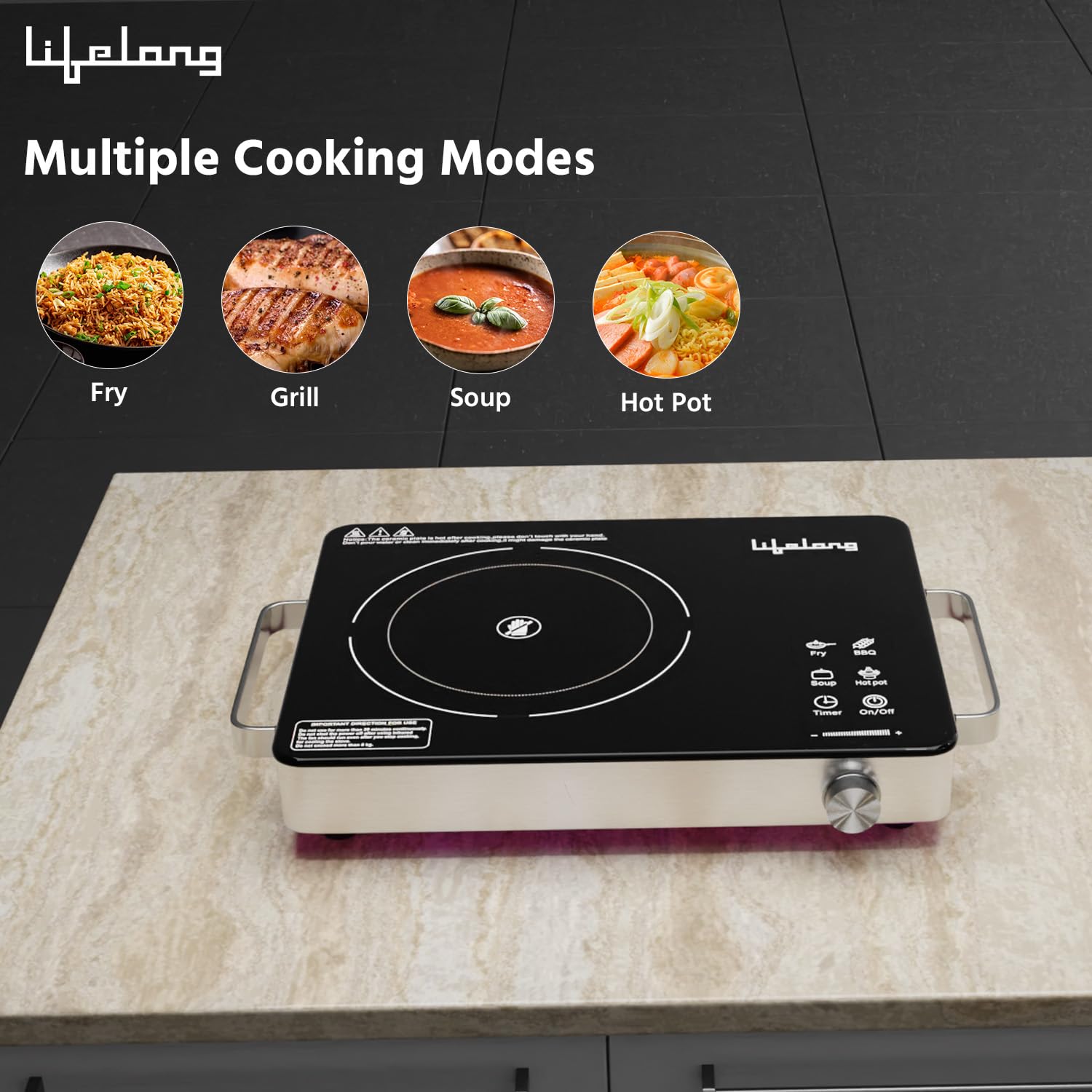
Figure 5.2: Icons representing the four versatile cooking modes.
Temperature Control
Adjust the cooking temperature or power level using the rotary knob located on the front panel. Turn clockwise to increase and counter-clockwise to decrease.

Figure 5.3: The temperature control knob allows for precise heat adjustments.
Timer Function
To set a cooking timer, press the Timer button. Use the temperature control knob to adjust the desired cooking duration. The appliance will automatically shut off once the timer expires.
Cookware Compatibility
This infrared induction stove is compatible with all types of flat-bottomed metal cookware, including stainless steel, cast iron, aluminum, copper, and ceramic pots and pans. Ensure the base of the cookware covers the heating zone adequately.

Figure 5.4: The stove is compatible with various flat-bottom metal cookware.
Grilling Demonstration Video
Video 5.1: A short demonstration of grilling paneer and vegetables on the Lifelong Infrared Induction Stove using a grill rack.
6. Maintenance and Cleaning
Regular cleaning and maintenance will ensure the longevity and optimal performance of your induction stove.
- Always unplug the appliance and allow it to cool completely before cleaning.
- Wipe the glass ceramic surface with a soft, damp cloth and mild detergent. For stubborn stains, use a non-abrasive cleaner specifically designed for glass cooktops.
- Do not use abrasive pads, harsh chemicals, or sharp objects that could scratch the surface.
- Clean the exterior housing with a soft, damp cloth.
- Ensure no water enters the internal components.
- Periodically check the air vents on the underside for dust accumulation and clean them gently with a soft brush or vacuum cleaner to maintain proper airflow.

Figure 6.1: The practical design of the stove facilitates easy cleaning and maintenance.

Figure 6.2: The cooling fan on the underside should be kept clear of obstructions for optimal performance.
7. Troubleshooting
If you encounter any issues, please refer to the following table before contacting customer support.
| Problem | Possible Cause | Solution |
|---|---|---|
| Appliance does not turn on. | No power supply. Power cord not properly plugged in. | Check if the power outlet is working. Ensure the power cord is securely plugged into both the appliance and the outlet. |
| Cookware is not heating. | Incompatible cookware. Cookware not centered on the heating zone. | Use flat-bottomed metal cookware. Place the cookware centrally on the heating zone. |
| Display shows an error code. | Internal malfunction or specific issue. | Refer to the error code section in the full manual (if available) or contact customer support. |
| Overheating protection activated. | Blocked ventilation. Prolonged high-power use. | Ensure vents are clear. Turn off the appliance, unplug, and allow it to cool down before restarting. |
8. Specifications
| Feature | Specification |
|---|---|
| Brand | Lifelong |
| Model Number | LLIRC001 |
| Wattage | 2000 Watts |
| Voltage | 220 Volts |
| Heating Elements | 1 |
| Burner Type | Infrared Induction |
| Control Type | Touch |
| Special Features | Adjustable Temperature, Automatic Shut-Off, Digital Display, Power-On Indicator, Surge Protection |
| Heater Surface Material | Glass Ceramic |
| Item Dimensions (D x W x H) | 45D x 9W x 35.5H Centimeters |
| Item Weight | 2300 Grams |
9. Warranty and Support
Warranty Information
This Lifelong Infrared Induction Stove comes with a 1 Year Warranty from the date of purchase. Please refer to the included Warranty Card for detailed terms and conditions.
Customer Support
For any queries, assistance, or service requests, please contact Lifelong customer support:
- Phone: +91 9711558877
- Email: customercare@lifelongonline.com
- Address: Lifelong Online Retail Private Limited, 5th Floor, Unit No. 508, DLF South Court, Saket District Center, Saket New Delhi, India - 110017