
SGeneE B0DCVPRGVX
SGeneE Elliptical Machine User Manual
Model: B0DCVPRGVX
1. Important Safety Information
Please read this entire manual before assembling or operating your SGeneE Elliptical Machine. Keep this manual for future reference. Failure to follow these instructions may result in injury or damage to the equipment.
- Consult your physician before beginning any exercise program.
- Ensure all parts are securely fastened before each use.
- Place the elliptical on a flat, stable surface.
- Keep children and pets away from the machine during operation.
- Maximum user weight capacity: 130 kg (286 lbs).
- Wear appropriate athletic footwear and clothing.
- Stop exercising immediately if you feel faint, dizzy, or experience pain.
2. Package Contents
Verify that all components are present before assembly. If any parts are missing or damaged, contact customer service.
- Main Frame Assembly
- Handlebars (Fixed and Moving)
- Pedals/Footplates
- Stabilizer Bars (Front and Rear)
- LCD Display Console
- Hardware Kit (bolts, washers, nuts, tools)
- User Manual
3. Setup and Assembly
Follow these steps carefully for proper assembly. It is recommended to have two people for assembly.
- Unpack Components: Carefully remove all parts from the packaging and lay them out on a clean, flat surface.
- Attach Stabilizer Bars: Secure the front and rear stabilizer bars to the main frame using the provided bolts and tools. Ensure they are tightened securely.
- Install Pedals/Footplates: Attach the left and right pedals to their respective crank arms. Note that the left pedal often tightens counter-clockwise. Ensure they are fully tightened to prevent loosening during use.
- Assemble Handlebars: Connect the moving handlebars to the main frame. Attach the fixed handlebars and connect any pulse sensor wires to the console.
- Mount LCD Display: Secure the LCD display console to its bracket on the main frame. Connect the sensor wires from the machine to the console.
- Final Check: Inspect all connections and ensure all bolts are tightened. Test the machine's movement gently before full use.

This image displays the SGeneE Elliptical Machine from a front-side perspective, illustrating its overall structure and components after assembly.

This image shows the SGeneE Elliptical Machine from a side angle, providing a clear view of its profile and footprint, suitable for understanding its placement in a room.
4. Operating Instructions
Before starting your workout, ensure the machine is on a stable surface and you are wearing appropriate footwear.
- Stepping On: Hold onto the fixed handlebars for stability. Step onto one footplate, then the other. Ensure your feet are centered on the anti-slip footplates.
- Starting Movement: Begin a smooth, elliptical motion by moving your legs in a forward or backward pedaling action. Simultaneously, grasp the moving handlebars and push and pull them in coordination with your leg movement.
- Heart Rate Monitoring: Grip the heart rate sensors on the fixed handlebars to display your pulse on the LCD screen.
- Stopping: Gradually slow down your movement until the machine comes to a complete stop. Hold onto the fixed handlebars and step off one foot at a time.

This image illustrates a user actively exercising on the elliptical machine, demonstrating the correct posture and movement. An inset highlights the transport wheels located at the front base, indicating the machine's portability.
5. Resistance Adjustment
The SGeneE Elliptical Machine features 8 levels of magnetic resistance, allowing you to customize your workout intensity.
- Locate the Knob: The resistance adjustment knob is typically located on the main frame, below the console.
- Increase Resistance: Turn the knob clockwise towards the 'HIGH' setting to increase the resistance, making your workout more challenging.
- Decrease Resistance: Turn the knob counter-clockwise towards the 'LOW' setting to decrease the resistance, making your workout easier.
- Adjust resistance as needed during your workout to match your fitness level and training goals.

This close-up image displays the tension control knob, clearly marked with levels 1 through 8 and indicators for 'LOW' and 'HIGH' resistance, demonstrating how to adjust workout intensity.
6. LCD Display Functions
The backlit LCD screen provides real-time feedback on your workout progress.
| Display Function | Description |
|---|---|
| SPEED | Current workout speed. |
| DISTANCE | Total distance covered during the current workout. |
| TIME | Duration of the current workout. |
| CALORIES | Estimated calories burned during the workout. |
| PULSE | Your current heart rate (when gripping the pulse sensors). |
Use the mode button on the console to cycle through the different display functions or to set a scan mode that rotates through all metrics.
7. Maintenance
Regular maintenance ensures the longevity and safe operation of your elliptical machine.
- Cleaning: Wipe down the machine with a damp cloth after each use to remove sweat and dust. Avoid abrasive cleaners.
- Lubrication: Periodically check moving parts for smooth operation. Apply a silicone-based lubricant to pivot points if squeaking occurs.
- Bolt Check: Every few weeks, inspect all bolts and nuts to ensure they are tight. Re-tighten as necessary.
- Storage: Store the elliptical in a dry, cool place away from direct sunlight and moisture. The integrated transport wheels allow for easy relocation.
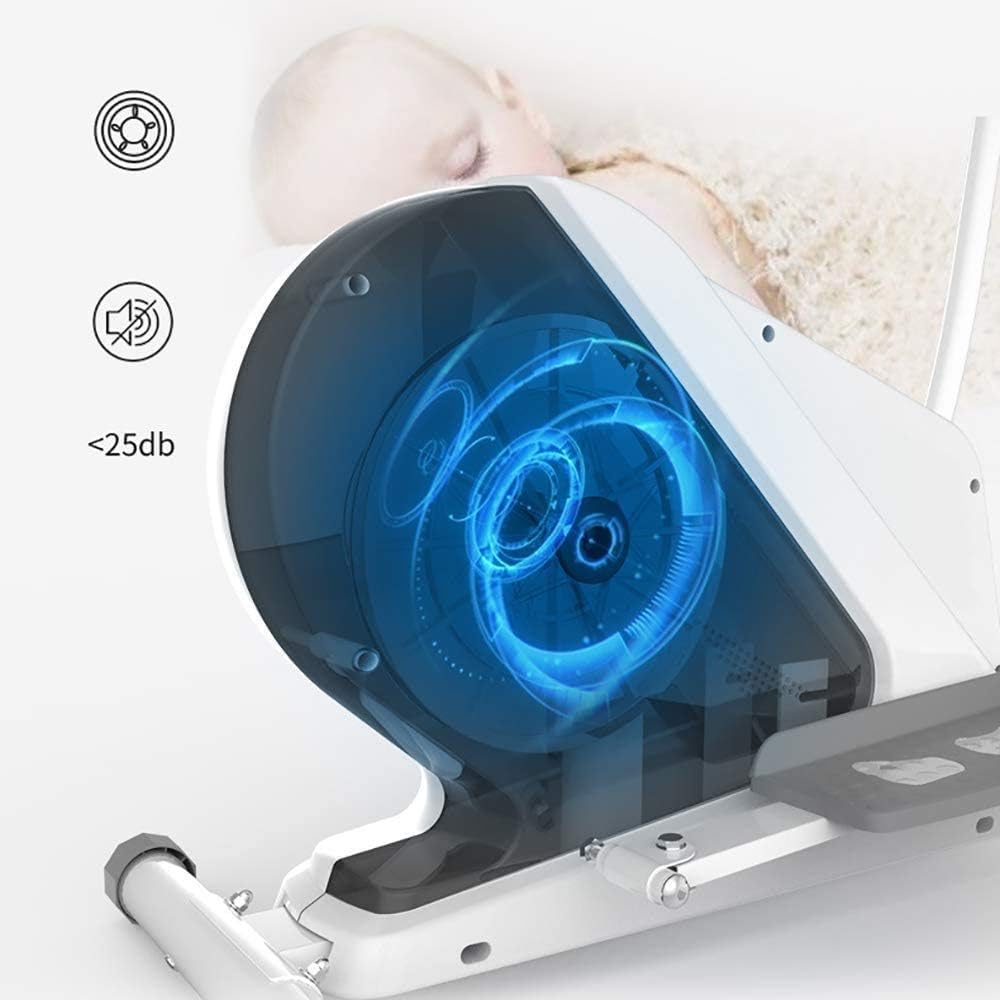
This diagram provides an internal view of the elliptical's magnetic control flywheel system, highlighting its design for silent operation, typically below 25 decibels, which minimizes disturbance during use.
8. Troubleshooting
If you encounter issues with your elliptical, refer to the following common problems and solutions:
| Problem | Possible Cause | Solution |
|---|---|---|
| Squeaking Noise | Loose bolts or lack of lubrication on pivot points. | Check and tighten all bolts. Apply silicone lubricant to moving joints. |
| Unstable Machine | Uneven floor or loose stabilizer bar connections. | Ensure the machine is on a level surface. Check and tighten stabilizer bar bolts. |
| LCD Display Not Working | Loose sensor cable connection or dead batteries. | Check all cable connections to the console. Replace batteries in the LCD display. |
| Resistance Not Changing | Internal mechanism issue or cable disconnection. | Ensure the resistance knob is turning freely. If the issue persists, contact customer support. |
9. Specifications
Key technical details for the SGeneE Elliptical Machine.
- Model: B0DCVPRGVX
- Brand: SGeneE
- Resistance Levels: 8 (Magnetic Control)
- Flywheel: Two-way silent magnetic control
- Max Load: 130 kg (286 lbs)
- Stride Length: 36 cm (approx. 14.2 inches)
- Display: Backlit LCD (Speed, Distance, Time, Calories, Pulse)
- Heart Rate Sensor: Integrated into fixed handlebars
- Footplates: Large anti-slip design
- Noise Level: <25dB (during operation)

This image provides a detailed diagram of the SGeneE Elliptical Machine's dimensions, indicating a length of 1040mm, a width of 480mm, and a height of 1600mm.
10. Warranty and Support
SGeneE is committed to providing satisfactory service. If you have any questions or require assistance with your product, please contact our customer service team.
- Customer Service: For product inquiries, technical support, or warranty claims, please refer to the contact information provided at the point of purchase or on the official SGeneE website.
- We aim to respond to all inquiries within 24 hours.
Related Documents - B0DCVPRGVX
 |
Wooden Deckchair Assembly and Usage Instructions Comprehensive assembly, usage, and safety instructions for the AllBag wooden deckchair. Includes maintenance tips and safety guidelines for indoor and outdoor use. |
 |
Oscar Breakout Seating - Product Information and User Guide Comprehensive product information, specifications, and usage instructions for the Oscar Breakout Seating chair, including care guidelines and warranty details. |
 |
Scooterpac Feather Transit Manual Assisted Wheelchair SA2021 Technical specifications and product overview for the Scooterpac Feather Transit, a lightweight, foldable manual assisted wheelchair with a 130kg weight capacity. |
 |
Vision VFM-W8X6 Heavy Duty Flat-Panel Wall Mount Installation Guide Detailed installation guide for the Vision VFM-W8X6 heavy-duty flat-panel wall mount, supporting up to 130KG with VESA 800x600mm compatibility. |
 |
Adler AD 8151 Personal Scale User Manual and Safety Instructions User manual and safety instructions for the Adler AD 8151 personal scale. Learn about its features, specifications, operation, and important safety guidelines for household use. |
 |
ekomia Levi Adjustable Standing Desk Assembly and User Manual Comprehensive assembly instructions, safety information, controller functions, and troubleshooting guide for the ekomia Levi adjustable standing desk. |
Ask a question about this manual
Ask about setup, troubleshooting, compatibility, parts, safety, or missing instructions. Manuals+ will review the question and use this page’s manual context to help answer it.