1. Product Overview
The ZonQoonz ZQ01632 is a versatile rechargeable portable par light designed for various lighting applications. It features 12 high-quality RGB LED lamp beads, offering bright and colorful lighting effects. With its built-in 2200mAh battery, it provides over 6 hours of continuous operation, eliminating the need for constant power connections. The light supports multiple control modes including remote control, sound activation, and automatic programs, making it suitable for small stages, home parties, events, and decorative uplighting.
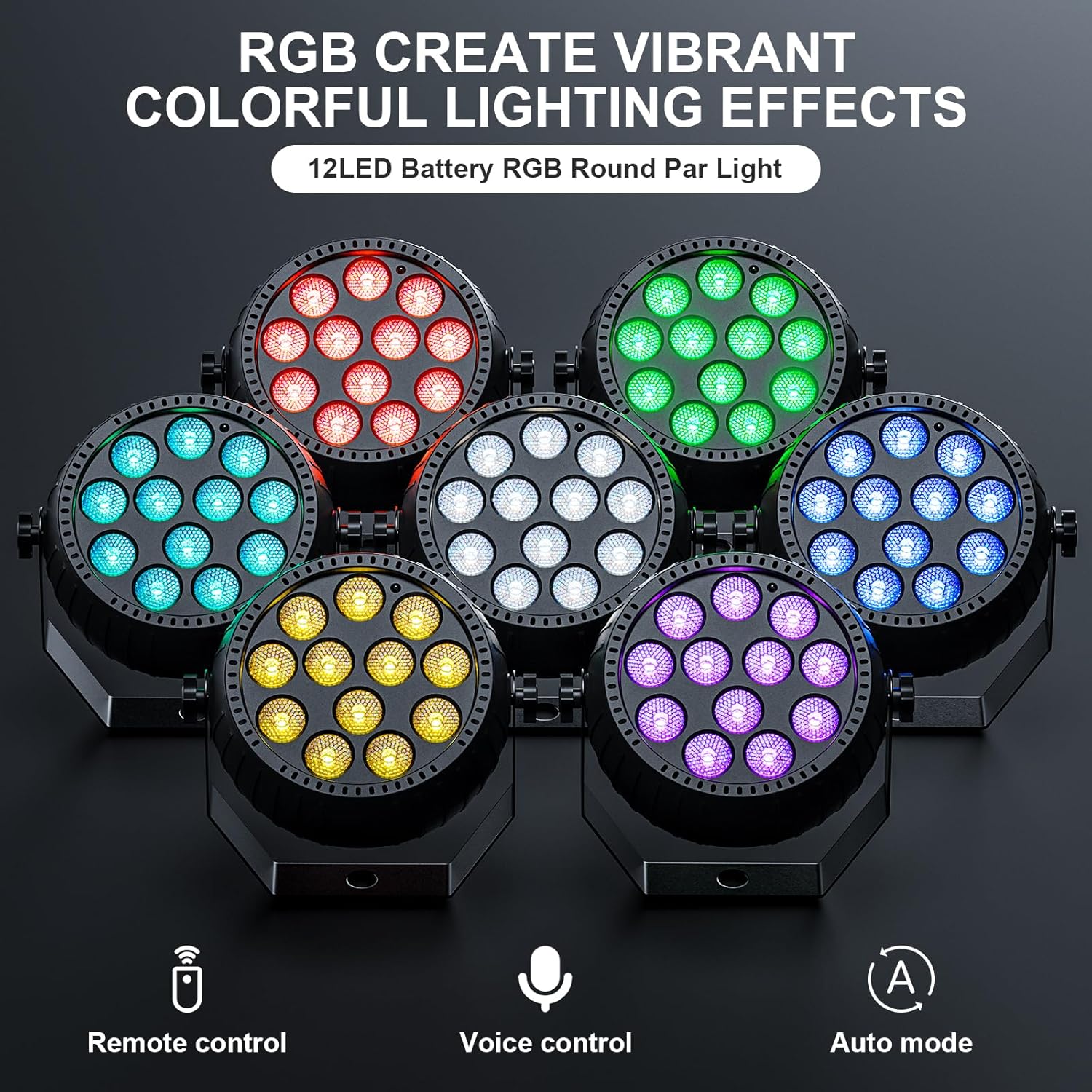
Image 1.1: The ZonQoonz ZQ01632 RGB Par Light showcasing its vibrant color capabilities and control options.
2. Safety Instructions
- Read all instructions before operating the device.
- Keep the device away from water or other liquids to prevent electric shock.
- Do not open the casing; there are no user-serviceable parts inside. Refer servicing to qualified personnel.
- Ensure proper ventilation around the unit to prevent overheating.
- Avoid direct eye exposure to the light source, as it can cause eye strain or damage.
- Use only the provided charging cable and adapter.
- Do not expose the battery to excessive heat or direct sunlight.
- Dispose of batteries according to local regulations.
3. Package Contents
Verify that all items are present in the package:
- 1 x ZonQoonz ZQ01632 Rechargeable Portable RGB Par Light
- 1 x USB Power Cord
- 1 x Remote Control
- 1 x User Manual

Image 3.1: The complete package contents of the ZonQoonz ZQ01632 par light.
4. Setup
4.1 Charging the Device
- Connect the provided USB power cord to the charging port on the par light.
- Plug the other end of the USB power cord into a compatible USB power adapter (not included) or a USB port.
- The light will indicate charging status (e.g., an indicator light). A full charge typically takes 2-4 hours and provides over 6 hours of continuous use.

Image 4.1: The par light connected to a power source for charging.
4.2 Remote Control Battery Installation
The remote control requires 1 CR5 battery (included). Open the battery compartment on the back of the remote and insert the battery, observing the correct polarity.
4.3 Mounting and Placement
The par light features a 360° adjustable bracket for flexible installation. It can be:
- Positioned: Place the light on a flat surface using its bracket as a stand.
- Wall-mounted: Secure the bracket to a wall using appropriate screws (not included).
- Hung: Attach the light to a truss or ceiling fixture using clamps (not included) through the bracket's mounting holes.
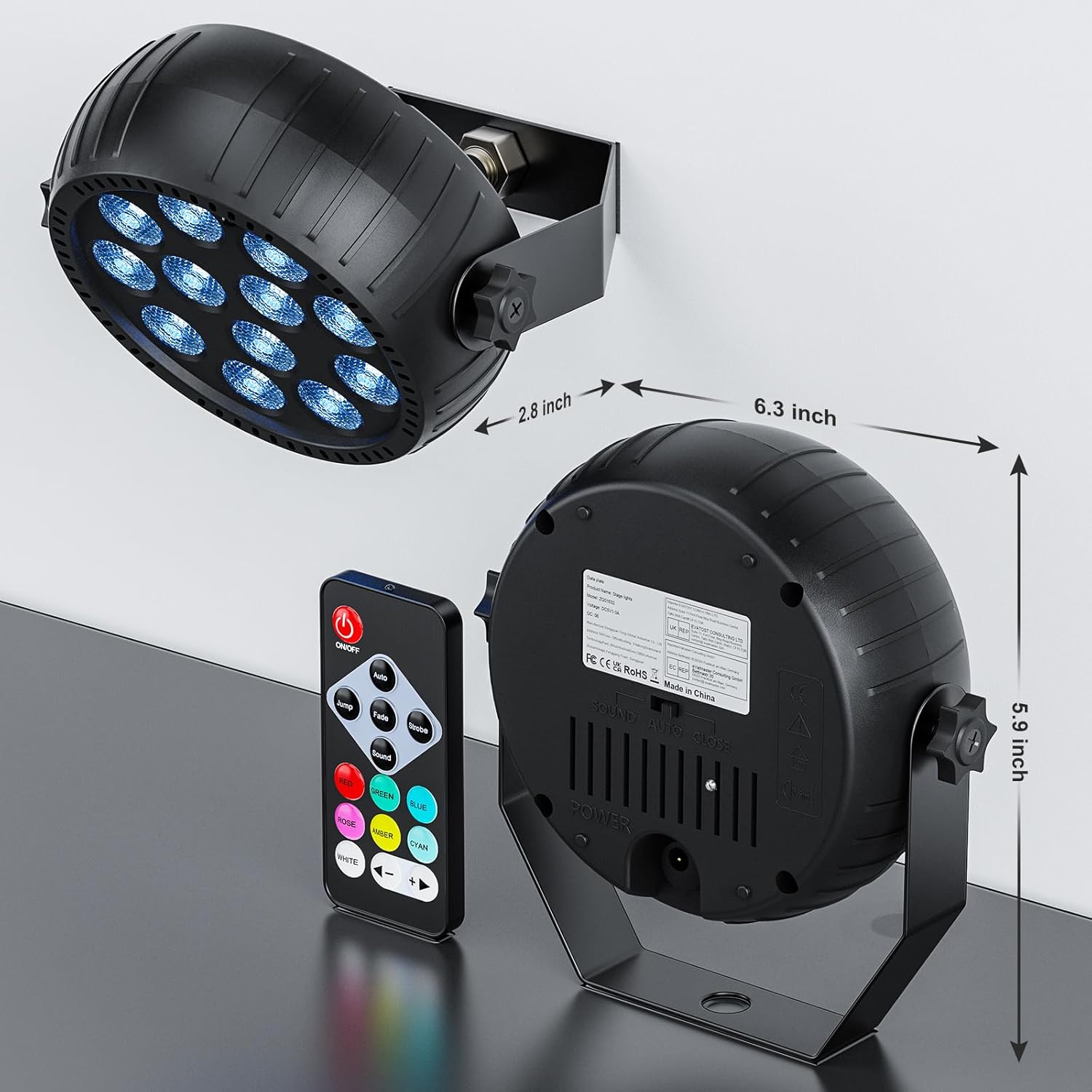
Image 4.2: The par light with its adjustable bracket, illustrating mounting flexibility and product dimensions.
5. Operating Instructions
The ZonQoonz ZQ01632 par light is primarily controlled using the included IR remote control.
5.1 Remote Control Functions
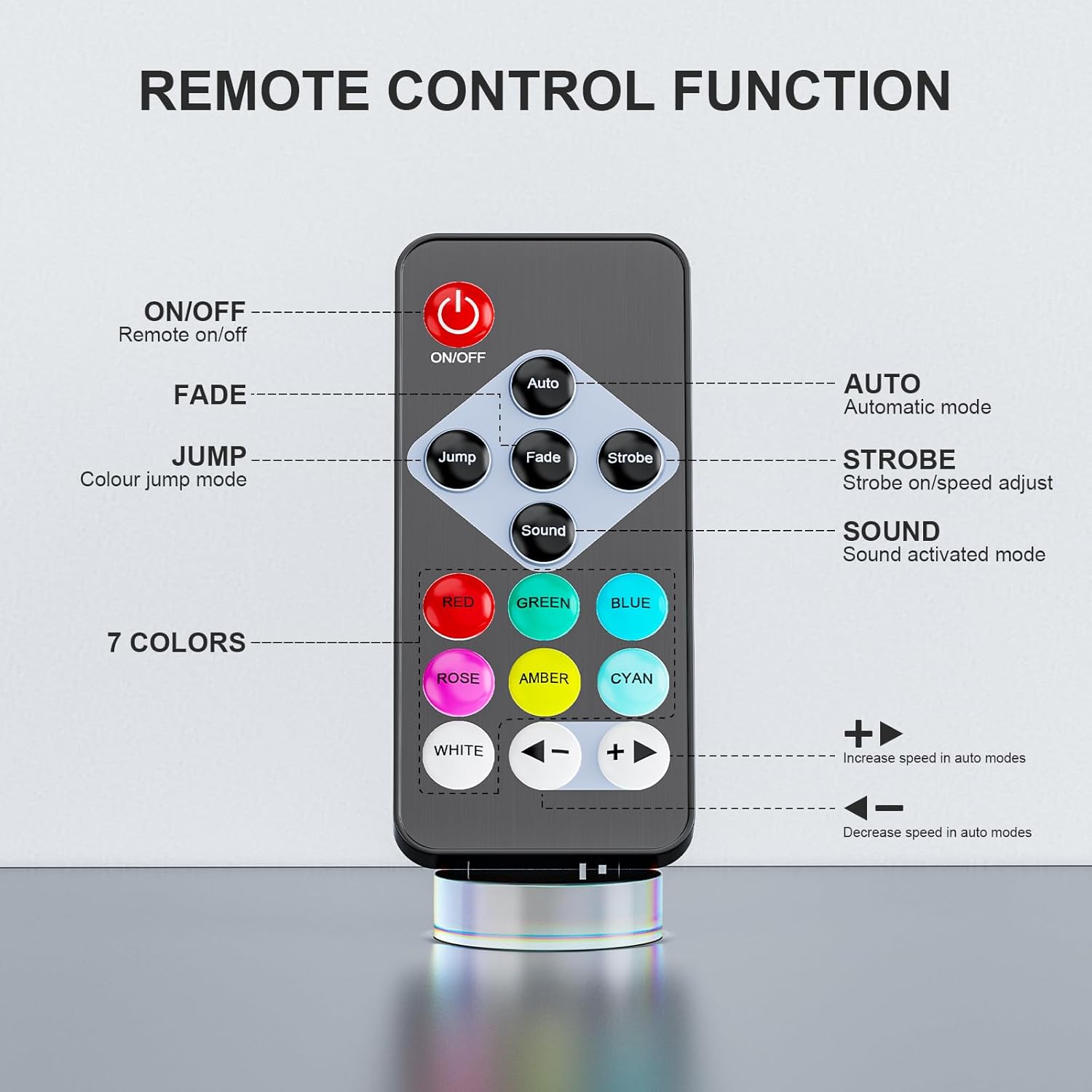
Image 5.1: Layout of the IR Remote Control.
- ON/OFF: Powers the light on or off.
- Auto: Activates automatic mode, cycling through various lighting effects.
- Jump: Engages color jump mode, where colors change abruptly.
- Fade: Initiates color fade mode, where colors transition smoothly.
- Strobe: Activates strobe mode, producing a flashing light effect.
- Sound: Enables sound-activated mode, where light changes respond to music or ambient sound.
- Color Buttons (RED, GREEN, BLUE, ROSE, AMBER, CYAN, WHITE): Selects a static color.
- Speed Adjustment (< / >): Increases or decreases the speed of effects in Auto, Jump, Fade, and Strobe modes.
5.2 Basic Operation
- Press the ON/OFF button to turn on the light.
- Select your desired lighting mode (Auto, Jump, Fade, Strobe, Sound) or a static color using the corresponding buttons on the remote.
- Adjust the effect speed using the < (decrease) and > (increase) buttons if in an effect mode.
- To turn off the light, press the ON/OFF button again.
6. Maintenance
6.1 Cleaning
Regularly clean the exterior of the light with a soft, dry cloth. Do not use abrasive cleaners or solvents, as they may damage the finish or internal components.
6.2 Storage
When not in use for extended periods, store the par light in a cool, dry place, away from direct sunlight and extreme temperatures. Ensure the battery is partially charged (around 50%) before storage to prolong its lifespan.
6.3 Battery Care
To maintain optimal battery performance, fully charge the device before first use. Avoid completely draining the battery frequently. If the device will not be used for a long time, charge it every 3 months to prevent deep discharge.
7. Troubleshooting
| Problem | Possible Cause | Solution |
|---|---|---|
| Light does not turn on. | Battery is depleted. | Charge the device fully. |
| Remote control battery is dead or incorrectly inserted. | Replace the CR5 battery in the remote, ensuring correct polarity. | |
| Remote control is unresponsive. | Remote is too far or not pointed at the sensor. | Ensure the remote is within range and pointed directly at the light's IR sensor. |
| Obstruction between remote and light. | Remove any obstructions. | |
| Light effects are not changing. | Stuck in a static color mode. | Press an effect mode button (Auto, Jump, Fade, Strobe, Sound) on the remote. |
| Sound activated mode not working. | No sound detected or sound is too low. | Ensure there is sufficient sound near the light's microphone. |
8. Specifications
| Feature | Specification |
|---|---|
| Model Number | ZQ01632 |
| Brand | ZonQoonz |
| Light Source Type | Light Emitting Diode (LED) |
| Number of Light Sources | 12 |
| Brightness | 900 Lumens |
| Light Source Wattage | 1.5 Watts (per LED) |
| Maximum Compatible Light Source Wattage | 15 Watts |
| Power Source | Battery Powered |
| Battery Capacity | 2200mAh (built-in) |
| Charging Time | 2-4 hours |
| Continuous Use Time | Over 6 hours |
| Control Modes | Remote Control, Sound Activated, Auto, Jump, Fade, Strobe |
| Color | RGB (Red, Green, Blue, Rose, Amber, Cyan, White) |
| Material | Acrylonitrile Butadiene Styrene (ABS) |
| Product Dimensions | 5.4"L x 1.96"W x 5.5"H |
| Item Weight | 12 ounces |
| Mounting Type | Wall Mount, Freestanding, Hanging |
| Beam Angle | 360 Degrees |
| Remote Control Battery | 1 CR5 battery (included) |
9. Warranty and Support
For warranty information or technical support, please refer to the contact details provided with your purchase or visit the official ZonQoonz website. Keep your proof of purchase for any warranty claims.