
1. Introduction
The WATTSMART 4,500 Sq Ft Home Dehumidifier is designed to efficiently remove excess moisture from your indoor environment, creating a more comfortable and healthier living space. This high-efficiency compressor dehumidifier is ideal for areas up to 4,500 square feet, including basements, bathrooms, bedrooms, and laundry rooms. It is capable of removing up to 55 pints of moisture per day under standard conditions (95°F, 95% RH). This manual provides detailed instructions for the safe operation, setup, maintenance, and troubleshooting of your new dehumidifier.

Figure 1: WATTSMART 4,500 Sq Ft Home Dehumidifier. This image shows the front-left view of the white dehumidifier with its digital display and a drain hose connected.
2. Safety Information
Please read all safety warnings and instructions carefully before using this appliance to prevent injury or damage. Keep this manual for future reference.
- Electrical Safety: Ensure the power supply matches the voltage specified on the dehumidifier's rating label. Do not use extension cords or adapters. Always plug the unit into a grounded outlet. Unplug the unit before cleaning or performing any maintenance.
- Placement: Place the dehumidifier on a level, stable surface. Maintain at least 8 inches (20 cm) of clearance around the unit for proper airflow. Do not block air inlets or outlets. Avoid placing the unit near heat sources or in direct sunlight.
- Water Safety: Do not immerse the unit in water or allow water to enter the electrical components. Always empty the water tank before moving the unit. If using continuous drainage, ensure the drain hose is properly secured and positioned to prevent leaks.
- Children and Pets: Keep the dehumidifier out of reach of children and pets. Do not allow them to play with or around the unit.
- Operation: Do not operate the unit if the power cord or plug is damaged. Do not attempt to repair or modify the unit yourself. Contact customer service for assistance.
3. Product Overview and Components
Familiarize yourself with the various parts and features of your WATTSMART Dehumidifier.
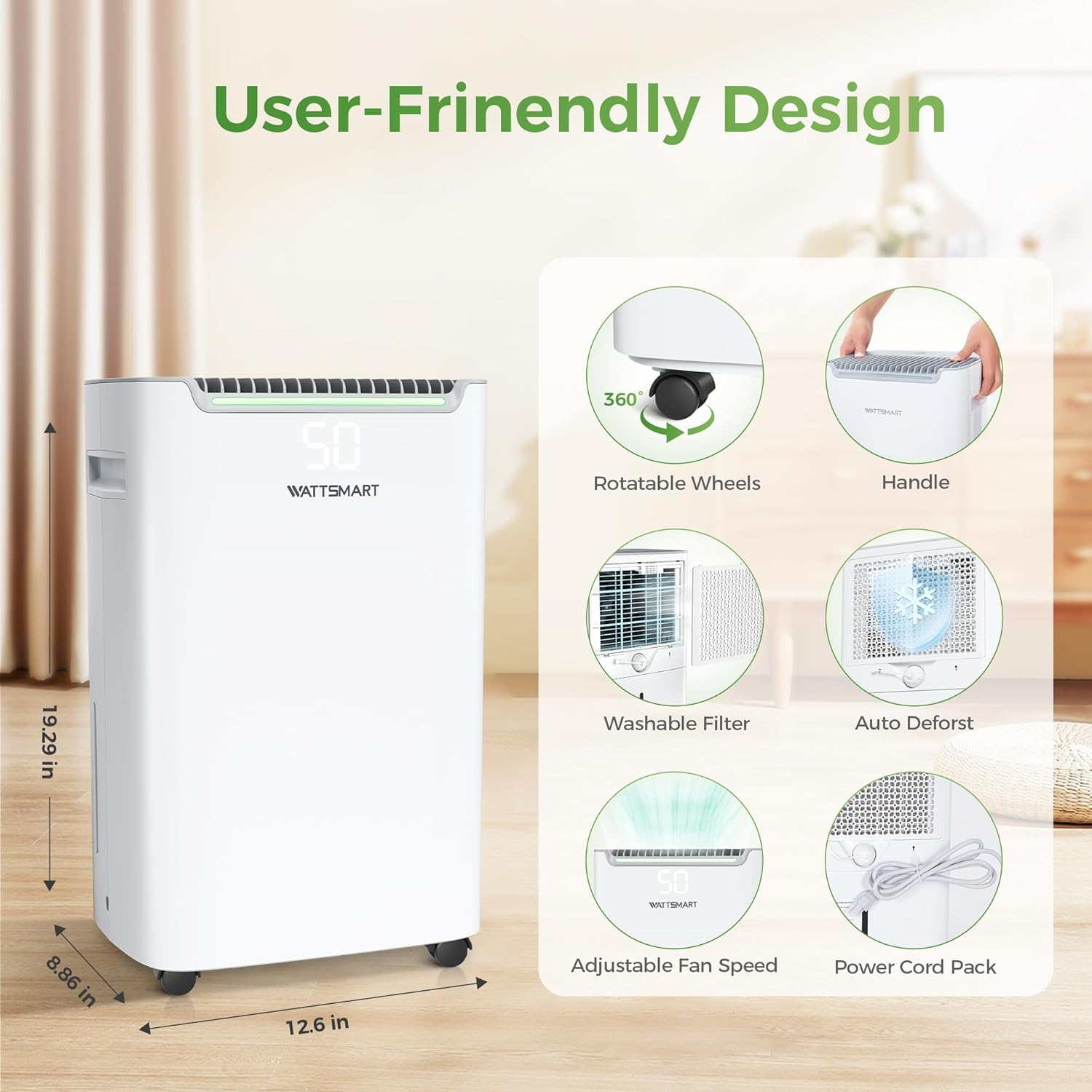
Figure 2: User-Friendly Design. This image highlights key features including rotatable wheels, a handle for portability, a washable filter, auto defrost function, adjustable fan speed, and a power cord pack for neat storage.
Key Components:
- Control Panel: Located on the top of the unit, featuring touch controls and a digital display for settings and current humidity.
- Air Inlet/Outlet: Located on the back and top of the unit for air circulation.
- Water Tank (75 oz / 0.58 Gallons): Removable tank for manual water collection.
- Drainage Outlet: Connection point for the continuous drain hose.
- Washable Filter: Reusable air filter located at the back of the unit.
- Rotatable Wheels: Four universal wheels for easy movement.
- Handle: Integrated handle for convenient lifting and transport.
- Power Cord Pack: Storage area for the power cord.

Figure 3: Efficient and Quiet Operation. This image shows the dehumidifier in a bedroom setting, emphasizing its quiet operation with a "<42dB" indicator.

Figure 4: Premium Compressor. This image provides an internal view of the dehumidifier, highlighting its high-efficiency compressor, which is designed for energy saving and comes with a 5-year warranty.
4. Setup
4.1 Unpacking and Placement
- Carefully remove the dehumidifier from its packaging.
- Place the unit upright on a firm, level surface in the desired location.
- Ensure there is at least 8 inches (20 cm) of clear space around all sides of the unit for proper air circulation. Do not place it against a wall or furniture that would obstruct the air inlets or outlets.
- The universal wheels allow for easy repositioning of the unit.
4.2 Drainage Options
Your WATTSMART Dehumidifier offers two convenient drainage methods:

Figure 5: Two Drainage Options. This image illustrates both continuous drainage using the included hose and manual drainage using the 0.58-gallon water tank. It also provides a visual guide for correct hose positioning for continuous drainage.
4.2.1 Manual Drainage (Water Tank)
- The dehumidifier will collect water in its internal 75 oz (0.58 Gallons) water tank.
- When the tank is full, the unit will automatically shut off and an indicator light will illuminate.
- Carefully remove the water tank from the unit and empty the collected water.
- Reinsert the empty water tank firmly into the unit. The dehumidifier will automatically resume operation.
4.2.2 Continuous Drainage (Drain Hose)
- For continuous operation without needing to empty the tank, use the included 3.3 ft drain hose.
- Locate the continuous drainage outlet on the back of the unit.
- Connect one end of the drain hose to this outlet. Ensure a secure connection to prevent leaks.
- Direct the other end of the hose to a suitable drain, such as a floor drain, large bucket, or sink.
- Important: Ensure the drain hose is always positioned below the drain outlet of the dehumidifier to allow gravity to drain the water. If the hose is elevated, water will not drain and will back up into the water tank, causing the unit to shut off when the tank is full.
5. Operating Instructions
The control panel allows you to manage all functions of your dehumidifier.
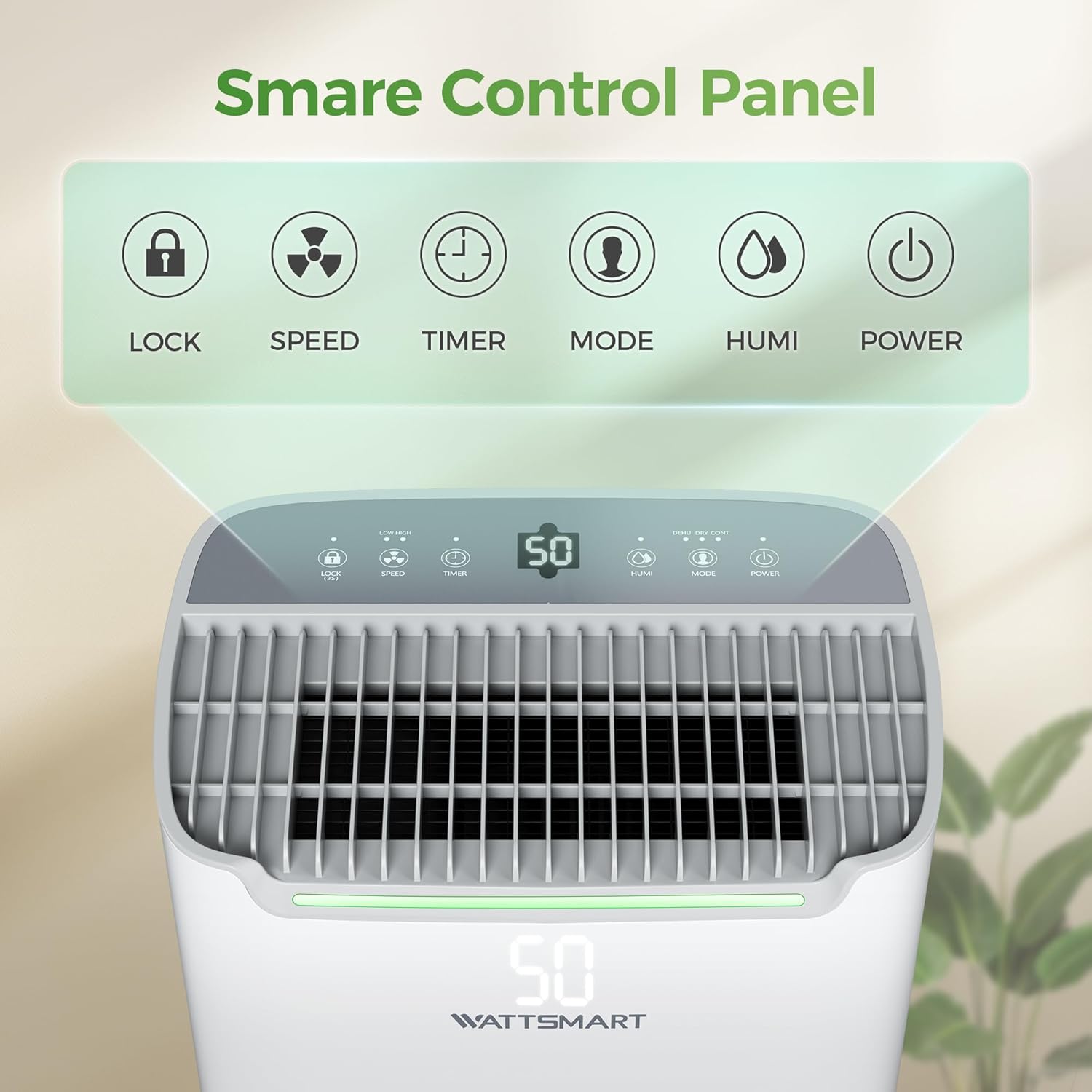
Figure 6: Smart Control Panel. This image displays the top control panel with touch buttons for Lock, Speed, Timer, Mode, Humidity, and Power, along with a digital display.
5.1 Control Panel Functions:
- POWER Button: Press to turn the dehumidifier ON or OFF.
- MODE Button: Cycle through available operating modes:
- Dehumidify Mode: Standard operation to remove moisture.
- Continuous Mode: Runs continuously regardless of humidity level, ideal for very damp spaces. Requires continuous drainage.
- Dry Mode: (Often referred to as Laundry Dry mode) Designed to dry clothes faster by providing continuous strong airflow.
- HUMI Button: Press to set your desired humidity level. The humidity can be adjusted from 30% to 80% Relative Humidity (RH) in 5% increments. The unit will operate until the set humidity is reached, then cycle off. It will restart automatically if the humidity rises above the set level.
- SPEED Button: Select between Low and High fan speeds. Higher speed results in faster dehumidification but may produce more noise.
- TIMER Button: Set a timer for automatic ON or OFF operation (1-24 hours).
- Timer ON: With the unit OFF, press TIMER to set the desired hours until the unit turns ON.
- Timer OFF: With the unit ON, press TIMER to set the desired hours until the unit turns OFF.
- LOCK Button (Child Lock): Press and hold for 3 seconds to activate or deactivate the child lock function. When activated, the control panel buttons will be locked to prevent accidental changes.

Figure 7: 24H Timer and Humidity Set. This image illustrates the functionality of setting a target humidity level (30% to 80%) and using the 24-hour timer for both timing ON and timing OFF operations.
5.2 Smart Operation Features:
- Auto Shut-Off/On: The dehumidifier will automatically turn off when the water tank is full and resume operation once the tank has been emptied and reinserted.
- Auto Restart: In case of a power outage, the unit will automatically restart with the previous settings once power is restored.
- Auto Defrost: If frost builds up on the evaporator coils, the unit will automatically enter defrost mode to melt the frost, ensuring efficient operation.
- Continuous Dehumidification Cycle: The unit is designed to automatically stop for 8 minutes every 8 hours during continuous operation to ensure durability and optimal performance.

Figure 8: Continuous Dehumidification. This image highlights the 8-hour continuous operation cycle, with an automatic 8-minute pause for durability.
6. Maintenance
Regular maintenance ensures the longevity and efficient operation of your dehumidifier.
6.1 Cleaning the Air Filter
The washable air filter should be cleaned every two weeks or more frequently depending on usage and air quality.
- Turn off the dehumidifier and unplug it from the power outlet.
- Locate the air filter at the back of the unit. Gently pull it out.
- Wash the filter with warm, soapy water. Rinse thoroughly.
- Allow the filter to air dry completely before reinserting it into the unit. Do not use a dryer or direct heat.
- Once dry, slide the filter back into its slot.
6.2 Cleaning the Water Tank
Clean the water tank periodically to prevent mold and mildew growth.
- Turn off the dehumidifier and unplug it.
- Remove the water tank and empty any remaining water.
- Wash the tank with warm water and a mild detergent. You can use a soft cloth or brush to scrub away any residue.
- Rinse the tank thoroughly with clean water.
- Allow the tank to air dry or wipe it dry before placing it back into the unit.
6.3 Storing the Dehumidifier
If the unit will not be used for an extended period:
- Unplug the unit and empty the water tank.
- Clean the air filter and water tank as described above.
- Coil the power cord neatly and secure it with the power cord pack.
- Cover the unit with a plastic bag or cloth to protect it from dust.
- Store the dehumidifier in a cool, dry place, away from direct sunlight and extreme temperatures.
7. Troubleshooting
Before contacting customer service, please refer to the following table for common issues and their solutions.
| Problem | Possible Cause | Solution |
|---|---|---|
| Dehumidifier does not turn on. | No power supply; Water tank full or not properly inserted; Power button not pressed. | Check if the unit is plugged in and the outlet is working. Empty and reinsert the water tank correctly. Press the POWER button. |
| Unit runs but does not collect water. | Humidity setting is higher than ambient humidity; Room temperature is too low; Air filter is clogged; Air inlets/outlets are blocked. | Lower the humidity setting. Ensure room temperature is above 41°F (5°C). Clean the air filter. Clear any obstructions from air inlets/outlets. |
| Unit is noisy. | Unit is not on a level surface; Air filter is dirty; Fan obstruction. | Place the unit on a flat, stable surface. Clean the air filter. Check for any foreign objects obstructing the fan. |
| Water leaks from the unit. | Water tank not properly inserted; Continuous drain hose is loose or elevated. | Ensure the water tank is fully and correctly inserted. Check the continuous drain hose connection and ensure it is positioned below the unit's drain outlet. |
| Frost appears on coils. | Room temperature is too low. | This is normal. The unit has an auto-defrost function that will activate to melt the frost. Operation will resume once defrosting is complete. |
8. Specifications
Technical details for the WATTSMART 4,500 Sq Ft Home Dehumidifier (Model: HK-DE002-N).
| Feature | Detail |
|---|---|
| Brand | WATTSMART |
| Model Name | 4,500 Sq. Ft (HK-DE002-N) |
| Floor Area Coverage | 4500 Square Feet |
| Dehumidification Capacity | 55 Pints per Day (at 95°F, 95% RH) |
| Water Tank Volume | 75 oz (0.58 Gallons) |
| Product Dimensions (D x W x H) | 8.86"D x 12.6"W x 19.29"H |
| Item Weight | 32.1 Pounds |
| Color | White |
| Wattage | 245 watts |
| Number of Speeds | 2 |
| Operation Modes | Continuous, Dry, Dehumidify |
| Air Flow Capacity | 82.4 Cubic Feet Per Minute |
| Upper Temperature Rating | 95 Degrees Fahrenheit |
| Included Components | Dehumidifier, Drain Hose |
| Special Features | Adjustable Humidity Control, Automatic Moisture Removal, Automatic Restart, Automatic Shutoff, Portable |
9. Warranty and Support
WATTSMART is committed to providing high-quality products and excellent customer service.
9.1 Warranty Information
Your WATTSMART Dehumidifier comes with a quality guarantee, including a 30-day money-back policy. Specific warranty details for components like the compressor (e.g., 5 years for compressor as indicated in Figure 4) are covered under WATTSMART's standard warranty terms. Please retain your proof of purchase for warranty claims.
9.2 Customer Support
For any questions, concerns, or assistance with your WATTSMART Dehumidifier, our 24/7 customer service team is available online. Please contact us anytime if you have any questions regarding product operation, troubleshooting, or warranty claims.
For the most up-to-date contact information, please refer to the official WATTSMART website or the contact details provided with your product packaging.