
Inefala 1-DIN Car Stereo with 10.4-inch Rotating Touchscreen User Manual
Model: Inefala-A3663A3IT53-C888
1. Introduction
This manual provides detailed instructions for the installation, operation, and maintenance of your Inefala 1-DIN Car Stereo. This advanced car stereo features a 10.4-inch rotating touchscreen, wireless CarPlay, Android Auto, Bluetooth hands-free functionality, FM radio, and support for various media inputs including USB, AUX, and TF cards. It also includes an equalizer (EQ) for audio customization and comes with a backup camera for enhanced safety.
2. Package Contents
Please verify that all items listed below are included in your package:
- 1 x Inefala 1-DIN Car Stereo Unit
- 1 x Power Cord
- 1 x Speaker Cable
- 1 x External Microphone
- 1 x Backup Camera
- 1 x User Manual (this document)
- Mounting Brackets
- GPS Antenna
- USB Cables (2)
- RCA Input/Output Cables
Unboxing Video
This video demonstrates the unboxing process for the car stereo, showing the included components.
3. Setup and Installation
Professional installation is recommended for optimal performance and safety. Ensure the vehicle's power is disconnected before beginning installation.
3.1 Wiring Connections
Connect the power, speaker, and accessory wires according to your vehicle's wiring diagram and the provided cables. Ensure all connections are secure to prevent malfunctions.
Backup Camera Wiring
The included backup camera requires specific wiring. Connect the red wire of the camera's signal to the red positive (+) wire of the reverse light. If no signal appears in reverse gear, check this connection.

Image illustrating the connection of the backup camera's red wire to the vehicle's reverse light positive wire.
Installation Videos
This video provides detailed installation instructions for the car radio, including wiring and mounting.
This video demonstrates the installation process for the product, showing step-by-step guidance.
4. Operating Instructions
4.1 Touchscreen Operation
The 10.4-inch touchscreen offers intuitive control over all functions. Tap, swipe, and pinch gestures are supported for navigation and interaction.

Image showing the high-definition touchscreen interface in use, demonstrating touch control.
4.2 Wireless CarPlay & Android Auto
Connect your smartphone via Bluetooth for wireless CarPlay or Android Auto. This allows access to navigation, music, calls, and messages through voice control, minimizing distractions while driving.

Image displaying the car stereo's screen with CarPlay and Android Auto interfaces, highlighting wireless connectivity.
4.3 Mirror Link Function
Synchronize your phone's screen content to the car stereo display using the original USB cable. This feature allows you to view and interact with your phone's apps, such as navigation, directly on the larger car stereo screen.

Image demonstrating the Mirror Link function, showing a smartphone screen mirrored onto the car stereo display.
4.4 Bluetooth Hands-Free & Music
Pair your smartphone via Bluetooth for hands-free calling and wireless music streaming. The system provides a stable connection and clear audio for calls and an enhanced music listening experience.
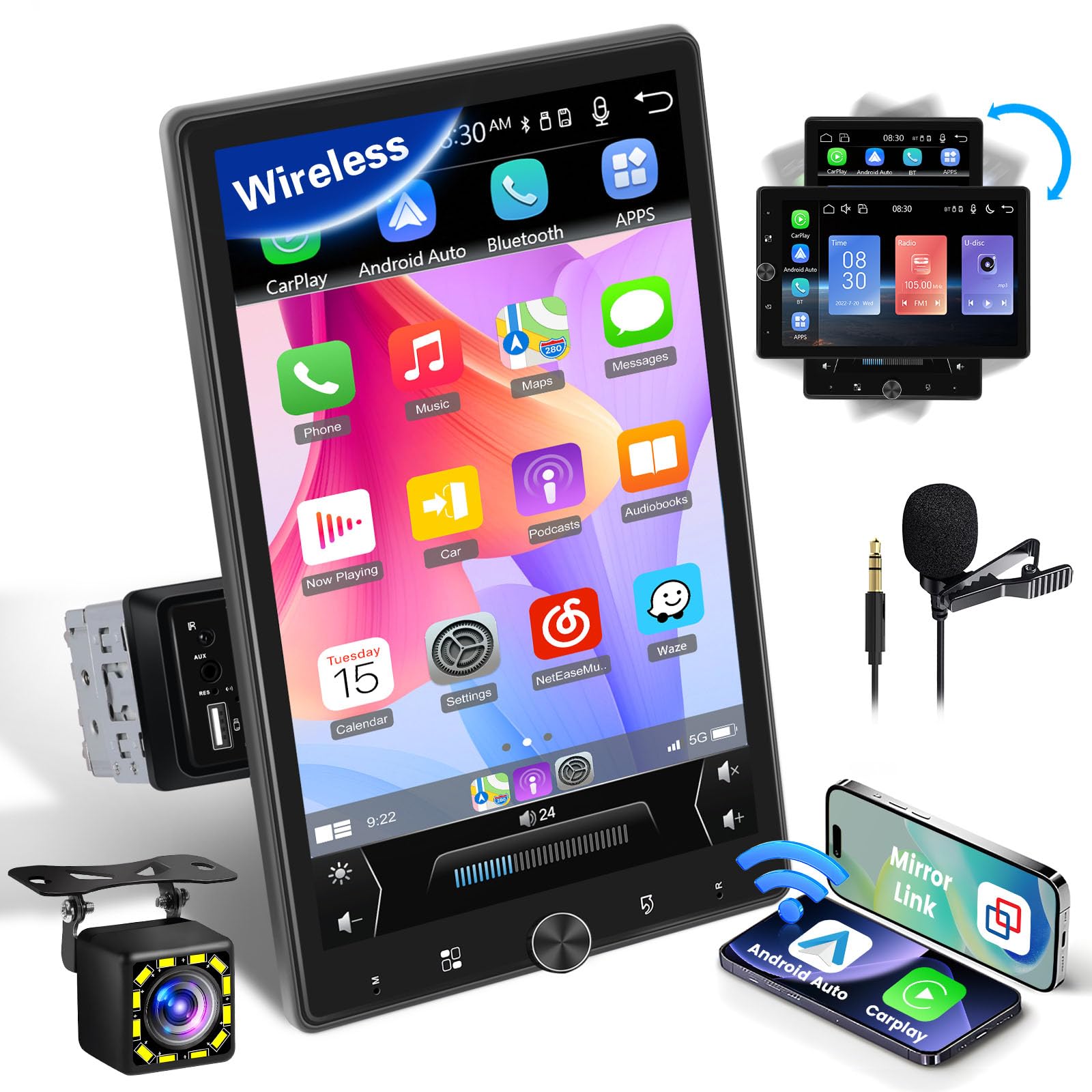
Image illustrating the Bluetooth connectivity, showing icons for phone calls and music playback.
4.5 FM Radio
Access high-quality FM radio with 18 preset stations. Stay informed with channel broadcasts, weather forecasts, and real-time road conditions.

Image showing the FM radio interface with frequency display and station presets.
4.6 EQ Settings
Adjust the equalizer settings to customize your audio experience. Fine-tune bass, treble, midrange, and other frequencies for optimal sound quality.

Image displaying the equalizer settings screen, allowing users to adjust audio frequencies.
4.7 Steering Wheel Control
Configure the car stereo to integrate with your vehicle's steering wheel controls. This allows for convenient operation of functions like volume adjustment, track skipping, and call management without taking your hands off the wheel.

Image showing the steering wheel control interface on the car stereo, indicating how to set up functions.
4.8 Backup Camera Display
When the vehicle is shifted into reverse, the touchscreen will automatically display the view from the included HD backup camera, making parking and reversing safer.
Image depicting the backup camera's view on the car stereo screen, with parking guidelines.
Product Introduction Video
This video provides an introduction to the car radio, highlighting its key features and functionalities.
5. Maintenance
- Cleaning the Screen: Use a soft, lint-free cloth to clean the touchscreen. Avoid abrasive cleaners or solvents.
- General Care: Keep the unit free from dust and moisture. Do not expose it to extreme temperatures.
- Software Updates: Periodically check the manufacturer's website for any available software updates to ensure optimal performance and access to new features.
6. Troubleshooting
| Problem | Possible Cause | Solution |
|---|---|---|
| No power | Incorrect wiring, blown fuse | Check power connections, inspect vehicle's fuse box |
| No sound | Incorrect speaker wiring, volume too low, mute activated | Verify speaker connections, increase volume, check mute setting |
| Bluetooth not connecting | Device not in pairing mode, interference | Ensure phone's Bluetooth is on and in pairing mode, restart both devices |
| Backup camera not displaying | Incorrect camera wiring, faulty camera | Check camera power and signal connections to reverse light |
| Touchscreen unresponsive | System freeze, dirt on screen | Restart the unit, clean the screen, perform a factory reset if necessary |
7. Specifications
- Brand: Inefala
- Model: Inefala-A3663A3IT53-C888
- Screen Size: 10.4 inches
- Screen Resolution: 1280 x 800
- Connectivity Technology: USB, AUX, TF, Bluetooth
- Special Features: Wireless CarPlay, Android Auto, Bluetooth Hands-free, Mirror Link, FM Radio, EQ
- Compatible Devices: Smartphone
- Output Power: 45 Watts
- Number of Channels: 4
- Audio Output Mode: Stereo, Surround
- Control Method: Touch
- Video Encoding: H.264, MPEG-4
- Supported Internet Services: YouTube, Web Browser, Netflix
- Origin: China
8. Warranty and Support
Your Inefala Car Stereo comes with a 24-month warranty. For any questions or technical support, please contact our online support. We aim to respond within 28 hours.
How to Contact Us
If you have questions or require support, please follow these steps:
- Navigate to the product page on Amazon.
- Click on the seller's name, "Inefala", usually located near the "Buy Now" button.
- On the seller's page, look for an option like "Ask a question" to send a message directly to our support team.

Image illustrating the steps to contact Inefala support via the Amazon platform.