
EV SPACES EV-302
EV SPACES EV-302 2.4G Dual Wireless Microphone Headset User Manual
Model: EV-302
Introduction
This manual provides detailed instructions for the setup, operation, and maintenance of your EV SPACES EV-302 2.4G Dual Wireless Microphone Headset. Please read this manual thoroughly before using the product to ensure proper function and longevity.
Package Contents
Verify that all items listed below are included in your package:
- 1 x Transmitter (Headset Microphone)
- 1 x Receiver
- 1 x Headband
- 1 x 6.35mm Adapter
- 1 x USB Charging Cable
- 1 x User Manual

Image: All components included in the EV SPACES EV-302 package.
Product Features
- 2.4G & UHF Wireless Technology: Utilizes 2.4G wireless transmission for stable connection and UHF technology for simultaneous use of up to 40 microphone sets without interference.
- Dual Microphone Support: Allows two users to operate microphones simultaneously with a single receiver.
- Wide Compatibility: Equipped with 3.5mm and 6.35mm jacks for connection to various devices such as PA systems, karaoke machines, voice amplifiers, and mixers. Note: Not compatible with PC, iPhone, iPad, Mac, or Bluetooth speakers.
- Rechargeable Battery: Built-in 400mAh lithium-ion batteries provide approximately 6 hours of working time after a 2-hour charge.
- IP67 Waterproof Rating: Resistant to sweat, moisture, and dust, suitable for active use.
- LED Digital Display: Shows frequency, volume, and battery status.
- Clear Sound Quality: Features a smart noise-canceling chip and omnidirectional pickup technology.
- Operating Range: Up to 165-260 feet (50-80 meters) in open areas.
Setup Instructions
1. Charging the Devices
Before initial use, fully charge both the transmitter (headset) and the receiver.
- Connect the dual micro USB V2.0 cable to the charging ports on the transmitter and receiver.
- Plug the USB cable into a standard USB power adapter (not included) or a computer USB port.
- The indicator light will turn red during charging and will turn off when fully charged. A full charge takes approximately 2 hours and provides about 6 hours of use.
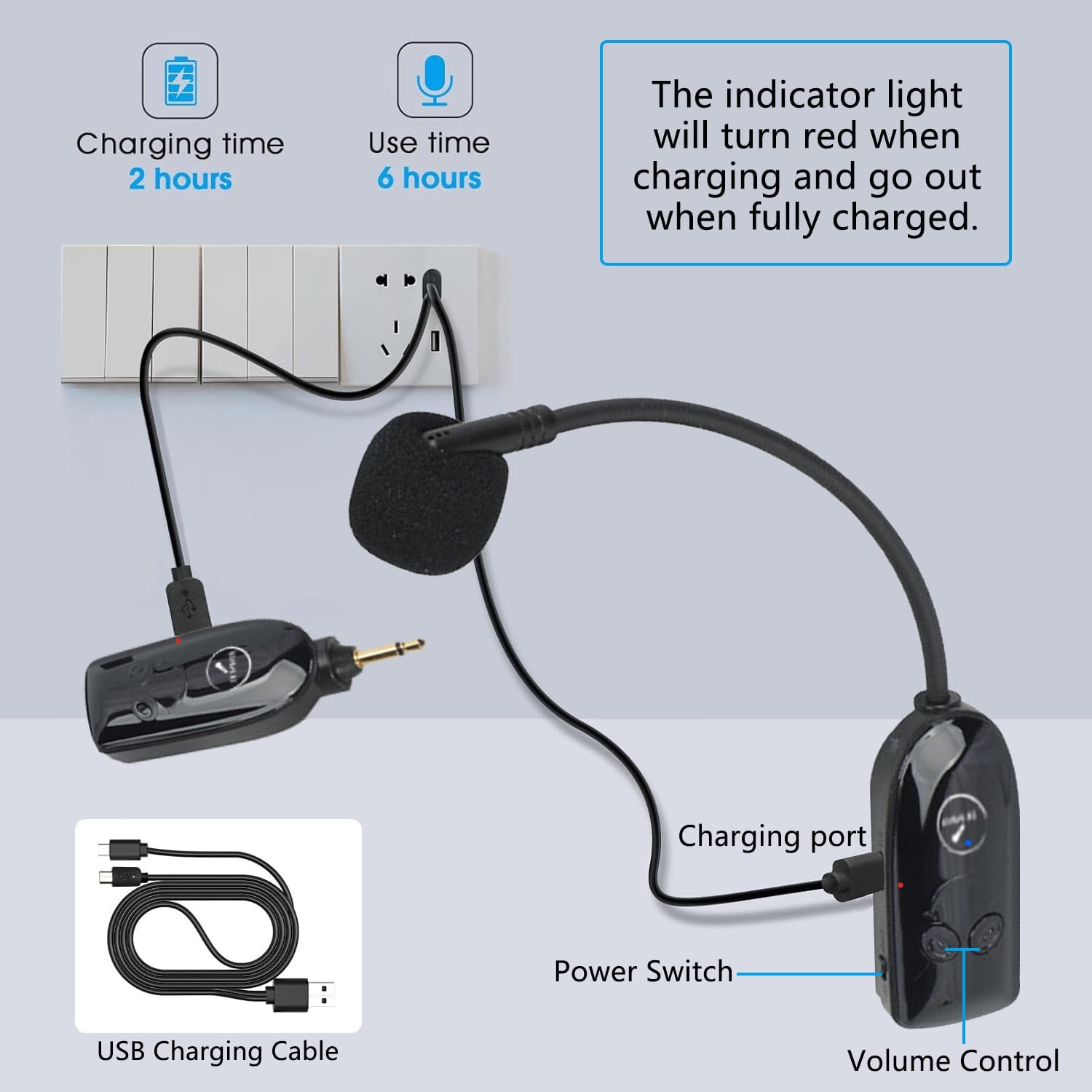
Image: Charging the transmitter and receiver using the provided USB cable.
2. Automatic Pairing
The system is designed for plug-and-play operation with automatic pairing.
- Ensure both the transmitter and receiver are fully charged.
- Switch on the power for both the transmitter and the receiver.
- The blue indicator light on both devices will flash for approximately 2 seconds, indicating they are searching for each other. Once paired, the blue light will remain solid. No further manual pairing is required.

Image: The receiver unit demonstrating 2.4G independent transmission and automatic pairing.
3. Connecting to an Audio Device
The receiver can be connected to devices with either a 3.5mm or 6.35mm microphone input jack.
- Identify the microphone input jack on your audio device (e.g., PA system, amplifier, mixer).
- If your device has a 3.5mm mic jack, plug the receiver directly into it.
- If your device has a 6.35mm mic jack, attach the included 6.35mm adapter to the receiver, then plug the receiver with the adapter into the 6.35mm mic jack.
- Ensure the audio device's volume is set to a low level before turning it on to prevent sudden loud noises.

Image: Compatibility with various audio devices using 3.5mm and 6.35mm jacks.
Operating Instructions
1. Power On/Off
- To power on, slide the power switch on both the transmitter and receiver to the 'ON' position.
- To power off, slide the power switch on both devices to the 'OFF' position.
2. Volume Control
The transmitter features volume control buttons. Use these to adjust the microphone's output level.
- Press the '+' button to increase volume.
- Press the '-' button to decrease volume.
3. Usage Modes
The EV-302 supports both headset and handheld microphone configurations.
- Headset Mode: Attach the microphone unit to the headband for hands-free operation.
- Handheld Mode: The microphone unit can be used independently as a handheld microphone.
Maintenance
- Cleaning: Use a soft, dry cloth to clean the surfaces of the transmitter and receiver. Do not use liquid cleaners or solvents.
- Storage: Store the microphone system in a cool, dry place away from direct sunlight and extreme temperatures.
- Battery Care: To prolong battery life, avoid fully discharging the batteries frequently. Recharge them regularly, even if not in constant use.
- Water Resistance: While the product is IP67 waterproof, avoid submerging it in water or exposing it to heavy rain. Dry thoroughly if it comes into contact with moisture.
Troubleshooting
| Problem | Possible Cause | Solution |
|---|---|---|
| No sound output |
|
|
| Sound is distorted or unclear |
|
|
| Limited range or signal drops |
|
|
| Charging indicator not working |
|
|
Specifications
- Model: EV-302
- Wireless Technology: 2.4G, UHF
- Microphone Form Factor: Headset
- Connectivity: Wireless
- Connector Type: 3.5 mm Jack, 6.35 mm Jack (with adapter)
- Power Source: Battery Powered (2 Lithium Ion batteries included)
- Battery Capacity: 400mAh (approx.)
- Charging Time: Approximately 2 hours
- Working Time: Approximately 6 hours
- Operating Range: 165-260 feet (50-80 meters) in open areas
- Signal-to-Noise Ratio: 95 dB
- Frequency Response: 20 KHz
- Material: Acrylonitrile Butadiene Styrene, Metal
- Item Weight: 3.2 ounces
- Waterproof Rating: IP67
Warranty and Support
EV SPACES provides a 1-year warranty for this product, which includes support for unconditional returns. For any questions, issues, or technical assistance, please contact our dedicated customer service team. They are available 24/7 to provide support.
For further assistance, please visit the EV SPACES Store on Amazon.
Ask a question about this manual
Ask about setup, troubleshooting, compatibility, parts, safety, or missing instructions. Manuals+ will review the question and use this page’s manual context to help answer it.