
1. Product Overview
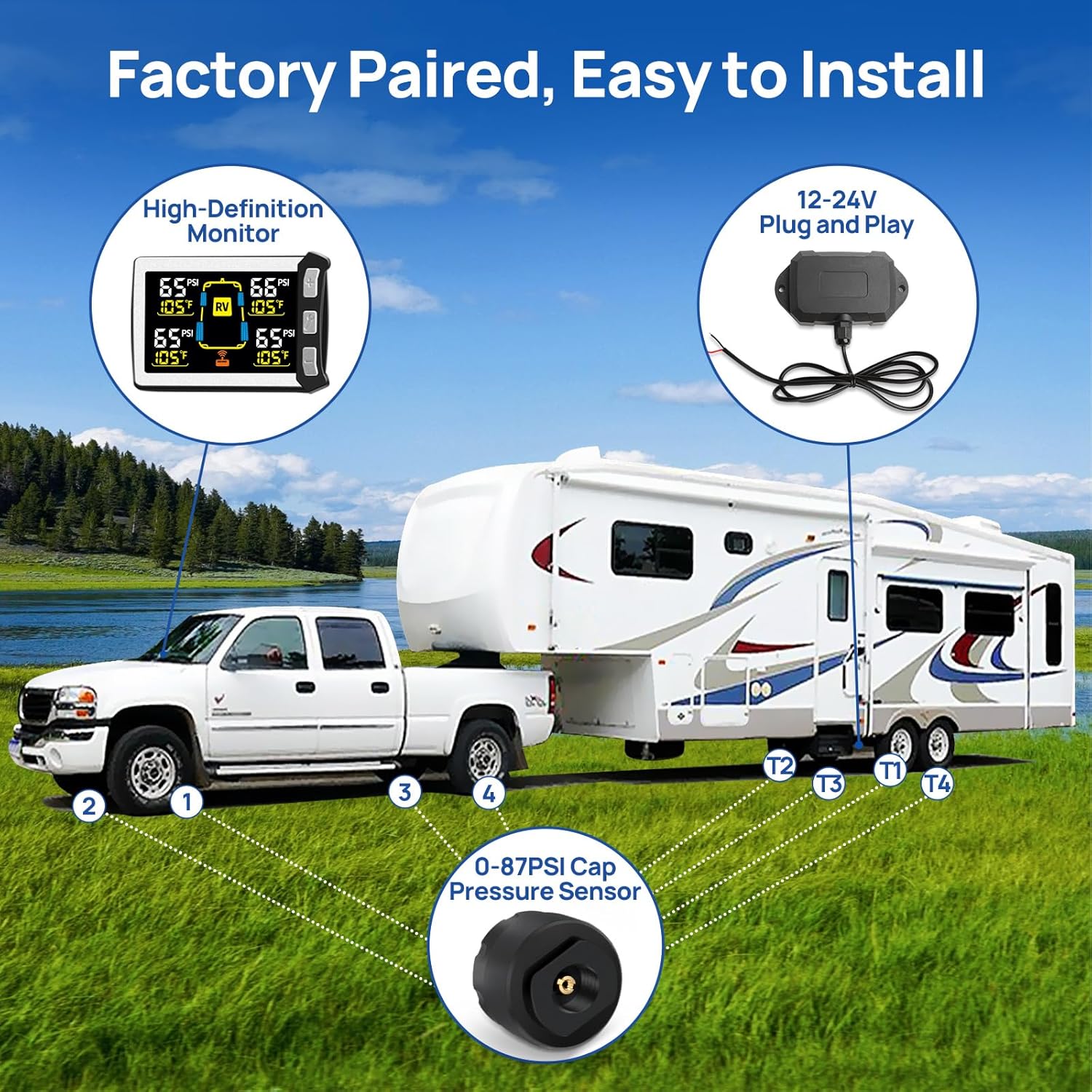
The Masoll RV Tire Pressure Monitoring System (TPMS) is designed to provide real-time tire pressure and temperature monitoring for recreational vehicles, trailers, and other compatible vehicles. This system helps enhance driving safety by alerting the user to abnormal tire conditions. The 2-sensor variant is suitable for vehicles requiring monitoring of two tires.
Key features include a color LCD display with adjustable brightness, automatic calibration, and a high-powered signal booster for extended transmission range up to 120 feet. The system is engineered for ease of installation and provides multiple alarm types for precise monitoring.


2. Package Contents
Verify that all components are present in the package:
- 1 x Masoll TPMS Display Monitor
- 2 x External Tire Pressure Sensors (T1, T2)
- 1 x Signal Booster
- 1 x Power Cable for Monitor (Cigarette Lighter Adapter)
- 1 x USB Cable for Monitor
- 1 x Monitor Mounting Bracket
- 1 x Sensor Wrench and Security Nuts
- 1 x User Manual (this document)

3. Setup and Installation
The Masoll TPMS is factory-paired for convenience. Follow these steps for installation:
3.1 Monitor Installation
- Choose a suitable location on your vehicle's dashboard that does not obstruct your view or interfere with driving controls.
- Attach the monitor to the mounting bracket. The monitor has a magnet on its back for easy attachment to the magnetic part of the holder.
- Connect the monitor to a 12-24V power source using the provided cigarette lighter adapter or USB cable. Ensure the cable is routed safely and does not interfere with vehicle operation.
3.2 Sensor Installation
Before installing sensors, ensure your tires are inflated to their recommended pressure. The system will use the current tire pressure as a reference for its alarm thresholds.
- Remove the original valve cap from the tire valve stem.
- Screw a security nut onto the valve stem.
- Screw the corresponding sensor (T1, T2) onto the valve stem. Ensure it is tightened securely to prevent air leakage.
- Tighten the security nut against the sensor using the provided wrench to deter theft and ensure a firm connection.
- Repeat for all tires to be monitored.
3.3 Signal Booster Installation
The signal booster enhances the transmission distance between the sensors and the monitor, especially for longer RVs or trailers.
- Mount the signal booster in a suitable location on your RV or trailer, preferably where it has a clear line of sight to both the sensors and the monitor. The booster is IP69 waterproof, allowing for external mounting.
- Connect the booster to a 12-24V power source. For trailers, it can often be wired into the running light circuit so it receives power when connected to the towing vehicle.
- Ensure the wiring is secure and protected from environmental elements.

4. Operating Instructions
Once installed and powered, the Masoll TPMS monitor will automatically begin displaying tire data.
4.1 Display Features
- Color LCD Display: Provides clear and bright readings of tire pressure and temperature.
- Brightness Adjustment: The monitor offers 4 levels of brightness adjustment. Press the 'Wrench' button (middle button) to cycle through brightness settings to adapt to different lighting conditions.
- Auto Swaps: The display automatically cycles through tire data every 5 seconds.
4.2 Reading Tire Data
The monitor displays real-time pressure in PSI and temperature in Fahrenheit for each monitored tire. The system is designed to show all active tire readings continuously.
4.3 Auto Calibration
The system automatically configures the current tire pressure as the reference pressure upon sensor installation. Alarm thresholds are then set relative to this reference:
- An alarm will activate if the actual pressure is 25% higher than the reference pressure.
- An alarm will activate if the actual pressure is 15% lower than the reference pressure.
4.4 Signal Booster Indicator
A booster symbol will illuminate on the monitor display when the signal booster is actively working and transmitting data.
5. Alarms and Alerts
The Masoll TPMS provides both visual and audio alarms to notify you of tire abnormalities. The system monitors for the following conditions:
- High/Low Tire Pressure Alert: Triggered when tire pressure deviates significantly from the calibrated reference pressure.
- High Temperature Alert: Warns of excessively high tire temperatures.
- Fast Leakage Alert: Detects rapid air loss from a tire.
- Sensor Lost Alert: Indicates a loss of signal from a tire sensor.
- Sensor Low Voltage Alert: Notifies when a sensor's battery is low and requires replacement.
6. Troubleshooting
If you encounter issues with your Masoll RV TPMS, refer to the following common solutions:
- Dim Display: The display may appear dim after prolonged exposure to high temperatures. It should return to normal brightness once the temperature drops. Adjust the 4-level brightness setting using the 'Wrench' button.
- No Signal/Intermittent Signal:
- Ensure the signal booster is correctly installed and powered. The booster symbol on the monitor should be ON.
- Verify that sensors are securely tightened on the valve stems.
- Check for any physical obstructions between the sensors, booster, and monitor.
- Inaccurate Readings:
- Confirm that sensors are installed on the correct tire positions (T1, T2).
- Ensure tire pressures were set correctly before sensor installation for accurate reference points.
- Booster Draining Battery: If the signal booster is wired directly to your RV battery, it may cause parasitic drain when the RV is not in use or being towed. Consider installing a switch on the positive wire for the signal booster to manually turn it off when not needed.
- Sensor Low Voltage Alert: Replace the battery in the affected sensor. Refer to the sensor's design for battery access.
7. Specifications
| Brand | Masoll |
| Model | XM+RP12+MZS3 |
| Manufacturer | nLONG |
| Product Dimensions | 16.26 x 12.19 x 6.1 cm |
| Item Weight | 311.84 g (11 Ounces) |
| Material | Plastic |
| Tire Pressure Range | 0-87 PSI |
| Transmission Distance | Up to 120 ft |
| Booster Waterproof Rating | IP69 |
| Batteries Required | 4 CR123A batteries (for sensors) |
| UPC | 767461916218 |
8. Safety Information
- Always ensure the monitor is placed in a location that does not obstruct your view of the road or interfere with vehicle controls.
- Do not attempt to service the internal components of the monitor or sensors. Refer to qualified personnel for repairs.
- Regularly check tire pressure with a calibrated gauge, even when using the TPMS, to ensure accuracy.
- Ensure all cables are securely routed and do not pose a tripping hazard or interfere with vehicle operation.
- Replace sensor batteries promptly when a low voltage alert is indicated to maintain continuous monitoring.