
1. Product Overview
The Masoll RV/Trailer Tire Pressure Monitoring System (TPMS) is designed to provide real-time tire pressure and temperature monitoring for recreational vehicles, travel trailers, 5th wheels, and campers. This system enhances driving safety by alerting you to potential tire issues before they become critical. It is suitable for vehicles with tire pressures ranging from 0-87 PSI and offers a transmission distance of up to 120 feet, ensuring comprehensive coverage for various RV setups.

Image: The Masoll RV/Trailer TPMS kit, showing the color LCD display, four tire pressure sensors (T1, T2, T3, T4), and the signal booster unit.
2. What's in the Box
Your Masoll RV/Trailer TPMS package includes the following components:
- Tire Pressure Monitor (Color LCD Display)
- Signal Repeater/Booster
- 4 Tire Pressure Sensors (for 4-sensor kit)
- USB Power Cable
- Cigarette Lighter Power Adapter
- Mounting Bracket for Display
- Anti-theft Nuts and Wrench for Sensors

Image: A visual representation of the accessories included in a 4-sensor Masoll TPMS kit, showing the monitor, repeater, sensors, power cables, and tools.
3. Key Features
- RV-Specific Design: Flexible sensor options (2/4/6/8 sensors) to accommodate various RV, travel trailer, and camper configurations. Supports tire pressures up to 87 PSI and a 120ft transmission distance.
- Color LCD Display: Provides bright and clear readings of tire pressure and temperature. Features 4-level brightness adjustment for optimal visibility in different lighting conditions (day and night).
- Factory Paired & Easy Installation: Sensors are pre-paired with the monitor, allowing for simple plug-and-play setup. Just connect power to the monitor and screw sensors onto the valve stems according to their position labels.
- High-Powered Signal Booster: An included booster enhances sensor signals, extending the transmission range up to 120ft. The booster is IP69 waterproof and dustproof, with built-in high voltage protection. A symbol on the display indicates when the booster is active.
- Multiple Alarm Modes: Provides visual and audio alerts for:
- High/Low Tire Pressure
- High Temperature
- Fast Leakage
- Sensor Lost
- Sensor Low Voltage
- Auto Calibration: Upon sensor installation, the current tire pressure is automatically set as the reference pressure. Alarms trigger if the actual pressure deviates by 25% higher or 15% lower than this reference.

Image: Illustration of the various alarm modes supported by the Masoll TPMS, including fast leakage, high pressure, low pressure, high temperature, sensor low battery, and sensor failure.
4. Setup and Installation
4.1 Monitor Installation
- Choose a suitable location on your dashboard or windshield for the monitor. Ensure it does not obstruct your view or interfere with driving.
- Attach the mounting bracket to the monitor.
- Secure the monitor with the bracket to your chosen location. The monitor has a magnet on its back for easy attachment to the magnetic part of the holder.
- Connect the monitor to a 12-24V power source using the provided USB cable and cigarette lighter adapter.
4.2 Sensor Installation
The sensors are factory-paired and labeled (T1, T2, T3, T4 for a 4-sensor kit) to correspond with specific tire positions. Install them as follows:
- Identify the correct sensor for each tire position (e.g., T1 for front left, T2 for front right, etc.).
- Remove the original valve cap from the tire.
- (Optional, for anti-theft) Screw the anti-theft nut onto the valve stem first.
- Screw the corresponding TPMS sensor onto the valve stem until it is hand-tight.
- (If using anti-theft) Use the provided wrench to tighten the anti-theft nut against the sensor.
- Repeat for all tires.
Once installed, the monitor will automatically detect the sensors and display the current tire pressure and temperature. The system will auto-calibrate the reference pressure based on the initial readings.
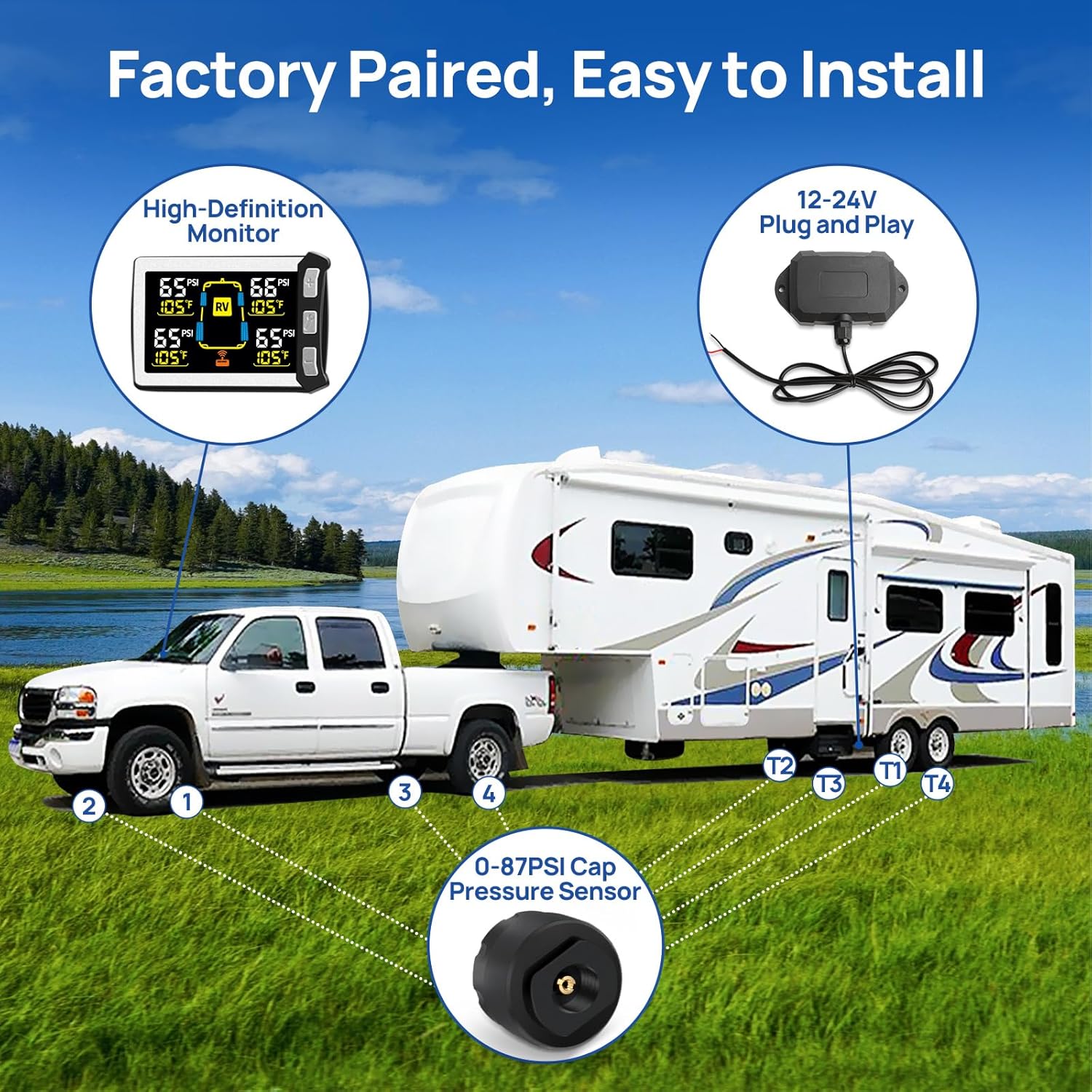
Image: Diagram illustrating the simple installation process of the Masoll TPMS, showing the monitor, booster, and cap pressure sensors on a truck and trailer setup.
4.3 Signal Booster Installation
The signal booster is crucial for maintaining a stable connection over long distances, especially with RVs and trailers.
- Mount the booster in a suitable location on your RV or trailer, ideally where it has a clear line of sight to both the sensors and the monitor. It is full sealed and IP69 waterproof, allowing for external mounting.
- Connect the booster to a 12-24V power source. Many users wire it into the trailer's running light circuit so it powers on when the trailer is connected.
- Ensure the booster symbol on the monitor stays ON, indicating it is working correctly.

Image: Features of the Masoll TPMS signal booster, highlighting stable connections, 12-24V power source, booster working symbol on monitor, and IP69 waterproof level.
5. Operating Instructions
5.1 Display Overview
The color LCD display shows real-time pressure (PSI) and temperature (°F) for each monitored tire. An RV icon in the center indicates the system is in RV mode. A signal icon indicates booster activity.
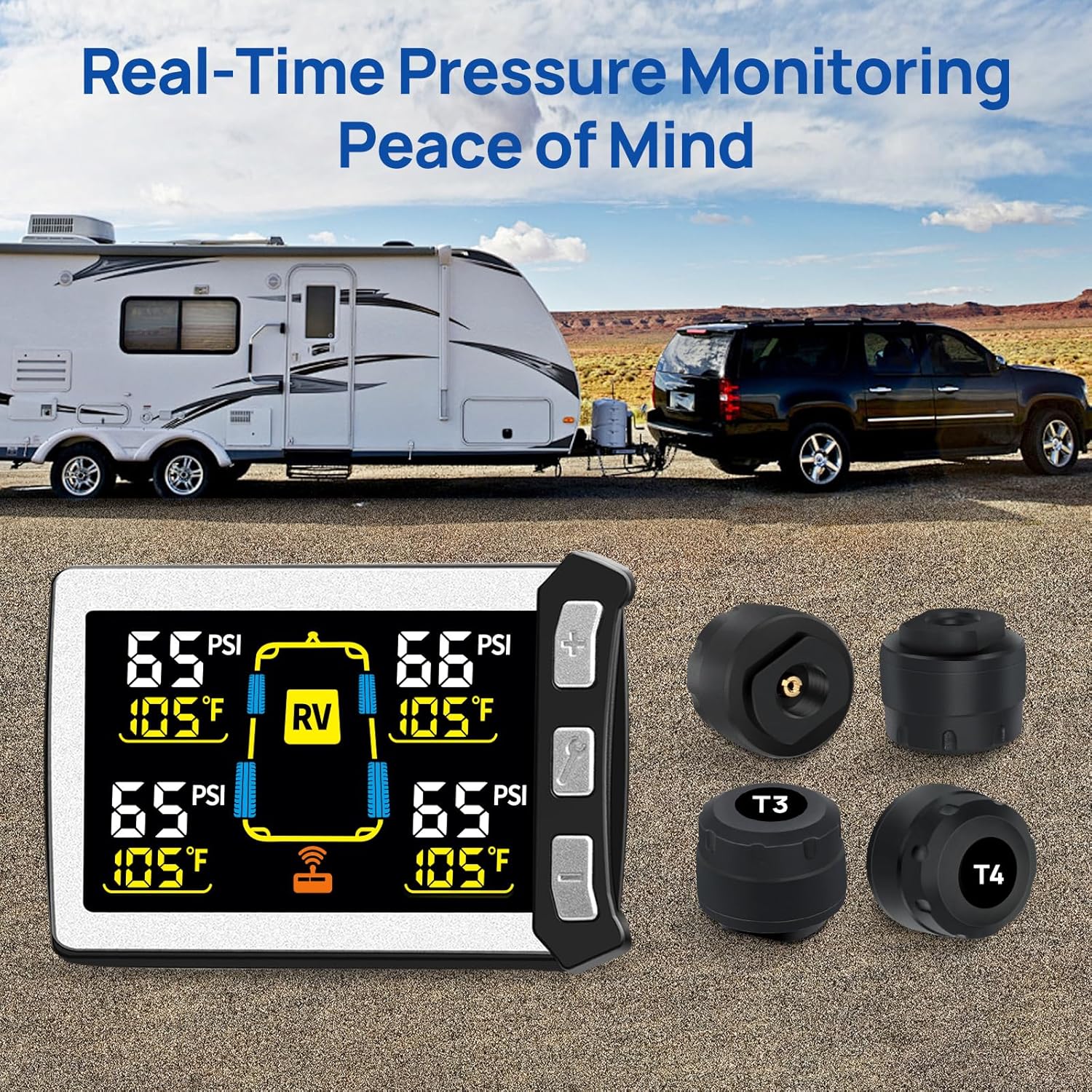
Image: The Masoll TPMS display showing real-time tire pressure and temperature readings for four tires, with an RV icon in the center, indicating active monitoring.
5.2 Brightness Adjustment
The monitor features 4 levels of brightness. Use the designated button (often labeled with a wrench icon or similar) to cycle through brightness settings to suit ambient light conditions.

Image: Comparison showing the Masoll TPMS display's readability in both day and night conditions, demonstrating its 4-level backlight adjustment feature.
5.3 Alarm Functions
The system provides both visual and audio alerts for various tire abnormalities:
- High/Low Pressure Alert: Triggers when tire pressure is 25% higher or 15% lower than the auto-calibrated reference pressure.
- High Temperature Alert: Activates if a tire's temperature exceeds a safe threshold (e.g., 158°F, though specific threshold may vary).
- Fast Leakage Alert: Detects rapid pressure drops, indicating a puncture or sudden leak.
- Sensor Lost Alert: Notifies if communication with a sensor is lost.
- Sensor Low Voltage Alert: Indicates that a sensor's battery is low and requires replacement.
When an alarm is triggered, the corresponding tire's data on the display will flash, and an audible alert will sound. Address the issue promptly for safety.
6. Maintenance
6.1 Sensor Battery Replacement
The tire pressure sensors use replaceable CR1632 coin cell batteries. When a "Sensor Low Voltage" alert appears, replace the battery as follows:
- Unscrew the sensor from the valve stem.
- Carefully open the sensor casing (refer to the sensor design for specific opening method, usually by twisting or prying a cap).
- Remove the old CR1632 battery.
- Insert a new CR1632 battery, ensuring correct polarity (+ side up).
- Close the sensor casing securely.
- Re-install the sensor onto the tire valve stem.

Image: Instructions showing DIY installation of the cap sensor with anti-theft design and how to replace the CR1632 battery in the sensor.
6.2 Cleaning
Wipe the monitor and sensors with a soft, damp cloth. Do not use abrasive cleaners or solvents, as these can damage the components.
7. Troubleshooting
| Problem | Possible Cause | Solution |
|---|---|---|
| Display is dim or unreadable. | Prolonged exposure to high temperatures; incorrect brightness setting. | Allow the display to cool down; adjust brightness using the dedicated button. |
| No tire data displayed / Sensor Lost alarm. | Sensor not installed correctly; sensor battery low/dead; out of transmission range; booster not powered or faulty. | Ensure sensors are tightly screwed on; check sensor battery and replace if necessary; ensure booster is powered and within range; verify booster symbol is ON on the display. |
| Inaccurate pressure/temperature readings. | Sensor not fully seated; external factors (e.g., rapid temperature changes). | Re-tighten sensors; allow time for readings to stabilize after significant environmental changes. |
| Monitor not powering on. | Power cable loose or damaged; vehicle's power outlet is off or faulty. | Check power connections; try a different power outlet; inspect cable for damage. |
8. Specifications
- Brand: Masoll
- Model: XM+RP12+4MZS3
- Manufacturer: nLONG
- Item Weight: Approximately 14 ounces
- Package Dimensions: Approximately 6.61 x 4.92 x 2.48 inches
- Tire Pressure Range: 0-87 PSI
- Transmission Distance: Up to 120 feet (with booster)
- Display: Color LCD with 4-level brightness adjustment
- Sensor Battery Type: CR1632 (replaceable)
- Booster Waterproof Rating: IP69
- First Available Date: August 11, 2024
9. Warranty and Support
Masoll products are designed for reliability and performance. For specific warranty details, please refer to the documentation included with your product at the time of purchase, or visit the official Masoll brand store.
For further assistance, technical support, or inquiries, please contact Masoll customer service or visit the Masoll Store on Amazon.