
1. Introduction
This manual provides detailed instructions for the installation, operation, and maintenance of replacement accessories compatible with the Xiaomi Mijia M30S D103CN Robot Vacuum Cleaner. These accessories include main brushes, side brushes, HEPA filters, mop cloths, and dust bags. Proper use and maintenance of these parts ensure optimal performance and longevity of your robot vacuum cleaner.
2. Product Overview
The accessory kit includes various components designed to maintain the cleaning efficiency of your Xiaomi Mijia M30S D103CN robot vacuum. Familiarize yourself with each part before installation.

Image 2.1: A comprehensive set of replacement parts for the Xiaomi Mijia M30S D103CN robot vacuum cleaner, including main brushes, side brushes, HEPA filters, mop cloths, and dust bags.
- Main Brushes: Designed for deep cleaning on various floor types.
- Side Brushes: Sweep debris from edges and corners into the main cleaning path.
- HEPA Filters: Capture fine dust particles and allergens.
- Mop Cloths: Used for wet cleaning and mopping functions.
- Dust Bags: Collect dust and debris from the vacuum's dustbin.
3. Installation and Replacement
Always power off and unplug your robot vacuum cleaner before attempting any installation or replacement of parts.
3.1. Main Brush Replacement
- Turn the robot vacuum cleaner upside down.
- Locate the main brush cover, usually secured by latches or screws. Open or unscrew it.
- Remove the old main brush.
- Insert the new main brush, ensuring it clicks into place correctly.
- Close the main brush cover and secure it.

Image 3.1.1: An orange and black main brush, typically found in robot vacuum cleaners.
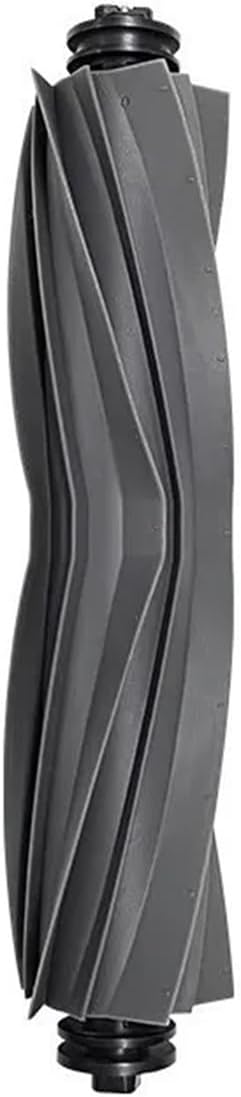
Image 3.1.2: A grey main brush, another variant for robot vacuum cleaners.
3.2. Side Brush Replacement
- Turn the robot vacuum cleaner upside down.
- Locate the side brush(es). They are usually held by a single screw.
- Unscrew and remove the old side brush.
- Align the new side brush with the post and secure it with the screw.

Image 3.2.1: A white three-arm side brush, showing its dimensions (120mm total length, 40mm arm length).
3.3. HEPA Filter Replacement
- Open the top cover of the robot vacuum cleaner to access the dustbin.
- Remove the dustbin from the vacuum.
- Open the dustbin cover and locate the HEPA filter.
- Remove the old filter by pulling it out.
- Insert the new HEPA filter firmly into its slot.
- Close the dustbin cover and reinsert the dustbin into the vacuum.

Image 3.3.1: A set of four rectangular HEPA filters, ready for replacement.

Image 3.3.2: A single HEPA filter showing its dimensions (95mm length, 43mm width, 12mm height).
3.4. Mop Cloth Attachment
Mop cloths are typically attached to a water tank or mop plate on the underside of the robot vacuum.
- Remove the mop plate/water tank module from the robot vacuum.
- Attach the mop cloth to the designated area on the module, usually using Velcro or a sliding mechanism.
- Ensure the cloth is securely fastened and evenly spread.
- Reattach the mop plate/water tank module to the robot vacuum.
3.5. Dust Bag Replacement
Dust bags are used in robot vacuums with auto-empty stations or specific dustbin designs.
- Locate the dust bag compartment on your robot vacuum or auto-empty station.
- Carefully remove the full dust bag, ensuring the opening is sealed to prevent dust leakage.
- Insert a new dust bag, aligning it with the slot or holder.
- Close the compartment securely.

Image 3.5.1: A dust bag showing its dimensions (19cm width, 11cm height, 13cm base width).
4. Operating Considerations for Accessories
- Main Brush: The glue brush type is anti-tangle, suitable for environments with a lot of hair. It is also effective on carpets. The bristle brush type is suitable for general floor cleaning.
- Side Brushes: Ensure side brushes are free from tangled hair or debris to maintain effective edge cleaning.
- HEPA Filters: A clean filter is crucial for maintaining strong suction and preventing dust from recirculating into the air.
- Mop Cloths: For optimal mopping, ensure the mop cloth is clean and damp before each use.
- Dust Bags: Replace dust bags when full to prevent reduced suction power and maintain hygiene.
5. Maintenance and Care
Regular maintenance of these accessories is essential for the efficient operation of your robot vacuum cleaner.
- Main Brush: Clean the main brush weekly by removing tangled hair and debris. Replace every 6-12 months, or sooner if wear is visible.
- Side Brushes: Inspect side brushes weekly for wear and tear. Clean any tangled hair. Replace every 3-6 months.
- HEPA Filters: Tap filters gently to remove dust weekly. Do not wash HEPA filters with water unless specified by the original vacuum manufacturer. Replace every 3-6 months.
- Mop Cloths: Wash mop cloths after each use. Replace every 1-3 months depending on usage.
- Dust Bags: Replace dust bags when the vacuum indicates it is full, or when suction power noticeably decreases.
6. Troubleshooting
- Reduced Suction Power: Check if the HEPA filter is clogged or the dust bag is full. Replace or clean as necessary.
- Ineffective Cleaning: Inspect main and side brushes for tangled hair or debris. Ensure they are installed correctly and not worn out.
- Robot Vacuum Not Moving Smoothly: Check if the main brush is properly seated and not obstructed.
- Streaks After Mopping: Ensure the mop cloth is clean and properly attached.
7. Specifications
| Component | Approximate Dimensions | Approximate Weight |
|---|---|---|
| HEPA Filter | 95mm x 43mm x 12mm (3.74in x 1.69in x 0.47in) | Not specified per unit |
| Side Brush | 120mm (total length), 40mm (arm length) | 5g |
| Main Brush | 200mm (length) | Not specified per unit |
| Dust Bag | 19cm x 11cm x 13cm (width x height x base width) | 24g |
Note: Dimensions and weights are approximate and may vary slightly.
8. Warranty and Support
These accessories are replacement parts for the Xiaomi Mijia M30S D103CN Robot Vacuum Cleaner. For warranty information regarding the original robot vacuum cleaner, please refer to the manufacturer's documentation provided with your device.
For support regarding these specific replacement parts, please contact the seller or manufacturer, ORCOW, through the platform where the purchase was made.