
1. Introduction and Safety Information
Thank you for choosing the bion HEATING Butterfly 12L Portable Air Cooler. This manual provides important information for the safe and efficient operation of your appliance. Please read it thoroughly before use and keep it for future reference.
Important Safety Instructions:
- Always place the air cooler on a stable, level surface.
- Do not immerse the appliance, cord, or plug in water or other liquids.
- Ensure the power supply matches the voltage specified on the rating label.
- Keep the air cooler away from heat sources, direct sunlight, and flammable materials.
- Do not block the air inlets or outlets.
- Unplug the appliance before cleaning, refilling water, or moving it.
- This appliance is for indoor use only.
- Do not allow children to operate the air cooler without supervision.
2. Product Overview
The bion HEATING Butterfly 12L Portable Air Cooler is designed to provide a comfortable cooling experience. Familiarize yourself with its main components:
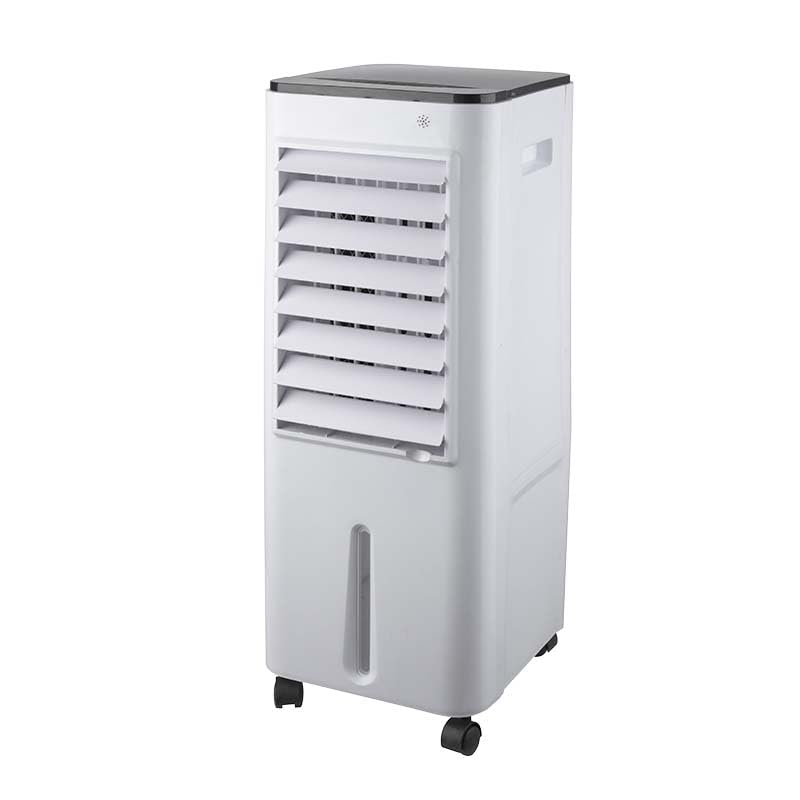
Image 1: Front view of the bion HEATING Butterfly 12L Portable Air Cooler. This image displays the compact, freestanding design of the unit, highlighting its white plastic casing and the air outlet grille. The control panel is visible on the top surface, and the overall aesthetic is clean and modern.
- Control Panel: Located on the top of the unit, featuring buttons for power, mode selection, fan speed, and timer.
- Air Outlet: Front grille where cooled air is discharged.
- Water Tank: A 12-liter capacity tank, typically located at the bottom or rear, for holding water and ice packs.
- Remote Control: For convenient operation from a distance.
- Wheels/Casters: For easy portability of the freestanding unit.
- Air Filter: Located at the rear, designed to filter dust from the incoming air.
3. Setup
Follow these steps to set up your air cooler for the first time:
- Unpacking: Carefully remove the air cooler from its packaging. Retain all packaging materials for future storage or transport.
- Placement: Place the unit on a firm, level surface in the desired location. Ensure there is adequate space around the unit for proper airflow (at least 20 cm from walls or furniture).
- Fill Water Tank: Locate the water tank. Pull it out or open the filling cap. Fill the tank with clean, cool water up to the 'MAX' level indicator. Do not overfill. For enhanced cooling, you may add ice packs (if included) to the water tank.
- Power Connection: Plug the power cord into a standard electrical outlet. Ensure the outlet is properly grounded.
4. Operating Instructions
Your bion HEATING Butterfly air cooler features an automatic operating mode and can be controlled via the control panel or the remote control.
Control Panel / Remote Control Functions:
- Power Button: Press to turn the unit ON or OFF.
- Mode Button: Cycle through different operating modes (e.g., Normal, Natural, Sleep).
- Speed Button: Adjust the fan speed (Low, Medium, High).
- Timer Button: Set the operating time (e.g., 1-8 hours) after which the unit will automatically turn off.
- Swing Button: Activate or deactivate the oscillation function for wider air distribution.
- Cool/Humidify Button: Activates the water pump for evaporative cooling and humidification. Ensure the water tank is filled when using this function.
Using the Remote Control:
Insert two AAA batteries (not included) into the remote control. Point the remote control directly at the receiver on the air cooler for optimal response.
5. Maintenance
Regular maintenance ensures optimal performance and longevity of your air cooler.
Cleaning the Exterior:
- Always unplug the unit before cleaning.
- Wipe the exterior surfaces with a soft, damp cloth. Do not use abrasive cleaners or solvents.
Cleaning the Water Tank:
- Empty and clean the water tank regularly (at least once a week, or more frequently with heavy use) to prevent mold and mildew growth.
- Remove the water tank, wash it with mild soap and water, then rinse thoroughly.
- Allow the tank to air dry completely before reinserting.
Cleaning the Air Filter:
- The air filter should be cleaned every two weeks or as needed.
- Remove the filter from the rear of the unit.
- Wash the filter under running water to remove dust. For stubborn dirt, use a soft brush.
- Allow the filter to dry completely before reattaching it to the unit.
6. Troubleshooting
If you encounter issues with your air cooler, refer to the following common problems and solutions:
| Problem | Possible Cause | Solution |
|---|---|---|
| Unit does not turn on | No power supply; Power button not pressed; Remote control batteries dead. | Check power cord connection; Press power button; Replace remote control batteries. |
| No cooling effect | Water tank empty; Cool/Humidify function not activated; Air filter blocked. | Fill water tank; Activate Cool/Humidify function; Clean air filter. |
| Weak airflow | Fan speed set too low; Air inlets/outlets blocked; Air filter dirty. | Increase fan speed; Clear obstructions; Clean air filter. |
| Unpleasant odor | Stagnant water in tank; Dirty filter. | Empty and clean water tank thoroughly; Clean air filter. |
If the problem persists after trying these solutions, please contact customer support.
7. Specifications
Refer to the following specifications for your bion HEATING Butterfly 12L Portable Air Cooler:
- Model Name: butterfly 12 lt
- Brand: bion HEATING
- Material: Plastic
- Mounting Type: Freestanding
- Control Type: Remote Control
- Water Tank Capacity: 12 Liters
- Item Weight: 13 Kilograms
- Operating Mode: Automatic
- Color: White
- Country of Origin: Italy
8. Warranty and Support
Your bion HEATING Butterfly 12L Portable Air Cooler comes with a standard manufacturer's warranty. Please refer to the warranty card included in your product packaging for specific terms and conditions, including the warranty period and coverage details.
For technical support, service, or to inquire about replacement parts, please contact bion HEATING customer service through their official website or the contact information provided in your warranty documentation. When contacting support, please have your model name (butterfly 12 lt) and purchase date ready.


