
Introduction
Welcome to the user manual for your Generic Scorpion Gaming Cockpit, Model NBCZBAZDA. This manual provides essential information for the safe assembly, operation, maintenance, and troubleshooting of your new ergonomic gaming and office chair. Please read this manual thoroughly before using the product to ensure optimal performance and longevity.
Important Safety Information
For safe use, properly assemble the chair using appropriate tools and adhere to the maximum weight capacity, which may be affected by the size and weight of hanging monitors.
- Ensure all connections are secure before use.
- Do not exceed the recommended weight limit for the chair or monitor mounts.
- Keep hands and clothing clear of moving parts during electronic adjustments.
- Operate the chair on a stable, level surface.
Product Overview
The Generic Scorpion Gaming Cockpit is an advanced ergonomic workstation designed for professional gamers and office users. It features an imitation space capsule design with an all-steel structure and electroplating spraying process. The cockpit supports multiple monitors and offers electronically controlled adjustments for optimal comfort and immersion.
Key Features
- Scorpion-shaped computer cockpit suitable for professional gamers and office workers.
- Supports hanging up to three screens (up to 32 inches each) or one 43-inch single screen, or one 49-inch ultrawide screen. Expandable to five 27-inch monitors.
- Built-in adjustable 16-color RGB light strip.
- Ergonomic design with multiple postures: upright, half-lying, reclining, and zero-gravity.
- Upgraded physical button electric adjustment for swing arm lifting/lowering and overall cockpit zero-gravity.
- High-quality PU leather for comfort and durability.
- Thickened steel frame for enhanced stability.
- Manually openable and closable armrest and oversized keyboard tray (90x40 cm).
- Hidden cup holder and headphone hanger.
Product Visuals
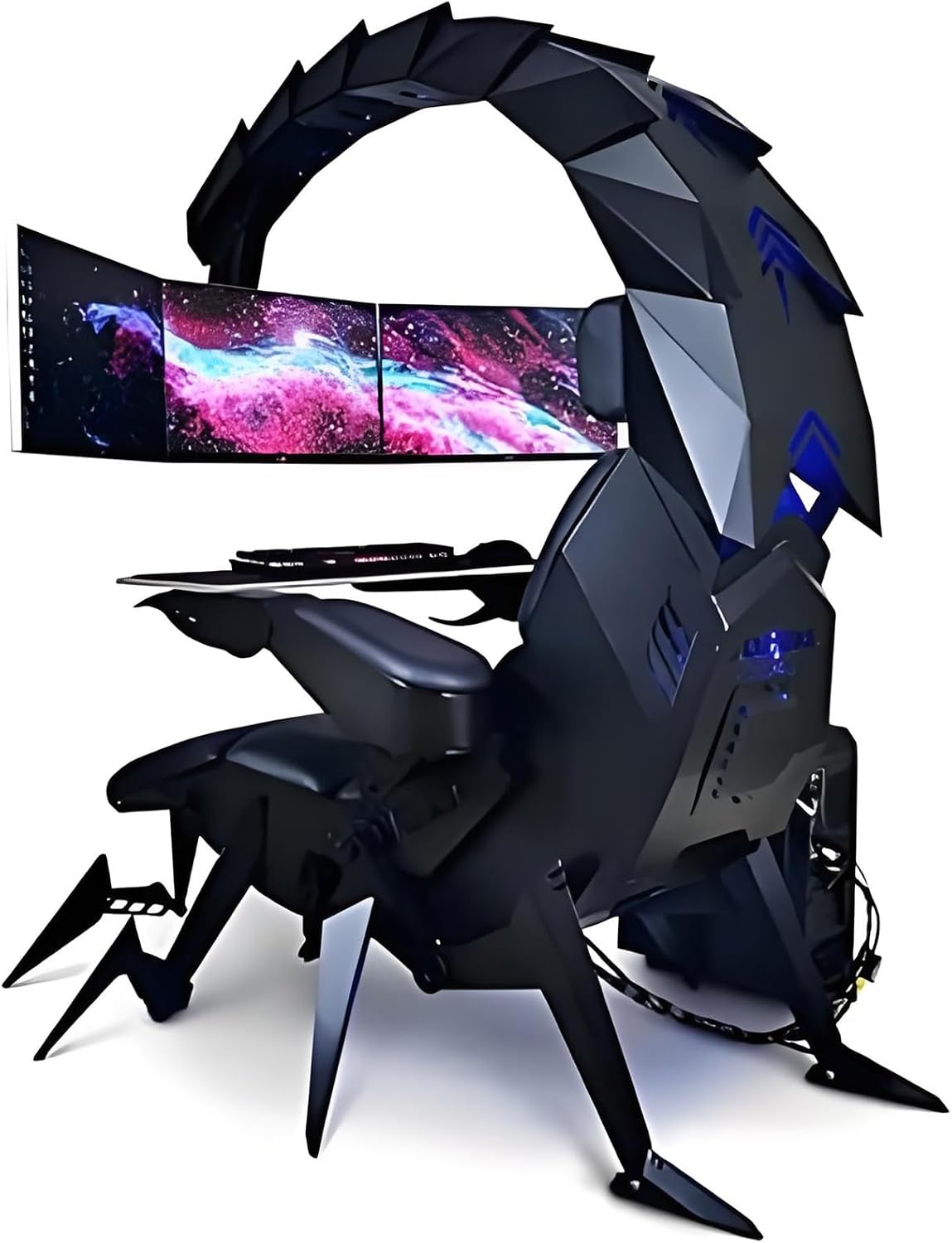
Figure 1: Overall view of the Generic Scorpion Gaming Cockpit in black, showcasing its unique design and multi-monitor setup capability.

Figure 2: Dimensional drawings of the Scorpion Gaming Cockpit, including side, front, and top views, along with packaging dimensions for transport.
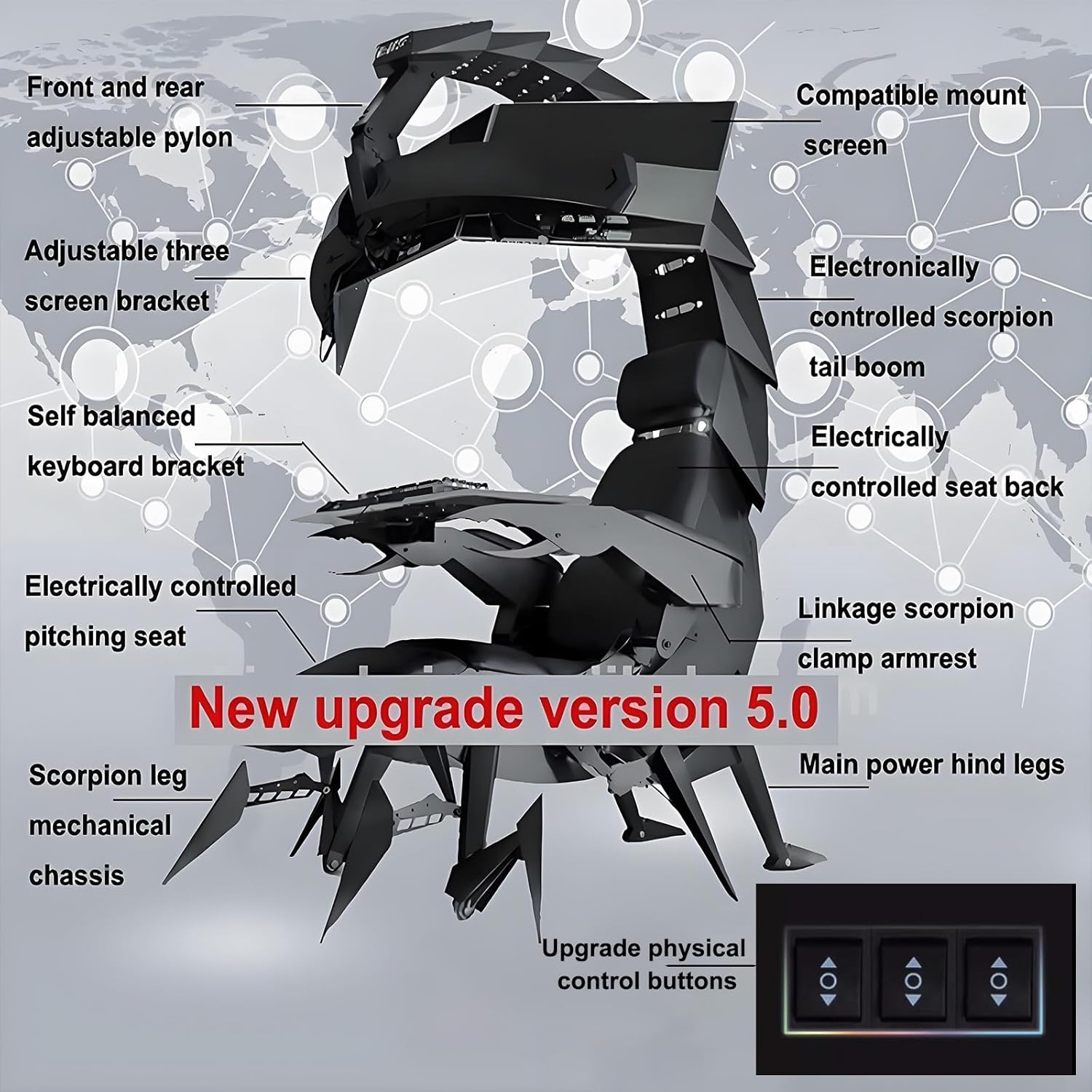
Figure 3: Diagram illustrating the key components of the Scorpion Gaming Cockpit, such as the adjustable pylon, screen bracket, tail boom, seat back, keyboard bracket, and control buttons.
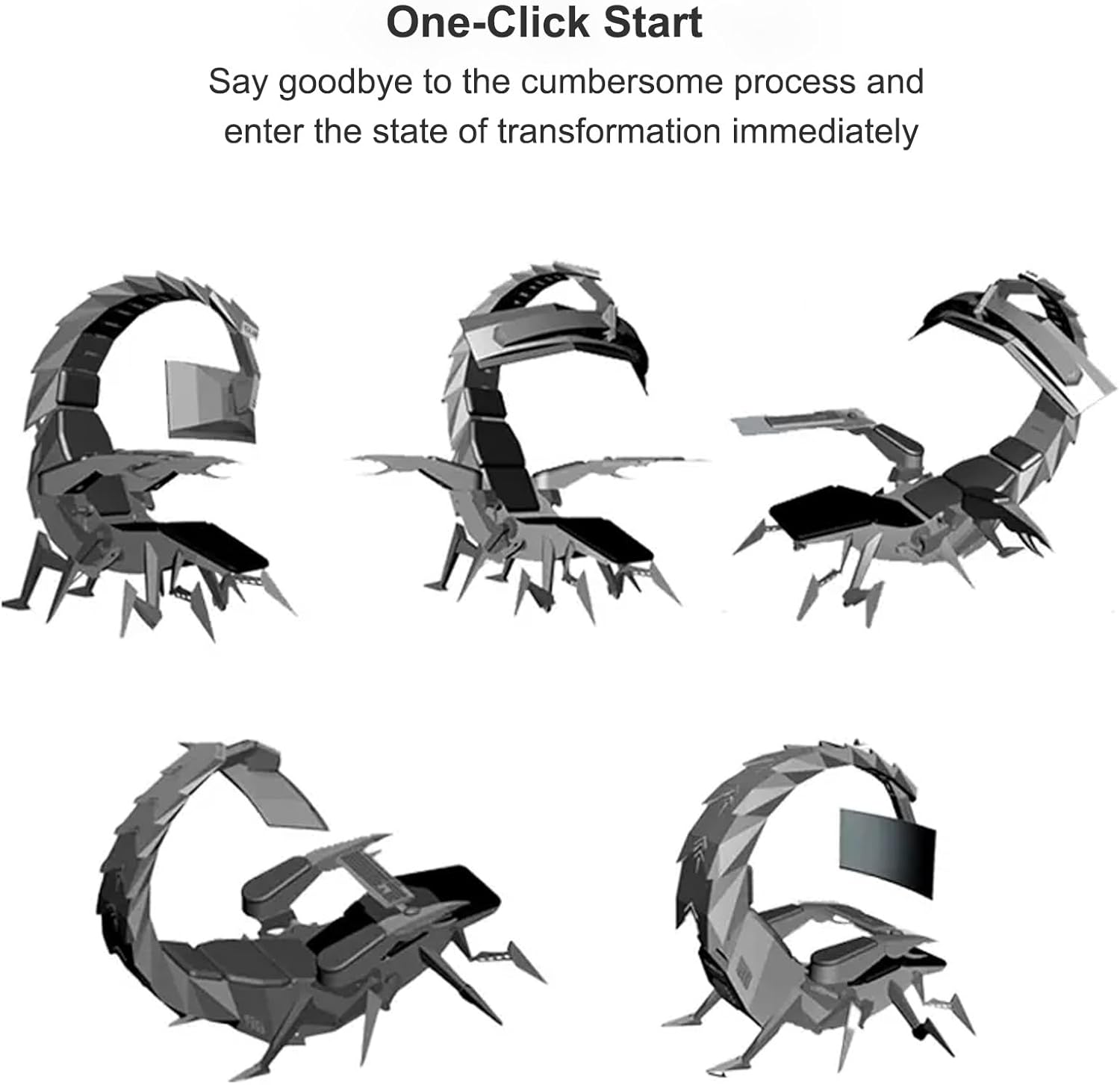
Figure 4: Visual representation of the various adjustable postures of the gaming cockpit, from upright to fully reclined, demonstrating its ergonomic flexibility.

Figure 5: A user engaged in gaming within the Scorpion Cockpit, highlighting the immersive experience with multiple screens and comfortable seating.
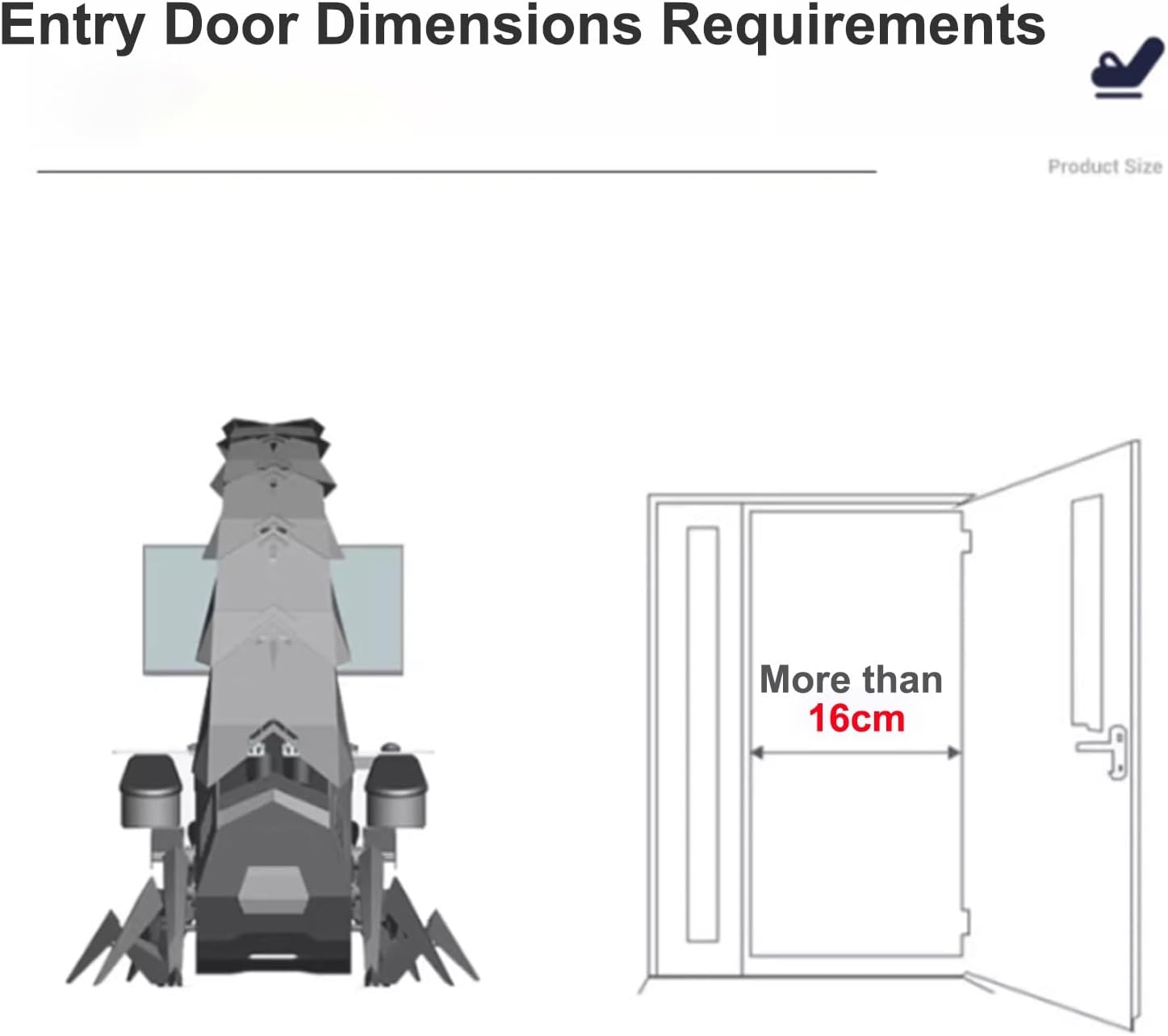
Figure 6: Diagram showing the minimum entry door dimensions required for the cockpit, indicating a width of more than 16cm for passage.
Setup and Assembly
The Scorpion Gaming Cockpit is delivered partially assembled. Professional installation is recommended due to its size and complexity. Ensure you have adequate space and assistance during setup.
Initial Placement
- Unpack all components carefully.
- Place the main chassis in your desired location, ensuring sufficient clearance around the unit for adjustments and entry/exit. Refer to Figure 6 for entry door dimension requirements.
Monitor Installation
- Attach your monitors to the adjustable screen bracket. The cockpit supports various configurations (single 43-inch, 49-inch ultrawide, or up to three 32-inch monitors, expandable to five 27-inch monitors).
- Ensure monitors are securely fastened to prevent accidental detachment.
- Connect your PC or console to the monitors and the cockpit's built-in inputs/outputs.
Power Connection
- Connect the cockpit to a standard power outlet using the provided power cable.
- Ensure the power source meets the product's electrical requirements.
Operating Instructions
The Scorpion Gaming Cockpit features intuitive electronic controls for various adjustments. Familiarize yourself with the control panel before use.
Electronic Adjustments
- Swing Arm Lift/Lower: Use the designated buttons on the control panel to electronically adjust the height of the monitor swing arm.
- Cockpit Zero Gravity: The overall cockpit can be adjusted to a zero-gravity position for enhanced comfort. Use the corresponding control buttons to recline the entire structure.
- Seat Back Adjustment: Electronically adjust the recline angle of the seat back for personalized comfort.
- Monitor Distance/Height: The height and distance of the monitor array can be adjusted manually or electronically depending on the specific model version.
Keyboard Tray and Armrests
- The armrest and keyboard tray can be manually opened and closed. Gently pull or push them into position as needed for entry/exit or use.
- The oversized keyboard tray (90x40 cm) provides ample space for your keyboard, mouse, and other peripherals.
RGB Lighting
- The cockpit features adjustable 16-color RGB light strips. Refer to the specific lighting control interface (usually integrated into the main control panel) to change colors and effects.
Maintenance
Proper maintenance ensures the longevity and optimal performance of your Scorpion Gaming Cockpit.
Cleaning
- Product Care Instructions: Wipe Clean.
- Use a soft, damp cloth to clean the PU leather surfaces. Avoid harsh chemicals or abrasive cleaners.
- For the steel structure, use a dry or slightly damp cloth.
- Regularly dust all surfaces, especially around electronic components and moving parts.
Inspection
- Periodically check all bolts and fasteners to ensure they are tight.
- Inspect electrical cables for any signs of wear or damage.
- Ensure moving parts operate smoothly without obstruction.
Troubleshooting
This section addresses common issues you might encounter with your Scorpion Gaming Cockpit.
Power Issues
- No Power: Ensure the power cable is securely plugged into both the cockpit and the wall outlet. Check if the outlet is functional.
- Intermittent Power: Verify all connections are stable. Avoid overloading the circuit.
Adjustment Malfunctions
- Electronic Adjustments Not Working: Check power supply. Ensure no obstructions are blocking the moving parts. If the issue persists, contact customer support.
- Stiff Manual Adjustments: Ensure no debris is caught in the mechanisms. Apply a small amount of silicone lubricant if necessary (avoiding electrical components).
Monitor Display Issues
- No Signal: Verify all video cables (HDMI, DisplayPort, etc.) are securely connected between your PC/console and the monitors. Check monitor input settings.
Technical Specifications
| Feature | Specification |
|---|---|
| Brand | Generic |
| Model Name | NBCZBAZDA |
| Color | Black |
| Product Dimensions (D x W x H) | 1.18"D x 0.79"W x 0.39"H (Note: These dimensions appear to be for a small component, not the full chair. Refer to Figure 2 for overall dimensions.) |
| Item Weight | 33.1 pounds (Note: This weight seems unusually low for a full cockpit. Please verify with seller.) |
| Material | Foam (Fill Material), PU Leather (Finish Type) |
| Frame Structure | All-steel structure with electroplating spraying process |
| Monitor Support | Single screen up to 43 inches, or 49-inch ultrawide, or three 32-inch monitors (expandable to five 27-inch monitors) |
| Special Feature | Ergonomic, Electronic Adjustments, RGB Lighting |
| Recommended Uses | Gaming, Office |
| Customization | Yes (Cockpit color, leather material, massage function) |
| Keyboard Tray Size | 90x40 cm |
Warranty Information
Specific warranty details for the Generic Scorpion Gaming Cockpit, Model NBCZBAZDA, are not provided in the product information. Please refer to your purchase documentation or contact the seller directly for information regarding warranty coverage and terms.
Customer Support
For any questions, technical assistance, or support regarding your Generic Scorpion Gaming Cockpit, please contact the seller or retailer from whom you purchased the product. They will be able to provide the most accurate and up-to-date support information.