
1. Introduction and Overview
The Lavales SafeFly Dot is a versatile 2-in-1 Bluetooth 5.3 audio adapter designed to enhance your audio experience across various devices. It functions as both a transmitter (TX) and a receiver (RX), allowing you to wirelessly connect your audio sources to Bluetooth-enabled headphones or speakers, or to bring Bluetooth capabilities to traditional wired audio systems.
Key features include AptX Low Latency support for synchronized audio, a long-lasting 25-hour battery, and the ability to connect to two devices simultaneously.
2. Product Features
- 2-in-1 Functionality: Seamlessly switch between Transmitter (TX) mode for sending audio to Bluetooth headphones/speakers, and Receiver (RX) mode for streaming audio from Bluetooth devices to wired systems.
- Advanced Bluetooth 5.3: Ensures stable and efficient wireless connections.
- Qualcomm Chip & AptX Low Latency: Supports AptX Low Latency, AptX HD, AptX Adaptive, AAC, and SBC audio codecs for high-quality, synchronized sound with minimal delay when paired with compatible devices.
- Extended Battery Life: Up to 25 hours of playtime in both TX and RX modes on a single 2-hour charge.
- Dual Pairing: Connect up to two Bluetooth headphones or two smartphones/tablets simultaneously.
- Long Working Range: Reliable, interference-free audio transmission up to 100 feet (30 meters).
- Built-in Microphone: Enables hands-free calls in RX mode when connected to a car stereo or home system.
3. Package Contents
Please verify that all items are present in your package:
- Lavales SafeFly Dot Bluetooth Audio Transmitter Receiver Unit
- USB-C Charging Cable
- 3.5mm Female-to-Female Audio Adapter
- Airplane Audio Adapter (Dual-prong)
- Keyring Cap
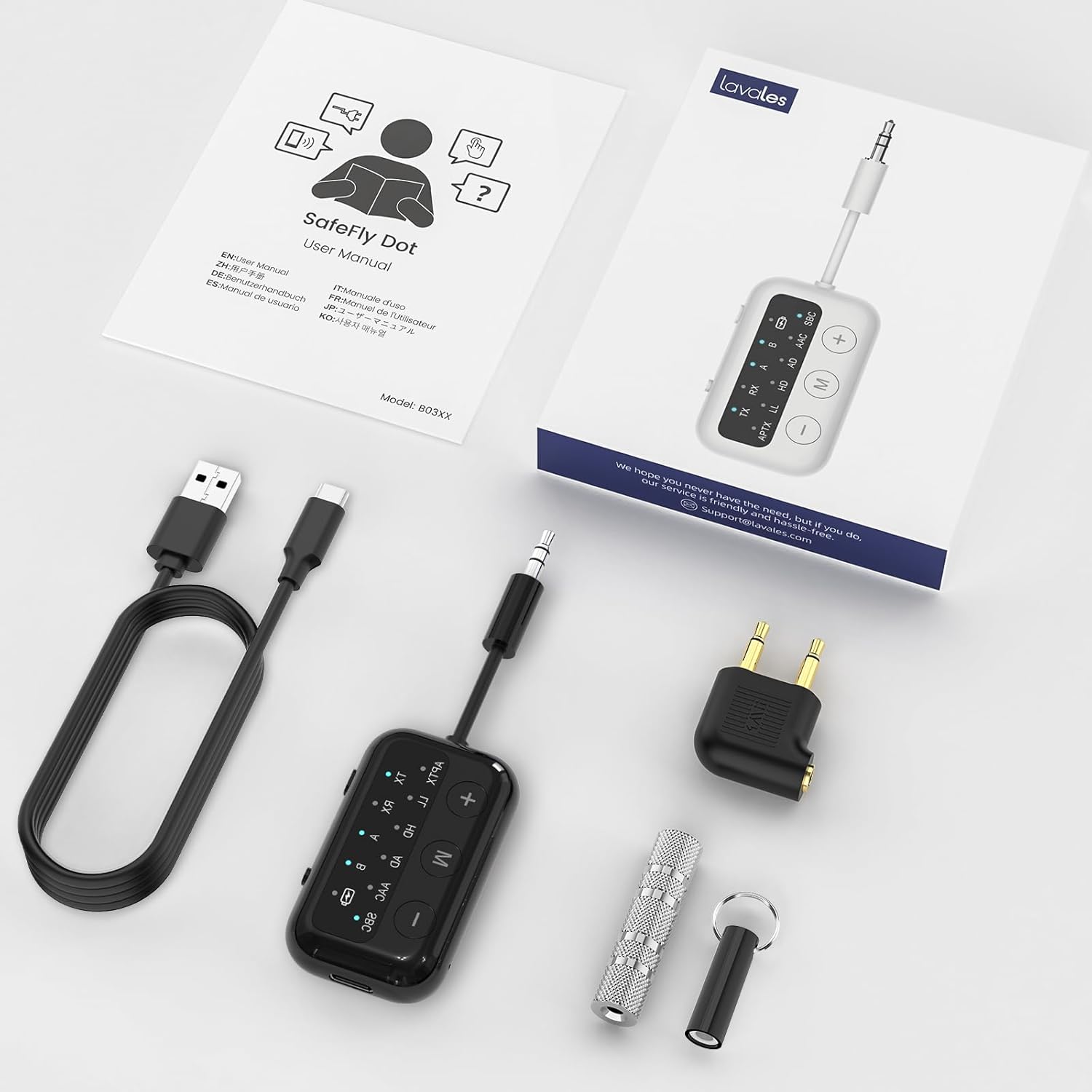
Image: Lavales SafeFly Dot package contents.
4. Device Layout and Controls

Image: Detailed view of the SafeFly Dot's indicator lights and button controls.
- TX/OFF/RX Switch: Slide to select Transmitter mode (TX), power off (OFF), or Receiver mode (RX).
- P/R Button (Pair/Reset): Press to enter pairing mode; long press to reset.
- M Button (Multi-functional Key): Play/pause, answer/end calls. Triple press to check battery level.
- '+' Button: Volume Up; long press for Next Track.
- '-' Button: Volume Down; long press for Previous Track.
- Indicator Lights: TX, RX, A (Device 1), B (Device 2), Battery, and various Bluetooth codec indicators (APTX, LL, HD, AD, AAC, SBC).
- 3.5mm Audio Plug: Integrated cable for connecting to audio sources/outputs.
- USB-C Port: For charging the device.
5. Setup and Operation
5.1 Charging the Device
Before first use, fully charge the SafeFly Dot using the provided USB-C cable. Connect the USB-C end to the device and the USB-A end to a standard USB power adapter (not included) or a computer USB port. The battery indicator light will show charging status and turn off when fully charged.
5.2 Transmitter Mode (TX) Setup
Use TX mode to transmit audio from non-Bluetooth devices (like TVs, PCs, or airplane entertainment systems) to your Bluetooth headphones or speakers.
- Slide the TX/OFF/RX switch to the TX position. The TX indicator will light up.
- Plug the SafeFly Dot's 3.5mm audio plug into the audio output jack of your desired audio source (e.g., TV headphone jack, airplane entertainment system). Use the airplane adapter if necessary.
- Put your Bluetooth headphones or speakers into pairing mode.
- Press the P/R button on the SafeFly Dot to enter pairing mode. The TX indicator will flash red and blue.
- Once connected, the 'A' indicator light will turn blue, and the corresponding audio codec light (e.g., APTX, AAC, SBC) will illuminate.
- Dual Pairing: To connect a second pair of Bluetooth headphones, press the P/R button again. The 'B' indicator light will turn blue upon successful connection.

Image: SafeFly Dot in Transmitter Mode (TX) for various devices.

Image: Wireless in-flight entertainment using the SafeFly Dot.

Image: Dual connection for two headphones with the SafeFly Dot.
5.3 Receiver Mode (RX) Setup
Use RX mode to receive audio from your Bluetooth-enabled smartphone or tablet and play it through wired speakers, car stereos, or wired headphones.
- Slide the TX/OFF/RX switch to the RX position. The RX indicator will light up.
- Plug the SafeFly Dot's 3.5mm audio plug into the audio input jack of your wired audio system (e.g., car AUX input, home stereo input). If using wired headphones, connect them to the SafeFly Dot using the 3.5mm female-to-female adapter.
- On your smartphone or tablet, enable Bluetooth and search for available devices. Select "SafeFly Dot" from the list to pair.
- Once connected, the 'A' indicator light will turn blue, and the corresponding audio codec light will illuminate.
- Dual Pairing: To connect a second smartphone or tablet, press the P/R button again. The 'B' indicator light will turn blue upon successful connection.

Image: SafeFly Dot in Receiver Mode (RX) for various devices.

Image: Hands-free clear calls in a car using the SafeFly Dot.
6. Operating Instructions
6.1 Basic Controls
- Volume Adjustment: Press the '+' button to increase volume, and the '-' button to decrease volume.
- Track Control: Long press the '+' button for the next track, and long press the '-' button for the previous track.
- Play/Pause: Press the 'M' button to play or pause audio.
- Call Management (RX Mode): Press the 'M' button to answer an incoming call, press again to end a call. Long press to reject a call.
6.2 Battery Level Check
To check the current battery level, triple-press the 'M' button. The battery indicator lights will illuminate to show the approximate charge remaining:
- 1 light: 0-20%
- 2 lights: 20-40%
- 3 lights: 40-60%
- 4 lights: 60-80%
- 5 lights: 80-100%
7. Troubleshooting
- Device not pairing: Ensure the SafeFly Dot is in the correct TX/RX mode and in pairing mode (flashing red/blue). Make sure your target device (headphones, phone) is also in pairing mode and within range. Try resetting both devices.
- No audio or poor audio quality: Check all cable connections. Ensure volume levels are adjusted on both the SafeFly Dot and the connected audio device. Verify that the correct audio codec is active (indicated by the lights). If using AptX, ensure both devices support it.
- Short battery life: Ensure the device is fully charged before use. Battery performance can vary based on volume levels and active codecs.
- Interference: Keep the SafeFly Dot away from other wireless devices or strong electromagnetic fields that might cause interference.
8. Specifications
| Model Number | RT8003 |
| Brand | Lavales |
| Connectivity Technology | USB, Bluetooth 5.3 |
| Power Source | Battery Powered (1 Lithium Polymer battery included) |
| Special Feature | AptX Low Latency |
| Item Weight | 2.39 ounces (0.07 Kilograms) |
| Package Dimensions | 4.53 x 3.66 x 0.75 inches |
9. Safety Information
Please observe the following safety precautions:
- Battery Handling: Do not disassemble, crush, or expose the battery to extreme temperatures or fire. Dispose of batteries according to local regulations.
- Interference: This device uses radio signals and may cause interference with other electronic devices, including medical devices. Maintain a safe distance from sensitive equipment.
- Water Exposure: Avoid exposing the device to water or excessive moisture.
- Cleaning: Clean the device with a soft, dry cloth. Do not use harsh chemicals or abrasive materials.
10. Official Product Videos
Watch these official videos from LavalesDirect for additional guidance:
Bluetooth Transmitter Receiver for TV
Video: This video demonstrates the functionality of the SafeFly Dot Bluetooth Transmitter Receiver, showcasing its use with a TV. It highlights how to connect the device and pair it with Bluetooth headphones for a wireless audio experience.
11. Warranty and Support
Specific warranty details are not provided in this manual. For warranty information, technical support, or customer service inquiries, please contact Lavales directly through their official website or the retailer where the product was purchased.