
1. Introduction
The GOYERRNES GR-8808 is an advanced 3-in-1 handheld anemometer designed to provide accurate measurements of wind speed, wind temperature, humidity, and wind chill. This versatile device is suitable for a wide range of outdoor activities and professional applications, including HVAC system analysis, outdoor sports like shooting, sailing, kite flying, climbing, golf, and drone operation.
Its robust design, large backlit LCD screen, and included tripod make it a reliable tool for obtaining essential environmental data in various conditions.
2. Package Contents
Verify that all items listed below are present in your package:
- GOYERRNES GR-8808 Handheld Anemometer
- Tripod
- Type-C Charging Cable
- Screwdriver
- Portable Carrying Bag
- Hand Strap
- User Manual (this document)
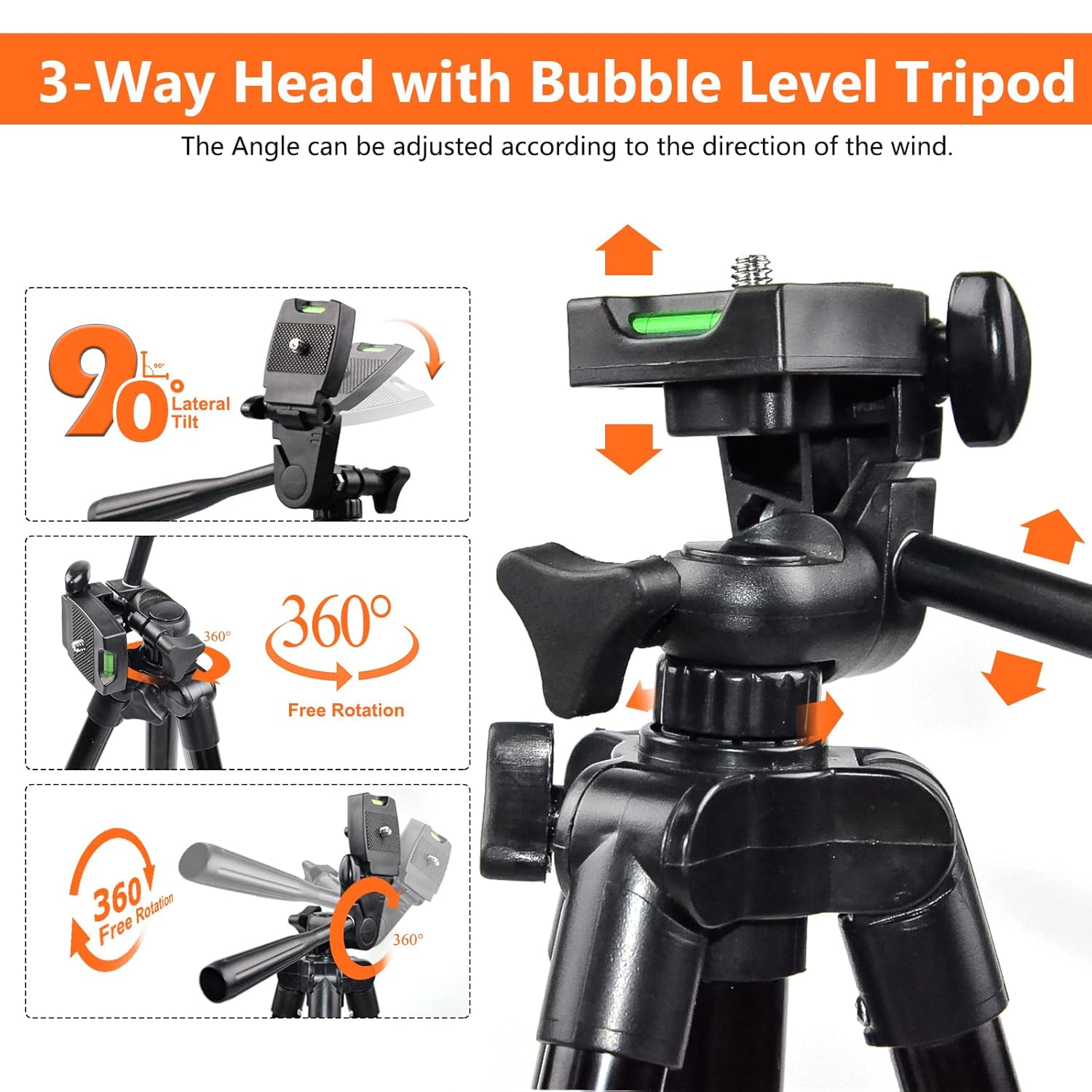
Figure 2.1: Included Package Contents
3. Product Components
Familiarize yourself with the main parts of your GR-8808 Anemometer:
- Fan Blades (Vane): 8-blade design for accurate wind speed measurement.
- Large Digital LCD Screen: Displays wind speed, temperature, humidity, and other data. Features a backlight for low-light conditions.
- Control Buttons:
- T/RH: Temperature/Humidity switching.
- UNIT: Wind speed unit switching (m/s, km/h, mph, knots, ft/min).
- HOLD: Data hold function.
- MODE: MAX/MIN/Current mode switching.
- Power Button: On/Off.
- Backlight/Flashlight Button: Activates screen backlight or flashlight.
- Flashlight: Integrated LED light for illumination.
- Tripod Screw Hole: Standard 1/4-inch thread for mounting on a tripod.
- Type-C Charging Port: For recharging the internal battery.

Figure 3.1: Front and Side View of Anemometer Components

Figure 3.2: LCD Screen and Button Functions
4. Setup
4.1 Charging the Device
The GR-8808 Anemometer features a rechargeable battery. Before first use, or when the low battery indicator appears on the screen, charge the device using the provided Type-C cable.
- Connect the Type-C end of the cable to the charging port on the side of the anemometer.
- Connect the USB-A end of the cable to a compatible USB power adapter (not included) or a computer's USB port.
- The battery indicator on the LCD screen will show charging status. A full charge typically provides up to 60 hours of working time.
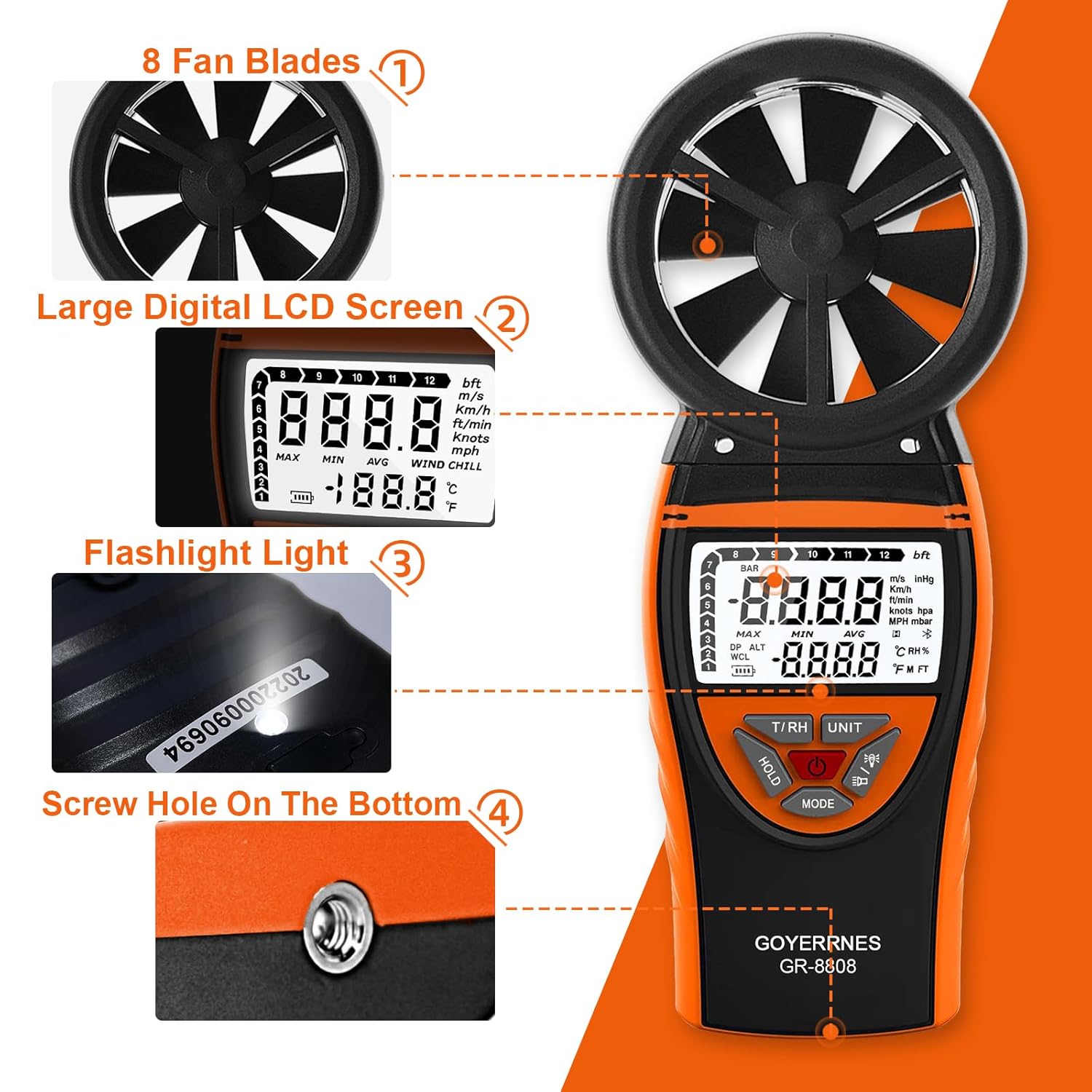
Figure 4.1: Type-C Charging Port
4.2 Powering On/Off
Press and hold the Power button (usually the central button with a circle icon) for a few seconds to turn the device on or off.
5. Operating Instructions
5.1 Basic Measurement
Once powered on, the anemometer will immediately begin displaying real-time wind speed, temperature, and humidity. Ensure the fan blades are exposed to the airflow for accurate readings.
5.2 Changing Measurement Units
Press the UNIT button to cycle through different wind speed units: meters per second (m/s), kilometers per hour (km/h), miles per hour (mph), knots, and feet per minute (ft/min).
Press the T/RH button to switch between Celsius (°C) and Fahrenheit (°F) for temperature, and to view relative humidity (RH%).
5.3 Data Hold Function
To freeze the current readings on the display, press the HOLD button. Press it again to release and resume real-time measurements.
5.4 MAX/MIN/AVG Mode
Press the MODE button to cycle through maximum (MAX), minimum (MIN), and average (AVG) wind speed readings. This allows you to track fluctuations over a measurement period.
5.5 Backlight and Flashlight
A short press of the Backlight/Flashlight button (light bulb icon) will activate the LCD screen backlight for improved visibility in dark environments. A long press of the same button will turn on the integrated flashlight. Long press again to turn off the flashlight.

Figure 5.1: Backlit Screen and Flashlight Operation
5.6 Auto-Off Function
The device features an automatic power-off function to conserve battery life. If no buttons are pressed for a certain period, the anemometer will automatically shut down. This feature can typically be disabled or adjusted in advanced settings, though specific instructions are not provided here.
6. Tripod Usage
For stable, hands-free measurements, especially during continuous monitoring or in windy conditions, utilize the included tripod.
- Locate the metal screw thread at the bottom of the anemometer.
- Attach the anemometer to the tripod by screwing it onto the tripod's mounting plate.
- Adjust the tripod's legs and head to position the anemometer correctly, ensuring the fan blades face the direction of the wind for optimal accuracy. The tripod features a 3-way head with lateral tilt and 360° free rotation.

Figure 6.1: Anemometer Mounted on Tripod
7. CFM Calculation Application
The GR-8808 Anemometer can assist in calculating Cubic Feet per Minute (CFM) for air flow measurements, particularly useful in HVAC applications. To obtain CFM, measure the wind speed and then multiply it by the cross-sectional area of the vent or duct.
Formula: Air Flow in CFM = Wind speed (in ft/min) × Duct Cross Sectional Area (in sq ft)
Ensure your wind speed unit is set to feet per minute (ft/min) for this calculation.
8. Specifications
| Feature | Specification |
|---|---|
| Brand | GOYERRNES |
| Model Number | GR-8808 |
| Power Source | Rechargeable Battery (Type-C) |
| Wind Speed Range | 0.67 to 67.1 mph (0.3 to 30 m/s) |
| Wind Speed Accuracy | +/- 2% of readings |
| Wind Temperature Range | 14℉ to 113℉ (-10℃ to 45℃) |
| Temperature Resolution | 0.1% |
| Temperature Accuracy | 0.18 °C |
| Display Type | LCD with Backlight |
| Included Components | Anemometer, Tripod, Type-C Cable, Screwdriver, Portable Bag, Hand Strap |
| Material | Acrylonitrile Butadiene Styrene (ABS) |
| Special Features | Large Display, Portable, Flashlight, Auto-Off, Data Hold, MAX/MIN/AVG |
9. Maintenance
- Cleaning: Wipe the device with a soft, dry cloth. Do not use abrasive cleaners or solvents. Ensure the fan blades are free from dust and debris for accurate readings.
- Storage: Store the anemometer in its portable carrying bag in a cool, dry place when not in use. Avoid extreme temperatures and direct sunlight.
- Battery Care: Recharge the battery regularly, even if the device is not used frequently, to maintain battery health.
10. Troubleshooting
| Problem | Possible Cause | Solution |
|---|---|---|
| Device does not power on. | Low or depleted battery. | Charge the device using the Type-C cable. |
| Inaccurate wind speed readings. | Fan blades obstructed or dirty; incorrect positioning. | Ensure fan blades are clean and rotate freely. Position the device directly into the wind. |
| Display is dim or unreadable. | Backlight is off; low battery. | Press the Backlight button. Charge the device if the battery is low. |
| Flashlight not working. | Flashlight off; low battery. | Long press the Flashlight button. Charge the device if the battery is low. |
11. Video Demonstration
Watch this official product video for a visual guide on unpacking, operating, and utilizing the various features of your GOYERRNES GR-8808 Handheld Anemometer, including backlight, unit switching, and flashlight functions.
Video 11.1: GOYERRNES GR-8808 Anemometer Unboxing and Feature Demonstration
12. Warranty and Support
For warranty information, technical support, or customer service inquiries, please refer to the contact details provided on the product packaging or visit the official GOYERRNES website. Keep your purchase receipt for warranty claims.