1. Introduction
This manual provides essential instructions for the safe and effective use of your saschedross AC Adapter. This adapter is designed as a replacement power supply for Zeelink Portable Speaker Karaoke Machines, specifically compatible with models KM-10, KM10, KM-10-B, KM10-B, and KM10B, which feature a 15000mAh Li-ion battery and 150W power output.
Please read this manual thoroughly before using the product and retain it for future reference.
2. Important Safety Instructions
- Read all instructions: Before using the AC adapter, read all safety and operating instructions.
- Retain instructions: Keep these safety and operating instructions for future reference.
- Heed warnings: Adhere to all warnings on the product and in the operating instructions.
- Follow instructions: Follow all operating and use instructions.
- Power Sources: Use only with the specified power source as indicated on the adapter.
- Ventilation: Do not block any ventilation openings. Install in accordance with the manufacturer's instructions.
- Heat: Do not install near any heat sources such as radiators, heat registers, stoves, or other apparatus (including amplifiers) that produce heat.
- Polarized Plug: Do not defeat the safety purpose of the polarized or grounding-type plug. A polarized plug has two blades with one wider than the other. A grounding type plug has two blades and a third grounding prong. The wide blade or the third prong are provided for your safety. If the provided plug does not fit into your outlet, consult an electrician for replacement of the obsolete outlet.
- Power-Cord Protection: Protect the power cord from being walked on or pinched, particularly at plugs, convenience receptacles, and the point where they exit from the apparatus.
- Cleaning: Unplug this apparatus during lightning storms or when unused for long periods of time.
- Servicing: Refer all servicing to qualified service personnel. Servicing is required when the apparatus has been damaged in any way, such as power-supply cord or plug is damaged, liquid has been spilled or objects have fallen into the apparatus, the apparatus has been exposed to rain or moisture, does not operate normally, or has been dropped.
- Battery Note: Rechargeable batteries typically last 1 to 3 years. If a battery is old or depleted, it may not charge, but this isn't necessarily the charger's fault. To determine if the charger is working, use a voltmeter.
3. Package Contents
Please check the package for the following items:
- 1 x saschedross AC Adapter
If any items are missing or damaged, please contact customer support.
4. Product Overview
The saschedross AC Adapter is a compact and efficient power supply designed to provide reliable power to your compatible Zeelink Karaoke Machine. It features a standard 2-pin US plug and a Micro-USB output connector.
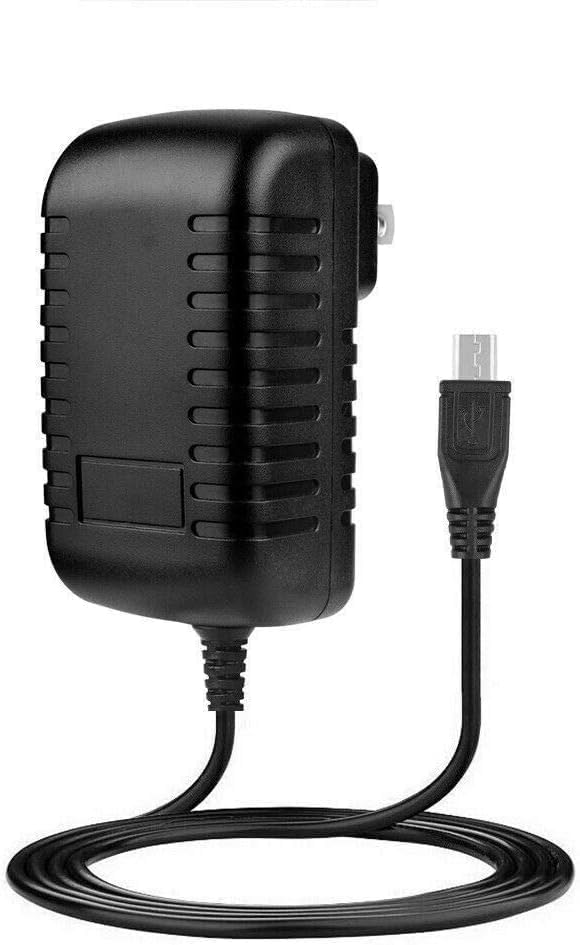
Figure 4.1: saschedross AC Adapter. This image shows the black AC adapter unit with its integrated power cable ending in a Micro-USB connector.

Figure 4.2: AC Adapter Dimensions. This image displays the physical dimensions of the AC adapter, indicating a length of 2.7 inches, a width of 1.2 inches, and a depth of 1.6 inches.
5. Setup Instructions
Follow these steps to set up your saschedross AC Adapter:
- Unpack: Carefully remove the AC adapter from its packaging.
- Inspect: Check the adapter and cable for any visible damage. Do not use if damaged.
- Connect to Device: Locate the power input port on your Zeelink Portable Speaker Karaoke Machine (models KM-10, KM10, KM-10-B, KM10-B, KM10B). Insert the Micro-USB connector of the AC adapter cable firmly into the device's power input port.
- Connect to Power Outlet: Plug the 2-pin AC plug of the adapter into a standard 110V AC wall outlet. Ensure the outlet is easily accessible.
- Verify Connection: Confirm that both connections are secure. The device should indicate that it is receiving power or charging (e.g., a charging indicator light).
Note: This adapter is specifically designed for the Zeelink KM-10 series karaoke machines. Using it with incompatible devices may cause damage.
6. Operating Instructions
Once the AC adapter is properly connected, your Zeelink Portable Speaker Karaoke Machine will begin to receive power or charge its internal battery.
- Powering the Device: The adapter provides continuous power to the connected device when plugged into an active wall outlet.
- Charging the Battery: If your device has a rechargeable battery, the adapter will charge it while connected. Refer to your device's manual for specific charging indicators and times.
- Disconnection: To disconnect, first unplug the AC adapter from the wall outlet, then gently remove the Micro-USB connector from your device.
7. Maintenance
Proper maintenance ensures the longevity and safe operation of your AC adapter:
- Cleaning: Disconnect the adapter from the power outlet and the device before cleaning. Use a soft, dry cloth to wipe the exterior. Do not use liquid cleaners or aerosols.
- Storage: When not in use, store the adapter in a cool, dry place, away from direct sunlight and moisture. Avoid tightly winding the cable to prevent damage.
- Inspection: Periodically inspect the power cord and adapter housing for any signs of damage, such as cuts, fraying, or cracks. If damage is found, discontinue use immediately.
8. Troubleshooting
If you encounter issues with your AC adapter, refer to the following common problems and solutions:
| Problem | Possible Cause | Solution |
|---|---|---|
| Device not powering on/charging. |
|
|
| Adapter feels hot during use. |
|
|
If the problem persists after trying these solutions, please contact customer support.
9. Specifications
| Feature | Detail |
|---|---|
| Brand | saschedross |
| Compatible Models | Zeelink KM-10, KM10, KM-10-B, KM10-B, KM10B Portable Speaker Karaoke Machine |
| Input Voltage | 110 Volts (AC) |
| Connector Type | 2-Pin (AC plug), Micro-USB (DC output) |
| Color | Black |
| Manufacturer | Shenzhen Waweis Technology Co., Ltd |
10. Warranty and Customer Support
Specific warranty information for this product may vary. Please refer to the product packaging or the retailer's website for details regarding warranty coverage and terms.
For technical support, troubleshooting assistance, or to inquire about warranty claims, please contact the seller or manufacturer directly. Contact information can typically be found on your purchase receipt or the product's listing page.


