
1. Introduction
This manual provides detailed instructions for the installation, operation, and maintenance of your Century Midiabox B7 Digital Satellite Receiver Kit. This kit is designed to deliver high-quality satellite television reception, supporting Full HD resolution and advanced standards like H.265 and DVBS2X. Please read this manual thoroughly before beginning installation or operation to ensure proper use and optimal performance.

Image 1.1: Century Midiabox B7 Digital Satellite Receiver. This compact device processes satellite signals for television display.
2. Package Contents
Verify that all the following components are included in your package:
- 1x Century Midiabox B7 Digital Satellite Receiver
- 1x 60 cm Satellite Antenna
- 1x Simple LNBF (Low-Noise Block Downconverter Feedhorn)
- 1x Coaxial Cable
- 1x HDMI Cable
- 1x AV Cable
- 1x External Bivolt Power Supply (100~240VAC/12V/1.5A)
- 2x AAA Batteries (for remote control)
- 1x Remote Control

Image 2.1: 60 cm Satellite Antenna. This dish collects satellite signals.
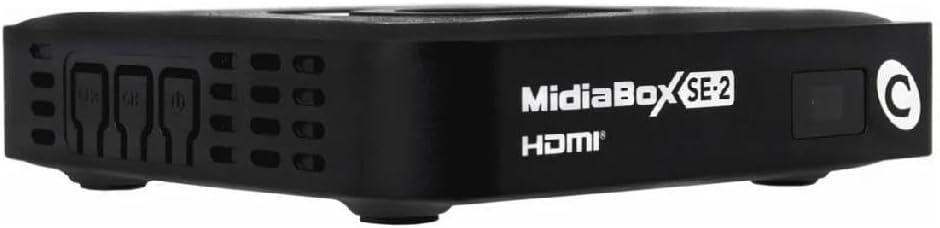
Image 2.2: Simple LNBF. This component is mounted on the antenna to receive and convert satellite signals.
3. Setup and Installation
3.1. Antenna Installation
Proper installation of the satellite antenna is crucial for optimal signal reception. This process typically involves:
- Mounting the Antenna: Securely mount the 60 cm satellite antenna in a location with a clear line of sight to the satellite. Avoid obstructions such as trees or buildings.
- Assembling the LNBF: Attach the Simple LNBF to the antenna arm according to the antenna manufacturer's instructions.
- Connecting Coaxial Cable: Connect one end of the coaxial cable to the LNBF and the other end to the "LNB IN" port on the Century Midiabox B7 receiver.
- Aiming the Antenna: Carefully adjust the antenna's elevation and azimuth to align with the satellite signal. This often requires a satellite finder tool or professional assistance.
3.2. Connecting the Receiver to Your TV
Connect the Midiabox B7 receiver to your television using either the HDMI or AV cable:
- HDMI Connection (Recommended for HD): Connect one end of the HDMI cable to the HDMI OUT port on the receiver and the other end to an available HDMI IN port on your television.
- AV Connection (Standard Definition): Connect the AV cable to the corresponding color-coded ports on the receiver and your television.
3.3. Powering On and Initial Setup
- Insert Batteries: Open the remote control battery compartment and insert the two AAA batteries, observing polarity.
- Connect Power: Connect the external bivolt power supply to the receiver's power input and then plug it into an electrical outlet (100~240VAC).
- Turn On: Power on your television and select the correct HDMI or AV input source. Turn on the Century Midiabox B7 receiver.
- "Instala Fácil" Function: Upon first power-on or after a factory reset, the receiver will prompt you to use the "Instala Fácil" (Easy Install) function. Follow the on-screen instructions. This function automatically updates the software and configures the channel list, simplifying the setup process.
4. Operation
4.1. Basic Functions
- Channel Navigation: Use the CH+/CH- buttons on the remote control to change channels.
- Volume Control: Use the VOL+/VOL- buttons to adjust the volume.
- Channel Programming Guide: Access the Electronic Program Guide (EPG) to view current and upcoming program schedules. Refer to your remote control for the specific EPG button.
- Multimedia Playback via USB: Connect a USB storage device to the receiver's USB port to play compatible multimedia content (e.g., photos, music, videos).
- Sleep Function: Set a timer for the receiver to automatically turn off.
- Timeshift Function: Pause live television and resume playback later. This requires a connected USB storage device.
- Program Scheduling: Schedule recordings of your favorite programs. This also requires a connected USB storage device.
4.2. Automatic Updates
The Century Midiabox B7 receiver supports automatic software updates via satellite. Ensure your receiver is connected to the satellite signal to receive these updates, which help maintain optimal performance and introduce new features.
5. Maintenance
- Cleaning: Clean the receiver's exterior with a soft, dry cloth. Do not use liquid cleaners or abrasive materials.
- Ventilation: Ensure the receiver has adequate ventilation to prevent overheating. Do not block ventilation openings.
- Software Updates: Allow the receiver to perform automatic software updates to ensure it runs the latest firmware.
- Cable Connections: Periodically check all cable connections (coaxial, HDMI, AV, power) to ensure they are secure.
6. Troubleshooting
| Problem | Possible Cause | Solution |
|---|---|---|
| No picture or sound |
|
|
| "No Signal" message |
|
|
| Remote control not working |
|
|
7. Specifications
| Brand | Century |
| Model | Midiabox B7 |
| Color | Black |
| Connectivity Technology | USB |
| HDMI Ports | 1 |
| Compatible Devices | Television |
| Compatible Satellite Services | SKY, Claro TV (as examples of compatible services) |
| Video Output Ports | 2 (HDMI, AV) |
| Video Output Resolution | 1080p (Full HD) |
| Compatible Standards | H.265, DVBS2X |
| Aspect Ratio | 16:9 |
| External Test Certification | ANATEL: 207482215339 |
| Power Supply | External Bivolt (100~240VAC/12V/1.5A) |
| Country of Origin | Brazil |
8. Warranty and Support
8.1. Warranty Information
This Century Midiabox B7 Digital Satellite Receiver Kit comes with a 1-year manufacturer's warranty. Please retain your proof of purchase for warranty claims. The warranty covers defects in materials and workmanship under normal use.
8.2. Customer Support
For technical assistance, troubleshooting beyond this manual, or warranty inquiries, please contact Century customer support. Refer to the product packaging or the manufacturer's official website for contact details.


