
1. Introduction
This manual provides detailed instructions for the installation and use of the YTRIO ISO Wiring Harness Adapter, designed specifically for Volkswagen Golf MK4 vehicles. This adapter facilitates the connection of aftermarket car audio systems or other electrical components by providing a standardized ISO interface. It is engineered for direct replacement, ensuring compatibility and reliable performance.
2. Safety Information
Please read and understand all safety instructions before attempting installation. Improper installation can lead to electrical damage, fire, or personal injury.
- Always disconnect the vehicle's battery negative terminal before beginning any electrical work to prevent short circuits.
- Ensure the vehicle's ignition is off and the key is removed.
- If you are unsure about any step, consult a qualified automotive technician.
- Use appropriate tools and wear protective eyewear.
- Verify all connections are secure and properly insulated to prevent electrical shorts.
3. Product Overview
The YTRIO ISO Wiring Harness Adapter consists of male and female connectors designed to interface with your Volkswagen Golf MK4's existing wiring and an aftermarket device. It simplifies the installation process by eliminating the need for cutting or splicing original vehicle wiring.

Figure 3.1: The YTRIO ISO Wiring Harness Adapter, showing the various colored wires and male/female connectors.
4. Setup and Installation
This section outlines the general steps for installing the ISO wiring harness adapter. Specific vehicle disassembly procedures are not covered and may vary.
- Prepare the Vehicle: Ensure the vehicle is parked on a level surface, the parking brake is engaged, and the engine is off. Disconnect the negative terminal of the car battery.
- Access Vehicle Wiring: Carefully remove the necessary trim panels and the existing car stereo or component to access the vehicle's factory wiring harness.
- Identify Connectors: Locate the factory wiring harness connectors in your Volkswagen Golf MK4. These will typically be connected to the back of the original head unit.
- Connect the Adapter: Plug the appropriate male connector of the YTRIO ISO Wiring Harness Adapter into the corresponding female factory connector from your vehicle. Then, connect the female end of the YTRIO adapter to the male connector of your aftermarket device's wiring harness. Ensure all connections are firm and secure.

Figure 4.1: Diagram illustrating the ISO wiring harness connections, showing the male and female connector types and their pin configurations for power and signal.
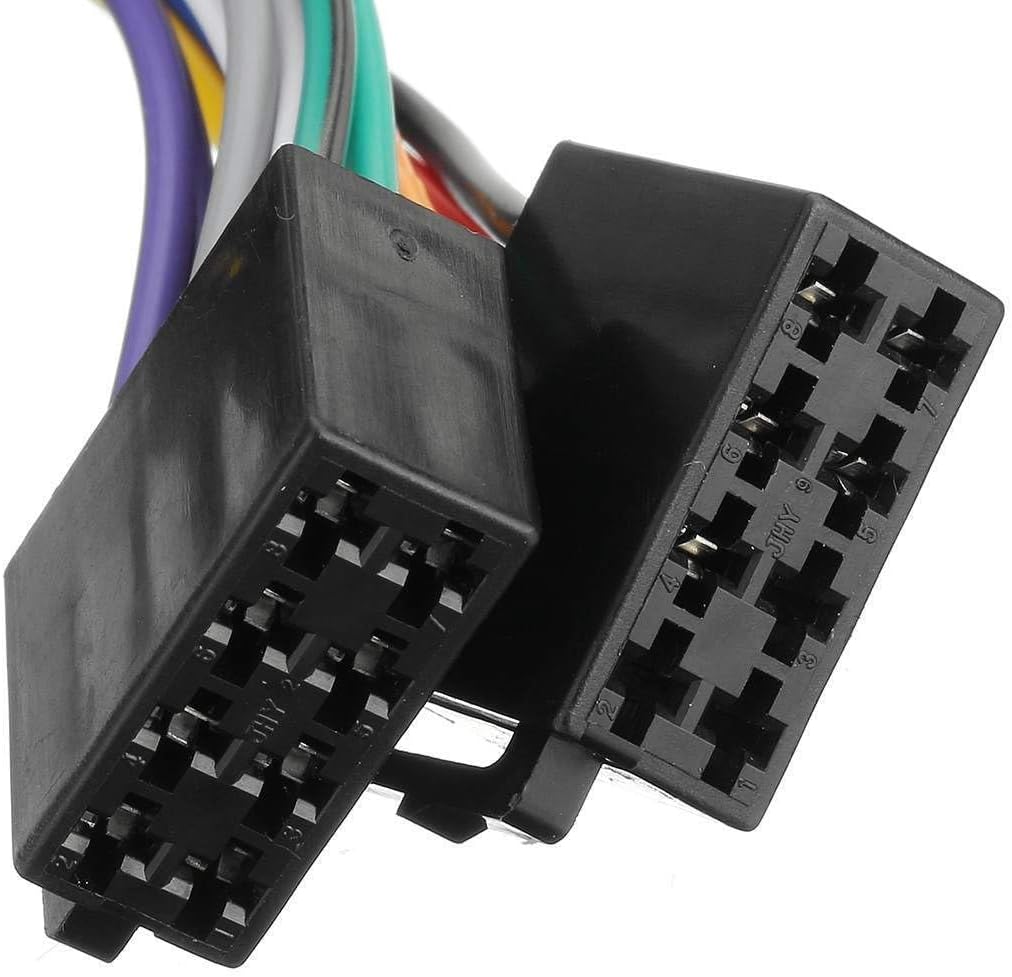
Figure 4.2: A close-up view of the male connector pins, showing the precise arrangement for secure electrical contact.
- Test Connections: Before reassembling, reconnect the vehicle battery and briefly test the functionality of the aftermarket device (e.g., car stereo power, sound output).
- Secure Wiring: Route the wiring neatly and securely, ensuring it does not interfere with moving parts or get pinched. Use zip ties if necessary.
- Reassemble: Reinstall all removed trim panels and the car stereo or component.
5. Operating Instructions
The YTRIO ISO Wiring Harness Adapter is a passive component. Once correctly installed, it facilitates the electrical connection between your vehicle and the aftermarket device. Its operation is seamless and requires no direct user interaction. Ensure your aftermarket device is powered on and functioning as per its own instruction manual.
6. Maintenance
The YTRIO ISO Wiring Harness Adapter requires minimal maintenance. It is designed for long-term reliability. Periodically, during other vehicle maintenance, you may visually inspect the connections to ensure they remain secure and free from corrosion or damage. Do not attempt to modify the wiring harness.
7. Troubleshooting
If you experience issues after installing the wiring harness adapter, consider the following troubleshooting steps:
- No Power to Device:
- Check the vehicle's fuse box for any blown fuses related to the car stereo or accessory power.
- Ensure all connections of the ISO harness are fully seated and secure.
- Verify the vehicle battery is properly connected and charged.
- No Sound:
- Confirm that the speaker wires are correctly connected from the aftermarket device to the ISO harness.
- Check the aftermarket device's settings (e.g., volume, mute function, input source).
- Intermittent Functionality:
- Inspect all connections for looseness or corrosion.
- Ensure no wires are pinched or damaged during reassembly.
If problems persist, it is recommended to consult a professional automotive electrician.
8. Specifications
| Specification | Detail |
|---|---|
| Product Dimensions | 1.18 x 0.79 x 0.79 inches |
| Item Weight | 1.76 ounces (50 Grams) |
| Manufacturer | YTRIO |
| Item Model Number | YTRIO717 |
| Installation Type | Direct Replacement |
| Number of Pieces | 1 |