1. Introduction
This manual provides essential information for the safe and efficient operation of your VOLTWORKS 4000 Watt Pure Sine Wave Power Inverter, Model VS-4000KAR. This inverter converts 12V DC battery power to 110V/120V AC household power, suitable for a wide range of applications including RVs, boats, off-grid solar systems, and emergency backup power.
The inverter delivers 4000 watts of continuous power and can handle a surge peak power of 7000 watts for up to 2 seconds, making it suitable for high-power inductive loads such as air conditioners, refrigerators, and power tools. It features an adjustable input voltage function for enhanced compatibility with various battery types, including lithium batteries, to optimize battery health and lifespan.

Image 1.1: The VOLTWORKS 4000 Watt Pure Sine Wave Power Inverter with its accompanying cables and remote control.
2. Safety Information
Read all safety instructions carefully before installation and operation. Failure to follow these instructions may result in electric shock, fire, or serious injury.
- Ventilation: Ensure adequate ventilation around the inverter. Do not block ventilation openings.
- Environment: Operate the inverter in a dry, cool, and well-ventilated area, away from direct sunlight, heat sources, and flammable materials.
- Grounding: Always ensure the inverter is properly grounded. Refer to the setup section for grounding instructions.
- Connections: Use appropriate cable gauges for connections. Ensure all connections are tight and secure to prevent overheating and arcing. Input cable connections are covered with plastic caps for protection against shorts.
- Initial Use: Before using the inverter for the first time, or after a long period of inactivity, operate it without a load for 30-60 minutes. This allows internal capacitors to charge properly, preventing potential damage.
- Protection Features: The inverter includes multiple safety protections:
- Short circuit protection
- Input over-voltage/under-voltage protection
- Output short-circuit protection
- Over-load protection
- Over-temperature protection
- Low-input alarm
- Low-Output Voltage Protection
- Reverse polarity protection
- Internal Components: The inverter features an ETL listed transformer, UL458 listed fuses, and a UL458 listed PCB for enhanced safety and fire protection. It is FCC approved for anti-interference.
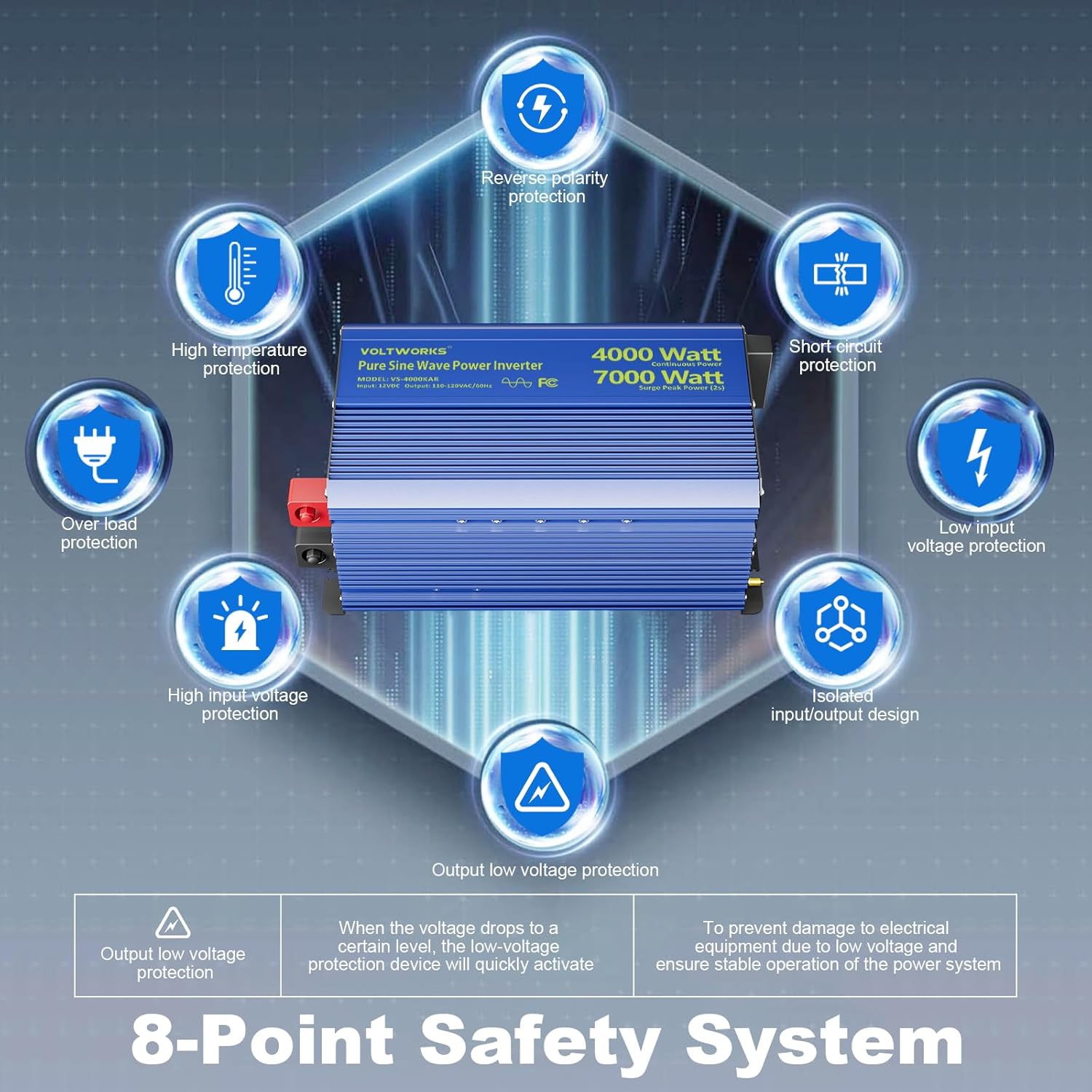
Image 2.1: Overview of the inverter's 8-point safety system, including protections against short circuits, over-voltage, under-voltage, overload, and high temperature.
3. Setup
Proper setup is crucial for the inverter's performance and safety.
3.1 Unpacking and Inspection
Upon receiving your inverter, carefully unpack all components and inspect for any shipping damage. The package should include:
- 1 x VOLTWORKS 4000W Pure Sine Wave Inverter
- 1 x 30ft Remote Controller (4P4C RJ10)
- 1 x 3ft Earth Wire
- 4 pairs of 2ft Battery Cables (4AWG)
- Instruction Manual
- Shockproof Pads

Image 3.1: The inverter and its included accessories, such as battery cables, remote controller, and grounding wire.
3.2 Mounting the Inverter
Choose a mounting location that is:
- Dry and protected from moisture.
- Cool and well-ventilated.
- Away from direct sunlight and heat sources.
- Secure and stable to prevent movement.
3.3 Battery Connection
Connect the inverter to your 12V DC battery bank. Ensure the battery bank can provide sufficient current for the inverter's rated output. Use the provided 4AWG battery cables or thicker cables if necessary for longer runs or higher current demands. Always connect the positive (+) terminal of the inverter to the positive (+) terminal of the battery and the negative (-) terminal of the inverter to the negative (-) terminal of the battery. Ensure all connections are tight.
It is recommended to install appropriate fuses and breakers between the battery and the inverter for added safety.
3.4 Grounding
Connect the inverter's grounding terminal to a reliable earth ground using the provided earth wire. This is a critical safety step to prevent electric shock.
3.5 Adjustable Input Voltage for Battery Compatibility
The inverter features an adjustable input voltage function, enhancing compatibility with various battery types, including lead-acid (GEL, SLA, FLD, AGM) and lithium (Li, LiFePo4) batteries. This function allows you to customize the low voltage shutdown value to protect battery health and extend lifespan. Refer to the manual for specific instructions on adjusting this setting.

Image 3.2: The inverter supports various battery types, including GEL, SLA, LI, FLD, AGM, and LiFePo4, with an adjustable low voltage shutdown setting.
3.6 Remote Controller Connection
Connect the 30ft remote controller to the designated port on the inverter. This allows for convenient remote power control and battery monitoring.
4. Operating Instructions
Follow these steps for safe and effective operation of your inverter.
4.1 Powering On/Off
- Ensure all connections are secure and correct.
- Press the power button on the inverter or the remote controller to turn the unit on. The LCD display will illuminate.
- To power off, press the power button again.
4.2 LCD Display and Monitoring
The integrated LCD display provides real-time operational status:
- Battery status
- Input DC voltage
- Output AC voltage
- Load watts
- Protection codes (for troubleshooting)
The LCD screen will automatically shut down after one minute of no operation to conserve power. The remote controller also offers battery monitoring, helping to prevent battery damage from frequent low power conditions.

Image 4.1: The inverter's LCD display provides real-time operational data, including battery level, voltage, and power output.
4.3 Connecting AC Appliances
The inverter is equipped with 4 AC outlets and a 40A hardwire terminal. Connect your AC appliances to these outlets. The pure sine wave output is suitable for sensitive electronics and high-power inductive loads.

Image 4.2: The pure sine wave output of the inverter is ideal for powering a wide range of sensitive electronics and appliances.

Image 4.3: The inverter's ability to handle 7000W surge peak power for 2 seconds allows it to start high-demand inductive loads like air compressors.
4.4 USB Charging
The inverter includes a PD36W USB-C port and a 3.6A USB-A port for charging smartphones, tablets, and other mobile devices.

Image 4.4: The inverter features both PD36W USB-C and 3.6A USB-A ports for convenient device charging.
5. Maintenance
Regular maintenance ensures optimal performance and longevity of your inverter.
- Cleaning: Keep the inverter clean and free from dust and debris. Use a dry cloth to wipe the exterior. Do not use liquid cleaners.
- Ventilation: Periodically check that the ventilation openings are clear and unobstructed.
- Connections: Regularly inspect all electrical connections (battery terminals, AC outlets, grounding wire) to ensure they remain tight and free from corrosion.
- Fuse Replacement: In the event of a blown fuse, replacement may be necessary. This typically involves unscrewing the output side plate's 4 screws and carefully sliding out the center panel of the top plate after disconnecting the display cable. Refer to the full product manual for detailed instructions or contact customer support. Use only fuses of the specified rating.
6. Troubleshooting
This section addresses common issues you might encounter with your inverter.
6.1 Inverter Not Powering On
- Check Battery Connections: Ensure battery cables are securely connected to both the inverter and the battery terminals.
- Battery Voltage: Verify that the battery voltage is within the operational range (12V nominal). If the battery is too low, the inverter's low-input voltage protection will activate.
- Fuses: Check the internal fuses. If a fuse is blown, replace it with one of the correct rating (refer to Maintenance section).
6.2 No AC Output
- Overload Protection: If the connected load exceeds the inverter's continuous or surge rating, the overload protection will activate. Reduce the load and restart the inverter.
- Over-temperature Protection: If the inverter overheats due to poor ventilation or excessive load, it will shut down. Allow it to cool down, ensure proper ventilation, and reduce the load.
- Short Circuit Protection: If a short circuit is detected in the output, the inverter will shut down. Disconnect all AC loads, check for faults, and restart.
- Low/High Input Voltage: The inverter will shut down if the input DC voltage is too low or too high. Check your battery voltage.
- Protection Codes: The LCD display may show specific protection codes. Consult the full instruction manual for a detailed explanation of these codes and corresponding troubleshooting steps.
6.3 Inverter Fans Not Running
The cooling fans operate based on load and internal temperature. They may not run continuously, especially under light loads or in cool environments. This is normal operation.
7. Specifications
| Feature | Specification |
|---|---|
| Model Name | VS-4000KAR |
| Continuous Wattage | 4000 watts |
| Surge Peak Power | 7000 watts (for 2 seconds) |
| Input Voltage | 12V DC |
| Output Voltage | 110V-120V AC |
| Output Waveform | Pure Sine Wave |
| Product Dimensions | 14.3 x 8 x 6.8 inches |
| Item Weight | 15.43 pounds |
| Power Source | Solar and Battery Powered |
| Recommended Uses | Home, Office, Vehicle (RV, Boat, Off-Grid) |
| Manufacturer | VOLTWORKS |
8. Warranty and Support
VOLTWORKS is committed to providing reliable products and excellent customer service.
- Warranty: This product comes with an 18-month warranty.
- Product Liability: Product liability insurance is covered by AIG insurance company.
- Customer Support: For any questions, technical assistance, or warranty claims, please contact VOLTWORKS customer service. We offer 24/7 real-person customer service.
- Online Resources: Visit the VOLTWORKS Store on Amazon for additional product information and support.