
IDplus 974
Temperature Controller IDplus 974 Cold Storage Thermostat User Manual
1. Introduction
This manual provides essential information for the proper installation, operation, and maintenance of the Generic IDplus 974 Temperature Controller. This device is designed for precise temperature control in cold storage applications, ensuring optimal environmental conditions. Please read this manual thoroughly before using the product.
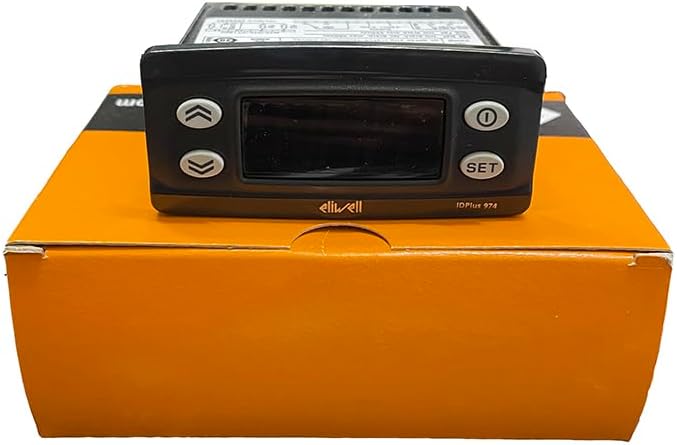
Figure 1: Front view of the IDplus 974 Temperature Controller, displaying the screen and control buttons (Up, Down, Power, SET).
2. Safety Information
Adherence to the following safety guidelines is crucial for safe operation and to prevent damage to the device or injury to personnel.
- This device is classified as an operation (not safety) device for incorporation into a larger system.
- Ensure the power supply matches the specifications on the instrument label (12Va/c or 230Va, 50/60 Hz). Incorrect voltage can cause severe damage.
- The device has a Pollution Class of 2 and an Overvoltage Category of II, with a Rated Impulse Voltage of 2500V. Install in environments consistent with these ratings.
- All electrical connections must be performed by qualified personnel in accordance with local and national electrical codes.
- Do not expose the device to excessive moisture, dust, or extreme temperatures outside its operating range (-5°C to +55°C).
3. Setup
3.1 Mounting
The IDplus 974 is designed for panel mounting. A drilling template of 71x29 mm (+0.2/-0.1 mm) is required for installation. Ensure adequate ventilation around the unit.
3.2 Power Supply and Connections
The unit operates on either 12Va/c (±10%) 50/60 Hz or 230Va (±10%) 50/60 Hz, with a maximum consumption of 4.5W. Refer to the device label for the specific power supply rating of your unit. Connect power and sensors to the appropriate terminals as indicated on the wiring diagram and terminal block.

Figure 2: Rear view of the IDplus 974 Temperature Controller, highlighting the terminal blocks for electrical connections.

Figure 3: Top view of the IDplus 974 Temperature Controller, displaying the product label with model information, electrical ratings, and a simplified wiring schematic.
The product includes a buckle, sensor, and packaging box. Ensure all components are present before installation.
4. Operation
4.1 Display and Inputs
The IDplus 974 features a 3-digit display with a sign. It supports various sensor types and input configurations:
- Display Range:
- NTC: -50.0°C to +110°C
- PTC: -55.0°C to +140°C
- PT1000: -55.0°C to +150°C
- Accuracy:
- NTC, PTC, PT1000 (-55.0°C to +70°C): Better than 0.5% of full scale +1 digit
- PT1000 (+70.0°C to +150°C): Better than 0.6% of full scale +1 digit
- Resolution: 0.1 °C
- Buzzer: Yes (functionality depends on the specific model configuration).
- Analogue Inputs (IDPlus 971/974): 2 NTC (default)/PTC/PT1000 inputs, selectable via parameter H00.
- Digital Inputs (IDPlus 971/974): 2 voltage-free digital inputs.
4.2 Control Buttons
The front panel features several buttons for configuration and operation:
- Up Arrow: Used to increase values or navigate menus.
- Down Arrow: Used to decrease values or navigate menus.
- Power Button: Typically used to turn the unit on/off or enter/exit standby mode.
- SET Button: Used to confirm selections, enter programming mode, or view setpoints.
Refer to the detailed programming manual (if provided separately) for specific parameter settings and advanced functions.
5. Maintenance
Regular maintenance ensures the longevity and accurate performance of your temperature controller.
- Cleaning: Periodically clean the front panel with a soft, damp cloth. Do not use abrasive cleaners or solvents. Ensure no liquid enters the device.
- Inspection: Regularly check all wiring connections for tightness and signs of wear or corrosion.
- Environmental Conditions: Ensure the operating environment remains within specified temperature and humidity limits to prevent damage.
- Sensor Check: Verify sensor integrity and placement periodically to ensure accurate temperature readings.
For any internal maintenance or repairs, contact qualified service personnel.
6. Troubleshooting
This section provides basic troubleshooting steps for common issues. For complex problems, contact technical support.
- No Power: Check the power supply connection and ensure the voltage matches the device's requirements. Verify the circuit breaker or fuse.
- Incorrect Temperature Reading: Check the sensor connection. Ensure the sensor type selected in the controller's parameters matches the installed sensor (NTC, PTC, PT1000). Verify the sensor is correctly placed in the environment being measured.
- Controller Not Responding: Try cycling the power to the unit. If the issue persists, verify all wiring connections.
- Alarm Activation: Identify the specific alarm code displayed (if any) and consult the programming manual for its meaning and resolution steps. Check if setpoints or alarm thresholds have been inadvertently changed.
7. Specifications
Detailed technical specifications for the IDplus 974 Temperature Controller:
| Feature | Specification |
|---|---|
| Model | IDplus 974 |
| Mounting | Panel mounting with 71x29 mm (+0.2/-0.1 mm) drilling template |
| Type of Action | 1.B |
| Pollution Class | 2 |
| Material Class | IIIa |
| Overvoltage Category | II |
| Rated Impulse Voltage | 2500V |
| Operating Temperature | -5°C to +55°C |
| Storage Temperature | -30°C to +85°C |
| Power Supply Options | 12Va/c (±10%) 50/60 Hz or 230Va (±10%) 50/60 Hz |
| Power Consumption | 4.5W max |
| Digital Outputs (Relay) | Refer to device label for specific ratings |
| Fire Resistance Category | D |
| Software Class | A |
| Item Weight | 0.55 Kilograms (1.21 pounds) |
| Manufacturer | Schneider (Brand: Generic) |
| Included Components | Buckle, sensor, packaging box |
8. Warranty and Support
Specific warranty details are not provided in this manual. For warranty information, technical support, or service inquiries, please contact the vendor or manufacturer directly. Ensure you have your product model number (IDplus 974) and any purchase details available when contacting support.
Related Documents - IDplus 974
 |
Eliwell IDPlus Electronic Controllers for Refrigeration Installers Eliwell IDPlus series offers a complete range of electronic controllers for refrigeration installers, featuring flexible and simple operation, clear displays, and USB customization. Models include IDPlus 902, 961, 971, 974, and 978 for various cooling and heating applications. |
 |
Crouzet Millenium 3 & 88 974 Series Controllers: Installation and Technical Guide Comprehensive installation guide and technical specifications for Crouzet Millenium 3 and 88 974 series industrial automation controllers, covering wiring, safety, and operating conditions. |
 |
Bosch Dishwasher Installation Guide Detailed installation instructions for Bosch dishwashers, covering water and electrical connections, mounting, and final checks. Includes technical specifications and part numbers. |
 |
HAVSTA Chest of Drawers Assembly Instructions Comprehensive assembly guide for the IKEA HAVSTA chest of drawers, featuring detailed step-by-step instructions, safety warnings, and parts list. Designed for easy understanding and safe installation. |
 |
Eliwell ID 974 Digital Temperature Controller User Manual and Technical Specifications This document provides a comprehensive guide to the Eliwell ID 974 digital temperature controller, covering its user interface, menu navigation, installation, operation, technical specifications, and troubleshooting. It is designed for refrigeration units. |
 |
JONAXEL Система за съхранение - Ръководство за закупуване и комбинации Открийте гъвкавата система за съхранение JONAXEL от IKEA. Разгледайте различни комбинации, компоненти и аксесоари, за да организирате дома си ефективно. Научете как да проектирате вашето решение за съхранение. |