
Introduction
This manual provides essential information for the setup, operation, and maintenance of your Skyworth 55 Inch C1 Canvas Art TV. Please read this manual thoroughly before using your television to ensure proper functionality and safety.
What's in the Box
Verify that all components are present upon unboxing:
- 1x Remote Control
- 2x AAA Batteries (for remote)
- 1x User Manual
- 1 Set x Frame (for Art Mode)
- Power Cable (1.5m / 5 ft)

Image: The television's dimensions, input/port details, and a list of included accessories such as the remote, batteries, user manual, and frame set.
Setup & Installation
Flush Wall Mounting
The Skyworth C1 Canvas Art TV features an all-in-one design that eliminates the need for an external connection box, allowing for a sleek, flush mount against the wall. The TV comes with specialized hardware for this purpose.
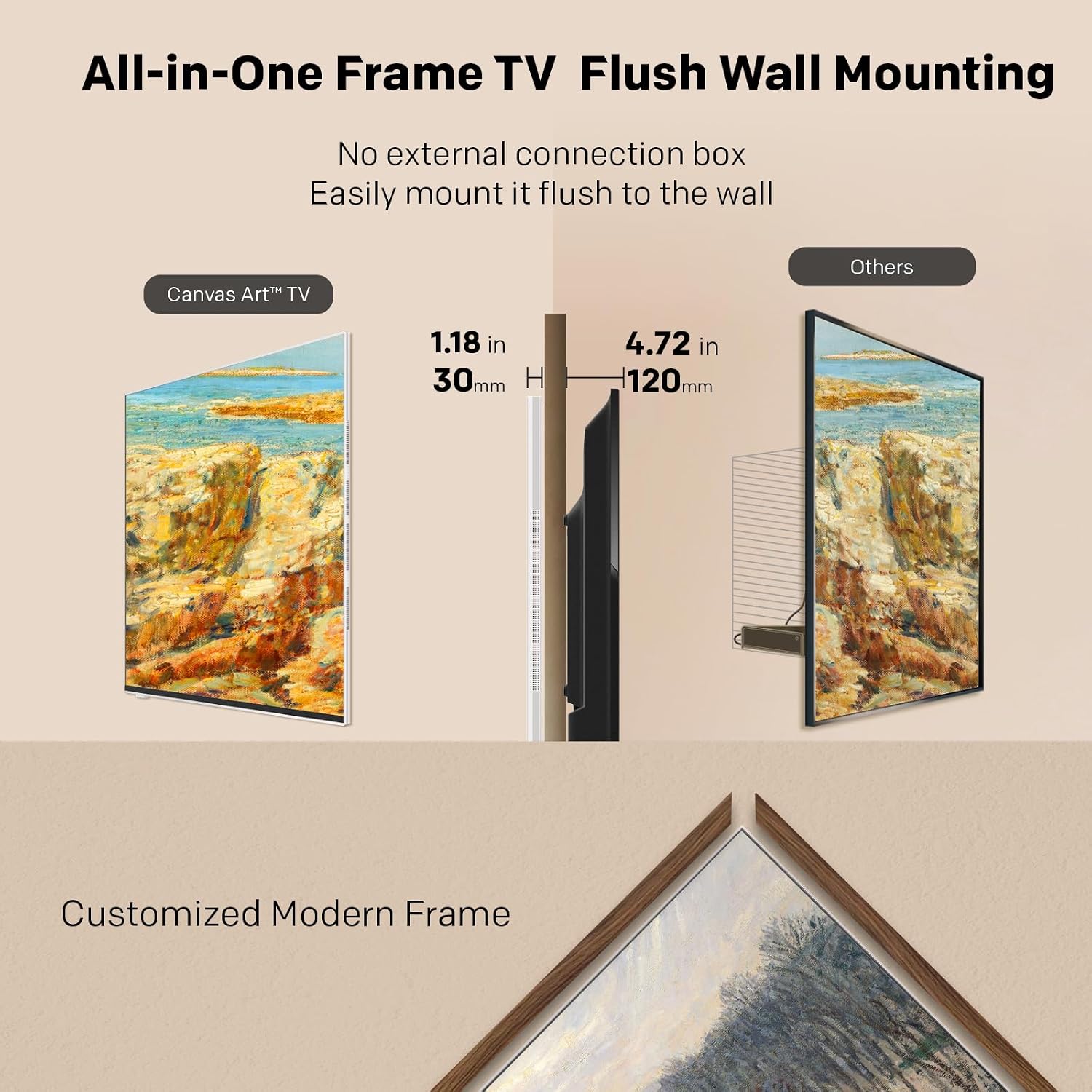
Image: A visual comparison illustrating the thin profile of the Canvas Art TV (1.18 inches / 30mm) when flush-mounted, next to a traditional TV with a larger gap (4.72 inches / 120mm) from the wall.
The mounting system includes fold-out hooks on the TV that engage with wall-mounted hardware. A paper template is provided to assist with accurate marking for drilling. It is recommended to have two people for installation due to the size and to ensure proper cable connection before securing the TV flush.
Connections
The TV's ports are clearly labeled on the back for easy identification. These include HDMI, USB, Ethernet (LAN), Composite In (AV), Digital Audio Out (Optical), and Wi-Fi connectivity. For a clean aesthetic, consider using a cord management system to conceal cables within the wall.
Video: A demonstration of the flush wall mounting process for the Skyworth Canvas Art TV, highlighting the thin profile and ease of installation.
Video: Another perspective on the flush wall mounting of the Skyworth Canvas Art TV, showcasing the minimal gap between the TV and the wall.
Operating Instructions
Google TV Interface
The Skyworth C1 operates on Google TV, providing a user-friendly interface for accessing streaming services, apps, and live channels. The home screen is customizable, allowing for personalized content recommendations and quick access to frequently used applications.
Art Mode
Transform your television into a dynamic art display with Art Mode. You can select from over 150 high-quality pre-loaded images or upload your personal photos to be displayed. The anti-reflection matte screen enhances the art viewing experience by minimizing glare.

Image: The Canvas Art TV showcasing a variety of digital artworks, demonstrating the 'Art Time' feature where the screen displays images like a framed picture.
Picture & Sound Settings
Customize your viewing experience through the Picture and Sound settings. Adjust brightness, color, clarity, and motion. The TV supports various picture modes, including standard, vivid, movie, and sports, to optimize content display. Audio settings allow for adjustments to enhance sound effects, leveraging Dolby Atmos for immersive surround sound.
Features Overview
QLED+ 4K Picture Quality
Experience vibrant colors and sharp detail with QLED+ 4K technology. This advanced display technology delivers a wide color gamut and enhanced contrast for an immersive viewing experience.

Image: A close-up of the TV screen displaying a vibrant, colorful image, with text highlighting 'QLED+ 4K Picture Quality' and logos for HDR, Dolby Vision, and Chameleon Extreme 2.0.
Matte Screen
The anti-reflection matte screen minimizes glare and reflections from ambient light, providing a comfortable viewing experience even in brightly lit rooms. This feature also helps reduce fingerprints on the screen surface.

Image: A split image comparing a 'Non-Matte Display' with significant reflections to a 'Matte Display' with minimal reflections, both showing the same artwork.
HDR & Dolby Vision / Atmos
Enjoy enhanced contrast, brightness, and color accuracy with HDR (High Dynamic Range) and Dolby Vision. Coupled with Dolby Atmos, which provides multi-dimensional audio, the TV delivers a cinematic audio-visual experience.
Adaptive Ambient Light & Blue Light Filter
The TV automatically adjusts screen brightness and color temperature based on ambient room lighting, reducing eye strain. A built-in Blue Light Filter further contributes to eye comfort and vision health.

Image: A split image demonstrating the 'Adaptive Ambient Light' feature, showing how the TV screen's brightness adjusts to match the surrounding room's illumination, reducing eye strain.
Maintenance & Care
To maintain the performance and appearance of your Skyworth C1 Canvas Art TV, follow these guidelines:
- Cleaning the Screen: Gently wipe the screen with a soft, dry microfiber cloth. For stubborn marks, lightly dampen the cloth with water or a screen-specific cleaning solution. Avoid harsh chemicals or abrasive materials.
- Cleaning the Frame: Use a soft, dry cloth to wipe the frame. Do not use liquid cleaners directly on the frame.
- Ventilation: Ensure adequate airflow around the television. Do not block ventilation openings.
- Power: Unplug the TV from the power outlet before cleaning or if it will be unused for an extended period.
Troubleshooting
If you encounter issues with your television, refer to the following common solutions:
- No Power: Check if the power cable is securely connected to both the TV and the power outlet. Ensure the outlet is functional.
- No Picture/Poor Picture Quality: Verify that input sources are correctly connected. Check picture settings (brightness, contrast, resolution). Ensure the correct input source is selected.
- No Sound/Poor Sound Quality: Check volume levels and mute settings. Verify audio output settings. Ensure external audio devices are correctly connected.
- Network Connection Issues: For Wi-Fi, check your router and network settings. For Ethernet, ensure the cable is securely connected.
- Remote Control Not Responding: Replace the batteries. Ensure there are no obstructions between the remote and the TV.
For persistent issues, please consult the full user manual or contact Skyworth customer support.
Specifications
| Brand | Skyworth |
| Model | C1 |
| Screen Size | 54.6 Inches (55-Inch Class) |
| Display Technology | QLED |
| Resolution | 4K UHD |
| Refresh Rate | 60 Hz |
| Product Dimensions (D x W x H) | 1.2"D x 48.4"W x 30.1"H |
| Item Weight | 59.1 pounds |
| Special Features | Blue Light Filter, Built-In Speaker, Chromecast, Multiple Voice Assistance, Wide Viewing Angle, Art Mode, Anti-Reflection Matte Screen, Dolby Vision, Dolby Atmos, HDR |
| Connectivity Technology | Wi-Fi |
Warranty & Support
For detailed warranty information, customer support, and service inquiries, please refer to the official Skyworth website or the warranty card included with your product. Keep your proof of purchase for warranty claims.
Important Safety Information
Always follow basic safety precautions when using this television to reduce the risk of fire, electric shock, and injury to persons. This includes, but is not limited to:
- Do not expose the TV to rain or moisture.
- Do not open the TV casing; refer all servicing to qualified personnel.
- Ensure proper ventilation to prevent overheating.
- Use only the power cord provided.
- Keep the TV away from heat sources and direct sunlight.