
Introduction
This manual provides detailed instructions for the assembly, operation, and maintenance of your Fesbos Metal Cabinet with Lockable Drawers and Doors. Please read this manual thoroughly before assembly and use to ensure proper function and safety. This cabinet is designed for organized storage of files and various items in home or office environments.
Safety Information
WARNING:
- Keep out of reach of children.
- Always follow assembly instructions carefully to avoid injury.
- Ensure the cabinet is placed on a level surface to prevent tipping.
- Do not overload shelves or drawers beyond their specified weight capacity.
- Open only one drawer at a time to maintain stability and prevent tipping.
Package Contents
Before beginning assembly, verify that all parts listed below are present and undamaged. If any parts are missing or damaged, contact customer support.
- Cabinet Panels (Top, Bottom, Sides, Back)
- Adjustable Metal Shelves (2)
- Drawer Components (2 sets)
- Locking Mechanisms and Keys (2 sets)
- Adjustable Hanging Rods for Drawers
- Assembly Hardware (screws, bolts, connectors)
- Instruction Manual
Setup and Assembly
Assembly of this metal cabinet requires careful attention to the instructions. It is recommended to have a power screwdriver with a magnetic tip for efficiency. An extra pair of hands can be helpful during certain steps.
Assembly Video Guide
For a visual guide to the assembly process, please refer to the official video below. This video provides step-by-step instructions to assist you.
Video: Fesbos Metal Cabinet with 2 Lateral File Drawers Assembly Guide. This video demonstrates the complete assembly process for the Fesbos metal cabinet, including panel connections, drawer installation, and lock setup.
Key Assembly Steps:
- Unpack and Identify Parts: Lay out all components and hardware. Refer to the parts list to ensure everything is present.
- Assemble the Cabinet Frame: Connect the side panels to the top and bottom panels using the provided hardware. Ensure all connections are secure.
- Install Shelves: Insert the adjustable metal shelves into the upper cabinet section. The shelves can be positioned at various heights to accommodate different item sizes. Ensure they are securely seated in the shelf clips.
- Assemble Drawers: Construct the two lateral file drawers. Pay close attention to the drawer slider tabs. They must be fully engaged and locked into position on the drawer slides to ensure smooth operation and proper alignment.
- Install Drawers: Carefully slide the assembled drawers into their respective compartments. Apply firm, even pressure until the drawer sliders click into place.
- Install Locking Mechanisms: Attach the locking mechanisms to the doors and drawers as per the instructions. Test each lock with its corresponding key to ensure it functions correctly.
- Final Checks: Verify all screws are tightened, and the cabinet is stable. Ensure doors and drawers open and close smoothly.
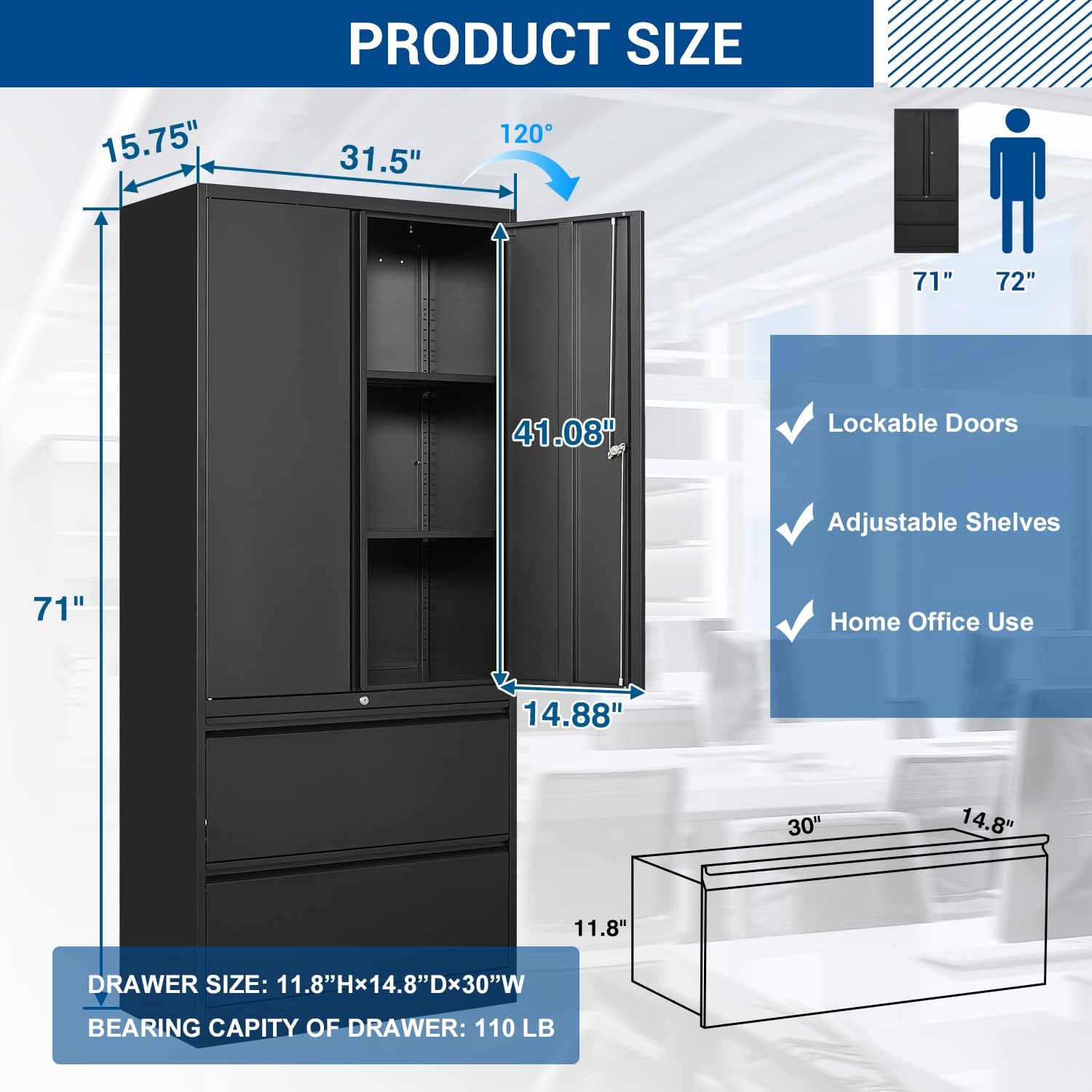
Image: Product dimensions and key features. This diagram illustrates the overall dimensions of the cabinet and highlights features like lockable doors, adjustable shelves, and suitability for home office use.
Operating Instructions
Lockable Doors and Drawers
- Each cabinet door and drawer is equipped with a separate built-in metal lock.
- Each lock comes with two keys. Insert the key and turn to lock or unlock the respective compartment.
- For security, ensure all compartments are locked when storing sensitive documents or valuables.
Adjustable Shelves
The upper cabinet section features adjustable metal shelves. To adjust:
- Empty the shelf of all contents.
- Carefully lift the shelf and remove it from its current position.
- Re-insert the shelf into the desired slots, ensuring it is level and securely seated on all four clips.

Image: Adjustable shelves and hanging rod. This image demonstrates how to adjust the shelves for various items and the hanging rod for different file sizes.
Lateral File Drawers
The lower section contains two lateral file drawers with adjustable metal hanging rods. These rods can be adjusted to accommodate various file sizes:
- Supported Sizes: Letter, Legal, F4, and A4 documents.
- Adjusting Rods: Slide the hanging rods along the tracks to fit your specific file dimensions.
- Maximum Storage: If you need to store items other than hanging files, the metal hanging rods can be removed to create more open storage space.

Image: Multi-size folder usage. This diagram illustrates how to configure the drawer for Letter, F4, Legal, and A4 size files.
Interlock System
The cabinet features an interlock system that allows only one drawer to be opened at a time. This safety feature prevents the cabinet from tipping over due to uneven weight distribution. Do not attempt to force open a second drawer if one is already open.
Maintenance
To maintain the appearance and functionality of your Fesbos Metal Cabinet:
- Cleaning: Wipe the surfaces with a damp cloth. Avoid abrasive cleaners or harsh chemicals that could damage the powder-coated finish.
- Regular Checks: Periodically check all screws and connections to ensure they remain tight. Tighten if necessary.
- Lubrication: If drawer slides become stiff, a small amount of silicone-based lubricant can be applied to the tracks.
Troubleshooting
If you encounter issues with your Fesbos Metal Cabinet, refer to the following common solutions:
- Drawers Not Aligning/Closing Properly: This is often due to the drawer slider tabs not being fully engaged in the final lock position during assembly. Ensure the drawer is pushed firmly until the sliders click into place. Re-check the assembly video for correct drawer installation.
- Locking Mechanism Issues: If a lock is not functioning correctly, verify that the mechanism was installed according to the instructions. Ensure no parts are bent or obstructed. If issues persist, contact customer support.
- Bent Parts: If any parts appear bent upon arrival or during assembly, do not attempt to force them. Contact customer support for replacement parts. Forcing bent parts can compromise the cabinet's stability and safety.
- Cabinet Instability: Ensure the cabinet is on a flat, level surface. Check that all assembly hardware is securely tightened. The adjustable feet can be used to level the cabinet on uneven floors.
Specifications
| Feature | Detail |
|---|---|
| Brand | Fesbos |
| Model Number | Lateral File Cabinet |
| Color | Black |
| Material | Metal |
| Product Dimensions (D x W x H) | 15.75"D x 31.5"W x 71"H |
| Item Weight | 100 pounds |
| Number of Drawers | 2 |
| Number of Shelves | 2 (adjustable) |
| Weight Capacity (Each Shelf) | Approx. 180 pounds |
| Weight Capacity (Each Drawer) | Approx. 110 pounds |
| Lock Type | Key (separate for doors and drawers) |
| File Sizes Supported | Letter, Legal, F4, A4 |
| Additional Features | Adjustable Feet, Removable Shelf, Powder Coated Finish |

Image: Heavy-duty storage capacity. This image highlights the robust weight capacity of each shelf (180 lbs) compared to other models.
Warranty Information
Fesbos products are manufactured to high-quality standards. For specific warranty details, including coverage period and terms, please refer to the warranty card included with your product or contact Fesbos customer support directly. Keep your purchase receipt as proof of purchase for any warranty claims.
Customer Support
If you have any questions, require assistance with assembly, or need to report missing/damaged parts, please contact Fesbos customer support. You can typically find contact information on the product packaging, the Fesbos official website, or through the retailer where you purchased the product.
When contacting support, please have your product model number (Lateral File Cabinet) and ASIN (B0DCJMHZ3L) ready for quicker service.


