
1. Introduction
Thank you for choosing the QUSKLISU 20L Electric Water Boiler. This commercial-grade hot water dispenser is designed for efficient and reliable hot water supply in various settings, including restaurants, offices, and homes. Please read this manual thoroughly before operation to ensure safe and optimal performance.

Image 1.1: Front view of the QUSKLISU 20L Electric Water Boiler.
2. Safety Instructions
To prevent injury or damage, always follow these safety precautions:
- Ensure the appliance is placed on a stable, level surface using its four anti-slip feet to prevent tipping.
- Always use the anti-scald PVC handle when operating the spigot to dispense hot water.
- Do not immerse the appliance, cord, or plug in water or other liquids.
- Keep children and pets away from the appliance during operation.
- Before opening the top cover for maintenance or cleaning, ensure the appliance is unplugged and has cooled down. Unscrew the four screws on the lid before lifting.
- Only connect to a properly grounded 110V power outlet.
- Do not operate the appliance if the power cord or plug is damaged.

Image 2.1: Close-up of the spigot and heat warning label, indicating hot surfaces.
3. Product Components
The QUSKLISU Electric Water Boiler package includes the following items:
- 1 x Electric Water Boiler Unit
- 1 x Removable Drip Tray
- 1 x Water Inlet Pipe (80cm/31.5in, 1/2" specification)
- 1 x English Instruction Manual
Key features of the unit include:
- Digital Display Control Panel: For temperature and timer settings.
- Anti-Scald Spigot Handle: For safe water dispensing.
- Stable Anti-Slip Feet: Ensures secure placement.
- 304 Stainless Steel Construction: Durable and rust-resistant.

Image 3.1: Rear view of the water boiler with included accessories: water inlet pipe, power cord, and drip tray.
4. Setup Instructions
- Unpack: Carefully remove all components from the packaging.
- Placement: Place the water boiler on a stable, flat, and heat-resistant countertop. Ensure there is adequate clearance around the unit for ventilation.
- Install Drip Tray: Slide the removable drip tray into its designated slot at the base of the unit.
- Connect Water Inlet Pipe: Connect one end of the provided 1/2" water inlet pipe to the inlet port at the back of the water boiler. Connect the other end to a suitable cold water supply line (ensure water pressure is between 100-250kPa). Tighten connections securely to prevent leaks.
- Power Connection: Plug the power cord into a grounded 110V US standard electrical outlet.
- Initial Rinse: Before first use, it is recommended to run a full cycle of water through the boiler without consumption to clean any manufacturing residues.
5. Operating Instructions
The QUSKLISU water boiler features a digital display and control panel for easy operation.
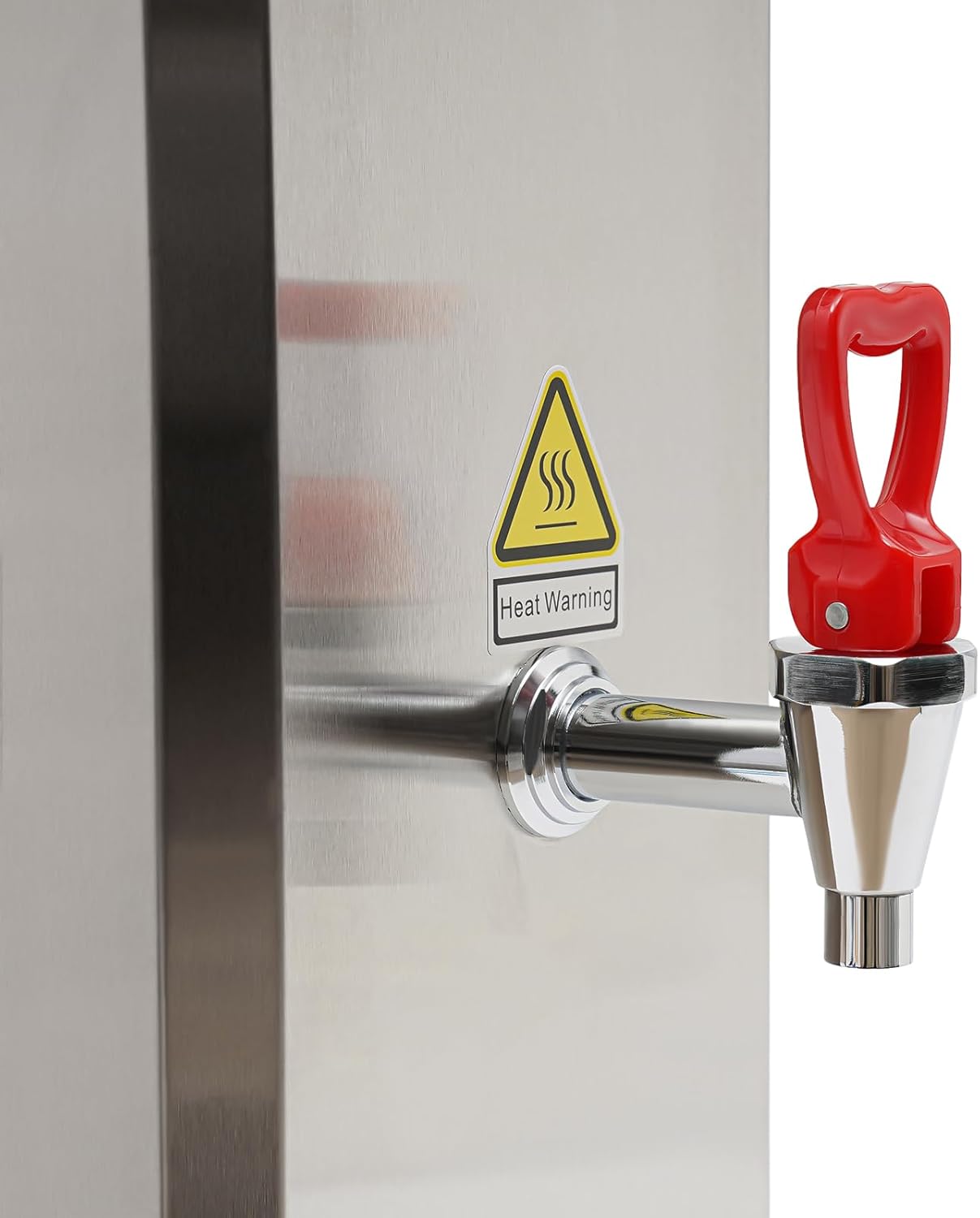
Image 5.1: Digital control panel with temperature display, timer, and function buttons.
5.1 Control Panel Overview
- Temperature Display: Shows current water temperature (30-100°C / 86-212°F).
- Time Display: Shows set timer or current time.
- TEMP SET Button: Adjusts target temperature.
- '+' / '-' Buttons: Increase or decrease temperature/time settings.
- Heating Indicator: Illuminates when the unit is actively heating water.
- Drinking Indicator: Illuminates when water is at optimal drinking temperature.
- Lack Indicator: Illuminates if water level is too low.
- Inlet Indicator: Illuminates when water is being supplied to the unit.
- Failure Indicator: Illuminates in case of an error.
- TIME ON / TIME OFF Buttons: Set scheduled operation times.
- AUTO Button: Activates automatic operation mode.
5.2 Initial Operation
- Ensure the water inlet pipe is connected and the water supply is open. The unit will automatically fill to the appropriate level.
- Press the power button (usually indicated by a universal power symbol) to turn on the unit.
- The unit will begin heating water using its stepping-type heating system. The initial heating time to 212°F (100°C) is approximately 12-18 minutes for a full 20L capacity.
5.3 Setting Temperature
- Press the TEMP SET button. The temperature display will flash.
- Use the '+' and '-' buttons to adjust the desired water temperature between 30°C and 100°C (86°F and 212°F).
- Press TEMP SET again or wait a few seconds for the setting to be saved. The unit will then heat or maintain water at the set temperature.
5.4 Using the Timer Function
The timer allows you to schedule when the boiler turns on or off.
- Press the TIME ON button to set a power-on time, or TIME OFF to set a power-off time.
- Use the '+' and '-' buttons to adjust the desired hour and minute.
- Confirm the setting by pressing the respective timer button again or waiting for the display to revert.
5.5 Dispensing Hot Water
- Place a cup or container under the spigot.
- Push the anti-scald handle down to dispense hot water.
- Release the handle to stop the water flow.

Image 5.2: The water boiler in use, dispensing hot water into a cup.
6. Maintenance
Regular cleaning and maintenance will prolong the life of your water boiler.
- Exterior Cleaning: Wipe the exterior of the unit with a damp cloth. Do not use abrasive cleaners or scouring pads.
- Drip Tray Cleaning: The drip tray is removable for easy cleaning. Empty and wash it regularly with warm, soapy water.
- Descaling: Depending on water hardness, mineral deposits (limescale) may build up inside the boiler. Descale the unit periodically using a commercial descaling solution suitable for stainless steel appliances, following the product's instructions.
- Internal Access: To access the internal components for thorough cleaning or inspection, ensure the unit is unplugged and cooled. Unscrew the four screws on the top lid and carefully lift it.
7. Troubleshooting
If you encounter issues with your QUSKLISU water boiler, refer to the following common problems and solutions:
| Problem | Possible Cause | Solution |
|---|---|---|
| Unit does not turn on. | No power supply; faulty power cord/outlet. | Check if the power cord is securely plugged in. Test the outlet with another appliance. |
| Water is not heating. | Heating element issue; low water level; incorrect temperature setting. | Check the 'Lack' indicator. Ensure the desired temperature is set above the current water temperature. If the issue persists, contact support. |
| 'Lack' indicator is on. | Insufficient water supply. | Check the water inlet pipe connection and ensure the water supply valve is open. |
| 'Failure' indicator is on. | Internal error or malfunction. | Unplug the unit, wait 5 minutes, then plug it back in. If the error persists, contact customer support. |
| Water leaks from connections. | Loose water inlet pipe connection. | Ensure all water inlet pipe connections are tightened securely. Check for damaged seals. |
For problems not listed here, please contact QUSKLISU customer support.
8. Specifications
Detailed technical specifications for the QUSKLISU 20L Electric Water Boiler:
| Feature | Specification |
|---|---|
| Brand | QUSKLISU |
| Model Number | QUSKLISU |
| Color | Silver |
| Material | 304 Stainless Steel, Insulation Material, PVC |
| Finish Type | Wire Drawing |
| Mount Type | Countertop |
| Heating Method | Stepping Type |
| Display Type | Digital Display |
| Power Type | Corded Electric |
| Plug Type | US Standard |
| Voltage | 110V |
| Power | 1500W |
| Capacity | 20L (5.28 gallons) |
| Water Volume (Output) | 45L/h (11.89 gal/h) |
| Single Water Output | 3-5.5L (0.79-1.45 gal) |
| Applicable People | 60-100 |
| Heating Time (to 212°F) | 12-18 minutes |
| Temperature Range | 30-100°C (86-212°F) |
| Product Dimensions (L x W x H) | 18.5 x 31.5 x 69 cm (7.28 x 12.4 x 27.17 inches) |
| Drip Tray Size (L x W) | 18.5 x 12 cm (7.28 x 4.72 inches) |
| Net Weight | 7.1 kg (15.65 lbs) |
| Gross Weight | 8.3 kg (18.3 lbs) |
| UPC | 757582630506 |
| ASIN | B0DCJG51N2 |
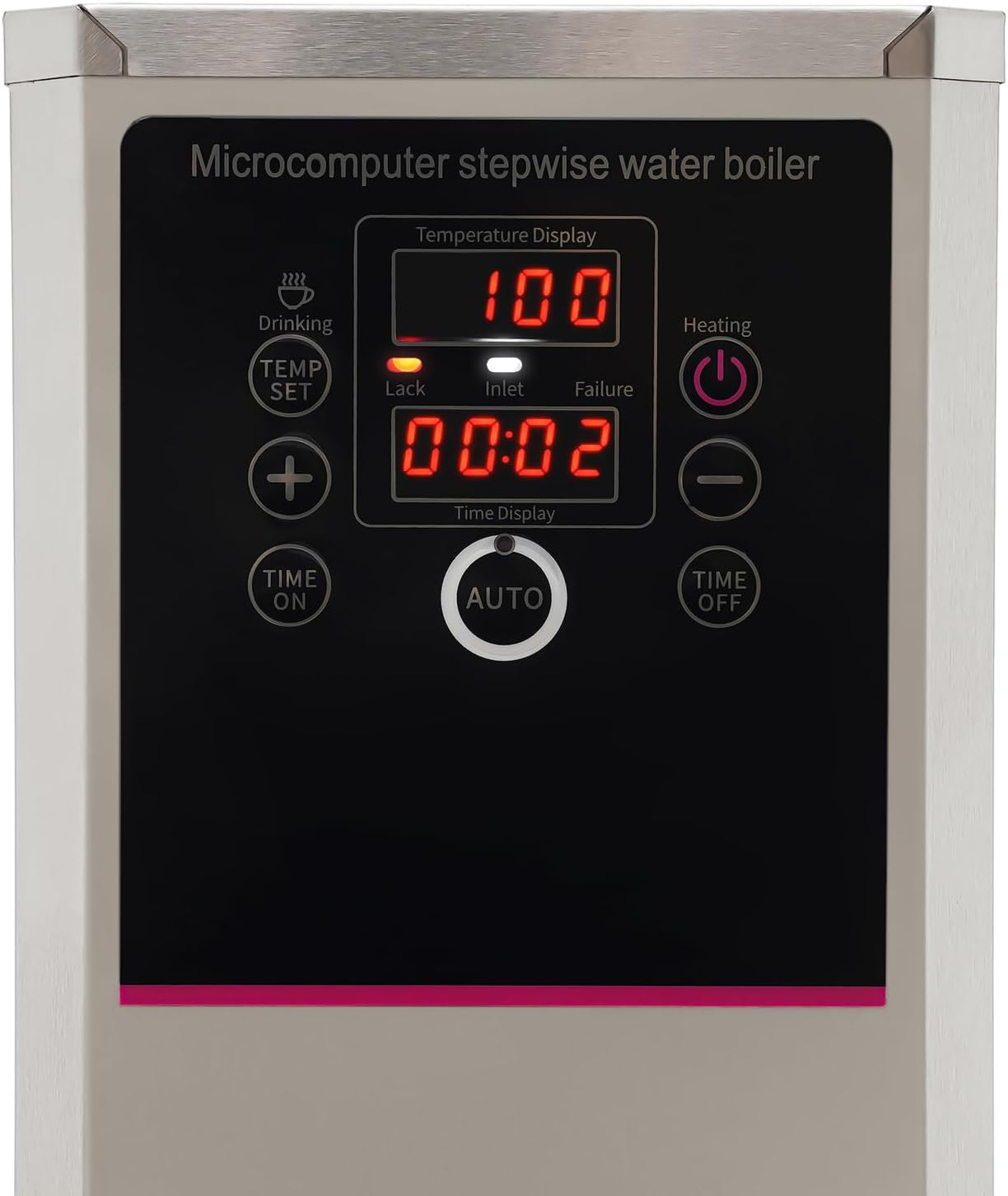
Image 8.1: Dimensions of the QUSKLISU Electric Water Boiler.
9. Warranty and Support
For warranty information or technical support, please refer to the contact details provided with your purchase documentation or visit the official QUSKLISU website. Please have your model number (QUSKLISU) and purchase date available when contacting support.