
1. Introduction
Thank you for choosing the Hodozzy Android Car Stereo. This 10.1-inch IPS touchscreen multimedia player is designed to enhance your driving experience with advanced features including Bluetooth, GPS navigation, WiFi, DSP, Mirror Link, FM RDS radio, USB connectivity, and support for rear view camera and steering wheel controls. This manual provides essential information for proper installation, operation, maintenance, and troubleshooting to ensure optimal performance and longevity of your device.
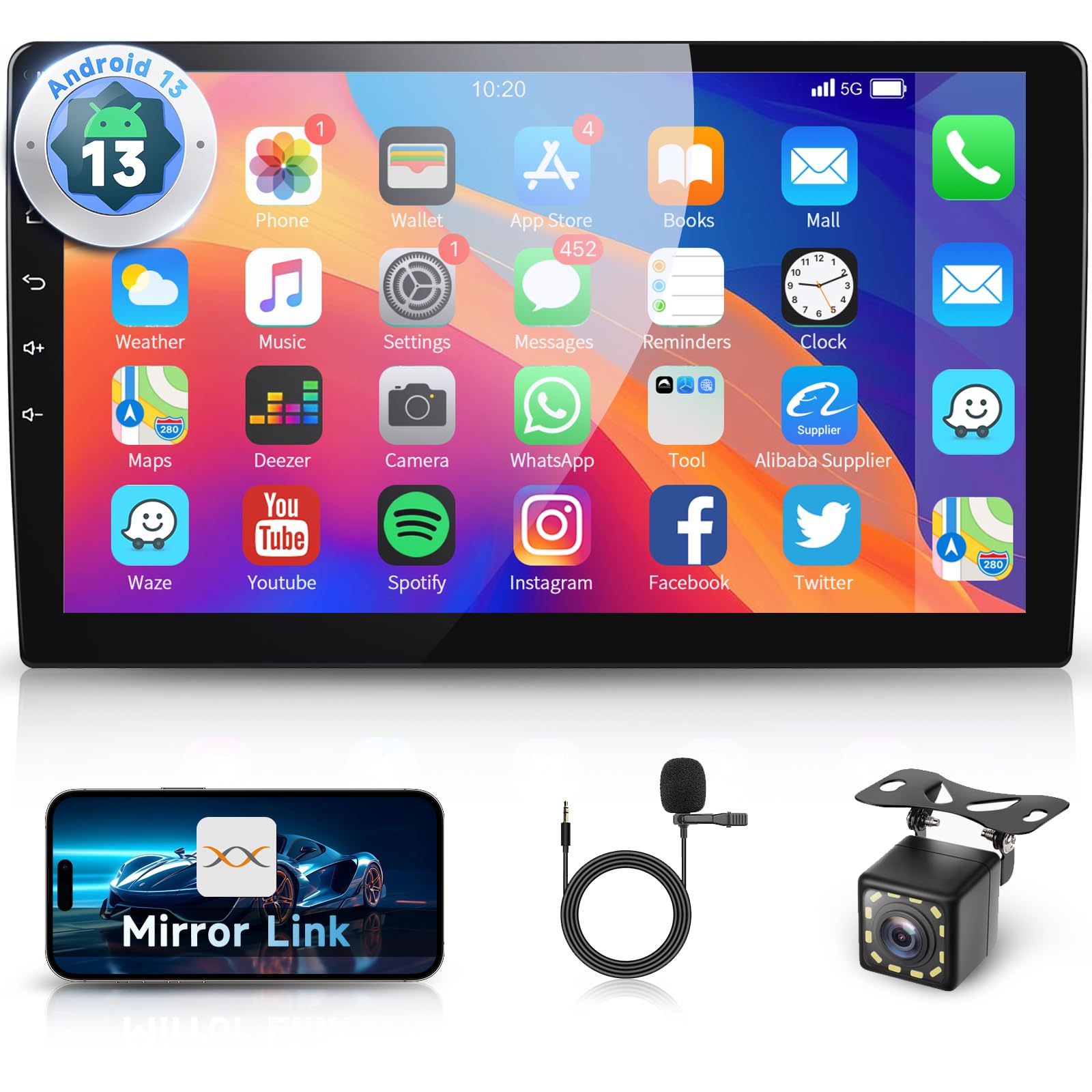
Figure 1: Hodozzy 10.1 Inch Android Car Stereo Main Unit
2. Product Features
- Universal 2-DIN Design: Compatible with most universal car models. Features a 10.1-inch 1080P IPS capacitive touchscreen with a 2.5D curved edge for high sensitivity, resolution, and scratch resistance.
- Android 13 Operating System: Provides a smooth and customizable user experience with support for various Android applications.
- Integrated GPS Navigation: Built-in GPS receiver for accurate navigation, supporting both online and offline maps.
- WiFi Connectivity: Connect to the internet for online services, app downloads, and real-time updates.
- Bluetooth Functionality: Enables hands-free calling, wireless music streaming, and management of contacts and playlists.
- DSP (Digital Signal Processor): Offers advanced noise filtering and dynamic sound adjustment for a rich, immersive audio experience.
- FM RDS Radio: Provides clear broadcast information, including real-time updates on music, news, and traffic.
- Mirror Link: Supports screen mirroring for both iOS (via WiFi) and Android devices (via WiFi/USB).
- USB Connectivity: Dual USB ports for media playback, charging, and connecting external devices.
- Rear View Camera Support: Includes a rear camera for safe parking and reversing.
- Steering Wheel Control (SWC): Compatible with existing steering wheel controls for convenient operation.
- Split Screen Function: Allows simultaneous display of two applications, such as navigation and music.
3. Setup and Installation
3.1. Pre-Installation Check
Before installation, ensure the unit is compatible with your vehicle's console dimensions. The screen size is 250mm (top width) x 145mm (height) x 240mm (bottom width). Professional installation is recommended.
3.2. Package Contents
Verify that all components are present in the package:
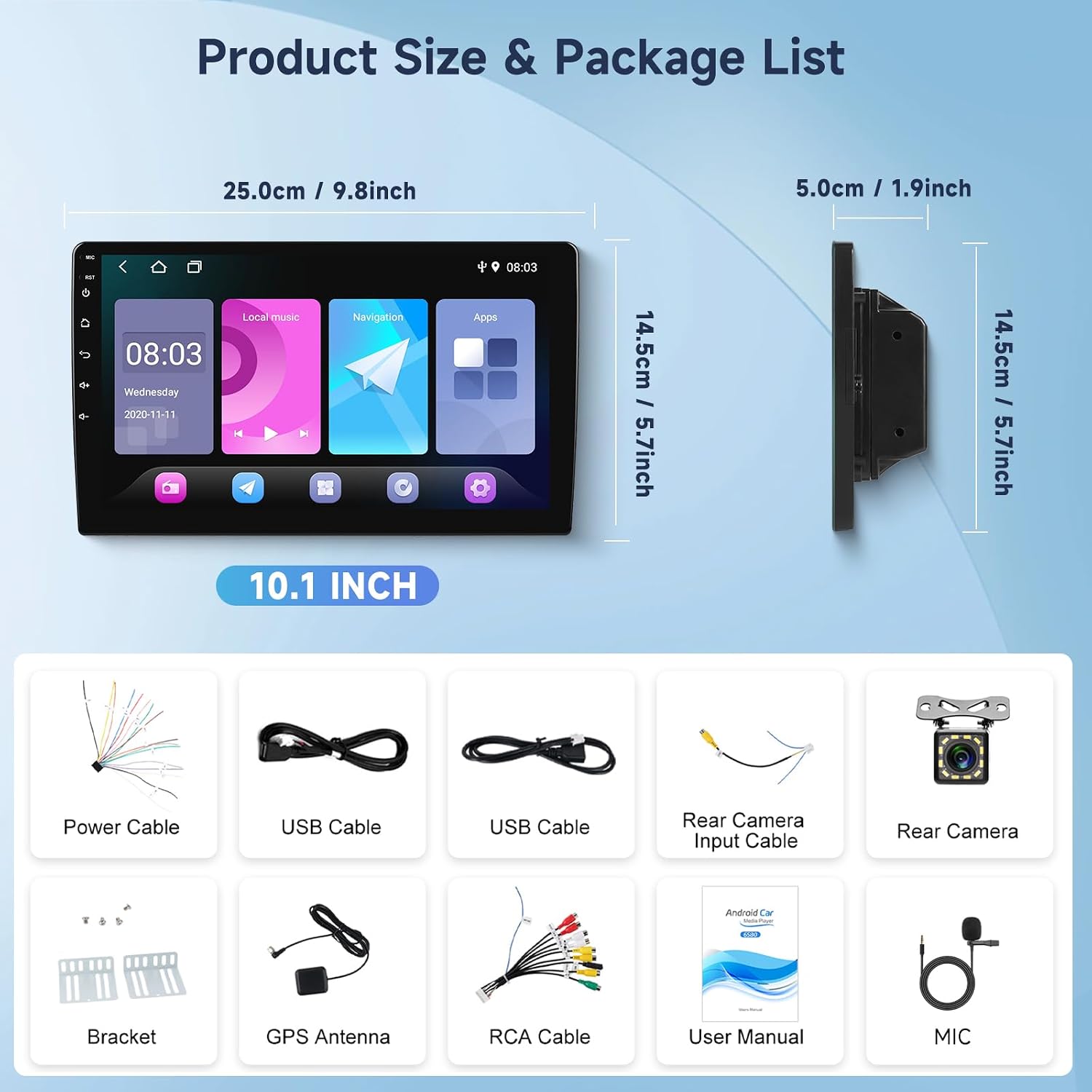
Figure 2: Product Dimensions and Included Accessories
- Hodozzy 10.1 Inch Android Car Stereo Unit
- Power Cable
- USB Cables (x2)
- RCA Cable
- Rear Camera Input Cable
- Rear View Camera
- Bracket
- GPS Antenna
- User Manual
- Microphone
3.3. Wiring Introduction
Refer to the wiring diagram for correct connections. Incorrect wiring can damage the unit or vehicle electrical system.
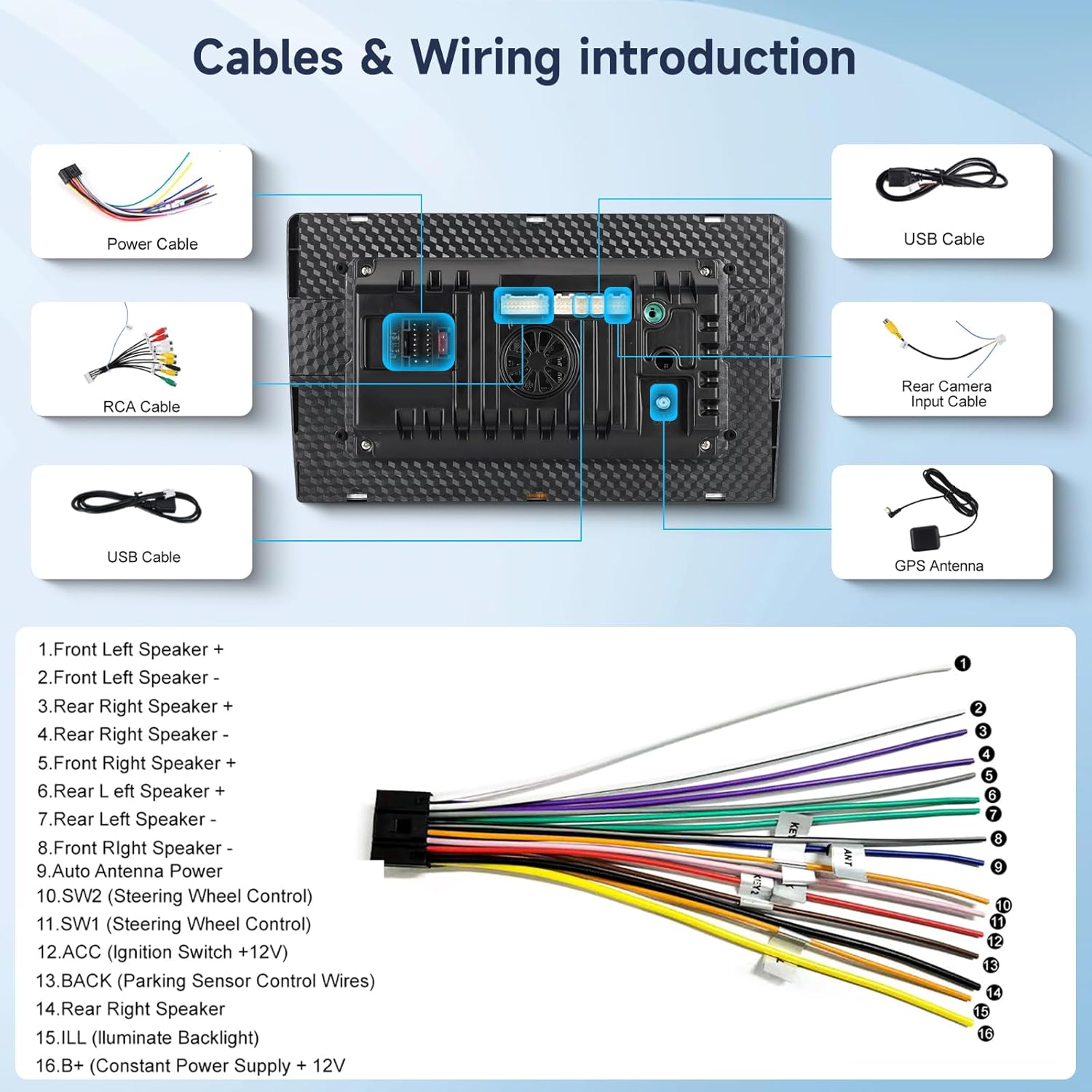
Figure 3: Wiring Diagram for Hodozzy Car Stereo
- Front Left Speaker +
- Front Left Speaker -
- Rear Right Speaker +
- Rear Right Speaker -
- Front Right Speaker +
- Rear Left Speaker +
- Rear Left Speaker -
- Front Right Speaker -
- Auto Antenna Power
- SW2 (Steering Wheel Control)
- SW1 (Steering Wheel Control)
- ACC (Ignition Switch +12V)
- BACK (Parking Sensor Control Wires)
- Rear Right Speaker
- ILL (Illuminate Backlight)
- B+ (Constant Power Supply + 12V)
4. Operating Instructions
4.1. GPS Navigation
The unit has a built-in GPS receiver. Connect to WiFi to download and update online maps, or use pre-installed offline maps. Access navigation through the dedicated 'Navigation' app on the home screen.

Figure 4: GPS Navigation and WiFi Interface
4.2. Bluetooth Connectivity
To pair your phone via Bluetooth:
- Go to the 'Bluetooth' settings on the car stereo.
- Enable Bluetooth on your mobile device and search for available devices.
- Select "Hodozzy" (or similar device name) from the list and confirm pairing.
- Once connected, you can make hands-free calls, stream audio, and sync contacts/playlists.

Figure 5: Bluetooth Hands-free Calling and Music Playback
4.3. Mirror Link
Mirror Link allows you to display your smartphone screen on the car stereo. This feature supports both iOS and Android devices.
- For iOS Devices: Connect via WiFi. Follow the on-screen instructions in the 'Mirror Link' app on the stereo.
- For Android Devices: Connect via WiFi or USB. If using USB, enable USB debugging mode on your Android phone and follow the instructions in the 'TIMA' app on the stereo.
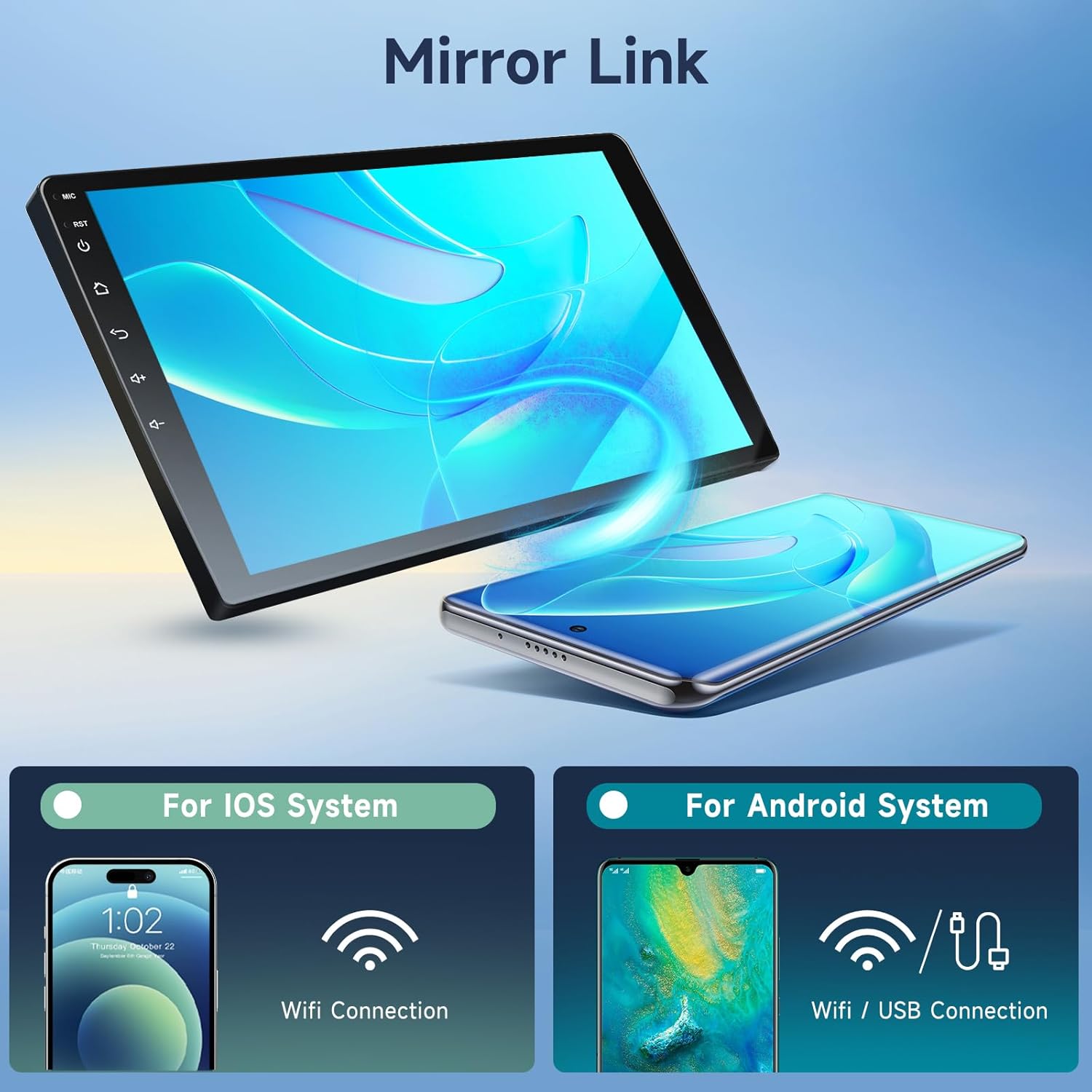
Figure 6: Mirror Link for iOS and Android Systems
4.4. FM RDS Radio and DSP
Tune into FM radio stations and enjoy enhanced audio quality with DSP. The RDS feature provides additional information like station name, song title, and traffic updates.
- FM Radio: Select the 'Radio' app. Use the scan function to find stations or manually tune to frequencies.
- DSP Settings: Access the 'DSP' or 'Equalizer' settings to customize sound profiles (Pop, Rock, Jazz, etc.) and adjust audio parameters for optimal listening.
4.5. Rear View Camera and Steering Wheel Controls
The included rear view camera automatically displays the rear view when reversing. The unit also supports integration with your vehicle's existing steering wheel controls (SWC) for safe and convenient operation.
- Rear View Camera: Ensure the camera is correctly wired according to the installation instructions. The display will automatically switch when the vehicle is in reverse.
- Steering Wheel Controls: Access the 'SWC' settings in the system menu to program the buttons on your steering wheel to control various functions of the car stereo.

Figure 7: Rear View Camera Display and Steering Wheel Control Interface
5. Maintenance
- Cleaning: Use a soft, dry cloth to clean the screen and unit. Avoid abrasive cleaners or solvents.
- Software Updates: Periodically check for system software updates via WiFi to ensure optimal performance and access to new features.
- Environmental Conditions: Avoid exposing the unit to extreme temperatures, direct sunlight for prolonged periods, or excessive moisture.
6. Troubleshooting
| Problem | Possible Cause | Solution |
|---|---|---|
| Unit does not power on. | Incorrect wiring, blown fuse, power supply issue. | Check power cable connections (B+, ACC, GND). Verify vehicle fuse. Consult a professional installer. |
| No sound. | Speaker wiring issue, volume too low, incorrect audio output settings. | Check speaker connections. Increase volume. Verify audio settings in the system menu. |
| GPS signal lost or inaccurate. | GPS antenna not properly connected or obstructed. | Ensure GPS antenna is securely connected and placed in an unobstructed location (e.g., dashboard). |
| Bluetooth connection issues. | Device not in pairing mode, interference, software glitch. | Ensure both devices are in pairing mode. Restart both devices. Clear previous Bluetooth pairings. |
| Mirror Link not working. | Incorrect connection method, USB debugging not enabled (Android), app issues. | Verify WiFi connection for iOS. For Android, ensure USB debugging is enabled and the correct app ('TIMA') is used. |
| Screen is slow or freezes. | Too many apps running, low RAM, software issue. | Close unnecessary applications. Restart the unit. Check for system updates. |
| Rear camera not displaying. | Camera wiring issue, camera malfunction. | Check the rear camera input cable connection. Ensure the camera is receiving power. |
7. Specifications
| Feature | Detail |
|---|---|
| Brand | Hodozzy |
| Model Name | MTK6580 |
| Screen Size | 10.1 Inches |
| Display Type | LCD |
| Touch Screen Type | Capacitive Touchscreen |
| Operating System | Android 13 |
| Memory (RAM/ROM) | 1GB RAM / 16GB ROM |
| Connectivity | Bluetooth, USB, Wi-Fi |
| GPS | Built-in GPS receiver, supports Street map type |
| Audio Output | 4*45W Subwoofer Audio Output |
| Special Features | Hands-free calling, DSP, Mirror Link, FM RDS, Rear View Camera Support, Steering Wheel Control (SWC), Split Screen |
| Included Components | Camera, Microphone |
| Mounting Type | Dashboard Mount |
| Compatible Vehicle Type | Passenger Car |
| Manufacturer Model Number | A3795 |
| Country of Origin | China |
8. Warranty and Support
Hodozzy offers a 24-month return or replacement policy for this product. Additionally, customers benefit from lifetime technical support provided by our professional team. For any inquiries, technical assistance, or warranty claims, please contact Hodozzy customer service. We aim to provide a fast response within 18 hours.

Figure 8: Hodozzy Support Information