
1. Product Overview
The Bosch NDA-5070-CBLI Clear Bubble is a high-quality polycarbonate dome replacement designed specifically for use with Bosch FLEXIDOME indoor 5100 IR and FLEXIDOME outdoor 5100i IR cameras. This accessory is crucial for maintaining the protective integrity and optical clarity of your surveillance system.
Key features include:
- Polycarbonate Construction: Ensures durability and optical clarity.
- IK10 Vandal Resistance: Provides robust protection against impacts and vandalism, safeguarding the camera's internal components.
- Direct Replacement: Engineered for seamless compatibility with specified FLEXIDOME camera models.
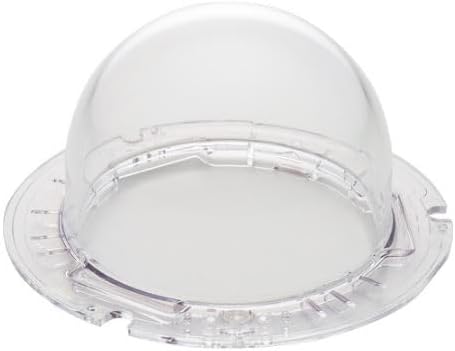
Figure 1: The Bosch NDA-5070-CBLI Clear Bubble, a transparent polycarbonate dome replacement.
2. Setup and Installation
This section outlines the general procedure for replacing the dome bubble. Always refer to your specific FLEXIDOME camera's installation guide for detailed instructions, as procedures may vary slightly by model.
2.1. Required Tools
- Small Phillips head screwdriver (if required for camera housing)
- Clean, lint-free cloth
- Gloves (recommended to avoid fingerprints)
2.2. Installation Steps
- Power Off: Ensure the camera system is completely powered off and disconnected from its power source before beginning any work.
- Access Camera: Carefully open the camera housing or access the dome assembly according to your FLEXIDOME camera's manual. This may involve unscrewing retaining clips or latches.
- Remove Old Bubble: Gently detach the existing dome bubble. Note its orientation for proper installation of the new bubble. Dispose of the old bubble responsibly.
- Clean Surfaces: Use a clean, lint-free cloth to gently wipe any dust or debris from the camera lens and the interior rim of the camera housing. Avoid touching the lens directly with bare hands.
- Install New Bubble: Carefully align the new NDA-5070-CBLI Clear Bubble with the camera housing. Ensure all tabs or alignment features are correctly seated. Apply gentle, even pressure to snap or secure the bubble into place.
- Secure Housing: Close and secure the camera housing, ensuring all screws, clips, or latches are fastened properly.
- Power On: Reconnect power to the camera system and verify proper operation and image clarity.
3. Operating Considerations
The NDA-5070-CBLI Clear Bubble is a passive component designed to protect the camera lens and internal electronics. Its operation is directly tied to the camera it is installed on. Ensure the bubble is clean and free from obstructions for optimal camera performance.
The IK10 rating signifies its resistance to impacts, making it suitable for environments where vandalism or accidental damage is a concern. However, it is not indestructible and extreme force can still cause damage.
4. Maintenance
Regular maintenance of the clear bubble ensures optimal image quality and extends the lifespan of your camera system.
4.1. Cleaning the Bubble
- Frequency: Clean the exterior of the bubble as needed, depending on environmental conditions (e.g., dust, rain spots, smudges).
- Method: Use a soft, clean, lint-free cloth dampened with clean water or a mild, non-abrasive glass cleaner. Avoid harsh chemicals, abrasive materials, or solvents, as these can scratch or damage the polycarbonate.
- Technique: Gently wipe the surface. For stubborn dirt, apply a little more pressure but avoid scrubbing vigorously.
4.2. Inspection
Periodically inspect the bubble for any signs of damage, such as cracks, deep scratches, or discoloration. If significant damage is observed, replace the bubble to maintain protection and image quality.
5. Troubleshooting
Most issues related to the clear bubble are visual in nature. If you experience problems, consider the following:
- Blurred or Obscured Image:
- Check if the bubble is dirty. Clean it as described in the Maintenance section.
- Ensure the bubble is correctly seated and not misaligned.
- Inspect for condensation inside the bubble. If present, this may indicate a sealing issue with the camera housing itself, requiring professional attention.
- Visible Scratches or Cracks:
- If the bubble is scratched or cracked, its protective capabilities and optical clarity may be compromised. Replacement is recommended.
- Bubble Detaches:
- Ensure the bubble was installed correctly and all retaining mechanisms (if any) are engaged. Re-install if necessary.
- Compatibility Issues:
- Verify that the NDA-5070-CBLI is the correct replacement bubble for your specific FLEXIDOME camera model (FLEXIDOME indoor 5100 IR or FLEXIDOME outdoor 5100i IR).
For issues not resolved by these steps, or for camera-specific problems, consult the camera's user manual or contact Bosch technical support.
6. Specifications
| Attribute | Detail |
|---|---|
| Model Number | NDA-5070-CBLI |
| Part Type | Clear Dome Bubble Replacement |
| Compatibility | Bosch FLEXIDOME indoor 5100 IR, Bosch FLEXIDOME outdoor 5100i IR cameras |
| Material | Polycarbonate |
| Vandal Resistance | IK10 Rated |
| ASIN | B0DCHK66CP |
| Manufacturer | Bosch |
| Date First Available | August 7, 2024 |
7. Warranty and Support
For information regarding the warranty of your Bosch NDA-5070-CBLI Clear Bubble, please refer to the warranty documentation provided with your original Bosch FLEXIDOME camera or visit the official Bosch Security Systems website. Warranty terms typically cover manufacturing defects.
For technical support, product inquiries, or to report issues, please contact Bosch Security Systems customer service. Contact details can usually be found on their official website or in the documentation accompanying your camera system.
Bosch Security Systems Official Website: www.boschsecurity.com