Introduction
This instruction manual provides detailed information on how to set up, operate, and maintain your new Generic Remote Control for the Aiwa LED402FHD TV. Please read this manual thoroughly before use to ensure proper functionality and to maximize your viewing experience.
Setup
Battery Installation
1. Locate the battery compartment on the back of the remote control. It typically has a sliding cover.
2. Slide the battery compartment cover downwards or outwards to open it.
3. Insert two AAA batteries (not included), ensuring the positive (+) and negative (-) terminals align correctly with the markings inside the compartment.
4. Close the battery compartment cover by sliding it back into place until it clicks securely.
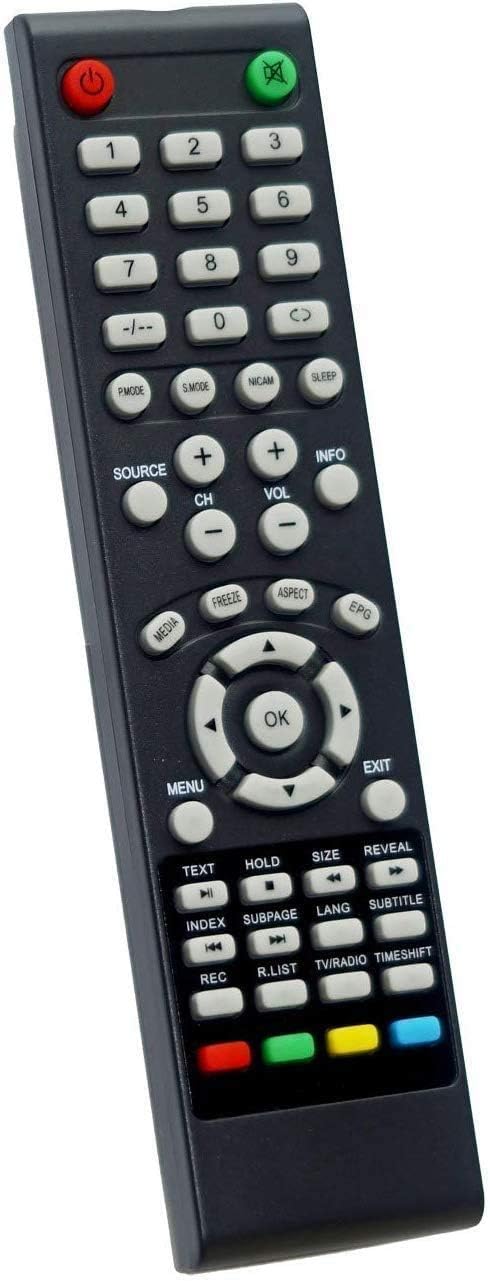
Image: Front view of the Generic Remote Control for Aiwa LED402FHD TV, showing all buttons and their layout.
Operating Instructions
Remote Control Layout and Button Functions
Familiarize yourself with the buttons on your remote control. Each button serves a specific function to control your Aiwa LED402FHD TV.
| Button Name | Function |
|---|---|
| Power (Red) | Turns the TV on or off. |
| Mute (Green) | Mutes or unmutes the TV sound. |
| Numeric Keypad (0-9) | Directly selects TV channels or enters numerical values. |
| -/-- | Switches between single and double-digit channel input. |
| P.MODE | Cycles through picture modes (e.g., Standard, Dynamic, Movie). |
| S.MODE | Cycles through sound modes (e.g., Standard, Music, Movie). |
| NICAM | Selects NICAM stereo or mono sound. |
| SLEEP | Sets the sleep timer for automatic TV shutdown. |
| SOURCE | Selects input sources (e.g., HDMI, AV, TV). |
| CH +/- | Changes the TV channel up or down. |
| VOL +/- | Adjusts the TV volume up or down. |
| INFO | Displays current channel information or program details. |
| MEDIA | Accesses media playback functions (e.g., USB media). |
| FREEZE | Freezes the current image on the screen. |
| ASPECT | Changes the screen aspect ratio (e.g., 16:9, 4:3). |
| EPG | Opens the Electronic Program Guide. |
| Navigation Buttons (Up, Down, Left, Right) | Navigates through menus and options. |
| OK | Confirms selections in menus. |
| MENU | Opens the main TV menu. |
| EXIT | Exits the current menu or function. |
| TEXT | Activates Teletext mode. |
| HOLD | Holds the current Teletext page. |
| SIZE | Changes the size of Teletext display. |
| REVEAL | Reveals hidden Teletext information. |
| INDEX | Displays the Teletext index page. |
| SUBPAGE | Accesses Teletext subpages. |
| LANG | Changes audio language (if available). |
| SUBTITLE | Turns subtitles on or off. |
| REC | Initiates recording (if TV supports PVR function). |
| R.LIST | Accesses the recording list. |
| TV/RADIO | Switches between TV and Radio modes. |
| TIMESHIFT | Activates or deactivates Timeshift function. |
| Color Buttons (Red, Green, Yellow, Blue) | Functions vary depending on the current menu or application (e.g., Teletext, EPG). |
Maintenance
Battery Replacement
Replace batteries when the remote control's response becomes sluggish or stops working. Always replace both batteries at the same time with new ones of the same type (AAA). Do not mix old and new batteries or different types of batteries.
Cleaning the Remote
To clean the remote control, wipe it with a soft, dry cloth. Do not use liquid cleaners or abrasive materials, as they may damage the remote's surface or internal components.
Troubleshooting
- Remote not responding:
- Check if the batteries are inserted correctly with the correct polarity.
- Replace old batteries with new ones.
- Ensure there are no obstructions between the remote control and the TV's infrared sensor.
- Point the remote directly at the TV's IR sensor.
- Some buttons not working:
- Clean the remote control, especially around the unresponsive buttons, to remove any dirt or debris.
- If the issue persists after battery replacement and cleaning, the remote control may be faulty.
- TV not turning on/off:
- Verify that the TV is plugged into a power outlet and is receiving power.
- Ensure the remote is compatible with your specific Aiwa LED402FHD TV model.
Specifications
- Brand: Generic
- Model Name: LED402FHD
- Compatible Devices: Television (Aiwa LED402FHD)
- Connectivity Technology: Infrared
- Number of Buttons: 25
- Controller Type: Remote Control
- Maximum Range: 10 Meters
Warranty and Support
This Generic Remote Control is designed to be a compatible replacement for your Aiwa LED402FHD TV. For specific warranty information, please refer to the retailer or manufacturer from whom you purchased this product. For technical support related to your Aiwa TV, please contact Aiwa customer service directly.