
Introduction
Thank you for purchasing the Dodoore 1:16 Scale RC Transporter Truck. This remote control truck is designed for engaging play with features such as 2.4GHz control, multi-directional movement, LED lights, and a unique spray effect. Please read this manual thoroughly before operating the product to ensure safe and optimal performance.
Safety Precautions
- Do not operate the remote-controlled toy in busy or crowded areas to prevent accidental injury.
- Ensure there are no obstacles around the operating area to avoid collisions or other hazards.
- This remote-controlled toy is suitable for use on flat and dry terrain. Avoid operating on damp or rough surfaces.
- Maintain focus and avoid distractions during operation to prevent accidents.
- Recommended age for use is 14 years and up.
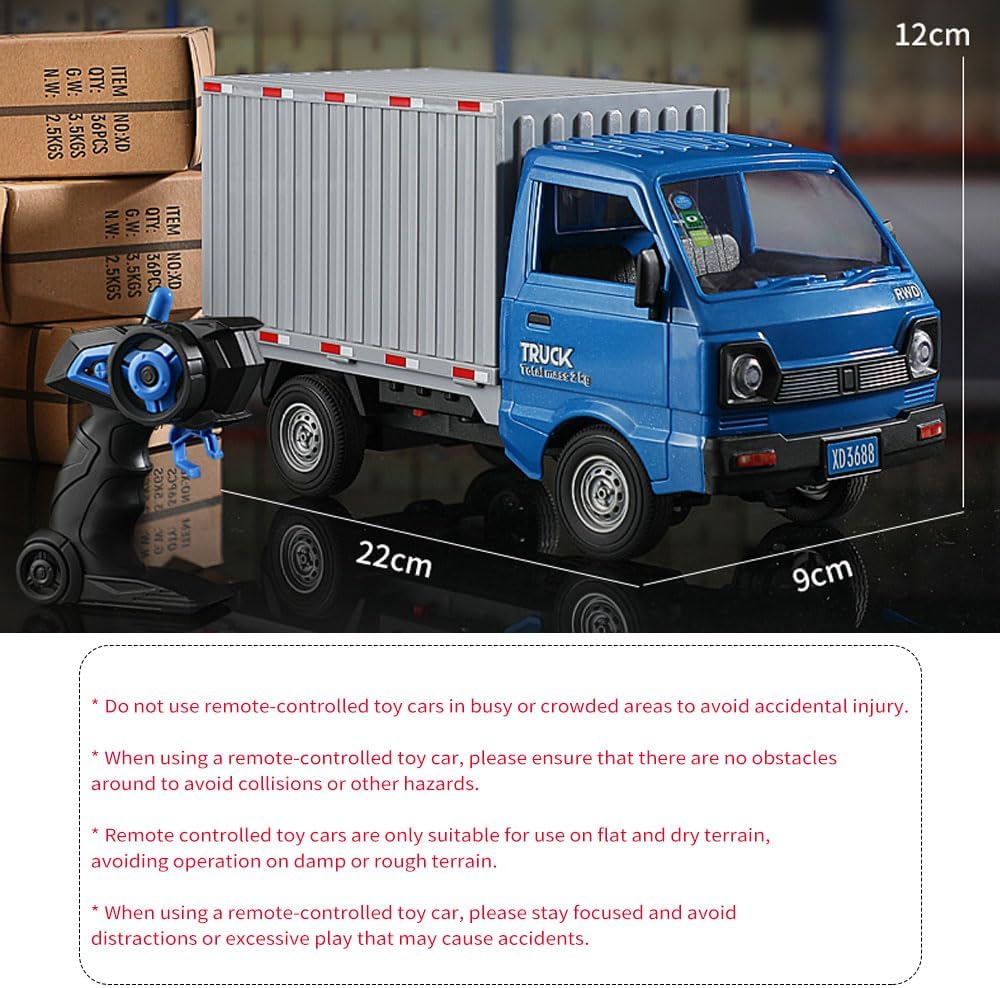
Image Description: A blue Dodoore RC Transporter Truck is shown next to a remote control and three batteries. Text overlays indicate dimensions (22cm length, 9cm width, 12cm height) and important safety warnings regarding usage areas and focus.
Package Contents
Please verify that all items listed below are included in your package:
- 1 x Dodoore RC Transporter Truck
- 1 x Remote Control
- 3 x Rechargeable Batteries (3.7V Li-ion)
- 1 x USB Charging Cable
- 1 x Water Injector Bottle
- 1 x Sticker Sheet
- 2 x Screwdrivers
- 1 x User Manual (this document)

Image Description: A visual representation of the Dodoore RC Transporter Truck package contents, including the blue truck, remote controller, three batteries, charging cable, water injector bottle, cardboard box, and stickers.
Setup
1. Battery Installation
- RC Truck Battery: Locate the battery compartment on the underside of the RC truck. Use a screwdriver to open the compartment. Insert one of the provided 3.7V rechargeable batteries, ensuring correct polarity. Close the compartment and secure it with the screw.
- Remote Control Battery: Open the battery compartment on the back of the remote control. Insert two AA batteries (not included), observing the correct polarity. Close the compartment.
2. Charging the RC Truck Battery
Connect the provided USB charging cable to the 3.7V rechargeable battery. Plug the other end of the USB cable into a standard USB power adapter (e.g., phone charger, computer USB port). The charging indicator light will show the charging status. A full charge typically takes about 1 hour, providing approximately 20 minutes of playtime.
3. Filling Water for Spray Effect
Locate the water reservoir on the RC truck. Open the lid and use the provided water injector bottle to carefully fill the reservoir with clean water. Do not overfill. Close the lid securely.

Image Description: A composite image detailing various parts of the RC truck. It shows a close-up of the 'TRUCK' labeling, the wheel steering trim, the car bottom battery compartment with a green battery, the openable rear carriage, illuminating headlights, and the cool light spray mechanism.
4. Applying Stickers
Use the included sticker sheet to customize your RC truck. Carefully peel and apply the stickers to the desired locations on the truck body.
Operating Instructions
1. Power On/Off
Turn on the RC truck by sliding the power switch located on its underside. Turn on the remote control. The truck and remote will automatically pair using the 2.4GHz frequency. If pairing fails, turn both off and on again.
2. Remote Control Functions
- Forward/Backward: Use the left joystick to move the truck forward or backward.
- Left/Right Turns: Use the right joystick to steer the truck left or right.
- Spray Effect: Press the designated spray button on the remote control to activate the water spray feature.

Image Description: A two-part image illustrating the 'Cool light spray' feature. The left panel shows a hand opening a lid on the truck and adding water with a small bottle. The right panel shows a finger pressing a button on the remote control, indicating one-button activation for the spray.
3. Driving and Maneuverability
The truck offers multi-directional driving capabilities, allowing for precise control. Its design enables it to adapt to various terrains, providing stable operation on flat, dry surfaces.

Image Description: A blue Dodoore RC Transporter Truck is depicted climbing a steep, rocky incline, demonstrating its '45° easy climbing' capability and strong power to overcome obstacles.
4. LED Lights
The RC truck is equipped with bright LED headlights that illuminate during operation, enhancing visibility and realism.

Image Description: A close-up view of the front of a white Dodoore RC Transporter Truck, highlighting its bright, illuminated LED headlights in a dark setting.
5. Openable Features
- Doors: The two car doors can be opened manually for a realistic experience.
- Rear Compartment: The rear compartment door can be opened to store small items, simulating transportation scenarios.

Image Description: A green Dodoore RC Transporter Truck is shown with both driver and passenger doors open, illustrating the 'Two car doors can be opened open the door manually' feature.

Image Description: A two-panel image demonstrating the rear compartment of the RC truck. The top panel shows a hand placing a small cardboard box into the open rear compartment. The bottom panel shows a hand operating the latch to open the rear doors, with text indicating 'Simulate transportation scenarios and store small items' and 'The rear compartment door can be opened'.
6. Product Demonstration Video
Watch this video for a visual guide on the Dodoore RC Transporter Truck's features and operation.
Video Description: An official Dodoore product video showcasing the 1:16 Scale RC Transporter Truck. The video highlights features such as LED lights, openable doors, the water spray effect, linked steering, openable trunk door, drifting capabilities, powerful performance, flexible control, and adaptability to various terrains. Multiple color variants of the truck are shown in action.
Maintenance
1. Cleaning
After use, especially on dusty or dirty surfaces, gently wipe the truck with a soft, dry cloth. Avoid using water or harsh chemicals directly on electronic components.
2. Battery Care
- Always remove batteries from the truck and remote control when not in use for extended periods.
- Store batteries in a cool, dry place.
- Do not overcharge or completely discharge the rechargeable batteries.
3. Storage
Store the RC truck and remote control in a dry environment, away from direct sunlight and extreme temperatures, to prolong their lifespan.
Troubleshooting
| Problem | Possible Cause | Solution |
|---|---|---|
| Truck does not respond to remote. | Low batteries in truck or remote; truck/remote not paired. | Charge/replace batteries. Turn both truck and remote off, then on again to re-pair. |
| Spray effect not working. | Water reservoir empty; nozzle blocked. | Refill water reservoir. Check for and clear any blockages in the spray nozzle. |
| Short playtime. | Battery not fully charged; old battery. | Ensure battery is fully charged (approx. 1 hour). Consider replacing old batteries. |
| Poor control range or interference. | Obstacles between remote and truck; other 2.4GHz devices nearby. | Operate in an open area. Move away from other wireless devices. |
Specifications
- Model Number: 3688-G155A
- Scale: 1:16
- Remote Control Frequency: 2.4GHz
- Remote Control Distance: 40-60 meters
- Truck Battery: 3.7V Li-ion (rechargeable)
- Charging Time: Approximately 1 hour
- Playtime: Approximately 20 minutes per battery
- Item Weight: 1.21 pounds
- Package Dimensions: 11.02 x 5.91 x 5.12 inches
- Manufacturer Recommended Age: 14 years and up
Warranty and Support
For warranty information or technical support, please contact Dodoore customer service through the retailer where the product was purchased or visit the official Dodoore website. Please retain your proof of purchase for warranty claims.