
1. Introduction
The Carlinkit Tbox Plus is an innovative CarPlay AI Box designed to transform your vehicle's wired CarPlay system into a wireless Android Auto and CarPlay experience. It features a powerful 8-core processor, 8GB RAM, and 128GB storage, ensuring smooth performance. With built-in Android 13.0, you can access a wide range of Android applications, including popular streaming services like YouTube and Netflix, directly on your car's display.

Figure 1: Carlinkit Tbox Plus device and its integration with a car's display.
2. Key Features
- Wireless CarPlay & Android Auto: Converts wired CarPlay to wireless Android Auto and CarPlay, eliminating the need for cables.
- Android 13.0 System: Provides a full Android operating system experience directly on your car's screen.
- High Performance: Equipped with an 8-core processor, 8GB RAM, and 128GB internal storage for fast and responsive operation.
- Media Streaming: Access popular streaming apps like YouTube, Netflix, and Hulu using a mobile hotspot or local video playback from an SD card.
- Built-in GPS: Features Glonass, Beidou, and Galileo SBAS for precise navigation and positioning.
- Dual Internet Methods: Supports connection via mobile hotspot or by inserting a Nano SIM card for 4G LTE network access.
- Plug & Play Installation: Simple USB connection to your car's existing wired CarPlay port.

Figure 2: Overview of the 3-in-1 functionality of the Carlinkit Tbox Plus.

Figure 3: The device supports downloading apps from the Google Play Store.

Figure 4: The Tbox Plus features built-in GPS for navigation.
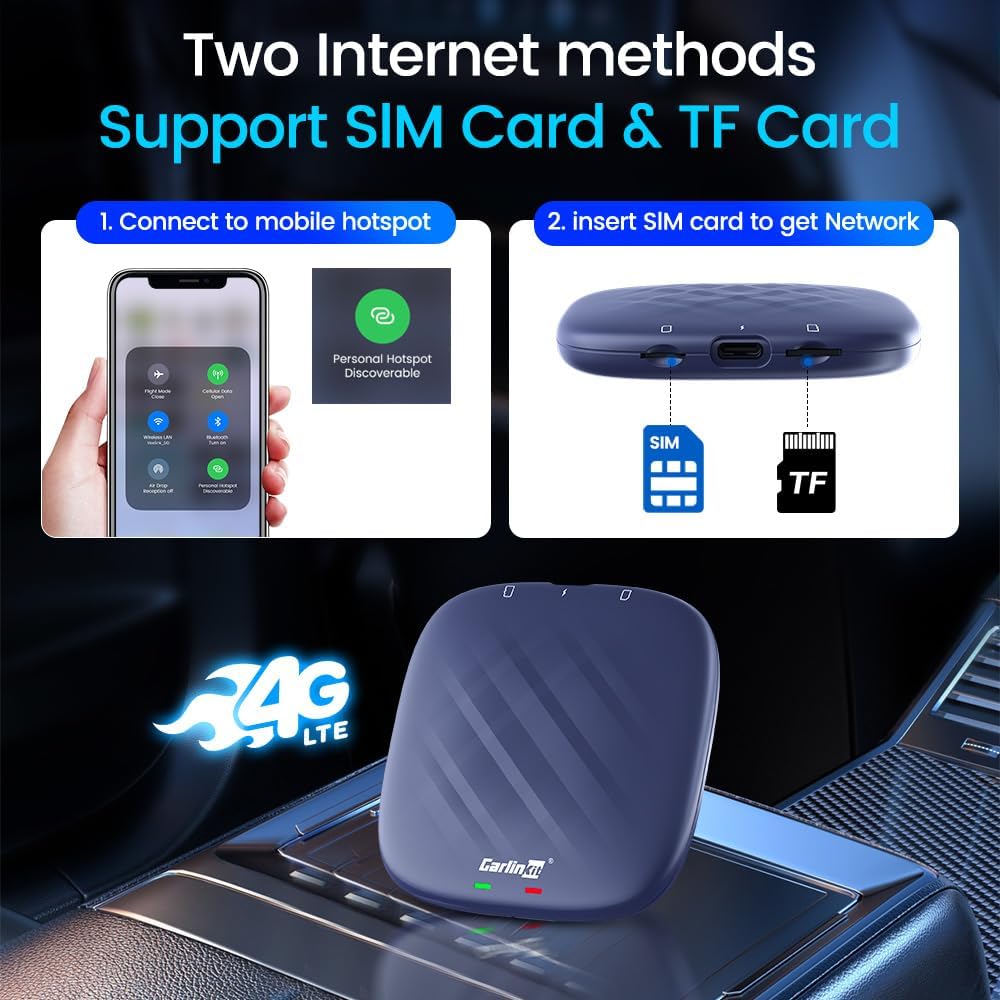
Figure 5: Internet connectivity options for the Carlinkit Tbox Plus.
3. Setup Guide
3.1 Plug & Play Installation
The Carlinkit Tbox Plus is designed for easy plug-and-play installation in vehicles equipped with factory wired CarPlay. No dismantling of the original car stereo is required.
- Plug in the Product: Connect the Carlinkit Tbox Plus to your car's USB port that supports wired CarPlay.
- Tap CarPlay Icon: On your car's screen, tap the "CarPlay" icon to initiate the connection.
- Enjoy: The device will boot up and display the Android interface, allowing you to access its features.
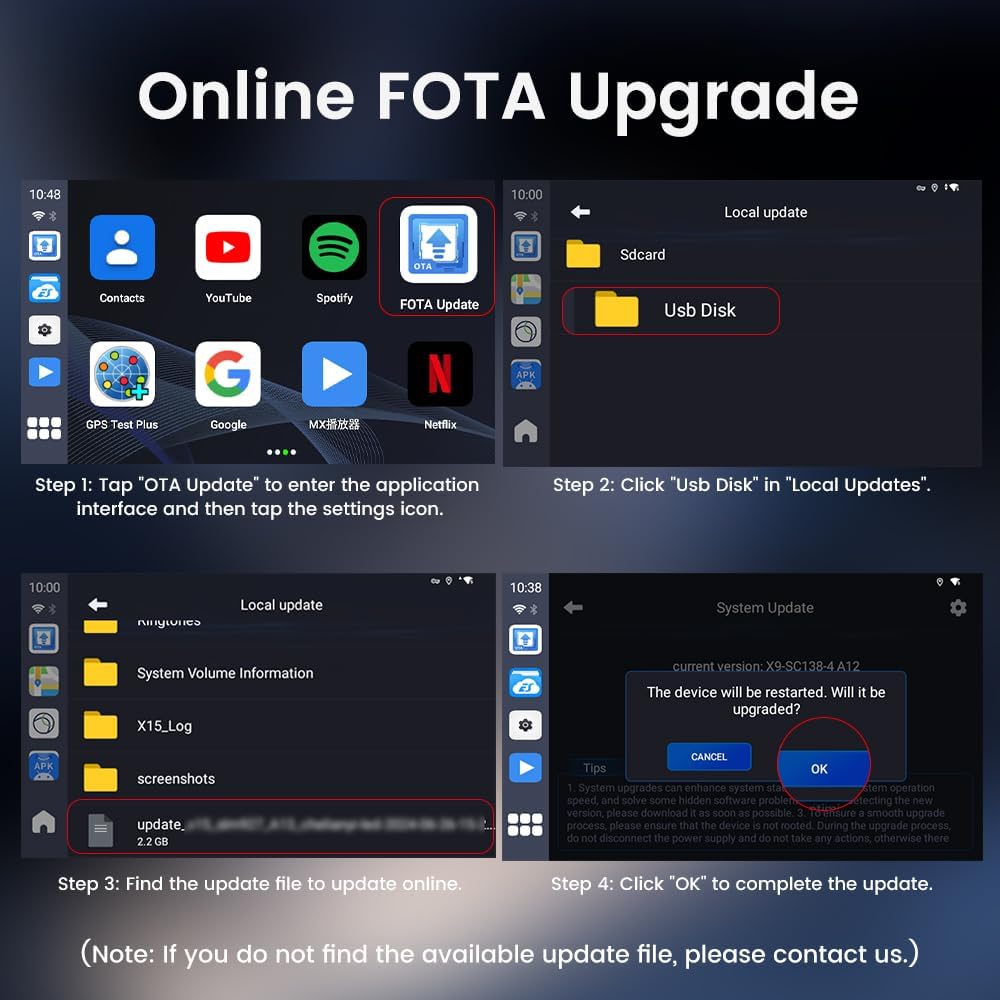
Figure 6: Visual guide for the simple plug and play installation process.
4. Operating Instructions
4.1 Wireless CarPlay and Android Auto
Once connected, the Tbox Plus will automatically enable wireless CarPlay or Android Auto. Ensure your phone's Bluetooth is turned off when setting up a connection to your mobile hotspot to avoid conflicts.
4.2 Media Streaming and Apps
The device allows you to stream movies and shows from platforms like YouTube and Netflix. You can also play local video and music files from an inserted SD card. The full Android system provides access to the Google Play Store for downloading additional applications.
Video 1: Demonstration of the Carlinkit Aibox in use, showcasing its media and navigation capabilities on a car's display.
5. Maintenance
5.1 Online FOTA Upgrade
To ensure optimal performance and access to the latest features, it is recommended to keep your Carlinkit Tbox Plus updated via Online FOTA (Firmware Over-The-Air) upgrades.
- Enter Application Interface: Tap "OTA Update" on the device's main screen.
- Access Local Updates: Click "USB Disk" in the "Local Updates" section.
- Find Update File: Locate the update file (e.g., "update_2.2 GB") within the listed files.
- Confirm Update: Click "OK" to complete the update process. The device will restart.
Note: If you do not find an available update file, please contact customer support for assistance.

Figure 7: Step-by-step guide for performing an Online FOTA Update.
6. Troubleshooting
If you encounter any problems with compatibility or device functionality, please refer to the following:
- Compatibility Issues: If the device does not connect or function as expected, contact Carlinkit support directly through Amazon. Provide your car's make, model, and year for accurate troubleshooting and to receive the latest software updates.
- Bluetooth Connection: When using a mobile hotspot for internet, ensure your phone's Bluetooth connection is turned off to prevent interference with the device's connection.
- Software Updates: Regularly check for and install FOTA updates as described in the Maintenance section. Updates often resolve bugs and improve performance.
7. Specifications
| Attribute | Value |
|---|---|
| Brand Name | Carlinkit |
| Item Weight | 6 ounces |
| Product Dimensions | 3.14 x 0.58 x 3.14 inches |
| Country of Origin | China |
| Item Model Number | SP-TBOX-6225NA-OVA-BL |
| Color Name | Blue |
| Special Features | Android Auto, Apple CarPlay, Voice Control, WAZE, Built-In Wi-Fi |
| Connectivity Technology | Bluetooth, Wi-Fi, USB |
| Controller Type | iOS, Android |
| Compatible Devices | IOS, Android |
| Connector Type | USB |
| Audio Output Mode | Stereo |
| Number of Channels | 2 |

Figure 8: Detailed product dimensions and contents of the packing list.
8. What's in the Box
- Product *1 (Carlinkit Tbox Plus)
- Box *1
- Manual *1
- Cable *2 (USB cables)
9. Warranty and Support
- 1 Month Warranty: For product-related problems within one month, contact customer service for replacement or a fast refund (non-artificial damage).
- 1 Year Guarantee: We provide one year FREE after-sale guarantee service. Support: support@carlinkit.com
- 24-Hour Support: If you encounter product problems, feel free to contact customer service; we will reply within 24 hours.
- Contact: Please actively contact Carlinkit via Amazon for any product issues.
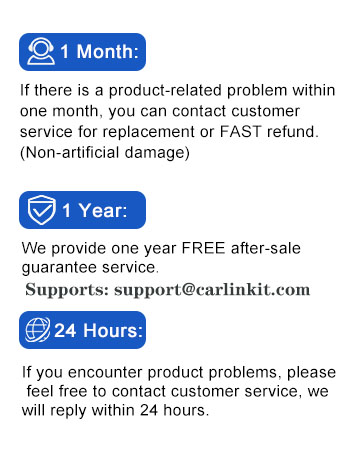
Figure 9: Carlinkit's customer support and warranty details.


