
Introduction
The GUPAY Smart Bird Feeder with Camera is designed to enhance your bird-watching experience by providing a close-up view of wild birds and intelligent features. This device combines a traditional bird feeder with advanced camera technology, allowing for real-time observation, automatic video capture, and AI-powered bird identification. It is solar-powered for continuous operation and includes features to deter unwanted visitors like squirrels.
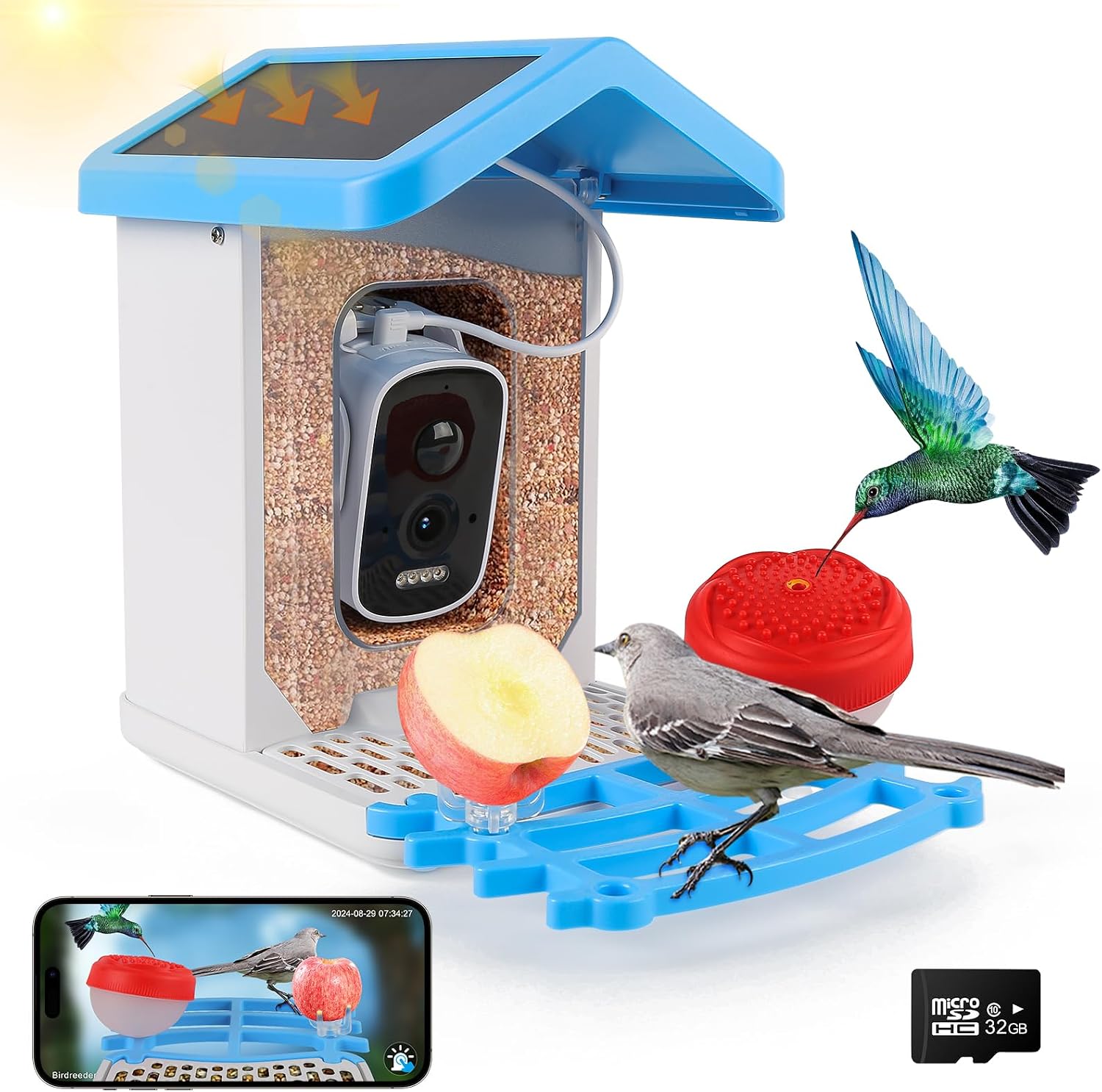
The GUPAY Smart Bird Feeder features a transparent seed container, an integrated camera, and a perch. It comes with additional accessories like a fruit holder and a hummingbird feeder, and is powered by a solar panel on its roof. A 32GB SD card is included for local storage of recordings.
Setup
1. Components Overview
Before beginning installation, ensure all components are present:
- Smart Bird Feeder Unit with integrated camera and solar panel.
- Mounting Kit (includes strap and screws for various installation methods).
- 32GB SD Card (pre-installed or to be inserted).
- Fruit fork and hummingbird feeder attachments.

Key components of the bird feeder, including the solar panel, camera, and seed capacity.
2. Initial Charging
Although the feeder is solar-powered, it is recommended to fully charge the internal batteries overnight before the first use. This ensures optimal performance and connectivity from the start.
3. Installation Methods
The GUPAY Smart Bird Feeder offers flexible installation options:
- Stable Surface Placement: The feeder can be placed on any flat, stable surface in your garden or patio.
- Tree Trunk Attachment (Strap): Use the provided strap to securely fasten the feeder around a tree trunk or a sturdy post.
- Tree Trunk Attachment (Screws): For a more permanent installation, use the mounting bracket and screws to attach the feeder directly to a tree or wooden post.

Various methods for installing the bird feeder to suit different outdoor environments.
Ensure the chosen location provides adequate sunlight for the solar panel and is within range of your Wi-Fi network for optimal camera performance. The recommended Wi-Fi range is less than 30 meters with obstacles and less than 100 meters without obstacles.

Optimal Wi-Fi signal range for the smart bird feeder.
4. App Download and Wi-Fi Connection
To utilize the smart features of your bird feeder, download and configure the companion application:
- Download the App: Scan the QR code provided in the manual or search for "Tris Home" in your mobile application market (App Store or Google Play) to download the app.

Detailed steps for app download and device setup. The app can be downloaded from d.xmeye.net/Czeye.
- Register Account: Run the Tris Home app and register an account. Third-party accounts (e.g., Google) may be supported for login.
- Add Device: In the app, click the "+" icon in the middle or the upper right corner to add a new device. Select "bird feeder" from the device list.
- Power On: Long press the power button at the top of the feeder for 3-4 seconds until you hear a tone and the blue light flashes. If no tone, ensure the device is charged. If the blue indicator light is not flashing quickly, long press the reset button at the bottom for 5-10 seconds to restore default settings.
- Connect to Wi-Fi: Enter your Wi-Fi password. Note: If using a dual-band router, connect your phone to the 2.4GHz Wi-Fi band when configuring the network for your device.
- Scan QR Code: The app will generate a QR code. Place the QR code in front of the camera lens (approximately 25-35cm or 1 foot away) until the device confirms successful connection.
Operating
1. Filling the Feeder
To fill the feeder, remove the top cover. Pour bird seed into the main compartment. The feeder has a 1.5L capacity. The seed will automatically dispense into the feeding tray as birds consume it.
The transparent container allows easy monitoring of seed levels.
2. Using Attachments
The feeder includes a fruit fork and a hummingbird feeder to attract a wider variety of birds. Attach these to the designated slots on the feeder's tray.

Optional attachments for attracting hummingbirds and offering fruit.
3. Camera Features and App Functions
- 1080P HD & 150° Wide-Angle Camera: Provides clear, high-definition video and a broad view of the feeding area.
- AI Bird Identification: The advanced AI recognition technology can identify over 11,000 species of birds, providing information about the visitors to your feeder. (Note: AI recognition may require a subscription).

The camera's AI identifies various bird species.
- Auto Capture & Motion Detection: The camera automatically captures videos and photos when motion is detected, ensuring you don't miss any bird visits.
- Real-time Notifications: Receive instant alerts on your smartphone when birds arrive at the feeder.

Receive instant alerts on your phone when birds are detected.
- Color Night Vision: The camera provides clear color images and videos even at night, allowing for 24/7 bird watching.

The camera provides clear color images and videos at night.
- Voice Intercom: Utilize the built-in microphone to hear bird sounds or to deter unwanted visitors like squirrels with your voice.

The voice intercom feature allows for two-way communication, useful for deterring squirrels.
- Storage Options: Videos and photos are saved to the included 32GB SD card. Cloud storage and AI recognition subscriptions are also available for enhanced features.

Recordings can be stored on the included SD card or via optional cloud storage.
Maintenance
1. Cleaning the Feeder
Regular cleaning of the bird feeder is essential for the health of visiting birds and the longevity of the device.
- Empty any remaining seed and debris.
- Wipe down all surfaces, including the feeding tray and transparent container, with a damp cloth. A mild soap solution can be used, followed by thorough rinsing.
- Ensure the solar panel is clean and free of dust or obstructions to maintain efficient charging.
- Clean the camera lens gently with a soft, lint-free cloth to ensure clear image quality.
2. Seed Refill
Check the seed level regularly and refill as needed to ensure a continuous food supply for birds. The transparent design allows for easy visual inspection.
3. SD Card Management
Periodically check the 32GB SD card for storage capacity. You can export saved videos and photos to your computer or other storage devices to free up space. If the SD card is full, new recordings may not be saved.
Troubleshooting
| Problem | Possible Cause | Solution |
|---|---|---|
| Missing SD card / Trouble loading app for camera. | SD card not properly inserted or corrupted. App installation issue. | Ensure the 32GB SD card is correctly inserted. Reinstall the "Tris Home" app if issues persist. Check app permissions. |
| Camera not connecting / Live view not working. | Weak Wi-Fi signal, incorrect Wi-Fi password, or device not properly paired. | Verify your Wi-Fi password. Ensure the feeder is within optimal Wi-Fi range. If using a dual-band router, ensure your phone is connected to the 2.4GHz band during setup. Try resetting the device (long press reset button) and re-pairing with the app. |
| Choppy video / Poor image quality. | Weak Wi-Fi signal, obstructions, or dirty camera lens. | Improve Wi-Fi signal strength or relocate the feeder closer to the router. Clean the camera lens gently with a soft cloth. |
| Squirrels accessing the feeder. | Squirrels are agile and persistent. | Utilize the built-in voice intercom feature to deter squirrels. Ensure the anti-squirrel net is properly installed. Consider placing the feeder in a location less accessible to squirrels. |
| Solar panel not charging effectively. | Insufficient sunlight, dirty solar panel, or panel obstruction. | Ensure the solar panel receives direct sunlight for several hours daily. Clean the solar panel regularly to remove dust, leaves, or other debris. |
Specifications
- Brand: GUPAY
- Model: TV-XM-Q20-4MP
- Product Dimensions: 9.8"L x 8.46"W x 7"H
- Item Weight: 2.64 pounds
- Material: Plastic
- Power Source: Solar Powered
- Capacity: 1.5 Liters (for bird seed)
- Camera: 1080P HD, 150° ultra wide angle
- Storage: 32GB SD Card (included), Cloud storage (subscription-based)
- AI Identification: Supports identification of over 11,000 bird species (subscription may be required)
- Special Feature: Weatherproof (IPX7), Color Night Vision, Motion Detection, Real-time Notifications, Voice Intercom, Squirrel-proof net.
- Batteries: 2 Lithium Ion batteries (included)
- UPC: 769464427951
Warranty and Support
For specific warranty details and terms, please refer to the documentation included with your product packaging or visit the official GUPAY brand store on Amazon.
For technical support, troubleshooting assistance, or inquiries regarding your GUPAY Smart Bird Feeder, please contact GUPAY customer service through their official channels. You can often find support information within the "Tris Home" application or on the GUPAY brand's Amazon store page.
GUPAY Store Link: Visit the GUPAY Store on Amazon