
1. Product Overview
This manual provides essential information for the setup, operation, and maintenance of your JNMDLAKO Folding Conference Table. Designed for versatility and efficiency, this table is ideal for training rooms, conference areas, and various collaborative environments. Its key features include a quick folding mechanism, 360-degree mobility, and durable construction.
2. Setup and Assembly
The JNMDLAKO Folding Conference Table is designed for straightforward assembly. All necessary hardware and detailed instructions are included to facilitate a quick setup process.
2.1 Unpacking
- Carefully open the packaging and remove all components.
- Verify that all parts listed in the packing list are present. Refer to the included parts diagram.
- Place components on a clean, flat, and soft surface to prevent scratches during assembly.
2.2 Assembly Steps
Follow the step-by-step instructions provided in the separate assembly guide. A general overview of key steps includes:
- Attach the leg frames to the tabletop using the provided screws and tools.
- Secure the universal wheels to the base of each leg frame. Ensure the locking mechanism on the wheels is functional.
- Install any additional components such as the privacy baffle or storage rack, if applicable.

Figure 2.2.1: Assembly diagram illustrating the connection points for the tabletop and leg frames.
3. Operating Instructions
The JNMDLAKO Folding Conference Table offers flexible functionality for various uses.
3.1 Folding Mechanism
The table features a quick-folding design for easy storage and portability. To fold the table:
- Locate the rotary switches on both sides of the table, near the top of the leg frames.
- Slightly twist the switches to unlock the tabletop.
- Gently fold the tabletop forward or backward until it locks into the vertical storage position.
- Ensure the table is securely locked in the folded position before moving or storing.
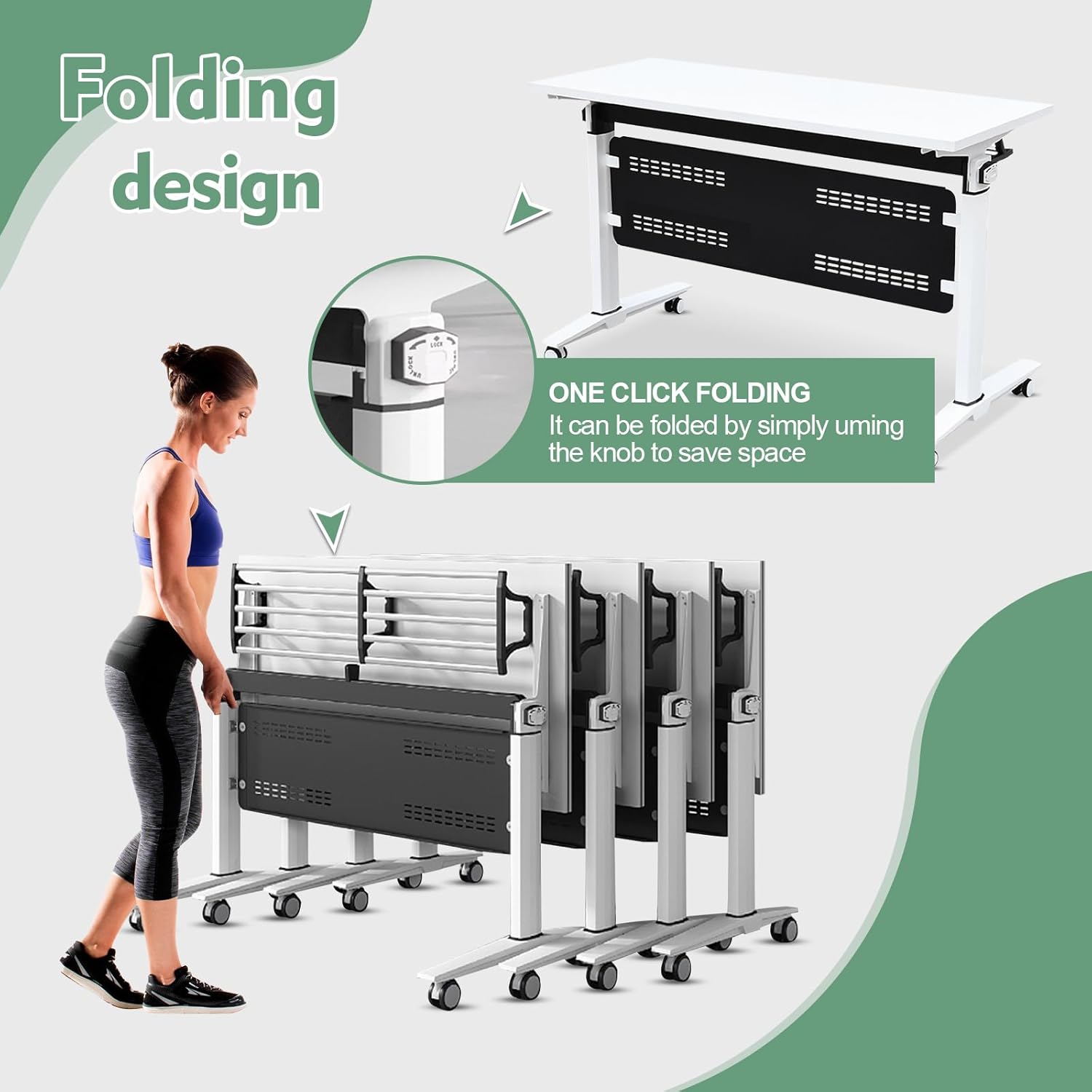
Figure 3.1.1: Detail of the one-click folding knob and an example of multiple tables stored in a folded configuration.
3.2 Mobility and Locking Wheels
Each table is equipped with four universal wheels for effortless movement. These wheels feature a 360-degree rotation capability and rubber coils for silent operation.
- To move the table, ensure the wheel brakes are disengaged.
- To secure the table in place, press down on the brake lever located on each wheel until it clicks into the locked position.
- Always engage the wheel brakes when the table is in its desired position to prevent accidental movement.

Figure 3.2.1: Detailed view of the PU silent wheel with its integrated brake mechanism.
3.3 Modular Configurations
The modular design allows for various table arrangements to suit different meeting or training needs. Multiple tables can be combined to form larger configurations such as U-shapes, rectangular setups, or individual workstations.

Figure 3.3.1: Examples of multiple table combinations for different room layouts and capacities.
4. Maintenance and Care
Proper care will ensure the longevity and appearance of your JNMDLAKO Folding Conference Table.
4.1 Cleaning
- The table surface is resistant to scratches and easy to clean.
- Wipe the surface with a soft, damp cloth. For stubborn marks, a mild soap solution can be used.
- Avoid abrasive cleaners or harsh chemicals, as these may damage the finish.
- Ensure the table is dry after cleaning to prevent water spots.
4.2 General Care
- Regularly check all screws and fasteners to ensure they are tight. Retighten if necessary.
- Inspect the wheel mechanisms periodically for smooth operation and ensure brakes are functioning correctly.
- Avoid placing extremely hot items directly on the table surface without protection.
- When storing, utilize the folding feature to save space and protect the table from potential damage.
Figure 4.2.1: Illustration of the table's durable, wear-resistant, and easy-to-clean surface material.
5. Troubleshooting
This section addresses common issues you might encounter with your conference table.
5.1 Table Does Not Fold Smoothly
- Issue: The tabletop feels stiff or gets stuck when attempting to fold.
- Solution: Ensure the rotary switches on both sides are fully twisted to the unlock position. Check for any obstructions in the folding mechanism. Apply a small amount of silicone lubricant to moving parts if necessary, avoiding contact with the tabletop surface.
5.2 Wheels Do Not Roll Freely or Lock Properly
- Issue: Wheels are difficult to move or the brakes do not engage/disengage.
- Solution: Check for debris (e.g., hair, dust) wrapped around the wheel axles. Clean as needed. Ensure the brake lever is fully pushed down to lock or fully lifted to unlock. If a wheel is damaged, contact customer support for replacement options.
5.3 Table Feels Unstable or Wobbly
- Issue: The table wobbles during use.
- Solution: Verify that all assembly screws are securely tightened. Ensure the table is placed on a flat, even surface. If the floor is uneven, consider using shims under the wheels (when locked) to stabilize.
If you encounter issues not covered here or require further assistance, please refer to the Warranty and Support section.
6. Specifications
| Attribute | Detail |
|---|---|
| Brand | JNMDLAKO |
| Model Name | Folding Table |
| Product Dimensions (D x W x H) | 23.6"D x 55.1"W x 29.5"H |
| Color | C (White) |
| Style | Modern |
| Base Type | Leg |
| Frame Material Type | Metal (Alloy Steel) |
| Top Material Type | Engineered Wood (P2 grade particle board) |
| Unit Count | 1.0 Count |
| Load Capacity | Up to 500 pounds |
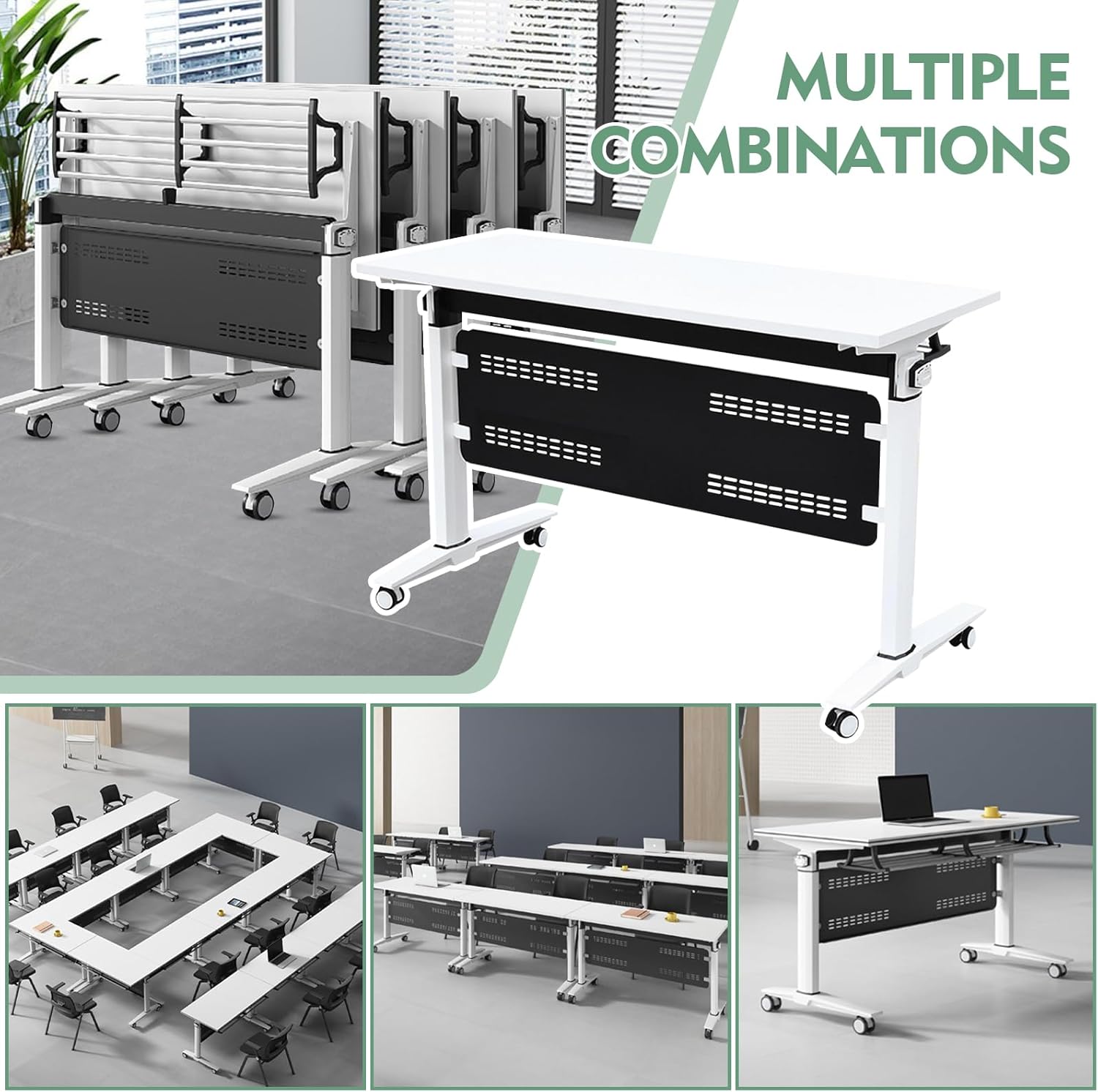
Figure 6.1: Detailed product dimensions including length, width, and height.
7. Warranty and Support
JNMDLAKO stands behind the quality of its products.
7.1 Warranty Information
This product comes with a 12-month warranty from the date of purchase. The warranty covers manufacturing defects and material flaws under normal use. It does not cover damage caused by misuse, accidents, unauthorized modifications, or normal wear and tear.
7.2 Customer Support
If you have any questions regarding assembly, operation, maintenance, or require assistance with a warranty claim, please do not hesitate to contact our professional customer service team. Please have your purchase details and product model information ready when contacting support.
For support, please visit the JNMDLAKO store on Amazon or contact the seller directly through your Amazon order history.


