
Introduction
Welcome to the Yoever IDW20 Smart Watch user manual. This guide provides detailed instructions to help you set up, operate, and maintain your new smartwatch. The Yoever IDW20 is designed to enhance your daily life with features such as Bluetooth calling, built-in Alexa, comprehensive health monitoring, and extensive fitness tracking capabilities. Please read this manual thoroughly to ensure optimal performance and longevity of your device.

Image: The Yoever IDW20 Smart Watch, showcasing its sleek design and digital interface.
What's in the Box
Upon unboxing your Yoever IDW20 Smart Watch, please verify that all the following components are included:
- Yoever IDW20 Smart Watch (1 unit)
- Magnetic Charger (1 unit)
- User Manual (1 unit)
Setup Guide
1. App Download and Pairing
To utilize all features of your Yoever IDW20 Smart Watch, you must first download and install the companion application on your smartphone.
- Download the 'VeryFit' App: Search for 'VeryFit' in your smartphone's app store (Google Play Store for Android or Apple App Store for iOS) and download the official application.
- Enable Bluetooth: Ensure Bluetooth is enabled on your smartphone.
- Open the App and Add Device: Launch the 'VeryFit' app, navigate to the 'Device' section, and select 'Add Device'. The app will search for available devices.
- Connect to 'IDW20': From the list of found devices, select 'IDW20' to initiate the pairing process. Follow any on-screen prompts to complete the connection.
2. Bluetooth Calling Function Setup
After initial pairing, follow these steps to enable the Bluetooth calling feature:
- Open Phone Bluetooth Settings: On your smartphone, go to the Bluetooth settings menu.
- Verify 'IDW20' Connection: Ensure 'IDW20' is listed as a connected device. If not, tap on it to connect.
- Allow Call Permissions: Grant necessary permissions for calls within your phone's Bluetooth settings for the 'IDW20' device.
- Confirm Functionality: The Bluetooth call function should now be active, allowing you to make and answer calls directly from your watch.

Image: Visual guide illustrating the app download, device pairing, and Bluetooth call setup process.
Operating the Smart Watch
Basic Navigation
- Touchscreen: The 1.91-inch HD LCD touchscreen allows for intuitive interaction. Swipe up, down, left, or right to navigate through menus and features.
- Rotating Crown: The innovative rotating crown on the side of the watch can be used to scroll through interfaces and lists, enhancing ease of use.
Customizing Watch Faces
Personalize your smartwatch experience with a variety of watch faces.
- The 'VeryFit' app offers over 100 different watch face styles.
- You can also customize watch faces with your own photos to showcase your personality.

Image: The smartwatch screen showing different watch face options and controls.
Alexa and Voice Assistant
The Yoever IDW20 features an integrated Amazon Alexa voice assistant and supports your phone's AI voice assistant (Siri for iOS, Google Assistant for Android).
- Alexa: Use voice commands to check messages, play music, set reminders, manage your schedule, get weather updates, and more.
- AI Voice Assistant: Wake up your mobile phone's smart assistant for tasks like making phone calls.

Image: The smartwatch demonstrating Alexa voice commands and smart dialing.
Smart Notifications
Receive real-time notifications directly on your wrist, ensuring you stay informed without needing to check your phone constantly.
- The watch displays notifications for social media messages, emails, and texts.
- Note: Sending SMS is not supported directly from the watch.

Image: The smartwatch displaying message notifications from various applications.
Additional Features
The Yoever IDW20 Smart Watch includes several practical daily features:
- Music Control: Play, pause, skip tracks on your smartphone.
- Camera Control: Remotely trigger your smartphone's camera shutter.
- Weather Forecast: Get current weather information.
- Calendar: View your schedule.
- Alarm Settings: Set alarms and reminders.
- Find Phone: Locate your misplaced smartphone.
- Games & Calculator: Enjoy simple utilities directly on your wrist.

Image: A collage of the smartwatch's various utility functions.
Health Monitoring
The Yoever IDW20 Smart Watch provides continuous monitoring of key health metrics using advanced high-precision sensors.
Sleep Monitoring
Track your sleep patterns to gain insight into your sleep quality.
- Monitors deep sleep, light sleep, and awake times.
- Provides data to help you understand and improve your sleep habits.
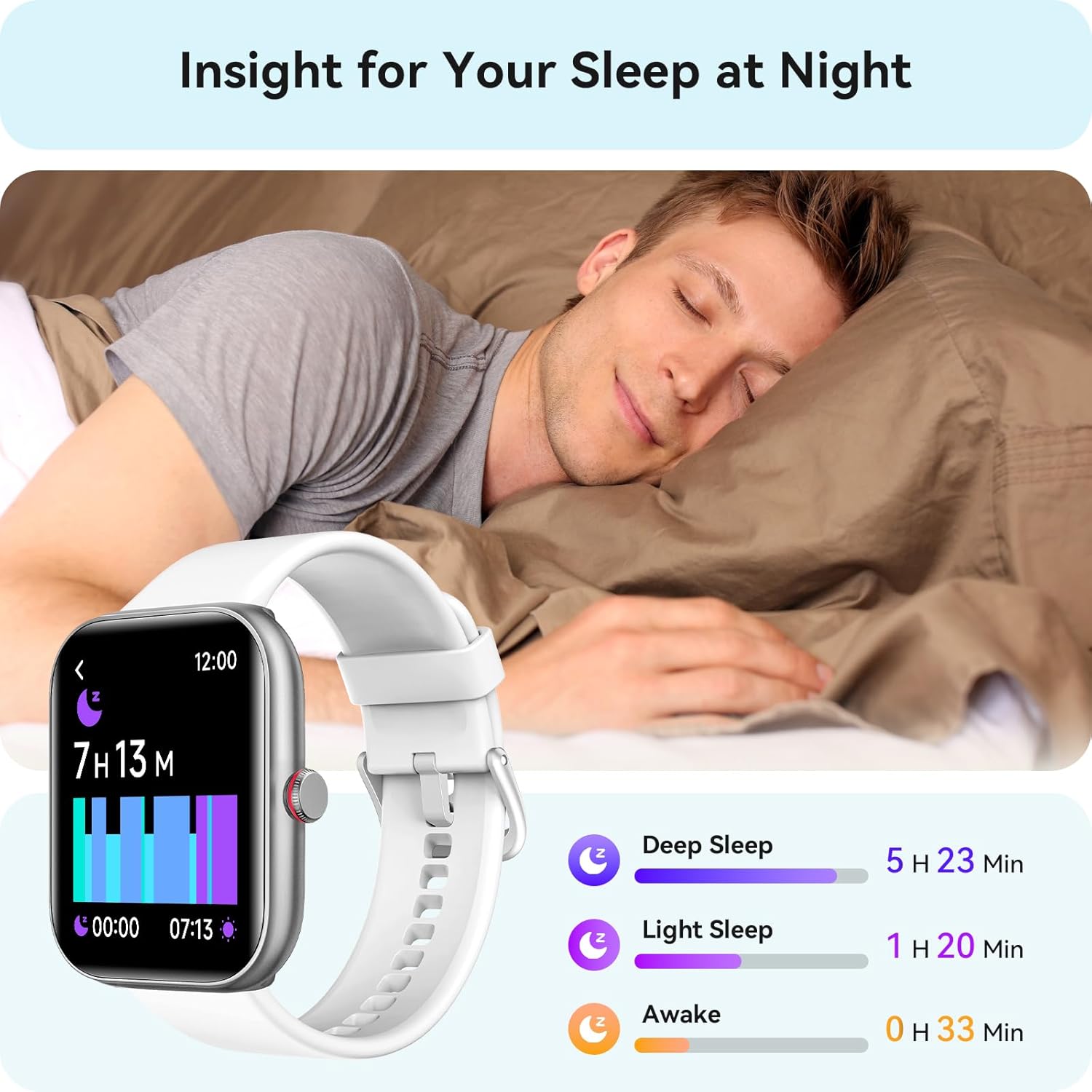
Image: The smartwatch screen showing detailed sleep analysis.
Heart Rate Monitoring
Continuously monitors your heart rate throughout the day.
- Provides real-time heart rate data.
- Alerts you with a vibration if your heart rate deviates from normal ranges.

Image: The smartwatch displaying heart rate data and trends.
Blood Oxygen (SpO2) Monitoring
Measures your blood oxygen saturation levels continuously.
- Helps ensure your breathing is safe and healthy.
- Provides alerts for abnormal SpO2 levels.

Image: The smartwatch displaying blood oxygen levels and historical data.
Stress Monitoring
Monitors your stress levels throughout the day.
- Provides insights into your mental well-being.
- Offers reminders to relax and suggests breathing exercises if high stress is detected.

Image: The smartwatch displaying stress level measurements and relaxation prompts.
Women's Health Tracking
The smartwatch includes features to help women track their menstrual cycle.
- Provides notifications and predictions for menstrual periods and ovulation.

Image: The smartwatch interface showing women's health tracking calendar.
Activity Tracking
The Yoever IDW20 is a comprehensive fitness tracker, supporting a wide range of activities.
100+ Sport Modes
Track your performance across over 100 popular indoor and outdoor sports modes, including:
- Running, Cycling, Swimming, Baseball, Basketball, Fitness, Yoga, Strength Training, and Free Workouts.
- Provides accurate and scientific data for each activity.

Image: The smartwatch interface showing a selection of available sport modes.
All-Day Activity Recording
The smartwatch continuously tracks your daily activity data.
- Monitors steps, distance, and calories burned.
- Provides a holistic view of your daily movement and exercise.

Image: The smartwatch displaying daily activity metrics like steps, calories, and heart rate.
Water Resistance
The Yoever IDW20 Smart Watch has an IP68 waterproof rating.
- This rating means you can confidently use it while washing hands, sweating, or swimming.
- It is waterproof up to 10 meters.
- Important Note: The watch is not suitable for seawater or sauna use.

Image: The smartwatch being used in water, highlighting its waterproof design.
Battery Life
The Yoever IDW20 Smart Watch is equipped with a 350 mAh battery, offering extended usage times.
- Standby Time: Up to 30 days.
- Average Usage: 5-7 days.
- Power Saving Mode: Up to 20 days.
- Charging Time: Approximately 2 hours for a full charge.

Image: The smartwatch highlighting its long battery life and charging specifications.
Compatibility
The Yoever IDW20 Smart Watch is designed for wide compatibility with various smartphones.
- iOS Devices: Compatible with iOS 9.0 and above (e.g., iPhone 15, 14, 13, 12, 11 Series, iPhone XR/XS/8/7).
- Android Devices: Compatible with Android 6.0 and above (e.g., Galaxy Series, Pixel Series, Xiaomi Series, and other Android smartphones).

Image: A visual representation of the smartwatch's compatibility with iOS and Android devices.
Maintenance
Proper care and maintenance will ensure the longevity and optimal performance of your Yoever IDW20 Smart Watch.
- Cleaning: Regularly wipe the watch screen and strap with a soft, dry, lint-free cloth. For stubborn dirt, slightly dampen the cloth with water. Avoid using harsh chemicals or abrasive materials.
- Drying After Water Exposure: Although IP68 waterproof, it is recommended to dry the watch thoroughly after exposure to water to prevent skin irritation and ensure proper sensor function.
- Charging: Use only the provided magnetic charger. Ensure the charging contacts on the watch and charger are clean and dry before connecting.
- Storage: Store the watch in a cool, dry place away from direct sunlight and extreme temperatures when not in use for extended periods.
- Avoid Impacts: Protect the watch from strong impacts or drops, which can damage the screen or internal components.
Troubleshooting
If you encounter issues with your Yoever IDW20 Smart Watch, please refer to the following common solutions:
- Watch Not Turning On: Ensure the watch is fully charged. Connect it to the magnetic charger and allow it to charge for at least 30 minutes before attempting to power it on again.
- Cannot Pair with Phone:
- Ensure Bluetooth is enabled on your phone and the watch.
- Make sure the 'VeryFit' app is installed and open.
- Restart both your phone and the watch.
- Ensure the watch is not already paired with another device.
- Notifications Not Appearing:
- Check that the watch is successfully connected to your phone via Bluetooth.
- Verify that notification permissions are granted for the 'VeryFit' app in your phone's settings.
- Ensure notifications are enabled within the 'VeryFit' app for the specific applications you wish to receive alerts from.
- Inaccurate Health Data:
- Ensure the watch is worn snugly on your wrist, but not too tight, with the sensors in contact with your skin.
- Clean the sensor area on the back of the watch.
- Avoid excessive movement during measurements for more accurate readings.
- Bluetooth Calling Issues:
- Confirm that the Bluetooth calling function is properly set up as described in the 'Setup Guide' section.
- Check your phone's Bluetooth settings to ensure 'IDW20' is connected for calls.
- Ensure your phone is within Bluetooth range of the watch.
If these steps do not resolve your issue, please contact Yoever customer support for further assistance.
Specifications
| Feature | Specification |
|---|---|
| Model Number | IDW20 |
| Screen Size | 1.91 Inches HD LCD Touchscreen |
| Battery Capacity | 350 mAh Lithium Polymer |
| Battery Life (Average) | 5-7 Days |
| Charging Time | Approx. 2 Hours |
| Water Resistance | IP68 (up to 10 meters, not for seawater/sauna) |
| Connectivity | Bluetooth 5.3 |
| Operating System Compatibility | Android 6.0+ / iOS 9.0+ |
| Health Monitoring | Heart Rate, SpO2, Sleep, Stress, Women's Health |
| Sport Modes | 100+ |
| Voice Assistant | Built-in Alexa, AI Voice Assistant (via smartphone) |
| Item Weight | 3.2 ounces |
| Dimensions | 47.02mm x 38.54mm x 11.60mm (Watch body) |
Warranty and Support
Yoever is committed to providing high-quality products and excellent customer service.
- 5-Year Guarantee: Your Yoever IDW20 Smart Watch is covered by a 5-year guarantee to protect your rights.
- Lifetime Technical Support: We offer lifetime technical support for your product.
- 12-Hour Customer Support: Our customer support team is available to assist you within 12 hours.
- Contact Us: If you encounter any issues or have questions, please do not hesitate to contact us. Refer to the product packaging or the 'VeryFit' app for specific contact information.

Image: Yoever customer care details, including warranty and support services.