
LCRBOL B0DCF9DY8M
LCRBOL TV Stand Model B0DCF9DY8M User Manual
Oak Finish, for 55/60/65 inch TVs
1. Introduction
This manual provides essential information for the assembly, safe use, and maintenance of your LCRBOL TV Stand, Model B0DCF9DY8M. Please read these instructions carefully before beginning assembly and retain this manual for future reference.

Image: The LCRBOL TV Stand in an oak finish, showcasing its fluted door cabinets and central open shelves, suitable for various living room setups.
2. Important Safety Information
Failure to follow these safety instructions may result in injury or product damage.
- Keep children away from sharp edges to avoid injury during assembly and use.
- Do not drag the TV stand on the floor; always lift it to move it to prevent damage to the product or flooring.
- Avoid pressing on the cabinet doors with excessive force.
- Children should only use or interact with the TV stand under adult supervision.
- Ensure all connections are secure before placing items on the stand.
- Do not exceed the maximum weight limit of 110 pounds.
3. Package Contents
Before assembly, verify that all components listed in the included installation manual are present and undamaged. If any parts are missing or damaged, please contact customer support.
- All necessary panels and wooden components.
- Hardware kit (screws, dowels, cam locks, etc.).
- Assembly tools (basic tools may be included, but a screwdriver is generally recommended).
- Installation Manual (PDF).
4. Assembly Instructions
The LCRBOL TV Stand is designed for straightforward assembly. Detailed, step-by-step instructions are provided in the official installation manual. Please follow these instructions carefully to ensure correct and safe assembly.
Download the Official Installation Manual (PDF): Click Here to Download
An installation video is also available to guide you through the process. Refer to the product page or the PDF manual for video access.

Image: An illustrative diagram detailing the various components and steps involved in assembling the LCRBOL TV Stand.
5. Product Features
- TV Compatibility: Designed to accommodate TVs up to 65 inches, providing a stable and spacious surface. The desktop measures 54.3 inches by 15.35 inches.
- Solid Foundation: Constructed with 6 durable wooden legs, including 2 adjustable middle feet to ensure balance and stability on various floor surfaces. The stand is built from robust P2 particleboard for long-lasting strength.
- Organized Storage: Features a central shelf and two spacious cabinets, offering versatile storage options. Two rear cord holes facilitate neat cable management for electronic devices.
- Adjustable & Removable Shelves: The central shelf offers 3 different height options, allowing customization for storing items of various sizes.
- Waveform Doors: The cabinet doors feature a distinctive waveform design, complementing the natural wood hues.
- Golden Handles: Integrated golden handles provide a functional and aesthetic accent to the cabinet doors.
- Curved Corner Design: The stand features curved corners for a sleek profile and enhanced safety.
- Large Cable Management Hole: Integrated cable management holes in the rear panel allow for tidy organization of wires and cables.

Image: Detail of the adjustable shelf, illustrating its three height options for flexible storage.

Image: A close-up view of the cabinet door, highlighting its unique waveform texture.

Image: A detailed shot of the golden handle, showcasing its design and integration with the cabinet.

Image: A close-up demonstrating the smooth, curved corner design of the TV stand.

Image: Detail of the cable management hole, showing how cables can be neatly routed through the back panel.
6. Specifications
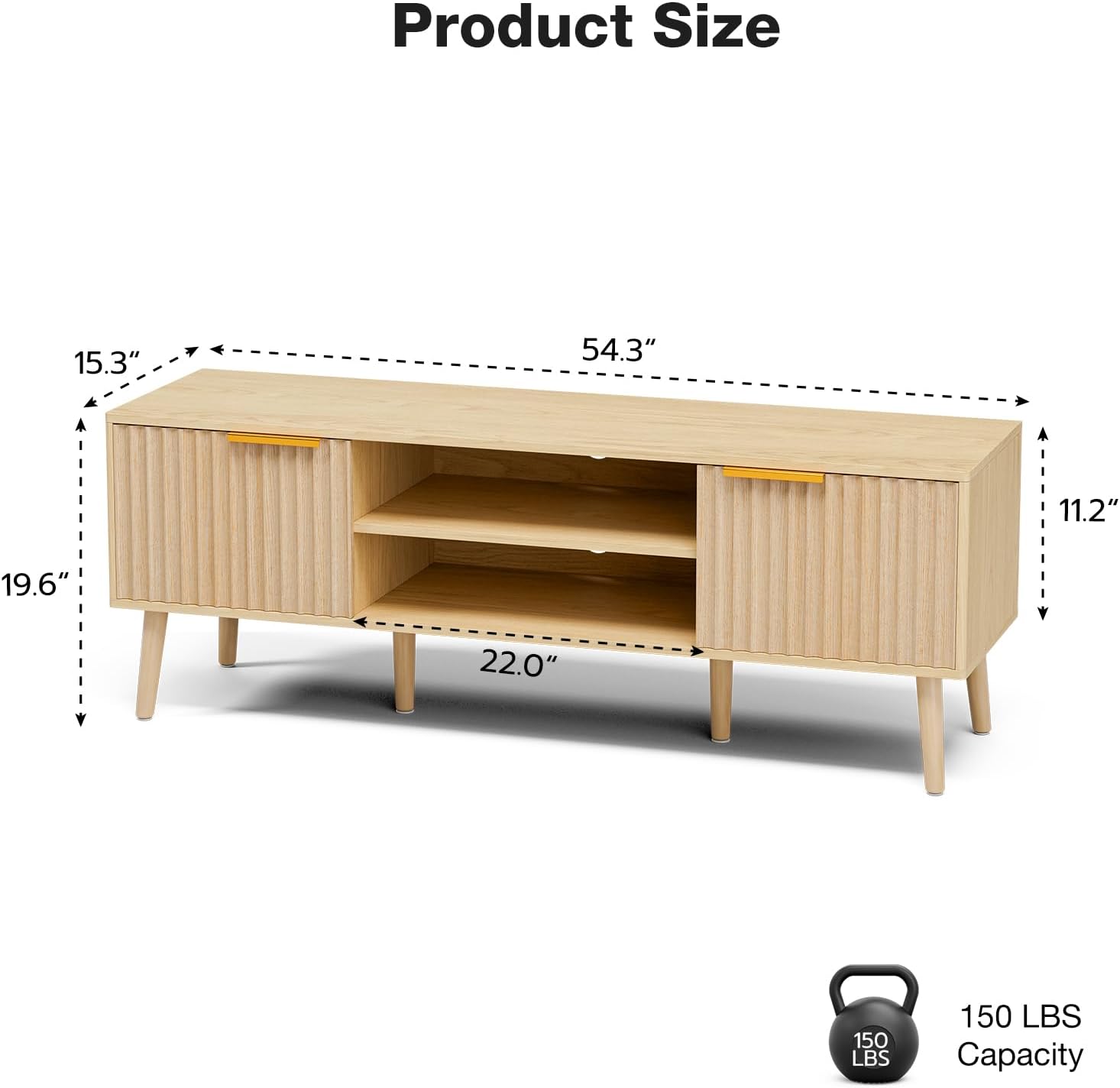
Image: A diagram illustrating the overall dimensions of the TV stand, including width, depth, and height.
| Attribute | Detail |
|---|---|
| Brand | LCRBOL |
| Model Number | B0DCF9DY8M |
| Color | Oak |
| Product Dimensions (D x W x H) | 15.4" x 54.3" x 19.7" |
| Recommended TV Size | Up to 65 inches |
| Weight Limit | 110 Pounds |
| Material | Engineered Wood (P2 Particleboard) |
| Number of Shelves | 1 (adjustable) |
| Number of Compartments | 4 (2 cabinets, 2 open sections) |
| Mounting Type | Floor Mount (Freestanding) |
| Assembly Required | Yes |
| Item Weight | 49.2 pounds |
7. Care and Maintenance
- Cleaning: Wipe surfaces with a soft, damp cloth. Avoid harsh chemicals or abrasive cleaners, as these can damage the finish.
- Dusting: Regularly dust with a dry, soft cloth to prevent buildup.
- Spills: Clean spills immediately with a dry cloth to prevent moisture damage.
- Sunlight: Avoid prolonged exposure to direct sunlight to prevent fading or discoloration of the wood finish.
- Heat: Do not place hot items directly on the surface. Use coasters or protective pads.
- Inspection: Periodically check all hardware and connections to ensure they remain tight. Retighten if necessary.
8. Troubleshooting
- Wobbling Stand: Ensure all legs are securely attached and the adjustable middle feet are properly set to compensate for uneven floors. Verify all screws are tightened.
- Cabinet Doors Not Aligning: Check that hinges are correctly installed and tightened. Minor adjustments to hinge screws may be required for proper alignment.
- Difficulty During Assembly: Refer to the detailed steps in the official installation manual. Ensure you are using the correct hardware for each step. Do not force components together.
- Missing Parts: If any parts are missing from the package, contact LCRBOL customer support with your purchase details.
9. Warranty and Support
LCRBOL stands behind the quality of its products. For specific warranty details, please refer to the documentation included with your purchase or contact LCRBOL customer service. If you require assistance with assembly, have questions about product features, or need to report a defect, please reach out to our support team.
Customer Support: Refer to your purchase receipt or the LCRBOL official website for contact information.