
imuto 649P2
imuto 20W PD 10000mAh Portable Charger User Manual
Model: 649P2
Introduction
This manual provides essential instructions for the safe and efficient use of your imuto 20W PD 10000mAh Portable Charger, Model 649P2. Please read this guide thoroughly before operating the device and retain it for future reference.
Package Contents
- imuto Slimmest 20W Portable Charger ×1
- USB-C to USB-C Cable ×1
- Quick Start Guide ×1

Image: The imuto portable charger, a USB-C to USB-C cable, and the user manual are shown as included items.
Setup
1. Initial Charging of the Power Bank
Before first use, fully charge your imuto portable charger. Use the provided USB-C to USB-C cable and connect it to a compatible 18W Power Delivery (PD) wall charger (not included). The four LED indicators will illuminate to show the charging progress.
- Charging Time: Approximately 5 hours with an 18W PD charger.
- LED Indicators: Each LED represents approximately 25% of the battery capacity.

Image: The imuto portable charger is connected to a wall charger via a USB-C cable for recharging. The text indicates a 5-hour recharge time with an 18W PD charger.

Image: A graphic illustrating the faster recharging time of the imuto 18W 10000mAh power bank (5 hours) compared to a standard 10W 10000mAh power bank (10 hours).
Operating Instructions
1. Charging Your Devices
The imuto portable charger features both USB-C and USB-A output ports for charging various devices.
- USB-C Output (PD 20W): Connect your device using a USB-C to USB-C cable or a USB-C to Lightning cable (not included). This port supports Power Delivery for fast charging compatible devices like iPhones and iPads.
- USB-A Output (18W): Connect your device using a standard USB-A charging cable. This port is suitable for a wide range of smartphones, earbuds, and other USB-powered accessories.
- Simultaneous Charging: You can charge two devices concurrently using both the USB-C and USB-A ports. The total output will be shared, with a maximum combined output of 15W (5V/3A).
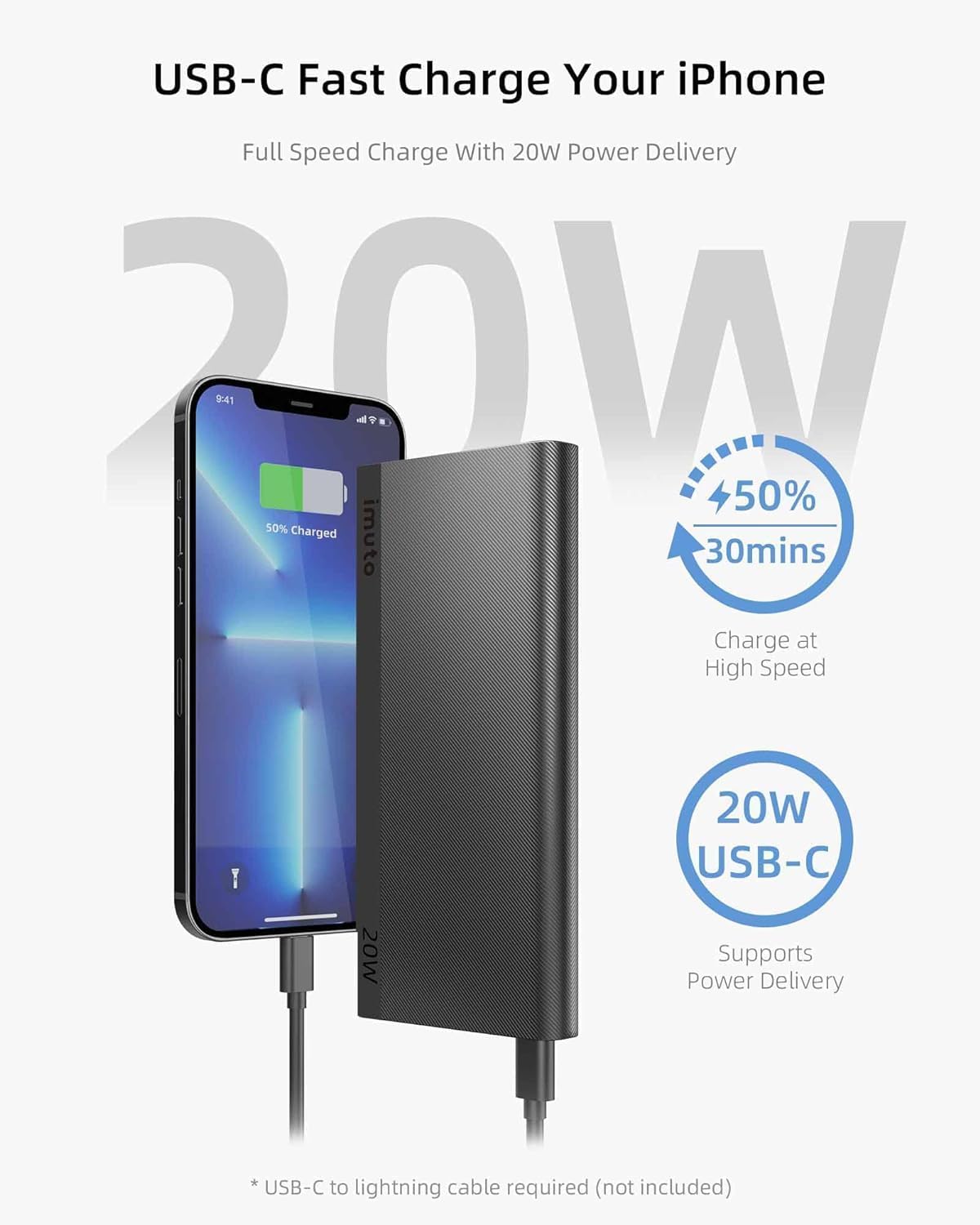
Image: An iPhone is shown connected to the imuto portable charger's USB-C port, illustrating fast charging with 50% charge in 30 minutes.
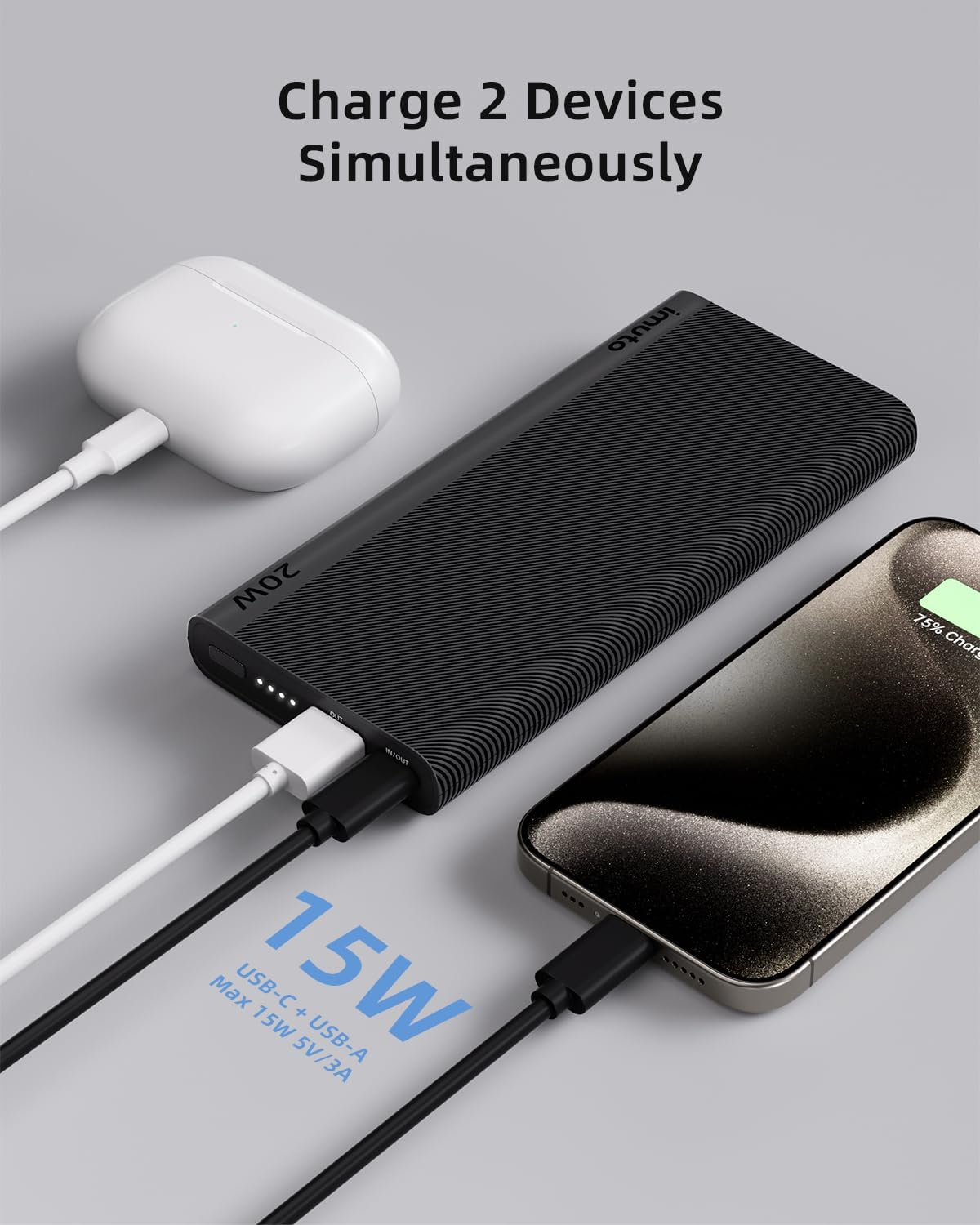
Image: The imuto portable charger is shown charging an iPhone via its USB-C port and a pair of AirPods via its USB-A port simultaneously.

Image: A diagram illustrating the simultaneous charging capabilities, showing a tablet connected to the USB-C port and a phone to the USB-A port.
2. Checking Battery Level
The four LED indicators on the side of the power bank display the remaining battery capacity:
- 4 LEDs: 75% - 100% charged
- 3 LEDs: 50% - 75% charged
- 2 LEDs: 25% - 50% charged
- 1 LED: 0% - 25% charged
3. Bidirectional USB-C Port
The USB-C port functions as both an input for recharging the power bank (18W) and an output for charging your devices (20W PD).

Image: A close-up diagram of the imuto portable charger's ports, highlighting the USB-C port's bidirectional capability for 18W input and 20W output.
4. Universal Compatibility
The imuto portable charger is designed to be compatible with a wide range of devices, including:
- PD 20W: iPhone 12-15 series, iPad models.
- QC 18W: Samsung Galaxy S series, Google Pixel.
- PD 18W: iPhone 8-11 series.
- Others: Gaming consoles, earbuds, smartwatches, handheld fans, and other USB-powered devices.
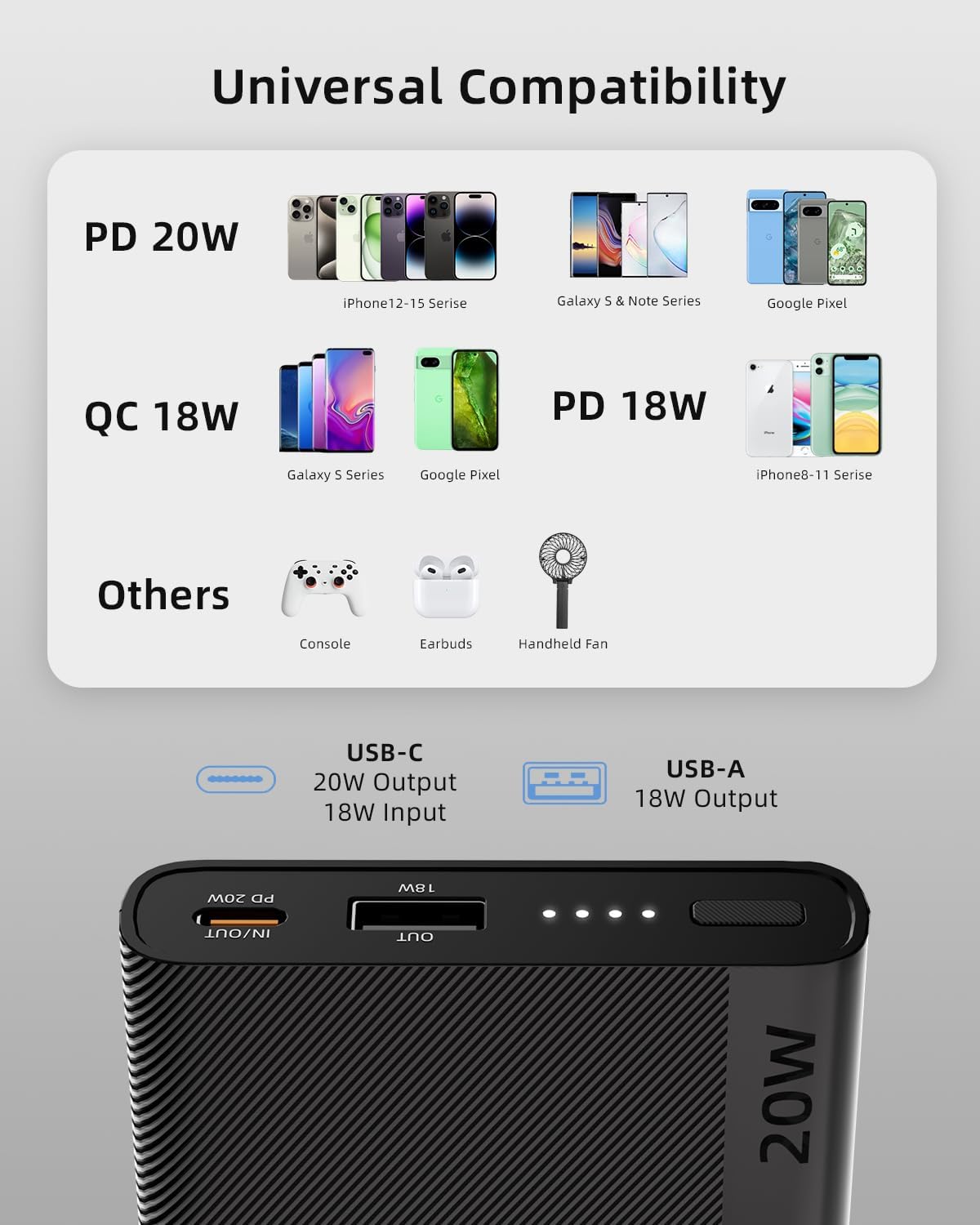
Image: A visual representation of universal compatibility, showing various smartphones, tablets, earbuds, and other gadgets that can be charged by the power bank.

Image: A compatibility chart categorizing devices like iPhones, Samsung Galaxy, Google Pixel, iPads, and MacBooks, indicating their compatibility with the charger.
Maintenance
- Keep the power bank away from extreme temperatures, direct sunlight, and liquids.
- Avoid dropping or subjecting the device to strong impacts.
- Clean the surface with a soft, dry cloth. Do not use abrasive cleaners or solvents.
- For long-term storage, charge the power bank to approximately 50% every three months to preserve battery health.
Troubleshooting
1. Power Bank Not Charging
- Ensure the charging cable is securely connected to both the power bank's USB-C input port and the wall charger.
- Verify that the wall charger is functioning correctly and provides sufficient power (preferably 18W PD).
- Try using a different USB-C cable.
2. Device Not Charging from Power Bank
- Check if the power bank has sufficient charge (refer to LED indicators).
- Ensure the charging cable is securely connected to both the power bank and your device.
- Try using a different charging cable or a different port on the power bank.
- Confirm your device is compatible with the power bank's output specifications.
3. Slow Charging
- Ensure you are using a fast-charging compatible cable and your device supports fast charging.
- When charging two devices simultaneously, the total output is shared, which may result in slower charging for each device.
- Environmental factors (e.g., extreme temperatures) can affect charging speed.
4. imuto SafetyGuard+ Technology
Your imuto portable charger is equipped with MultiProtect 3.0 safety features to ensure protection against:
- Temperature Control
- Surge Protection
- Short-Circuit Prevention
- Over Charging Protection
- Input High-Voltage Protection
- Output High-Voltage Protection
- Input Current Regulation
- Output Current Regulation
- Automatic Current Matching
- Static Resistance

Image: An exploded view diagram of the imuto portable charger, highlighting various safety protections such as input/output high-voltage protection, current regulation, short-circuit protection, and static resistance.
Specifications
| Model Number | 649P2 |
| Battery Capacity | 10000 mAh |
| USB-C Input | 18W (Power Delivery) |
| USB-C Output | 20W (Power Delivery) |
| USB-A Output | 18W |
| Total Output (USB-C + USB-A) | Max 15W (5V/3A) |
| Dimensions | 5.4 x 2.6 x 0.6 inches |
| Weight | 8.3 ounces |
| Color | Black |
| Special Features | Fast Charging, Lightweight, Over Charging Protection, Pocket Size, Slim, Airline Approved |

Image: A hand holding the imuto portable charger next to a smartphone, illustrating its slim and lightweight design with dimensions of 5.4 x 2.6 x 0.6 inches and a weight of 7 oz (as depicted in the image).

Image: A person holding the imuto portable charger at an airport, with text indicating it is airline approved (37Wh / 10000mAh).
Warranty and Support
imuto provides a 2-Year Worry-Free Warranty for this product. For any inquiries, technical assistance, or warranty claims, please contact our 24/7 Customer Support.
Please refer to the Quick Start Guide included in your package for contact details or visit the official imuto website for more information.
Ask a question about this manual
Ask about setup, troubleshooting, compatibility, parts, safety, or missing instructions. Manuals+ will review the question and use this page’s manual context to help answer it.