
1. Introduction
The E T EASYTAO TENS/EMS Muscle Stimulator is a versatile device designed for transcutaneous electrical nerve stimulation (TENS), electrical muscle stimulation (EMS), and relaxing massage therapy. It provides targeted pain relief, muscle conditioning, and relaxation through its advanced programs and adjustable intensity levels. This manual provides essential information for the safe and effective operation of your device.
2. Important Safety Information
Please read all instructions and warnings carefully before using this device. Failure to do so may result in injury or device malfunction.
- Do not use if you have a pacemaker, implanted defibrillator, or other implanted metallic or electronic device.
- Do not use if you are pregnant.
- Do not use on areas of skin that are broken, irritated, or numb.
- Consult your physician before use if you have any medical conditions, including but not limited to epilepsy, heart disease, or cancer.
- Keep out of reach of children.
- Do not use while driving or operating heavy machinery.
- Do not apply electrodes to the head, face, neck, or chest.
- Use only the electrodes and accessories provided or recommended by the manufacturer.
- Discontinue use immediately if you experience any discomfort or adverse reactions.
3. Package Contents
Please check the package to ensure all items are present:
- E T EASYTAO TENS/EMS Muscle Stimulator Unit
- Electrode Pads (8 pieces)
- Electrode Cables (4 pieces, for 4 channels)
- USB Charging Cable
- User Manual
4. Product Features
- 4 Channel Output: Allows simultaneous treatment of up to four different body areas with 8 electrode pads.
- 48 Advanced Therapy Modes: Includes TENS for pain relief, EMS for muscle conditioning, and various massage techniques.
- 20 Levels of Output Strength: Adjustable intensity to suit individual comfort and therapeutic needs.
- Timer Function: Customizable treatment duration.
- Rechargeable Battery: Long-lasting battery provides 4-6 hours of use on a single charge.
- Compact and Portable Design: Easy to carry for on-the-go relief.
- USB Charging: Convenient charging via wall charger, power bank, or laptop USB port.

Figure 1: Device overview highlighting key features like 4 channel output, 48 massage modes, 20 intensity levels, and timer function.
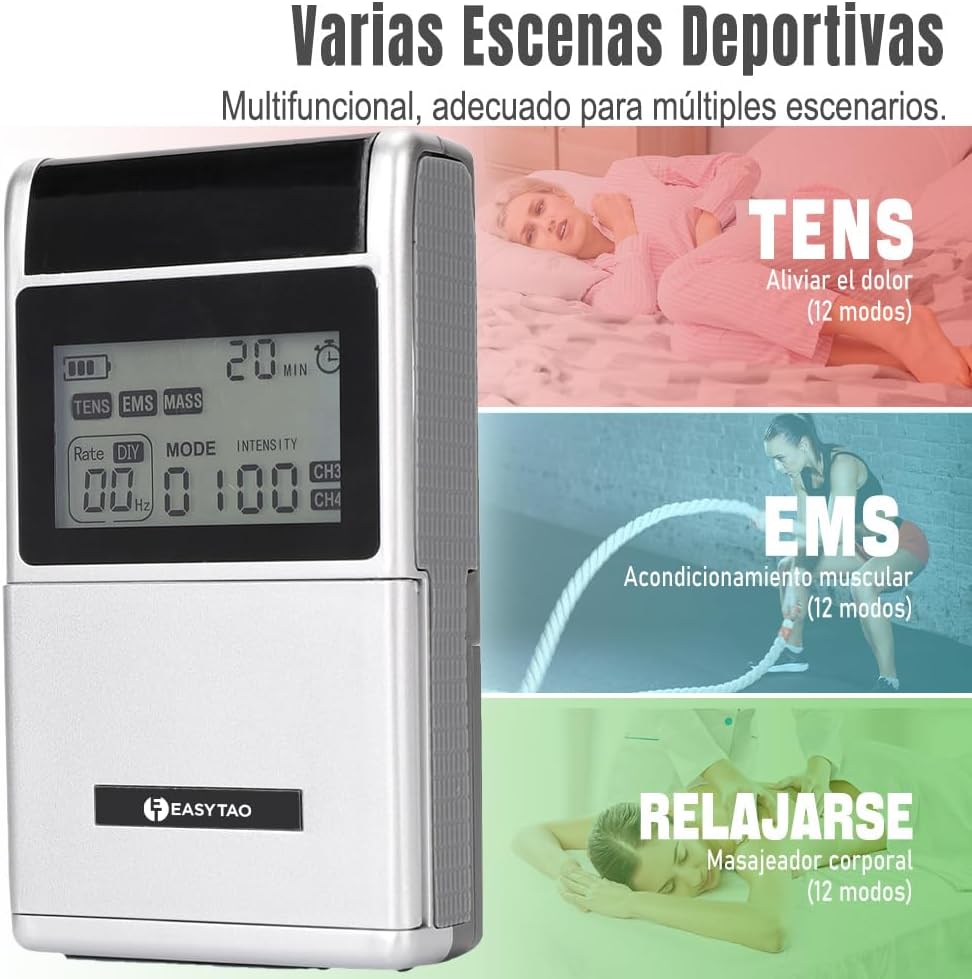
Figure 2: The device supports TENS for pain relief, EMS for muscle conditioning, and Relax modes for general body massage.
5. Setup
- Charge the Device: Before first use, fully charge the device using the provided USB cable. Connect the USB cable to the device's USB port and a compatible power source (wall adapter, power bank, or computer USB port). The battery indicator on the display will show charging status. Note: The device cannot be turned on or display content during charging. Only the battery compartment movement may be visible. Use the included charging cable for optimal compatibility.
- Connect Electrode Cables: Insert the pin connectors of the electrode cables into the output ports (CH1/CH2, CH3/CH4) on the top of the device.
- Attach Electrode Pads: Connect the electrode pads to the snap connectors at the end of the electrode cables. Ensure a secure connection.
- Prepare Skin: Clean and dry the skin area where the electrode pads will be applied. This ensures good adhesion and conductivity.
- Apply Pads: Carefully peel the protective film from the electrode pads and apply them firmly to the desired treatment area. Ensure pads are not overlapping.
6. Operating Instructions

Figure 3: Detailed view of the device's controls and display.
- Power On/Off: Press and hold the Power/Pause button (9) to turn the device on or off.
- Select Mode: Press the Mode Selection button (10) to cycle through the available therapy modes (TENS, EMS, MASS). The indicated mode (8) will change on the display.
- Choose Program: Once a mode is selected, use the Mode/Rate/Frequency button (14) to select one of the 48 advanced programs within that mode.
- Adjust Intensity:
- For Channel 1/2: Use the Intensity Increase button (12) and Intensity Decrease button (15).
- For Channel 3/4: Use the Intensity Increase button (13) and Intensity Decrease button (16).
- Set Timer: Press the Time button (11) to adjust the treatment duration.
- Pause/Resume: Press the Power/Pause button (9) briefly to pause or resume a session.
- End Session: The device will automatically turn off after the set timer expires. Alternatively, press and hold the Power/Pause button (9) to manually turn off the device.
7. Modes and Programs
The device offers 48 advanced modes categorized into TENS, EMS, and Massage. It is recommended to alternate between different treatment modes for optimal results.
- TENS (Transcutaneous Electrical Nerve Stimulation): Primarily used for pain relief by blocking pain signals to the brain.
- EMS (Electrical Muscle Stimulation): Used for muscle conditioning, strengthening, and rehabilitation by causing muscle contractions.
- Massage: Provides relaxing massage effects, simulating various techniques to soothe muscles and reduce tension.

Figure 4: The device simulates various real massage techniques for comprehensive relief.
8. Charging
The E T EASYTAO TENS/EMS Muscle Stimulator is equipped with a rechargeable battery. To charge:
- Connect the provided USB charging cable to the device's USB port (18).
- Plug the other end of the USB cable into a compatible USB power source (e.g., wall adapter, power bank, computer USB port).
- The battery indicator on the display will show the charging status.
- A full charge provides approximately 4 to 6 hours of continuous use.
- Important: The device cannot be operated while it is charging.
9. Maintenance and Care
- Cleaning the Device: Wipe the device with a soft, damp cloth. Do not use abrasive cleaners or immerse the device in water.
- Electrode Pads: After each use, place the electrode pads back on their protective film to maintain their adhesive quality. Replace pads when they lose their stickiness.
- Storage: Store the device and accessories in a cool, dry place, away from direct sunlight and extreme temperatures. The compact design allows for easy storage in a bag or backpack.

Figure 5: The device's compact and lightweight design makes it easy to carry and store.
10. Troubleshooting
| Problem | Possible Cause | Solution |
|---|---|---|
| Device does not turn on. | Low battery or device is charging. | Charge the device fully. Ensure it is not connected to the charger when attempting to turn on. |
| No sensation or weak sensation. | Electrode pads not properly applied, pads have lost adhesion, or intensity is too low. | Ensure pads are firmly applied to clean, dry skin. Replace old pads. Increase intensity gradually. Check cable connections. |
| Pads do not stick. | Pads are dirty or worn out. | Clean skin before application. Replace electrode pads with new ones. |
| Display is not working during charging. | Normal operation. | The device is designed not to display content while charging. This is not a malfunction. |
11. Specifications
- Brand: E T EASYTAO
- Model: B0DCBL1SX2
- Output Channels: 4
- Therapy Modes: 48 (TENS, EMS, Massage)
- Intensity Levels: 20
- Power Source: Rechargeable Lithium Battery
- Charging: USB Type-C (use included cable)
- Unit Dimensions (approx.): 57mm (H) x 24mm (W) x 13mm (D)
- First Available: August 6, 2024
12. Warranty and Support
For warranty information or technical support, please refer to the product packaging or contact E T EASYTAO customer service through the retailer where the product was purchased. Keep your purchase receipt as proof of purchase.