
1. Overview
The LewanSoul miniArm Standard Kit is an open-source 5-Degrees-of-Freedom (5DOF) robotic arm designed for educational purposes, compatible with Arduino programming. It provides a platform for learning robotics, engineering, science, coding, and artificial intelligence concepts. This manual provides essential information for setting up, operating, maintaining, and troubleshooting your miniArm.

Key Features:
- Arduino Programming & Open Source: Built on the Atmega328 platform, compatible with Arduino. Open-source programs, tutorials, and secondary development examples are available.
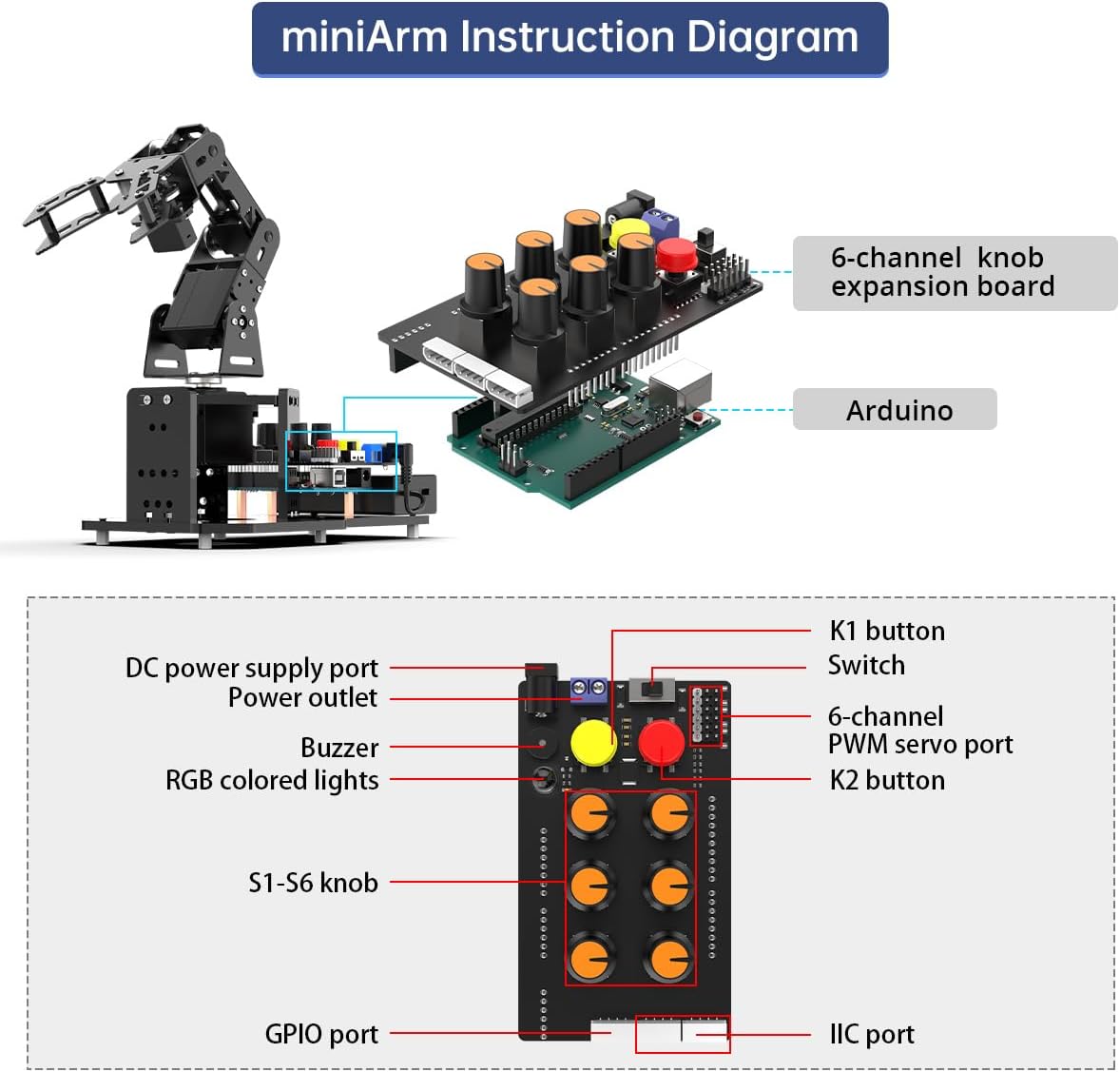
- High-Performance Hardware & Sensor Expansion: Equipped with a 6-channel knob controller, Bluetooth module, and high-precision digital servos. Multiple expansion ports support sensors like ESP32 Cam, accelerometer, touch sensor, and ultrasonic sensor for advanced capabilities.
- Versatile Control Options: Supports app control for real-time operation and knob potentiometers for offline action editing.
- Expandable: Designed for integration with various sensors to unlock diverse project possibilities.
2. Setup
2.1 Package Contents
Verify that all components listed below are included in your miniArm Standard Kit package:
- miniArm robotic arm
- Base U-shaped bracket
- Acrylic board
- LD-1501MG servo
- 6-channel knob expansion board
- Controller
- USB square port cable
- Bluetooth module
- Charger
- Battery box
- LiPo battery (2x 1500mAh)
- EVA Blocks 35mm
- USB data cable
- Accessory bag
- Glowing Ultrasonic Sensor
- Touch Sensor
- Acceleration Sensor
- ESP32Cam Module
- Type C data cable
- 4PIN wire

2.2 Assembly Instructions
The miniArm requires assembly. Detailed step-by-step instructions are provided in the accompanying physical manual and online tutorials. Ensure all connections are secure and components are correctly oriented before powering on the device.

For detailed assembly guidance, refer to the official LewanSoul miniArm assembly tutorials available online. These resources provide visual aids and step-by-step instructions to ensure correct setup.
Video 1: This video demonstrates multiple control methods, simple operation, and easy-to-learn tutorials for the Arduino robotic arm kit, including glimpses of assembly.
3. Operating Instructions
3.1 Software Setup and Programming
The miniArm is designed for Arduino programming. To begin, download and install the Arduino IDE (Integrated Development Environment) on your computer. Access the open-source programs and learning tutorials provided by LewanSoul for the miniArm. These resources will guide you through uploading code and developing custom functionalities.

Video 2: This video showcases the 5DOF Robotic Arm with Arduino UNO and AI Cam, highlighting programming capabilities.
3.2 Control Methods
The miniArm offers flexible control options:
- App Control: Use the dedicated mobile application to control the robotic arm in real-time. The app provides an intuitive interface for movement and task execution.
- Knob Potentiometers: The 6-channel knob controller allows for direct, real-time control of each axis. It also supports offline action editing, enabling you to record and replay sequences of movements.
3.3 Sensor Expansion and AI Vision
The miniArm Standard Kit includes various sensors for advanced functionalities:
- ESP32 Cam Module: Enables AI vision applications such as color recognition, color tracking, face recognition, and vision image return.
- Glowing Ultrasonic Sensor: Used for sonic ranging and object detection, allowing the arm to interact with its environment based on distance.
- Touch Sensor: Provides tactile feedback for grasping and object manipulation.
- Acceleration Sensor: Can be integrated for pose control capabilities, allowing the arm to mimic movements or respond to changes in orientation.


Video 3: This video demonstrates how the AI vision module unlocks creative vision applications for the robotic arm.
Video 4: This video illustrates how sensors expand the functionality of the Arduino robot arm, enhancing learning experiences.
4. Maintenance
To ensure the longevity and optimal performance of your LewanSoul miniArm, follow these maintenance guidelines:
- Cleaning: Regularly wipe down the robotic arm with a soft, dry cloth to remove dust and debris. Avoid using harsh chemicals or abrasive materials.
- Connection Checks: Periodically inspect all wiring and connections to ensure they are secure. Loose connections can lead to erratic behavior or component failure.
- Servo Care: Avoid forcing the robotic arm's joints manually, as this can damage the internal servo motors. Operate the arm within its specified range of motion.
- Storage: When not in use, store the miniArm in a clean, dry environment away from extreme temperatures and direct sunlight.
5. Troubleshooting
If you encounter issues with your miniArm, consider the following troubleshooting steps:
- No Power: Ensure the battery is fully charged and correctly connected. Check the power switch on the control board.
- Erratic Movement: Verify all servo connections are firm. Re-upload your Arduino code to ensure it's not corrupted. Check for any physical obstructions.
- Communication Issues (Bluetooth/USB): Ensure the Bluetooth module is properly installed and paired. For USB, confirm the correct drivers are installed and the cable is functional.
- Programming Errors: Double-check your Arduino code for syntax errors or logical flaws. Utilize the Arduino IDE's serial monitor for debugging output. Refer to LewanSoul's online tutorials and community forums for common programming issues.
- Sensor Malfunction: Ensure sensors are correctly wired and their libraries are properly included in your code. Test sensors individually if possible.
For more in-depth troubleshooting or technical support, please refer to the official LewanSoul support resources and online documentation.
6. Specifications
| Feature | Detail |
|---|---|
| Product Dimensions | 5 x 13 x 8 inches |
| Item Weight | 2.44 pounds |
| Manufacturer Recommended Age | 16 years and up |
| Batteries | 1 Lithium Ion battery required (included) |
| Body Material | Acrylic plate + hard aluminum |
| PTZ Angle | 180° |
| Power Supply | Two 3.7V batteries (1500mAh) |
| Main Control System | Arduino control board + 6-channel knob expansion board |
| Software | iOS/Android mobile APP |
| Communication Method | Bluetooth |
| DOF | 4DOF+gripper (5DOF) |
| Servo | LFD-01M/LDX-218/LD-1501MG |
| Control Method | Mobile phone control/knob control |

7. Warranty and Support
LewanSoul products are designed for quality and performance. For information regarding product warranty, please refer to the warranty card included in your package or visit the official LewanSoul website. For technical support, additional tutorials, or to report any issues, please contact LewanSoul customer service through their official channels.
Online Resources:
- Official LewanSoul Store: Visit Store
- Product Page: Product Details