
WESLNN 1005004891416856
User Manual
WESLNN Double-CIS Mixed Denomination Multi-Currency Banknote Counter and Sorter
Model: 1005004891416856
1. Product Overview
The WESLNN Double-CIS Mixed Denomination Multi-Currency Banknote Counter and Sorter is designed for efficient and accurate processing of banknotes. It features advanced Double-CIS technology for precise denomination and counterfeit detection across multiple currencies. This manual provides essential information for setting up, operating, maintaining, and troubleshooting your device.

Figure 1: Front view of the Banknote Counter and Sorter, showing the display and control panel.
2. Setup
- Unpacking: Carefully remove the banknote counter from its packaging. Retain the packaging for future transport or storage.
- Placement: Place the machine on a stable, flat, and dry surface, ensuring adequate ventilation around the unit.
- Power Connection: Connect the power cord to the machine's power input port located at the rear, then plug it into a suitable power outlet.
- External Display (Optional): If using an external display, connect it to the dedicated external display connector on the rear of the machine. This is a direct plug-in connection for ease of use.
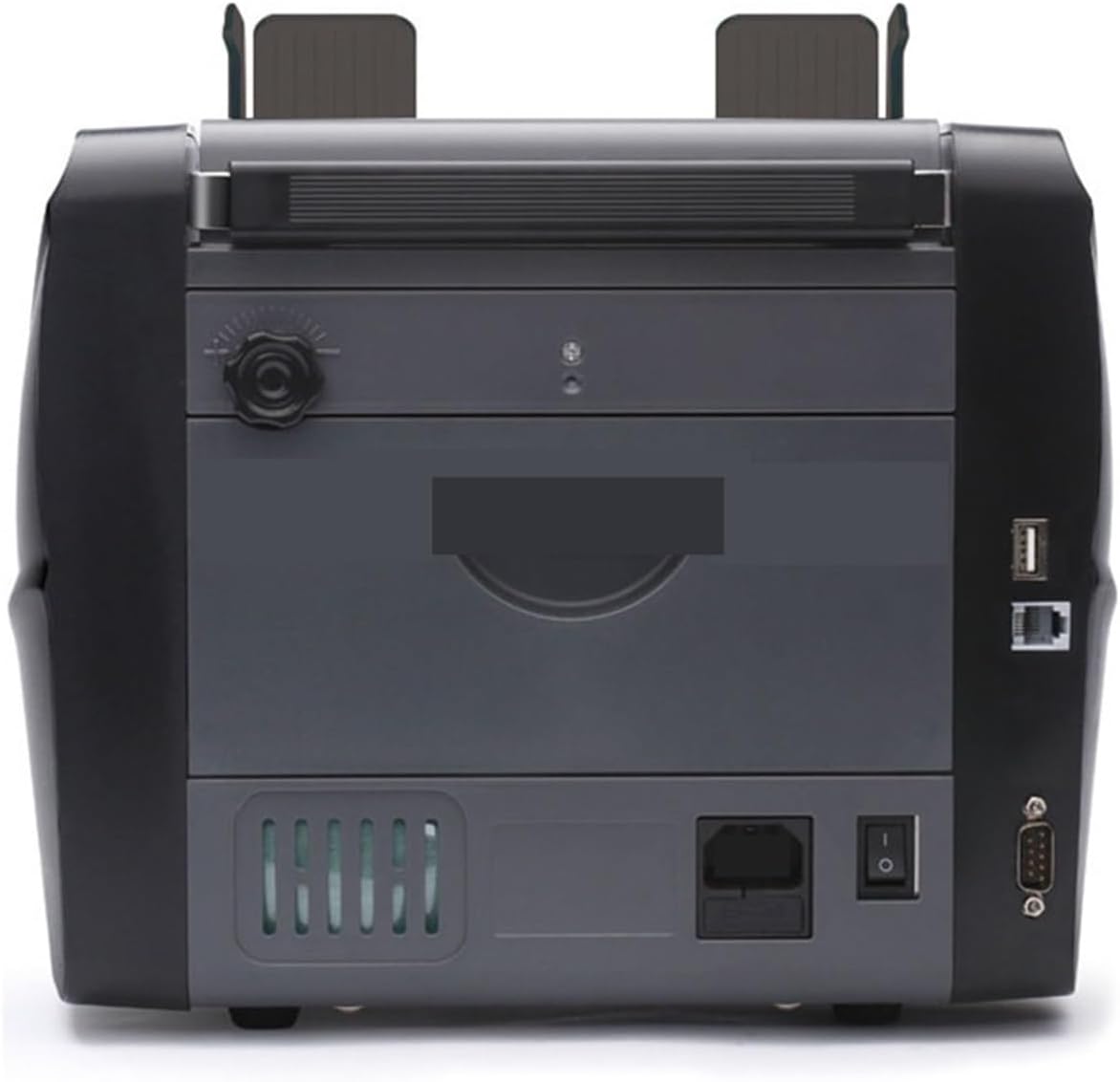
Figure 2: Rear view of the machine, highlighting connection ports.
3. Operating Instructions
This section details the basic operation of the banknote counter.
- Power On: Flip the power switch located at the rear of the machine to the 'ON' position. The machine will perform a self-test.
- Loading Banknotes: Place the banknotes neatly into the vertical flat banknote feeder. The feeder is designed to ensure stable counting and prevent misfeeds or jams. Ensure the banknotes are aligned properly. The large banknote acceptance wheel facilitates smooth feeding.
- Selecting Mode: Use the simple function buttons on the control panel to select the desired counting or sorting mode (e.g., MIX, SORT, ADD, BATCH). The display will show the current mode.
- Starting Operation: Press the 'START' button to begin counting. The machine will process the banknotes and display the results.
- Batch Counting: To count a specific number of notes, use the 'BATCH' function and set the desired quantity (1-999 sheets).
- Clearing Alarms/Resetting Sensor: If an error or alarm occurs, remove any banknotes from the machine. The sensor can be reset automatically, and alarms can be cleared by pressing the 'RESET' button.

Figure 3: Angled view showing the banknote feeder and output.
4. Maintenance
Regular maintenance ensures the longevity and optimal performance of your banknote counter.
- Cleaning Sensors: Dust and debris can accumulate on the sensors, affecting accuracy. Use a soft, dry cloth or a small brush to gently clean the sensors located inside the banknote path. Ensure the machine is powered off and unplugged before cleaning.
- General Cleaning: Wipe the exterior of the machine with a soft, damp cloth. Do not use abrasive cleaners or solvents.
- Clearing Jams: In case of a banknote jam, power off the machine immediately. Carefully open the access covers (if applicable) and gently remove the jammed banknotes. Do not force the banknotes out.

Figure 4: Side view of the machine, illustrating its profile.
5. Troubleshooting
This section addresses common issues you might encounter.
- Machine Not Powering On:
- Check if the power cord is securely connected to both the machine and the power outlet.
- Ensure the power switch is in the 'ON' position. - Banknotes Not Feeding Smoothly / Jams:
- Ensure banknotes are neatly stacked and aligned in the feeder.
- Check for any foreign objects or debris in the banknote path.
- Clean the banknote acceptance wheel and feeder area as described in the Maintenance section. - Inaccurate Counting / Error Messages:
- Clean all sensors thoroughly, as dust can interfere with detection.
- Ensure banknotes are not excessively worn, torn, or folded.
- Press the 'RESET' button to clear any temporary errors. - Display Issues:
- If using an external display, ensure it is properly connected.
- Restart the machine.
6. Specifications
| Feature | Specification |
|---|---|
| Brand | WESLNN |
| Model Number | 1005004891416856 |
| Counting Speed | 800-1200 sheets/min |
| Preset Sheet Count | 1-999 sheets |
| Counting Range | 1-9999 sheets |
| Capacity | 500 sheets (Hopper) / 200 sheets (Stacker) |
| Feeder Size | 60x110mm - 90x185mm |
| Dimensions (Package) | 2.54 x 2.54 x 2.54 cm |
| Weight | 50 g |
| Color | One Color |
7. Warranty and Support
For warranty information and technical support, please contact the seller directly. Keep your purchase receipt as proof of purchase. The product is typically shipped within 4-5 days, and a return policy of 30 days is generally applicable for refunds or replacements, subject to seller terms and conditions.
Ask a question about this manual
Ask about setup, troubleshooting, compatibility, parts, safety, or missing instructions. Manuals+ will review the question and use this page’s manual context to help answer it.