
ADORNEVE B0DC9FHKCK
ADORNEVE Lift Up Storage Twin Bed Frame User Manual
Model: B0DC9FHKCK
1. Introduction
Thank you for choosing the ADORNEVE Lift Up Storage Twin Bed Frame. This innovative bed frame is designed to provide both comfort and practical storage solutions, featuring a hydraulic lifting mechanism, integrated LED lighting, and a convenient charging station. This manual provides detailed instructions for assembly, operation, maintenance, and troubleshooting to ensure you get the most out of your new bed frame.

Figure 1.1: ADORNEVE Lift Up Storage Twin Bed Frame with LED lights and hydraulic lift mechanism, showcasing the headboard storage and under-bed storage.
2. Safety Information
Please read and understand all safety instructions before assembling or using the bed frame. Failure to follow these instructions may result in injury or damage to the product.
- Always assemble the bed according to the provided instructions.
- Keep small objects away from the hidden storage headboard to prevent entrapment.
- Do not exceed the maximum weight recommendation of 880 pounds for the bed frame.
- Use appropriate bedding materials for infants and young children.
- Follow the instructions for the hydraulic system to ensure safe operation.
- This bed does not require a box spring.
- Ensure all connections for the charging station and LED lights are secure before use.
3. Included Components
Before beginning assembly, verify that all parts listed below are present and undamaged. If any components are missing or damaged, please contact customer support.
- Storage Headboard
- Steel Slat Platform
- Charging Station
- Light Strips (LED)
- Accessory Bag (contains fasteners and small tools)
- Assembly Tools
- Instructions (this manual)

Figure 3.1: Overview of bed frame dimensions and weight capacity (880 lbs total, 160 lbs for lifting).
4. Setup and Assembly
Assembly of the ADORNEVE bed frame requires careful attention to detail. It is recommended to have two people for assembly. Please follow the step-by-step instructions provided in the included assembly guide. Below are general tips and key steps:
- Unpack and Organize: Lay out all components and hardware. Refer to the parts list to ensure everything is present.
- Frame Assembly: Begin by assembling the main bed frame structure. Ensure all connections are tightened securely but do not overtighten until the frame is fully assembled.
- Slat Installation: Install the heavy-duty metal slats onto the frame. These slats eliminate the need for a box spring. Ensure they are properly seated to prevent noise.
- Headboard Attachment: Attach the storage headboard to the main frame. Connect the LED light strips and charging station wiring as per the specific instructions. The LED strips attach with Velcro for easy installation.
- Hydraulic Mechanism: Carefully install the hydraulic lifting mechanism. Ensure the hydraulic pistons are correctly oriented and securely fastened. The cushioned pneumatic lever controls the landing speed for smooth operation.

Figure 4.1: Illustration of the easy assembly process for connecting metal pipes into notches.
Important Note: Some parts may appear similar but have slight differences. Refer to the detailed assembly diagrams to correctly identify each component. If you encounter mislabeled parts, compare them carefully with the diagrams before proceeding.
5. Operating Instructions
5.1. LED Lighting System
The bed frame features integrated RGB LED lights on the headboard and around the bed base, offering customizable ambiance.
- Control: The LED lights can be controlled via a dedicated remote control or a mobile application.
- Color Selection: Choose from over 60,000 colors to match your preference.
- Modes: Explore various control modes including Style Mode, Music Mode (lights react to sound), Microphone Mode, and Timing Function (schedule on/off times).

Figure 5.1: The bed frame illuminated by RGB LED lights, highlighting remote and app control features.
5.2. Built-in Charging Station
The headboard is equipped with a convenient charging station to power your electronic devices.
- Ports: Includes 2 standard USB ports (5V/2A) and 1 Type-C port (5V/3A).
- AC Outlets: Features 2 AC outlets (125V/12A) for larger electronics.
- Usage: Ideal for charging phones, laptops, smartwatches, and other compatible devices directly from your bedside.
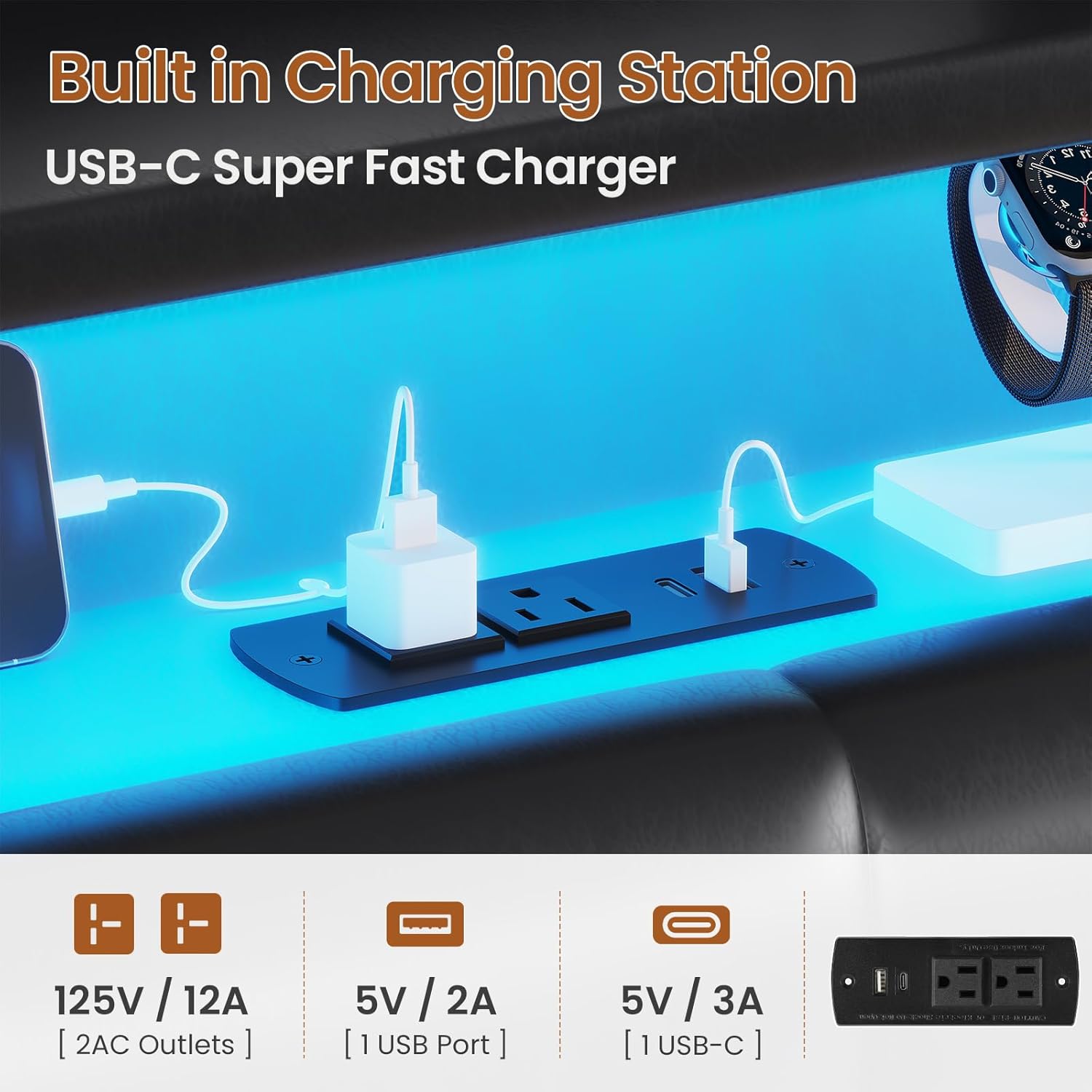
Figure 5.2: Detail of the charging station with USB, Type-C, and AC power outlets.
5.3. Hydraulic Lifting Mechanism & Under-Bed Storage
The bed frame features a hydraulic system for easy access to a large under-bed storage area.
- Lifting: To access storage, gently lift the mattress platform. The hydraulic pistons will assist in smoothly raising and holding the platform in place.
- Lowering: To lower, gently push down on the platform. The cushioned pneumatic lever will control the descent speed, ensuring a safe and controlled landing.
- Storage Capacity: Utilize the spacious area for storing luggage, storage boxes, quilts, shoes, clothing, and other items.
- Dust-Proof Design: The design helps protect stored items from dust and moisture.

Figure 5.3: The spacious under-bed storage area, ideal for various household items.

Figure 5.4: Details of the hydraulic lifting mechanism, dust-proof base, and anti-falling mattress design.
5.4. Storage Headboard
The headboard offers both hidden and open storage options for your convenience.
- Hidden Storage: The top section of the headboard can be opened to reveal a secret storage compartment, perfect for valuables or items you want out of sight.
- Open Display Shelf: An open shelf is available for displaying nighttime essentials like books, alarm clocks, or decorative items.
- Side Pockets: Small storage pockets are located on either side of the headboard, ideal for storing remotes, cell phones, or glasses.

Figure 5.5: The multi-functional storage headboard with hidden compartment, open shelf, and side pockets.
6. Maintenance
Proper care will extend the life and appearance of your bed frame.
- Cleaning: Dust or wipe the bed frame with a damp cloth as needed. Avoid harsh chemicals or abrasive cleaners.
- Hydraulic System: Periodically check the hydraulic pistons for smooth operation. If the closing mechanism feels clunky, refer to the troubleshooting section or the detailed assembly manual for adjustment instructions.
- Fasteners: Occasionally check all screws and fasteners to ensure they remain tight. Retighten if necessary to maintain stability and prevent noise.
- Noise Prevention: The bed frame includes EVA quieting strips under the center bar to prevent noise from metal-to-metal contact. Ensure these strips remain in place.
7. Troubleshooting
If you encounter issues with your ADORNEVE bed frame, refer to the common problems and solutions below.
| Problem | Possible Cause | Solution |
|---|---|---|
| Difficulty during assembly due to mislabeled parts. | Incorrect labeling or similar-looking components. | Carefully compare parts with the assembly diagrams in the detailed manual. Identify components by shape, size, and hole patterns rather than just labels. |
| Hydraulic lifting mechanism is clunky or disconnects. | Improper installation of hydraulic pistons or loose connections. | Ensure hydraulic pistons are correctly installed and all fasteners are securely tightened. Refer to the assembly manual for specific instructions on hydraulic system setup and adjustment. If a strut is faulty, contact customer support for a replacement. |
| Bed frame makes noise (squeaking/creaking). | Loose fasteners or displaced quieting strips. | Check and tighten all screws and bolts. Ensure the EVA quieting strips under the center bar are properly in place to prevent metal-to-metal contact. |
| LED lights not working or unresponsive. | Loose connection, power issue, or remote/app malfunction. | Check all power connections for the LED strips. Ensure the remote control has fresh batteries or that the mobile app is correctly paired and updated. |
| Charging station not providing power. | Loose wiring, power outage, or device incompatibility. | Verify all charging station wiring connections are secure. Ensure the bed frame is properly plugged into a working power outlet. Test with different devices and cables. |
If the problem persists after attempting these solutions, please contact ADORNEVE customer support for further assistance.
8. Specifications
| Feature | Detail |
|---|---|
| Brand | ADORNEVE |
| Model | B0DC9FHKCK |
| Size | Twin |
| Product Dimensions (L x W x H) | 79.92" x 39.37" x 43.7" |
| Color | Pu Black |
| Finish Type | Painted |
| Compatible Mattress Size | Twin |
| Weight Capacity (Bed Frame) | 880 lbs |
| Weight Capacity (Lifting Mechanism) | Up to 160 lbs |
| Charging Station | 2 USB Ports (5V/2A), 1 Type-C Port (5V/3A), 2 AC Outlets (125V/12A) |
| Lighting | RGB LED Lights (App/Remote Controlled, 60,000+ colors, various modes) |
| Special Features | No Box Spring Needed, Hidden Storage Headboard, Hydraulic System, Squeak Resistant, Easy to Assemble |
9. Warranty and Support
For warranty information and customer support, please contact ADORNEVE directly. Details regarding warranty coverage, terms, and conditions are typically provided with your purchase documentation or can be obtained by contacting the manufacturer's customer service department.
If you require assistance with assembly, parts replacement, or troubleshooting beyond what is covered in this manual, please reach out to:
ADORNEVE Customer Service: Refer to your purchase receipt or the ADORNEVE official website for contact details.
Ask a question about this manual
Ask about setup, troubleshooting, compatibility, parts, safety, or missing instructions. Manuals+ will review the question and use this page’s manual context to help answer it.